
DEERC 9206E
DEERC 9206E Remote Control Car User Manual
Model: 9206E | Brand: DEERC
1. Introduction
Thank you for choosing the DEERC 9206E 1:10 Scale High-Speed Remote Control Car. This powerful 4WD off-road monster truck is designed for thrilling performance across various terrains, reaching speeds of 48+ km/h. Equipped with durable components and a 2.4GHz proportional control system, it offers an exciting and responsive driving experience. This manual provides essential information for setting up, operating, maintaining, and troubleshooting your RC car to ensure long-lasting enjoyment.

Image: The DEERC 9206E RC Car, showcasing its impressive 1:10 scale compared to a smaller model, emphasizing its larger size and presence.
2. Package Contents
Please verify that all items listed below are included in your package:
- 1 x DEERC 9206E RC Car (1:10 Scale)
- 1 x 2.4GHz Remote Controller
- 2 x 7.4V/1700mAh Rechargeable Li-ion Batteries
- 1 x Transparent DIY Car Shell
- 2 x USB Charging Cables
- 2 x Metal Oil-Filled Shock Absorbers (pre-installed)
- 1 x Screwdriver
- 1 x 4-sided Wrench
- Spare Hardware (pins, screws)

Image: A visual representation of the DEERC 9206E RC Car and its complete accessories, including the remote controller, two batteries, spare shocks, and an additional transparent car shell for customization.
3. Setup
3.1 Battery Installation and Charging
- Car Battery: Open the battery compartment on the underside of the RC car. Connect one of the 7.4V/1700mAh Li-ion batteries to the car's power connector. Securely place the battery in the compartment and close the lid.
- Remote Controller Battery: Open the battery cover on the back of the remote controller. Insert 3 AA batteries (not included) into the battery compartment, ensuring correct polarity. Close the cover.
- Charging: Connect the car battery to the provided USB charging cable. Plug the USB end into a compatible USB power source (e.g., computer USB port, USB wall adapter). The charging indicator light will show the charging status (refer to charger instructions for specific light behavior). A full charge typically takes approximately 3 hours per battery.

Image: The DEERC 9206E RC Car alongside its two high-capacity 1500mAh batteries, highlighting the 40+ minutes of running time provided by both batteries.
3.2 Pairing the Remote Controller
Ensure both the car and the remote controller are powered off before starting. First, turn on the RC car. Then, turn on the remote controller. The remote and car should automatically pair. If pairing fails, turn both devices off and repeat the process. A successful connection is indicated by a solid light on both the car and the remote.

Image: The 2.4GHz remote controller for the DEERC 9206E, emphasizing its proportional throttle and steering control capabilities for precise handling.
4. Operating Instructions
4.1 Basic Controls
- Throttle Trigger: Pull the trigger to move forward. Push the trigger to brake or reverse.
- Steering Wheel: Turn the wheel left or right to steer the car in the desired direction.
4.2 Proportional Control and Speed Adjustment
The 9206E features a full-scale synchronous remote control system, allowing for precise proportional control of throttle and steering.
- Speed Switch: Adjust the speed switch on the remote controller. Turn clockwise to increase driving speed and counter-clockwise to decrease it. This feature is useful for beginners or for driving in confined spaces.
- Steering Trim: Use the steering trim knob to fine-tune the driving direction of the wheels, ensuring the car drives straight when the steering wheel is centered.

Image: An illustration detailing the wheel steering control mechanism on the 2.4G remote, explaining how to adjust the steering angle for precise maneuvering.
4.3 Driving on Different Terrains
The DEERC 9206E is designed as an all-terrain challenger, capable of handling various surfaces thanks to its 4WD system and metal oil-filled shock absorbers. It performs well on:
- Beach and Sand
- Rock and Gravel
- Grass and Dirt
- Concrete Roads

Image: A dynamic collage demonstrating the DEERC 9206E's versatility as an 'All Terrain Challenger', showing it in action on different surfaces.
4.4 Safety Guidelines
- Always operate the RC car in open areas away from people, pets, and obstacles.
- Do not operate in wet conditions or near water to prevent damage to electronic components.
- Avoid driving into walls or hard objects at high speeds to prevent damage to the car and potential injury.
- Supervise children during operation.
- Turn off the car and remote when not in use.
5. Maintenance
Regular maintenance will extend the lifespan and performance of your DEERC 9206E RC car.
5.1 Cleaning
- After each use, especially after driving on dusty or dirty terrains, clean the car body and chassis with a soft brush or cloth to remove dirt and debris.
- Ensure no foreign objects are lodged in the wheels, suspension, or drivetrain.
5.2 Battery Care and Storage
- Always disconnect batteries from the car when not in use.
- Store batteries in a cool, dry place away from direct sunlight and extreme temperatures.
- Do not overcharge or over-discharge the batteries.
5.3 Component Checks
- Shocks: Periodically inspect the metal oil-filled shock absorbers for any leaks or damage.
- Differential: The alloy differential allows for stable turning at high speeds. Check for smooth operation and any unusual noises.
- Tires: Inspect the durable all-terrain tires for wear and tear. Ensure they are securely attached to the wheels.
- Overall Structure: The car features an ultra-stable structure. Regularly check all screws and connections to ensure they are tight and secure.

Image: An exploded view highlighting key internal components of the DEERC 9206E, such as the powerful motor, oil-filled shock absorbers, and alloy differential, which contribute to its performance and durability.
5.4 DIY Car Shell Customization
The package includes a transparent car shell, allowing you to customize your RC car's appearance. Use appropriate paints designed for polycarbonate or RC car bodies. Ensure the shell is clean and dry before painting.

Image: Display of the two car shells provided with the DEERC 9206E: the standard cool design and an additional transparent shell for personalized DIY customization.
6. Troubleshooting
If you encounter issues with your DEERC 9206E RC car, please refer to the following common problems and solutions:
| Problem | Possible Cause | Solution |
|---|---|---|
| Car does not respond to remote. | Low battery in car or remote; Not paired; Power switch off. | Charge car battery; Replace remote batteries; Ensure both are powered on and paired correctly. |
| Short play time. | Battery not fully charged; Old battery; Aggressive driving. | Ensure battery is fully charged; Consider replacing old batteries; Drive less aggressively. |
| Car pulls to one side. | Steering trim needs adjustment; Damaged steering components. | Adjust the steering trim knob on the remote; Inspect steering linkage for damage. |
| Unusual noises during operation. | Debris in gears; Damaged motor or differential. | Clean out any debris; Inspect motor and differential for damage. |
If the problem persists after trying these solutions, please contact DEERC customer support for further assistance.
7. Specifications
Key technical specifications for the DEERC 9206E RC Car:
| Feature | Detail |
|---|---|
| Model Number | 9206E |
| Scale | 1:10 Scale |
| Max Speed | 48+ km/h |
| Drive System | 4-Wheel Drive (4WD) |
| Frequency | 2.4GHz |
| Control Type | Full-Scale Proportional |
| Batteries | 2 x 7.4V/1700mAh Lithium-Ion (included) |
| Run Time | Approx. 40+ minutes (20+ min per battery) |
| Material | Metal components, PVC shell |
| Dimensions (L x W x H) | 45.01 x 27.94 x 14.99 cm |
| Weight | 2.49 kg |
| Recommended Age | 8 years and up |
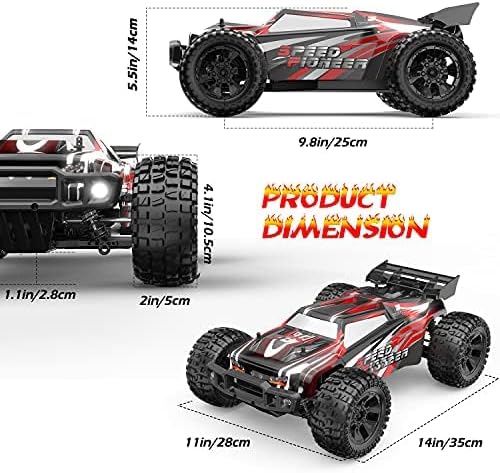
Image: A detailed diagram illustrating the product dimensions of the DEERC 9206E RC Car, including length, width, and height measurements.
8. Warranty and Support
The DEERC 9206E RC Car comes with a standard manufacturer's warranty. Please refer to the product packaging or the official DEERC website for specific warranty terms and conditions.
For technical support, troubleshooting assistance, or inquiries regarding replacement parts, please contact DEERC customer service. Contact information can typically be found on the product packaging or the official DEERC brand store online.
Related documents9206E


Ask a question about this manual
Ask about setup, troubleshooting, compatibility, parts, safety, or missing instructions. Manuals+ will review the question and use this page’s manual context to help answer it.