
Product Overview
The SDRGEEK SI4732 ATS-25 max-DECODER Radio Receiver, Version 4.17, is a versatile DSP receiver designed for a wide range of radio enthusiasts. It supports FM, LW (MW and SW), and SSB bands, and includes advanced features such as CW and RTty decoding, WiFi functionality, and four audio spectrum displays. This compact device is equipped with a built-in 4000mAh lithium battery for extended use.
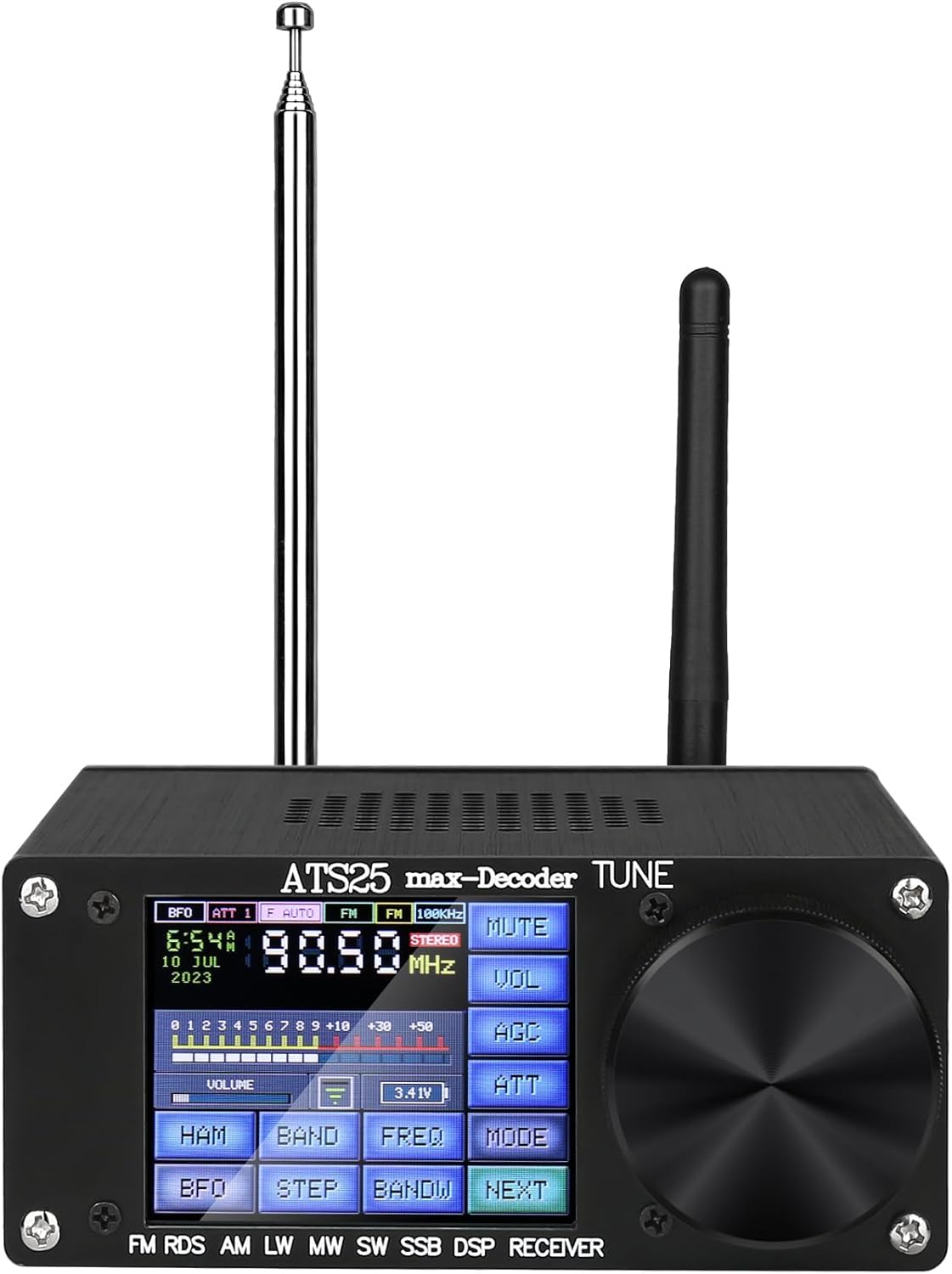
Figure 1: Front view of the ATS-25 max-DECODER Radio Receiver, showing the display, controls, and antennas.
Key Features:
- Upgraded Functions: Version 4.17 introduces 4 new DIGI, CWR, SYNC L, SYNC U modes in CW, along with WiFi functionality, RTty decoding, and four audio spectrum displays.
- Integrated WiFi: Direct WiFi login option without needing an external app, indicated by a WiFi icon on the display.
- TYPE-C Charging: Features a TYPE-C charging interface with a maximum 1.5A charging current.
- Audio Output: Includes a 3.5mm stereo audio output and supports a 3.5mm audio FM antenna interface.
- Radio Search: Supports broadcast search, direct frequency input via numeric keypad, and HAM band shortcut channels.
- Bandwidth: AM bandwidth: 1-6K; SSB bandwidth: 0.5-4.0K.
- Portability: Compact design with a built-in 4000mAh lithium battery for extended portable use.
Setup Guide
Follow these steps to set up your ATS-25 max-DECODER Radio Receiver for optimal performance.
1. Initial Charging
Before first use, ensure the device is fully charged. Connect the provided TYPE-C cable to the charging port on the device and the other end to a compatible USB power adapter. The device supports a maximum charging current of 1.5A.

Figure 2: The radio receiver being charged via its TYPE-C port, indicating the built-in 4000mAh battery.
2. Antenna Connection
For proper reception, both the receiving antenna (telescopic or external) and the WiFi antenna must be mounted. The device supports a 3.5mm audio FM antenna interface.
3. WiFi Function Setup
The ATS-25 max-DECODER features a direct WiFi login option. To connect to a local network:
- Ensure both receiving and WiFi antennas are mounted.
- Connect to a local radio channel (turn off LNA / HIZ before connection).
- Navigate through the menu: SETUP -> WIRELESS ON -> SELECT AP -> ENTER PIN CODE.
- Once connected, a WiFi icon will be displayed on the page.
Operating Instructions
This section details the various functions and modes of your radio receiver.
1. Frequency Bands and Ranges
The receiver covers a broad spectrum of frequencies:

Figure 3: Overview of the full-band radio receiver's frequency capabilities, including FM, LW, MW, and SW ranges.
- FM: 64MHz - 108MHz
- LW: 100kHz - 514kHz
- MW: 514kHz - 1800kHz
- SW & SSB: 1800kHz - 30000kHz (with various amateur radio bands and broadcast bands)
Specific band details are as follows:
| Band Name | Type | Min Freq (kHz) | Max Freq (kHz) | Default Freq (kHz) |
|---|---|---|---|---|
| FM | FM | 64000 | 108000 | 99200 |
| LW | AM | 100 | 514 | 198 |
| MW | AM | 514 | 1800 | 1395 |
| BACON | AM | 280 | 470 | 284 |
| 630M | LSB | 470 | 480 | 475 |
| 160M | LSB | 1800 | 2000 | 1850 |
| 120M | AM | 2000 | 3200 | 2400 |
| 90M | AM | 3200 | 3500 | 3300 |
| 80M | LSB | 3500 | 3900 | 3630 |
| 75M | AM | 3900 | 5300 | 3950 |
| 60M | USB | 5300 | 5900 | 5375 |
| 49M | AM | 5900 | 7000 | 6000 |
| 40M | LSB | 7000 | 7500 | 7074 |
| 41M | AM | 7200 | 9000 | 7210 |
| 31M | AM | 9000 | 10000 | 9600 |
| 30M | USB | 10000 | 10200 | 10099 |
| 25M | AM | 10200 | 13500 | 11700 |
| 22M | AM | 13500 | 14000 | 13700 |
| 20M | USB | 14000 | 14500 | 14074 |
| 19M | AM | 14500 | 17500 | 15700 |
| 17M | AM | 17500 | 18000 | 17600 |
| 16M | USB | 18000 | 18500 | 18100 |
| 15M | AM | 18500 | 21000 | 18950 |
| 14M | USB | 21000 | 21500 | 21074 |
| 13M | AM | 21500 | 24000 | 21500 |
2. Radio Search and Frequency Input
The receiver offers multiple ways to find and tune into stations:
- Broadcast Search: Utilize the radio search function to scan for available broadcasts.
- Direct Frequency Input: Enter desired frequencies directly using the numeric keypad on the device's interface.
- HAM Band Shortcut: Access predefined HAM band channels for quick tuning.

Figure 4: The device's interface highlighting the station search function, numeric keypad input, and HAM band fast channel access.
3. Decoding Functions and CW Modes
The ATS-25 max-DECODER supports various decoding functions and CW modes:

Figure 5: Screenshots of the decoder setup menu, showing options for CW & DIGI decoder, decoded data to COM port, and Feld-Hell picture smoothing. Also shown is the WiFi setup screen.
- CW & DIGI Decoder: Enable decoding of Morse code (CW) and various digital modes.
- RTty Decoding: Decode Radio Teletype signals.
- CW Modes: The Version 4.17 adds 4 new CW modes: DIGI, CWR, SYNC L, and SYNC U, in addition to LSB, USB, AM, and CW.

Figure 6: Comparison showing the ATS-25 max-DECODER's 8 CW modes (DIGI, CWR, SYNC L, SYNC U, LSB, USB, AM, CW) versus older versions with only 4 modes.
The device also features four audio spectrum displays for visual analysis of signals.

Figure 7: Display showing CW network signals in four different formats, which can be changed using a stylus.
Maintenance
To ensure the longevity and optimal performance of your ATS-25 max-DECODER Radio Receiver, follow these maintenance guidelines:
- Cleaning: Use a soft, dry cloth to clean the exterior of the device. Avoid using abrasive cleaners, solvents, or strong chemicals, as these can damage the finish or internal components.
- Storage: When not in use for extended periods, store the receiver in a cool, dry place away from direct sunlight, extreme temperatures, and high humidity.
- Battery Care: To maintain battery health, avoid fully discharging the battery frequently. If storing for a long time, charge the battery to about 50% every few months.
- Antenna Care: Handle the telescopic antenna with care to prevent bending or breaking. Ensure external antennas are securely connected and free from damage.
Troubleshooting
This section provides solutions to common issues you might encounter with your ATS-25 max-DECODER Radio Receiver.
- Issue: No Power / Device Not Turning On
- Ensure the device is fully charged. Connect it to a power source using the TYPE-C cable and allow it to charge for at least 30 minutes before attempting to power on.
- Verify the charging cable and adapter are functioning correctly. Try a different cable or adapter if available.
- Issue: Poor Radio Reception
- Ensure the telescopic antenna is fully extended and positioned vertically.
- If using an external antenna, verify it is securely connected to the appropriate port.
- Move the receiver away from sources of electronic interference (e.g., computers, TVs, large metal objects).
- For shortwave and HAM bands, an external antenna is often required for optimal performance.
- Check the selected bandwidth (AM: 1-6K; SSB: 0.5-4.0K) to ensure it is appropriate for the signal you are trying to receive.
- Issue: WiFi Connection Problems
- Confirm both the receiving antenna and the WiFi antenna are properly mounted.
- Ensure you have turned off LNA / HIZ before attempting to connect to a local radio channel as part of the WiFi setup process.
- Double-check the PIN code entered during the WiFi setup (SETUP -> WIRELESS ON -> SELECT AP -> ENTER PIN CODE).
- Verify that the WiFi network you are trying to connect to is active and within range.
- Issue: Decoding Functions Not Working
- Ensure the specific decoding function (e.g., CW & DIGI decoder, RTty decoding) is enabled in the device's setup menu.
- Verify that the signal being received is strong and clear enough for successful decoding.
- Confirm the correct CW mode (DIGI, CWR, SYNC L, SYNC U, LSB, USB, AM, CW) is selected for the signal type.
Specifications
Detailed technical specifications for the ATS-25 max-DECODER Radio Receiver:
| Specification | Detail |
|---|---|
| Product Dimensions | 7.2 x 2.6 x 7.6 inches (18.3 x 6.6 x 19.3 cm) |
| Item Weight | 13 ounces (368.5 grams) |
| Model Number | ATS-25 max-DECODER |
| Batteries | 1 Lithium Ion battery (included) |
| Manufacturer | SDRGEEK |
| Country of Origin | China |
| Color | Brown |
| Special Feature | Portable |
| Connectivity Technology | USB |
| Tuner Technology | SSB |
| Style | Modern |
| Power Source | Battery Powered |
| Radio Bands Supported | FM, LW, MW, SW, SSB |
| Included Components | Owner's Manual |
| Visible Screen Diagonal | 3" / 7 cm |
Warranty and Support
For detailed warranty information and customer support, please refer to the included Owner's Manual. The manual contains specific terms and conditions of the product warranty, as well as contact information for technical assistance and service inquiries.
SDRGEEK is committed to providing high-quality electronic products and comprehensive solutions. For further assistance, please consult the official SDRGEEK website or contact their customer service as directed in your Owner's Manual.
