
1. Introduction
This manual provides essential instructions for the safe and efficient operation of your ROARBATT 4000W 24V Pure Sine Wave Power Inverter. This device converts 24V DC battery power into 110V/120V AC household electricity, suitable for powering various appliances. Please read this manual thoroughly before installation and use to ensure proper function and to prevent damage to the unit or connected devices.

Figure 1.1: ROARBATT 4000W Pure Sine Wave Power Inverter with included remote control and battery cables.
2. Safety Instructions
Adherence to these safety guidelines is crucial for preventing personal injury and damage to the inverter or connected equipment.
- Ventilation: Ensure the inverter is installed in a well-ventilated area. Do not block ventilation openings.
- Dry Environment: Avoid exposure to water, rain, snow, or spray. The inverter is designed for indoor or protected use.
- Proper Grounding: Always connect the inverter to a proper earth ground. Refer to the installation section for details.
- Input Voltage: Connect the inverter only to a 24V DC power source. Connecting to other voltages may cause damage.
- Output Load: Do not exceed the inverter's rated continuous power output of 4000W. The peak power is 8000W.
- Flammable Materials: Do not operate the inverter near flammable materials, gases, or vapors.
- Children: Keep the inverter out of reach of children.
- Servicing: Do not attempt to service the inverter yourself. Refer all servicing to qualified personnel.
- Battery Connection: Always connect the positive (+) terminal of the battery to the positive (+) terminal of the inverter and the negative (-) terminal of the battery to the negative (-) terminal of the inverter. Reverse polarity will cause damage.
3. Product Overview
The ROARBATT 4000W Pure Sine Wave Power Inverter is designed for reliability and versatility. It features multiple output options and an intelligent display for monitoring.
3.1 Main Components
- Inverter Unit: The main power conversion unit.
- Remote Control: Allows for convenient power ON/OFF control from a distance.
- Battery Cables: Heavy-duty cables for connecting to a 24V DC battery bank.
- Earth Wire: For proper grounding of the unit.
- Fuses: Spare 40A fuses for protection.
- Wrench: For securing battery cable connections.
3.2 Front and Rear Panel Features

Figure 3.1: Key features of the inverter, including DC input terminals, cooling fans, AC outlets, USB ports, and remote control port.
The inverter features:
- DC Input Terminals: Positive (red) and Negative (black) terminals for 24V DC battery connection.
- Cooling Fans: Intelligent temperature-controlled fans activate automatically to maintain optimal operating temperature.
- LED Display: Provides real-time operational status.
- Power Indicator: LED light indicating power status.
- Power ON/OFF Switch: Main switch for the inverter.
- USB Ports: Two 5V DC, 3.4A USB ports for charging mobile devices.
- Remote Control Port: RJ10 port for connecting the wired remote control.
- AC Outlets: Four 110V/120V AC outlets for connecting standard appliances.
- AC Terminal Blocks: For heavy-duty AC output connections (4000W-8000W peak).
- Earth Wire Terminal: For grounding the inverter chassis.
3.3 Internal Design

Figure 3.2: Internal components highlighting the high-precision circuit board and robust cooling system for stable output and extended product life.
4. Setup and Installation
Follow these steps for safe and correct installation of your inverter.
4.1 Choosing an Installation Location
- Mount the inverter on a flat, stable surface.
- Ensure adequate ventilation around the unit. Maintain at least 6 inches (15 cm) of clear space on all sides.
- Avoid direct sunlight, heat sources, and moisture.
- Keep away from any flammable materials or gases.
4.2 Connecting Battery Cables
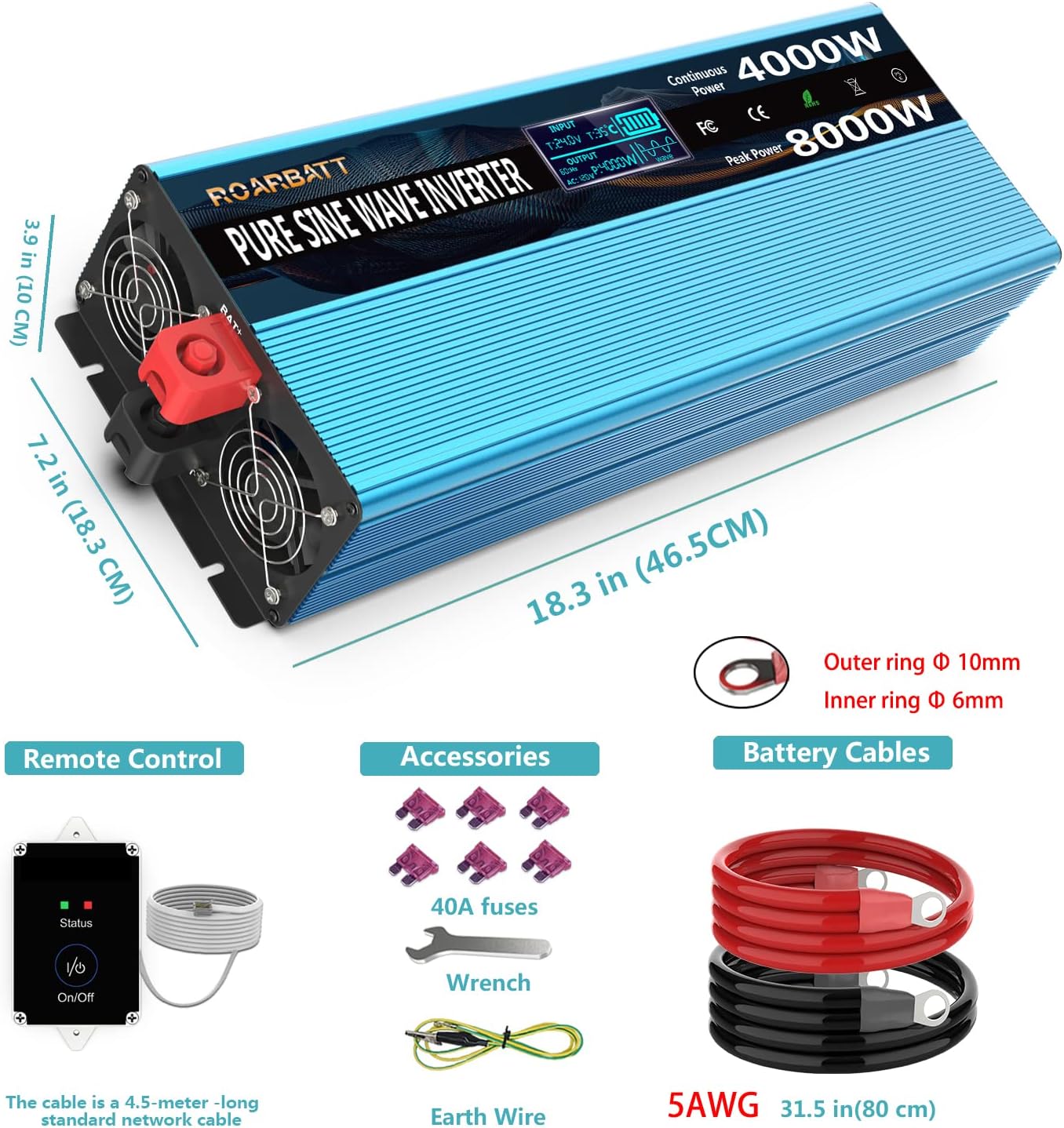
Figure 4.1: Included accessories: remote control, battery cables, 40A fuses, wrench, and earth wire. Also shows inverter dimensions.
- Ensure the inverter's power switch is in the OFF position.
- Connect the red battery cable to the positive (+) terminal of the inverter. Use the provided wrench to tighten securely.
- Connect the black battery cable to the negative (-) terminal of the inverter. Tighten securely.
- Connect the other end of the red battery cable to the positive (+) terminal of your 24V DC battery bank.
- Connect the other end of the black battery cable to the negative (-) terminal of your 24V DC battery bank.
- Verify all connections are tight and secure to prevent arcing.
4.3 Grounding the Inverter
Connect the provided earth wire from the inverter's ground terminal to a reliable earth ground point (e.g., vehicle chassis, ground rod, or proper electrical ground system).
4.4 Connecting the Remote Control
Plug the RJ10 connector of the remote control cable into the 'Remote Control' port on the inverter. The remote control allows you to power the inverter ON/OFF from a convenient location.
5. Operating Instructions
Learn how to power on your inverter and utilize its features.
5.1 Powering On/Off
- After all connections are secure, switch the main power switch on the inverter to the 'ON' position. Alternatively, if the remote control is connected, you can use its ON/OFF button.
- The LED display will illuminate, and the cooling fan may briefly activate.
- To power off, switch the main power switch to 'OFF' or use the remote control.
5.2 Using AC Outlets and USB Ports
- Plug your 110V/120V AC appliances into the four AC outlets. Ensure the total power consumption does not exceed 4000W.
- For high-power loads, consider using the AC terminal blocks for a more robust connection.
- Connect your USB-powered devices to the two 5V DC, 3.4A USB ports for charging.
5.3 Understanding the Intelligent LCD Display

Figure 5.1: The intelligent LCD display provides real-time status information.
The LCD display provides critical information about the inverter's operation and battery status:
- Input Voltage Data (BT): Displays the current DC input voltage from the battery.
- Working Temperature (T): Shows the internal operating temperature of the inverter.
- Battery Power: Indicates the estimated remaining battery capacity.
- Output Voltage (AC): Displays the AC output voltage (110V/120V).
- Appliance's Using Power (P): Shows the current power consumption of connected AC appliances.
- Protection Mode: Indicates if the inverter is in a protection state (e.g., overload, low voltage).
- Pure Sine Wave Indicator: Confirms the output waveform is pure sine wave.
6. Maintenance
Regular maintenance ensures the longevity and optimal performance of your inverter.
- Cleaning: Periodically clean the exterior of the inverter with a dry, soft cloth. Ensure ventilation openings are free from dust and debris.
- Connections: Regularly check all DC and AC connections to ensure they are tight and free from corrosion.
- Storage: If storing the inverter for an extended period, disconnect it from the battery and store it in a cool, dry place.
- Battery Health: Maintain your battery bank according to the battery manufacturer's instructions. A healthy battery is crucial for inverter performance.
7. Troubleshooting
This section addresses common issues and their solutions. The inverter features advanced protection mechanisms that may cause it to shut down or alarm under certain conditions.
| Problem | Possible Cause | Solution |
|---|---|---|
| Inverter does not turn on | Loose battery connections; Low battery voltage; Blown fuse; Inverter switch OFF. | Check and tighten battery cables; Charge battery; Replace fuses (use only 40A); Ensure inverter switch is ON. |
| No AC output, but inverter is ON | Overload protection; Short circuit protection; Over-temperature protection. | Reduce load below 4000W; Disconnect faulty appliance; Allow inverter to cool down. Check LCD for protection mode indication. |
| Low Voltage Alarm/Shutdown | Battery voltage dropped below 20V (alarm) or 19V (shutdown). | Charge or replace battery. Reduce load to extend battery life. |
| Over Voltage Shutdown | Input voltage exceeded 32V DC. | Check charging system (e.g., solar charge controller) to ensure proper voltage regulation. |
| Overload Protection | Connected appliance(s) draw more than 4000W continuously or 8000W peak. | Disconnect some appliances to reduce the load. Restart the inverter. |
| Over Temperature Protection | Internal temperature exceeded 65°C. | Ensure adequate ventilation. Reduce load. Allow inverter to cool down. |
8. Specifications
Detailed technical specifications for the ROARBATT 4000W 24V Pure Sine Wave Power Inverter.
| Feature | Specification |
|---|---|
| Continuous Power | 4000 Watts |
| Peak Power | 8000 Watts |
| DC Input Voltage | 24V DC |
| AC Output Voltage | 110V/120V AC ±5% |
| Output Waveform | Pure Sine Wave (THD≤3%) |
| No-Load Current Draw | ≤ 0.6A |
| Max Efficiency | 90% |
| USB Output | 2 x 5V DC, Max. 3.4A |
| AC Outlets | 4 |
| Input Under-Voltage Alarm | 20 ± 0.5V DC |
| Input Under-Voltage Shutdown | 19 ± 1V DC |
| Input Over-Voltage Shutdown | 32 ± 1V DC |
| Over Temperature Protection | 65 ± 5°C |
| Working Temperature | 0–40°C |
| Storage Temperature | -10–45°C |
| Cooling Fan | Temperature controlled (activates near 113℉ / 45°C) & Power controlled (activates up to 1/2 rated power) |
| Remote Controller Cable Length | 15 ft (RJ10 Plug) |
| Battery Cables | 2 pairs (red/black), 2.62 ft length |
| Item Weight | 16.27 pounds |
| Package Dimensions | 23.9 x 10.4 x 7.5 inches |
9. Warranty and Support
Your ROARBATT 4000W 24V Pure Sine Wave Power Inverter comes with a 24-month warranty from the date of purchase.
This warranty covers defects in materials and workmanship under normal use. It does not cover damage caused by improper installation, misuse, abuse, neglect, accident, or unauthorized repair.
For warranty claims or technical support, please contact ROARBATT customer service. Please have your purchase information and product model number ready when contacting support.

