1. Product Overview
The Philips T4506 True Wireless Headphones offer an immersive audio experience with Active Noise Canceling (ANC) technology. Designed for comfort and durability, these headphones feature intuitive touch controls, an Awareness Mode, and an IPX4 water-resistant rating. Enjoy extended listening with up to 24 hours of playtime, supported by a portable USB-C charging case.

Image: Philips T4506 True Wireless Headphones in teal, shown inside their open charging case. The earbuds are nestled in their respective slots, and the case lid is open, revealing product information on the inside.
2. Setup and First Use
2.1. What's in the Box
- Philips T4506 True Wireless Headphones (Left and Right earbuds)
- Portable Charging Case
- USB-C Charging Cable
- Eartips (3 sizes: Small, Medium, Large)
- Quick Start Guide (not included in this manual)

Image: A black USB-C charging cable is coiled next to three pairs of teal silicone eartips of varying sizes, representing the included accessories.
2.2. Initial Charging
- Place both earbuds into the charging case.
- Connect the USB-C charging cable to the port on the charging case and the other end to a USB power source.
- Allow the earbuds and case to fully charge before first use. Charging indicators on the case will provide status. A 15-minute charge provides approximately 1 hour of playback.
2.3. Pairing with a Bluetooth Device
- Ensure the earbuds are charged and placed in the charging case.
- Open the charging case. The earbuds will automatically enter pairing mode.
- On your Bluetooth device (smartphone, tablet, laptop), go to Bluetooth settings and enable Bluetooth.
- Select "Philips T4506" from the list of available devices.
- Once connected, a voice prompt will confirm successful pairing.
Note: The headphones are ready to pair the moment you open the charging case after initial setup.
2.4. Fitting the Earbuds
- Select the appropriate size of silicone ear-tips for a secure and comfortable fit. A snug fit is crucial for optimal sound quality and Active Noise Canceling performance.
- Gently insert each earbud into your ear canal.
- Twist slightly to ensure a secure and comfortable seal.
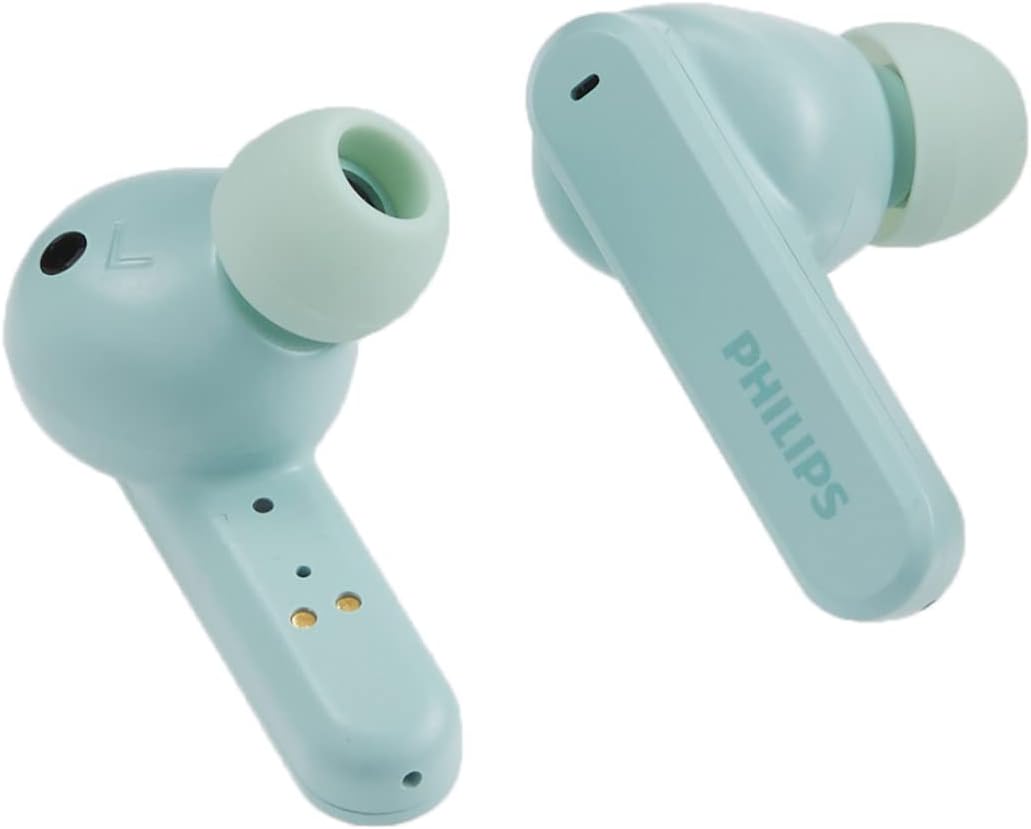
Image: A close-up view of a single teal Philips T4506 earbud, emphasizing the soft silicone ear tip designed for a comfortable and secure fit.
3. Operating Instructions
3.1. Touch Controls
The Philips T4506 headphones feature intuitive touch controls on each earbud for managing audio playback, calls, and voice assistant activation.
| Function | Action |
|---|---|
| Play/Pause Music | Single tap on either earbud |
| Next Track | Double tap on the right earbud |
| Previous Track | Double tap on the left earbud |
| Answer/End Call | Single tap on either earbud |
| Reject Call | Press and hold on either earbud |
| Activate Voice Assistant | Triple tap on either earbud |
3.2. Active Noise Canceling (ANC) and Awareness Mode
- Active Noise Canceling (ANC): Internal microphones filter out unwanted ambient sound, providing a focused listening experience.
- Awareness Mode: Allows you to hear your surroundings without removing the earbuds, useful for safety or conversations.
- Switching Modes: Refer to the quick start guide or product packaging for specific touch control gestures to switch between ANC, Awareness Mode, and standard listening.

Image: The front of the Philips T4506 headphones box, visually emphasizing the Active Noise Canceling and Touch Control functionalities.
3.3. Mono Mode and Auto-Pause
- Mono Mode: Use a single earbud for calls or music while the other charges. The microphone is automatically assigned to the earbud in use.
- Auto-Pause: Music playback will automatically pause when you remove either earbud from your ear and resume when re-inserted.

Image: Both teal Philips T4506 earbuds are shown outside their charging case, with a clear view of their charging contacts, illustrating their readiness for use or charging.
4. Care and Maintenance
4.1. Cleaning
- Regularly clean the earbuds, especially the ear-tips and charging contacts, with a soft, dry, lint-free cloth.
- Do not use abrasive cleaners, alcohol, or chemical solvents.
- Ensure no moisture enters any openings.
4.2. Water Resistance (IPX4)
The Philips T4506 headphones have an IPX4 rating, meaning they are resistant to splashing water from any direction. This makes them suitable for workouts and light rain. However, they are not designed for submersion in water or exposure to pressurized water jets.
- Do not intentionally submerge the earbuds in water.
- If they get wet, wipe them dry thoroughly before placing them back in the charging case.

Image: The back of the Philips T4506 headphones box, illustrating key features such as IPX4 water resistance and Awareness Mode, alongside battery life information.
4.3. Storage
- When not in use, store the earbuds in their charging case to protect them and keep them charged.
- Store the case and earbuds in a cool, dry place, away from extreme temperatures and direct sunlight.

Image: The teal Philips T4506 earbuds are displayed alongside their matching closed charging case, showcasing their compact and portable design.
5. Troubleshooting
If you encounter issues with your Philips T4506 headphones, refer to the following common solutions:
5.1. Earbuds Not Charging
- Ensure the charging case is charged. Connect it to a power source using the USB-C cable.
- Verify that the earbuds are correctly seated in the charging case and that the charging contacts on both the earbuds and the case are clean and free of debris.
- Try cleaning the charging contacts with a dry cotton swab.
5.2. Cannot Pair with Device
- Make sure Bluetooth is enabled on your device and the earbuds are in pairing mode (open the charging case).
- Ensure the earbuds are not already connected to another device. Disconnect them from any previously paired devices.
- Try turning Bluetooth off and on again on your device.
- If the issue persists, try resetting the earbuds (refer to the full product manual for specific reset instructions, if available).
5.3. Low Sound Quality or Intermittent Connection
- Ensure the ear-tips provide a secure seal in your ear canal. Try different sizes if necessary.
- Check for obstructions or debris in the earbud speakers.
- Ensure your device is within the 10-meter Bluetooth range and there are no significant obstacles between the earbuds and your device.
- Fully charge both the earbuds and the charging case.
6. Technical Specifications
| Feature | Detail |
|---|---|
| Model Name | T4506 |
| Noise Control | Active Noise Cancellation |
| Connectivity Technology | Bluetooth 5.0 |
| Wireless Range | 10 Meters |
| Audio Driver Size | 10 mm Neodymium Drivers |
| Battery Life (Earbuds) | Up to 6 hours |
| Total Playtime (with Case) | Up to 24 hours |
| Quick Charge | 15 minutes charge for 1 hour playback |
| Charging Interface | USB-C |
| Water Resistance | IPX4 (Splash Resistant) |
| Control Method | Touch, Voice |
| Included Components | USB-C cable, Eartips (3 sizes) |
| Item Weight | 4.8 ounces (total) |
| UPC | 840063201989 |
7. Warranty and Support
Philips products are manufactured to the highest standards and are designed to deliver high-quality performance. For detailed warranty information, please refer to the warranty card included with your product or visit the official Philips support website.
For further assistance, technical support, or to register your product, please visit the Philips Support Website.
8. Product Video
Video: An official product video showcasing the Philips T4506 True Wireless Headphones, highlighting their features and design. This video provides a visual overview of the product's functionality and aesthetics.


