
Perel WC118
Perel Radio-Controlled Wall Clock
Model: WC118
1. Introduction
Thank you for choosing the Perel Radio-Controlled Wall Clock. This clock is designed for precise timekeeping, automatically synchronizing with the DCF77 atomic clock signal. It also features integrated analog displays for temperature and humidity, making it a versatile addition to any room.
1.1 Safety Instructions
- Read all instructions carefully before use.
- Do not expose the clock to extreme temperatures, direct sunlight, or high humidity.
- Use only the specified battery type (1 x AA, not included).
- Dispose of used batteries responsibly according to local regulations.
- Keep out of reach of children.
2. Product Overview
2.1 Key Features
- Radio-Controlled (DCF77): Automatic time synchronization with the atomic clock in Frankfurt, Germany.
- Automatic Summer/Winter Time Adjustment: Seamless transition between daylight saving and standard time.
- Integrated Thermometer: Analog display for room temperature.
- Integrated Hygrometer: Analog display for air humidity.
- Large, Easy-to-Read Display: 35.5 cm diameter with clear numbers.
- Timeless Design: Minimalist black dial with silver-grey aluminum frame.
2.2 Components
Familiarize yourself with the clock's components:
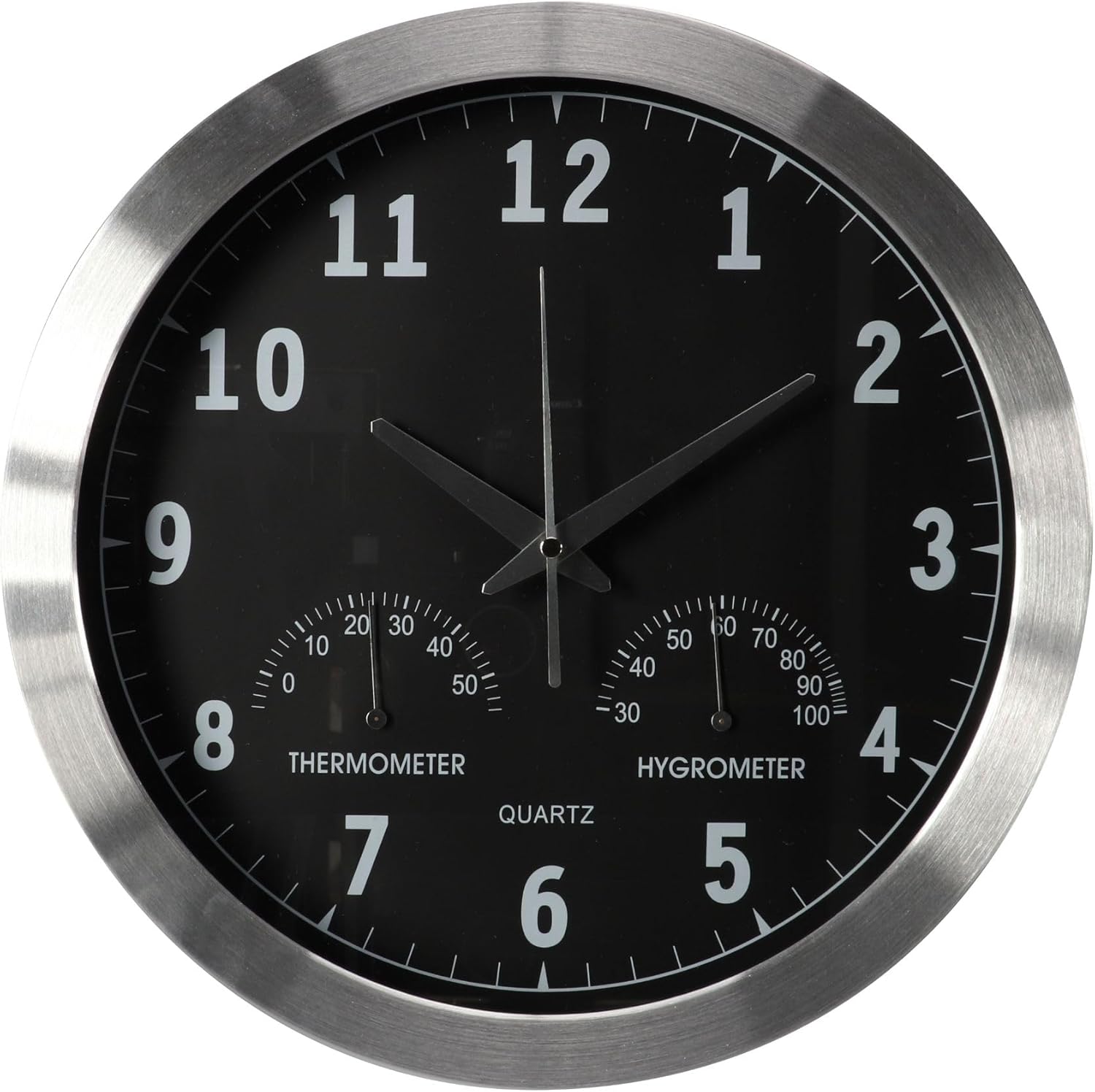
Figure 2.1: Front view of the Perel Radio-Controlled Wall Clock, showing the main clock face with hour, minute, and second hands, and the smaller thermometer and hygrometer dials at the bottom.

Figure 2.2: Back view of the clock, illustrating the battery compartment and control buttons. Key components are labeled:
- Manual Setting Button (SET)
- Reset Pinhole (RESET)
- Forced Reception Button (REC)
- Battery Compartment (1.5V AA/LR6/R6P)
- Safety Pin (for transport)
3. Setup and Installation
3.1 Battery Installation
- Remove the battery compartment cover on the back of the clock.
- Insert one (1) AA 1.5V battery, ensuring the correct polarity (+/-).
- Replace the battery compartment cover.
3.2 Initial Time Synchronization (DCF77)
After inserting the battery, the clock will automatically attempt to receive the DCF77 radio signal. The hands will move to the 12 o'clock position and then begin searching for the signal. This process can take several minutes, or up to 24 hours in areas with weak reception.
- Place the clock near a window or in an open area for best reception.
- Avoid placing it near electronic devices that may cause interference (e.g., TVs, computers, microwaves).
- Once the signal is received, the clock will automatically set itself to the correct time.
To manually initiate a signal search, press the 'REC' (Forced Reception) button on the back of the clock (see Figure 2.2).
3.3 Mounting the Clock
The clock features a central universal hanging system for easy installation.
- Choose a suitable location on a wall, ensuring it is sturdy enough to support the clock's weight (approx. 1.07 kg).
- Install a screw or hook into the wall at the desired height.
- Hang the clock securely using the hanging slot on the back.
4. Operation
4.1 Automatic Time Adjustment
The Perel Radio-Controlled Wall Clock automatically adjusts its time based on the DCF77 signal. This includes automatic switching between summer and winter time (Daylight Saving Time and Standard Time).

Figure 4.1: The clock automatically adjusts for summer and winter time changes via the DCF77 radio signal.
4.2 Reading the Display
- Time: Read the time using the large hour, minute, and second hands on the main dial.
- Temperature: The left small dial indicates the ambient temperature in degrees Celsius.
- Humidity: The right small dial indicates the relative air humidity in percentage (%).
4.3 Manual Time Setting (If Needed)
In rare cases where the DCF77 signal cannot be received (e.g., outside the reception range), you can manually set the time:
- Press and hold the 'SET' (Manual Setting) button on the back of the clock (see Figure 2.2).
- The hands will start to move. Release the button when the hands reach the desired time.
- Note: Manual setting will be overridden once the DCF77 signal is successfully received.
5. Maintenance
5.1 Cleaning
- Wipe the clock's surface with a soft, dry cloth.
- Do not use abrasive cleaners, solvents, or chemical sprays, as these can damage the finish.
5.2 Battery Replacement
When the clock hands stop moving or the time becomes inaccurate, it is likely time to replace the battery.
- Remove the old battery from the compartment.
- Insert a new AA 1.5V alkaline battery, observing polarity.
- The clock will automatically attempt to re-synchronize with the DCF77 signal after battery replacement.
6. Troubleshooting
If you experience issues with your Perel Radio-Controlled Wall Clock, consult the table below for common problems and solutions.
| Problem | Possible Cause | Solution |
|---|---|---|
| Clock does not set time automatically. | Weak or no DCF77 signal reception. | Relocate the clock to an area with better reception (e.g., near a window, away from electronics). Press the 'REC' button to force a signal search. |
| Clock hands are stuck or not moving. | Low or depleted battery. | Replace the battery with a new AA 1.5V alkaline battery. |
| Time is incorrect after initial setup. | Initial signal reception failed or was interrupted. | Press the 'RESET' button (using a thin object like a paperclip) to restart the clock and initiate a new signal search. Ensure good reception conditions. |
| Thermometer/Hygrometer readings seem inaccurate. | Sensors need time to adjust to new environment; extreme conditions. | Allow the clock to acclimate to the room temperature and humidity for at least 30 minutes. Ensure the clock is not placed in direct sunlight or near heat/cold sources. |
7. Technical Specifications
| Feature | Specification |
|---|---|
| Model Number | WC118 |
| Brand | Perel |
| Manufacturer | Velleman Group nv |
| Dimensions (Diameter x Depth) | 35.5 cm x 4.5 cm (approx. 36.5 x 37 x 37 cm overall product dimensions) |
| Weight | 1.07 kg |
| Material | Metal (Aluminum frame) |
| Color | Black (dial), Silver-grey (frame) |
| Display Type | Analog |
| Power Source | 1 x AA 1.5V Battery (Alkaline recommended, not included) |
| Special Features | Radio-controlled (DCF77), Thermometer, Hygrometer, Automatic Summer/Winter Time Adjustment |
| Mounting Type | Wall Mount |

Figure 7.1: Side view of the clock highlighting its dimensions (diameter 35.5 cm, depth 4.5 cm) and weight (930g).
8. Warranty and Support
Perel products are manufactured to high-quality standards. For information regarding warranty terms, technical support, or service, please refer to the contact information provided with your purchase or visit the official Perel website.
Please retain your proof of purchase for any warranty claims.
Related documentsWC118

Ask a question about this manual
Ask about setup, troubleshooting, compatibility, parts, safety, or missing instructions. Manuals+ will review the question and use this page’s manual context to help answer it.