
1. Introduction
Thank you for choosing the TOPSKY Dual Motor Electric Adjustable Standing Desk. This manual provides essential information for the safe assembly, operation, and maintenance of your new standing desk. Please read these instructions thoroughly before use and retain them for future reference.
This product combines a robust dual-motor frame (DF02.01) with a durable oak desktop board (ZB001) to offer a versatile and ergonomic workspace solution.
2. Safety Instructions
- Ensure all components are present and undamaged before assembly. Do not use if any parts are missing or damaged.
- Keep children and pets away from the desk during operation to prevent injury.
- Do not place hands or other objects near moving parts of the desk frame during height adjustment.
- Ensure the power cord is not pinched or damaged. Do not operate the desk with a damaged power cord or plug.
- Do not overload the desk. The maximum weight capacity is 225 lbs (102 kg). Exceeding this limit may cause damage or injury.
- If the desk displays an "OVR" code, reduce the load on the desktop to less than 175 lbs before attempting further operation.
- Only use the desk on a level and stable surface.
- Disconnect power before cleaning or performing any maintenance.
- This desk is designed for indoor use only.
3. Package Contents
Your TOPSKY Dual Motor Electric Adjustable Standing Desk package includes the following components:
- 1 x Desk Frame (Model DF02.01)
- 1 x Desk Board (Model ZB001, Oak finish, 58.3''x26.8'')
- Assembly Hardware (screws, tools, etc. - specific list may vary, refer to included assembly guide)
- Control Panel and Power Adapter
Note: The desk frame and desk board may arrive in separate packages and at different times.
4. Setup & Assembly
Assembly is required for this product. Please follow the detailed instructions provided in the separate assembly guide included with your package. The general steps involve:
- Unpacking: Carefully unpack all components and verify against the package contents list.
- Frame Assembly: Assemble the dual-motor desk frame according to the instructions. Ensure all screws are tightened securely.
- Desktop Attachment: Place the oak desktop board onto the assembled frame. Align the pre-drilled holes on the desktop with the mounting points on the frame.
- Secure Desktop: Use the provided screws to securely attach the desktop to the frame. Refer to the screw hole distance diagram for proper alignment.
- Control Panel & Wiring: Mount the control panel to the underside of the desktop in a convenient location. Connect all motor and control cables to the control box, and then connect the power adapter. Ensure cables are neatly managed to avoid interference with desk movement.

Figure 4.1: Desk Frame Dimensions and Weight Capacity. This image illustrates the adjustable width (43"-59" / 108.8cm-150cm), adjustable height (27.6"-47.3" / 70cm-120cm), and the maximum weight capacity of 225 lbs (102 kg).

Figure 4.2: Desktop Screw Hole Distances. This diagram provides measurements for the screw hole placement on the desktop, crucial for proper frame attachment.
5. Operating Instructions
The TOPSKY Electric Standing Desk features a user-friendly control panel for easy height adjustment and personalized settings.
5.1 Basic Height Adjustment
- Use the Up and Down arrow buttons on the control panel to smoothly adjust the desk height.
- The desk moves at approximately 1 inch per second with low noise operation (around 45.1 dB).
- The LCD display will show the current height in inches or centimeters.

Figure 5.1: Low Noise Operation and Speed. This image highlights the desk's quiet operation at 45.1 dB and an operating speed of 1 inch per second, with a height range from 27.6" to 47.3".
5.2 Memory Presets
The desk allows you to save up to 3 preferred height positions for quick adjustment.
- Adjust the desk to your desired height.
- Press the "M" button (Memory button). The display will flash.
- Immediately press one of the numbered preset buttons ("1", "2", or "3") to save the current height to that position.
- To recall a saved position, simply press the corresponding numbered button. The desk will automatically move to the saved height.
5.3 Anti-Collision Function
The anti-collision feature protects the desk from damage by automatically stopping and slightly reversing if it encounters an obstacle during height adjustment.
- Ensure there are no obstructions above or below the desk before adjusting its height.
- If the desk stops unexpectedly, check for obstacles and remove them before resuming operation.
5.4 Unit Conversion
The control panel allows you to switch between inches and centimeters for height display.
- Refer to your control panel's specific instructions for unit conversion, typically involving a long press on a specific button or a combination of buttons.
5.5 Container and Self-Stop Positions
This function allows you to set limits for the desk's movement range, useful for preventing collisions with overhead cabinets or under-desk drawers.
- Consult the detailed control panel manual for instructions on setting container (upper limit) and self-stop (lower limit) positions.
6. Maintenance
- Cleaning: Wipe the desk surface and frame with a soft, damp cloth. Avoid harsh chemicals or abrasive cleaners that could damage the finish.
- Inspection: Periodically check all screws and connections to ensure they are tight. Retighten if necessary.
- Cable Management: Ensure all cables are properly routed and secured to prevent snagging or damage during desk movement.
- Motor Care: The dual motors are designed for long-term use and generally require no special maintenance. Avoid exposing them to excessive moisture or dust.
7. Troubleshooting
If you encounter issues with your TOPSKY standing desk, refer to the following common problems and solutions:
| Problem | Possible Cause | Solution |
|---|---|---|
| Desk does not move. | Power cord disconnected, control panel not connected, motor cable loose, power outage. | Check all power and motor connections. Ensure the power outlet is functional. Reset by unplugging for 30 seconds and plugging back in. |
| Desk moves unevenly or makes unusual noise. | Uneven load, loose connections, damaged motor. | Ensure weight is evenly distributed. Check all frame connections. If problem persists, contact customer support. |
| "OVR" code displayed. | Overload detected. | Reduce the load on the desktop to less than 175 lbs. Allow the desk to cool down if it has been operating continuously. |
| Anti-collision activates frequently. | Obstacles in the path of movement, sensitivity setting too high. | Remove any obstructions. Refer to the control panel manual for adjusting anti-collision sensitivity if available. |
| Memory presets not working. | Presets not saved correctly. | Re-save your desired height positions following the instructions in section 5.2. |
If you experience a problem not listed here or if the suggested solutions do not resolve the issue, please contact TOPSKY customer support for assistance.
8. Specifications
| Model | DF02.01 (Frame) + ZB001 (Board) |
| Brand | TOPSKY |
| Type | Dual Motor Electric Adjustable Standing Desk |
| Desktop Material | Oak Wood |
| Frame Material | Alloy Steel (Powder Coated) |
| Adjustable Height Range | 27.6" - 47.3" (70 cm - 120 cm) |
| Adjustable Width Range | 43" - 59" (108.8 cm - 150 cm) |
| Desktop Dimensions (L x W) | 58.3" x 26.8" (148 cm x 68 cm) |
| Desktop Thickness | 0.7" (1.8 cm) |
| Maximum Weight Capacity | 225 lbs (102 kg) |
| Operating Speed | Approx. 1 inch/second |
| Noise Level | Low noise, approx. 45.1 dB |
| Special Features | 3 Memory Presets, Anti-Collision, LCD Display, Unit Conversion, Container/Self-Stop Positions |
| Assembly Required | Yes |
| Room Type | Office |
| Recommended Uses | Working |
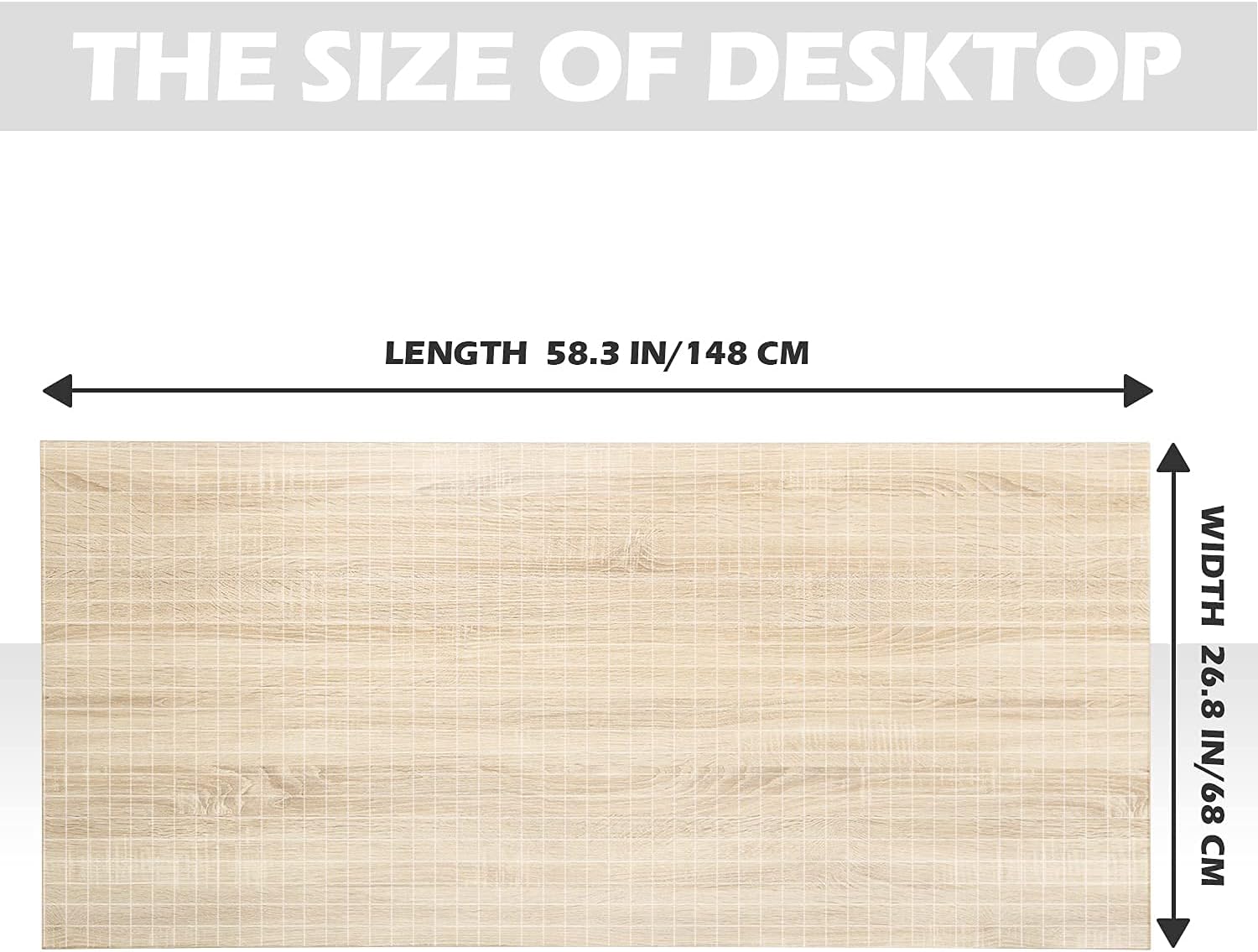
Figure 8.1: Desktop Dimensions. This image details the desktop length of 58.3 inches (148 cm) and width of 26.8 inches (68 cm).

Figure 8.2: Desktop Thickness. This image shows the desktop thickness of 0.7 inches (1.8 cm).

Figure 8.3: One-Piece Desktop. This image confirms the desktop is a single, complete board.
9. Warranty & Support
9.1 Product Warranty
The TOPSKY Dual Motor Electric Adjustable Standing Desk (Model DF02.01 + ZB001) comes with a 1-year limited warranty from the date of purchase. This warranty covers manufacturing defects in materials and workmanship under normal use. It does not cover damage caused by misuse, accidents, unauthorized modifications, or normal wear and tear.
Please retain your proof of purchase for warranty claims.
9.2 Customer Support
For any questions, technical assistance, or warranty claims, please contact TOPSKY customer support. Refer to the contact information provided with your purchase documentation or visit the official TOPSKY website.
When contacting support, please have your product model (DF02.01 + ZB001) and purchase date ready.


