
Ticova M8
Ticova Ergonomic Office Chair
Instruction Manual

1. Introduction
This manual provides detailed instructions for the assembly, operation, and maintenance of your Ticova Ergonomic Office Chair, Model M8. Designed for optimal comfort and support, this chair features multiple adjustable components to suit your individual needs. Please read this manual thoroughly before assembly and use to ensure proper function and longevity of your chair.

Figure 1.1: Ticova Ergonomic Office Chair (Model M8)
2. Product Features
The Ticova Ergonomic Office Chair is engineered with advanced features to provide superior comfort and support during long hours of sitting:
- Adjustable Lumbar Support: Customize the height and depth of the lumbar support to perfectly fit the curve of your spine, significantly reducing back fatigue and pain.
- Adjustable Headrest: A large, curved foam headrest offers comprehensive neck and head support, with adjustable height and angle for personalized comfort.
- 3D Adjustable Armrests: Unlike standard armrests, these can be adjusted in height, angle, and forward/backward position, providing optimal support for your arms and shoulders.
- High-Density Foam Seat: The 9CM thick seat cushion features a W-shaped and waterfall-edge design, distributing pressure evenly across your hips and thighs for enhanced comfort.
- Breathable Mesh Backrest: The backrest is made from a strong, tensile mesh material, ensuring excellent airflow to keep you cool and comfortable, even during extended use.
- Recline Function with Lock: The chair offers a recline angle of up to 130°, allowing you to find your most comfortable position for relaxation or focused work. The recline can be locked at various angles.
- Durable Construction: Built with a robust base and a high-quality gas lift, the chair is designed for stability and long-term durability, having passed BIFMA tests.

Figure 2.1: Comprehensive Feature Overview

Figure 2.2: Revolutionizing Ergonomics with 3.0 Design
3. Setup and Assembly
Before beginning assembly, ensure all parts are present and undamaged. Refer to the included assembly diagram for detailed steps. Typically, assembly involves the following sequence:
- Unpack Components: Carefully remove all parts from the packaging and lay them out on a clean, flat surface.
- Attach Casters to Base: Insert the five casters into the holes at the end of each leg of the chair base until they click securely into place.
- Insert Gas Lift: Place the gas lift cylinder into the center hole of the chair base.
- Attach Mechanism to Seat: Secure the control mechanism to the underside of the seat cushion using the provided screws. Ensure the front of the mechanism faces the front of the seat.
- Connect Seat to Gas Lift: Carefully place the assembled seat onto the gas lift cylinder, ensuring it is centered and stable.
- Attach Backrest: Secure the backrest to the seat mechanism using the designated screws. Ensure all connections are tight and stable.
- Install Armrests: Attach the armrests to the seat or backrest as indicated in the assembly diagram, tightening all screws firmly.
All necessary tools are typically included. Ensure all screws are tightened securely before using the chair.

Figure 3.1: Chair in typical use environment
4. Operating Instructions
Your Ticova Ergonomic Office Chair offers a range of adjustments to optimize your seating posture and comfort:
- Seat Height Adjustment: To raise the seat, lift the lever on the right side of the chair while taking your weight off the seat. To lower the seat, lift the lever while seated. Release the lever at the desired height.
- Lumbar Support Adjustment: The lumbar support can be adjusted both vertically (up and down by 4cm) and in depth (forward and backward by 3.5cm) using the knob located on the backrest. Rotate the knob to adjust depth and slide the entire lumbar support mechanism up or down to adjust height.
- Headrest Adjustment: The headrest can be adjusted in height (up to 13cm) and angle (up to 135° rotation). Grasp the headrest and move it to your preferred position.
- Armrest Adjustment: The 3D armrests offer three adjustment options:
- Height: Press the button on the side of the armrest and move it up or down (7cm range).
- Angle: Rotate the armrest pad left or right (40° range).
- Forward/Backward: Slide the armrest pad forward or backward (6cm range).
- Tilt/Recline Function: Pull out the lever on the left side of the chair to enable the recline function. Push the lever back in to lock the backrest at your desired angle (up to 130°). The tension of the recline can be adjusted by rotating the large knob located underneath the seat.

Figure 4.1: Lumbar Support Adjustment
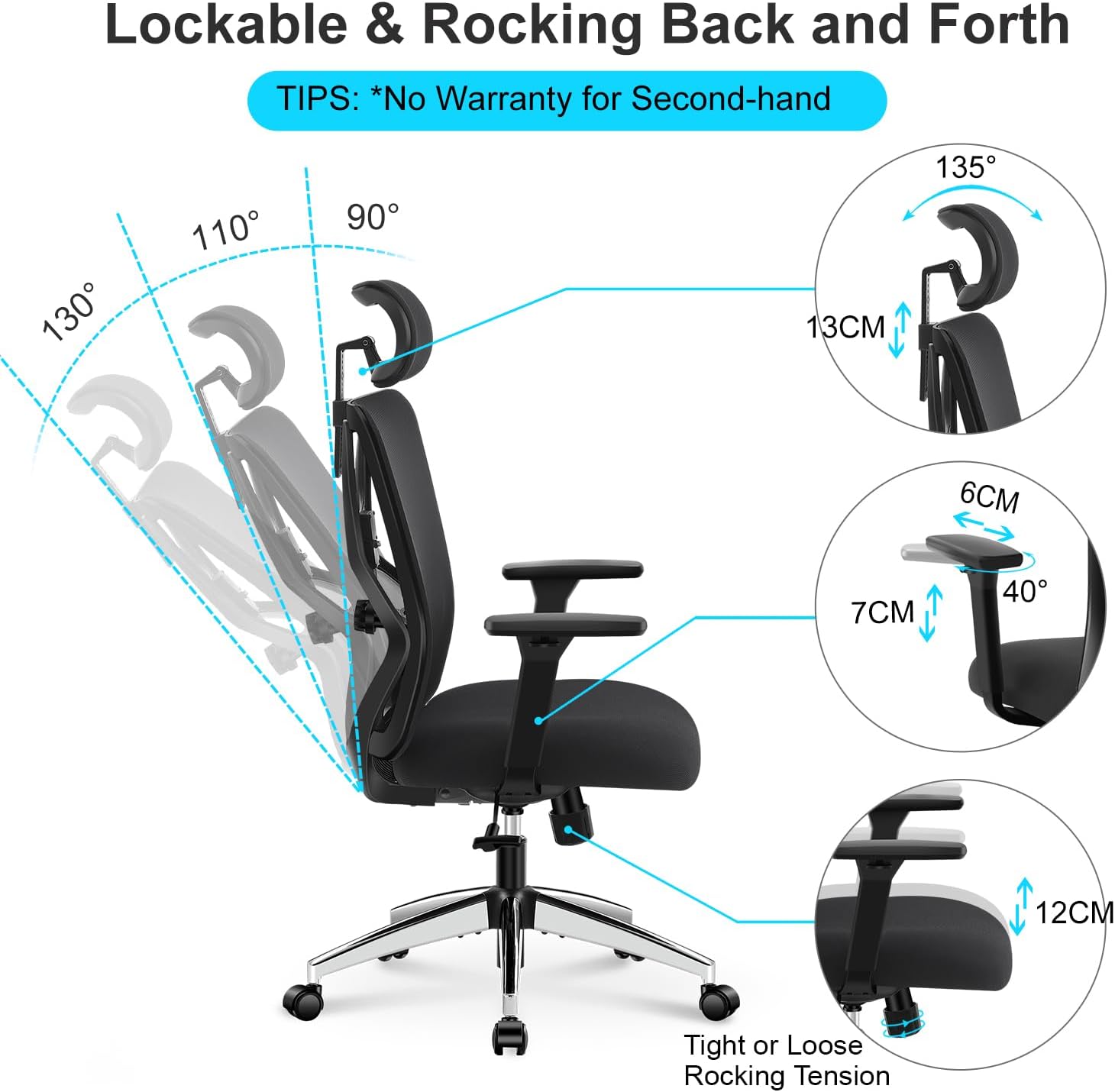
Figure 4.2: Recline and Adjustment Overview

Figure 4.3: 3D Armrest Adjustment

Figure 4.4: Adjustable Headrest
5. Maintenance
Regular maintenance will help preserve the appearance and functionality of your Ticova office chair:
- Cleaning: For fabric and mesh surfaces, use a soft cloth dampened with mild soap and water. Avoid harsh chemicals or abrasive cleaners. For plastic and metal parts, wipe with a damp cloth.
- Check Fasteners: Periodically check all screws and bolts to ensure they are tight. Re-tighten if necessary to prevent wobbling or noise.
- Caster Care: Keep casters clean from hair and debris to ensure smooth rolling. If casters become stiff, a small amount of silicone lubricant can be applied to the axle.
- Gas Lift: The gas lift is a sealed unit and requires no maintenance. If you experience issues with height adjustment, refer to the troubleshooting section.
6. Troubleshooting
If you encounter any issues with your Ticova Ergonomic Office Chair, please refer to the following common problems and solutions:
| Problem | Possible Cause | Solution |
|---|---|---|
| Chair Squeaks or Creaks | Loose fasteners; friction between components. | Tighten all assembly screws. Apply a small amount of silicone spray lubricant to moving parts and joints, especially where metal meets metal. |
| Gas Lift Not Holding Height | Faulty gas lift cylinder. | This indicates a defect in the gas lift. Please contact customer support for a replacement. Do not attempt to repair the gas lift yourself. |
| Backrest Feels Loose/Unstable | Backrest attachment screws are loose or damaged. | Ensure the screws connecting the backrest to the seat mechanism are fully tightened. If the issue persists, inspect for any damaged components and contact support. |
| Casters Not Rolling Smoothly | Debris caught in casters; worn casters. | Remove any hair or debris from the caster wheels. If casters are worn, replacements may be needed. |
If the problem persists after attempting these solutions, please contact Ticova customer support for further assistance.
7. Specifications
| Attribute | Detail |
|---|---|
| Brand | Ticova |
| Model Number | M8 |
| Color | Black |
| Product Dimensions (L x W x H) | 69 x 25 x 53 cm |
| Item Weight | 18 Kilograms |
| Maximum Load Capacity | 150 KG (330 LBS) |
| Backrest Type | Full-length, Mesh |
| Certifications | BIFMA Tested |

Figure 7.1: Chair Dimensions

Figure 7.2: Key Components
8. Warranty and Customer Support
Ticova stands behind the quality of its products. Your Ticova Ergonomic Office Chair comes with:
- 30-Day Money-Back Guarantee: If you are not satisfied with your purchase, you may return it within 30 days for a full refund.
- One-Year Warranty: The chair is covered by a one-year warranty against manufacturing defects.
For any quality issues, questions, or assistance with assembly or operation, please do not hesitate to contact Ticova customer service. Our professional support team is dedicated to providing you with a satisfactory solution.
Contact Information: Please refer to your purchase documentation or the Ticova official website for the most current customer service contact details.
Related documentsM8

Ask a question about this manual
Ask about setup, troubleshooting, compatibility, parts, safety, or missing instructions. Manuals+ will review the question and use this page’s manual context to help answer it.