
Introduction
Thank you for choosing the STANLEY 20V Brushless Cordless Drill/Driver. This manual provides essential information for the safe and efficient operation, maintenance, and troubleshooting of your new tool. Please read this manual thoroughly before first use and keep it for future reference.
This powerful and versatile tool is designed for drilling and driving applications, featuring a brushless motor for extended tool life and improved efficiency. It includes a 13 mm keyless chuck for quick bit changes and 22 torque positions for precise control.
Safety Information
WARNING: Always wear appropriate personal protective equipment, including safety glasses, hearing protection, and gloves, when operating power tools.
- Keep work area clean and well lit. Cluttered or dark areas invite accidents.
- Do not operate power tools in explosive atmospheres, such as in the presence of flammable liquids, gases or dust. Power tools create sparks which may ignite the dust or fumes.
- Keep children and bystanders away while operating a power tool. Distractions can cause you to lose control.
- Avoid accidental starting. Ensure the switch is in the off-position before connecting to battery pack, picking up or carrying the tool.
- Use the correct tool for your application. Do not force the tool.
- Disconnect the battery pack from the tool before making any adjustments, changing accessories, or storing power tools.
Components Included
Your STANLEY 20V Brushless Cordless Drill/Driver package includes the following items:
- 1 x STANLEY 20V Brushless Cordless Percussion Drill/Driver
- 2 x SB201 1.5 Ah Lithium-Ion Batteries
- 1 x Battery Charger
- 1 x Plastic Carrying Case

Setup
1. Charging the Battery
Before first use, fully charge the battery pack. Insert the battery pack into the charger, ensuring it clicks into place. The charger indicator light will show the charging status. Refer to the charger's specific instructions for detailed light indications.
2. Installing the Battery
Align the battery pack with the battery port on the base of the drill handle. Slide the battery into the tool until it locks securely into place. Ensure it is fully seated before operation.

3. Installing Drill Bits/Driver Bits
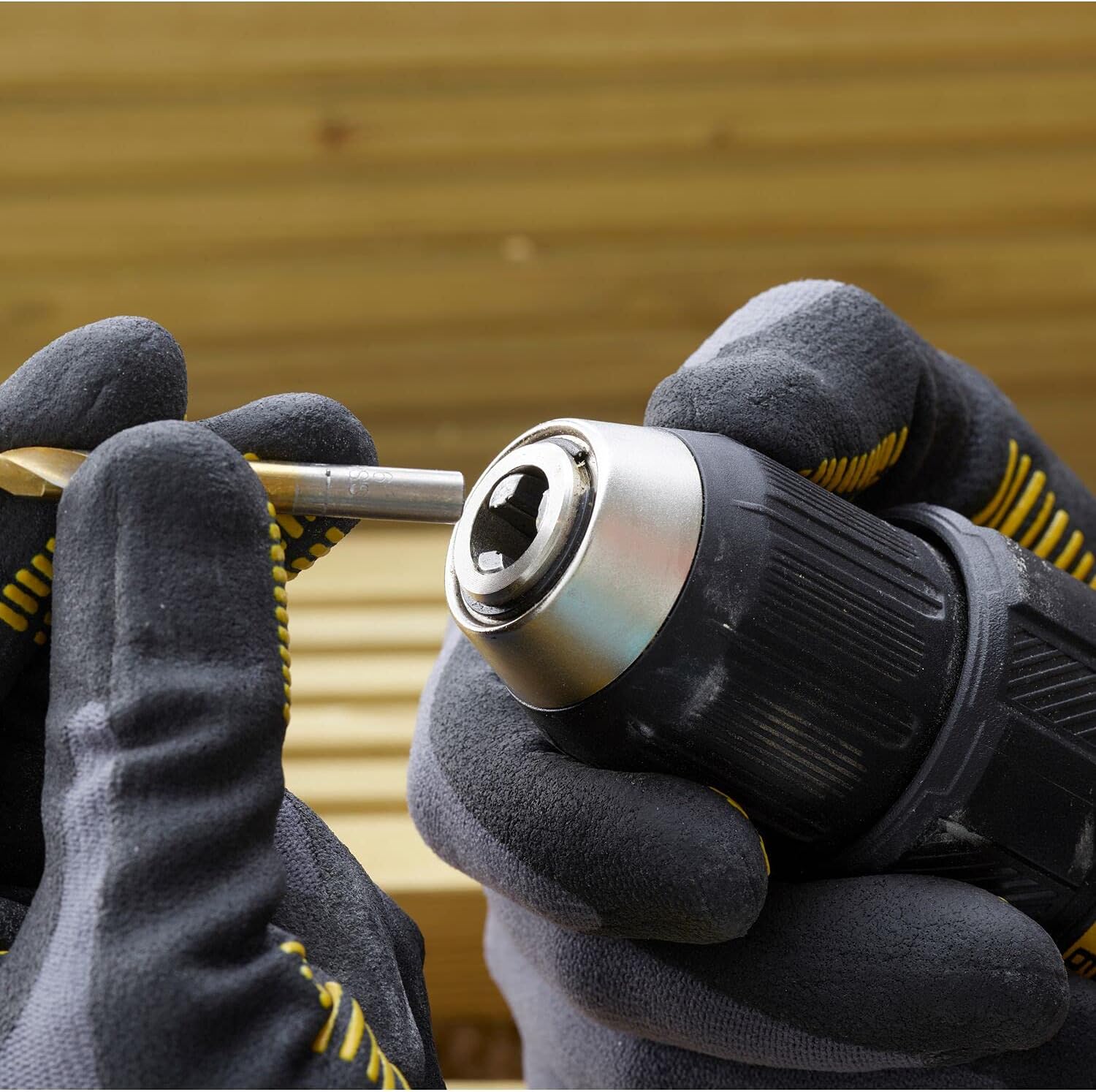
The drill features a 13 mm keyless chuck for quick and easy bit changes.
- Rotate the chuck counter-clockwise to open the jaws.
- Insert the desired drill bit or driver bit into the chuck, ensuring it is centered.
- Rotate the chuck clockwise to tighten the jaws firmly around the bit. Do not overtighten.
Operating Instructions
1. Powering On/Off
To turn the drill on, press the trigger switch. The tool's speed is variable and controlled by the amount of pressure applied to the trigger. To turn off, release the trigger switch.

2. Forward/Reverse Rotation
A forward/reverse button is located above the trigger. Push the button to the left for forward rotation (for drilling and driving screws). Push it to the right for reverse rotation (for removing screws or backing out bits). Ensure the button is in the center position to lock the trigger for safety when not in use.
3. Speed Selection
The drill features a two-speed gearbox. A speed selector switch is located on top of the tool.
- Position 1 (Low Speed): For high torque applications, such as driving large screws or drilling large holes.
- Position 2 (High Speed): For faster drilling and lighter driving applications.

4. Torque Adjustment
The torque collar, located behind the chuck, allows you to select from 22 torque settings plus a drill mode. Rotate the collar to align the desired setting with the arrow indicator.
- Lower settings (1-5): For driving small screws or working with soft materials.
- Medium settings (6-15): For general driving and drilling.
- Higher settings (16-22): For driving larger screws or working with harder materials.
- Drill symbol: For drilling applications where maximum torque is required and the clutch will not slip.

5. Using the LED Work Light
The integrated LED light automatically illuminates the work area when the trigger is pressed, providing improved visibility in dimly lit spaces.

Maintenance
Regular maintenance ensures the longevity and optimal performance of your tool.
- Cleaning: Use a clean, damp cloth to wipe down the tool. Do not use harsh chemicals or abrasive cleaners. Keep the ventilation openings clear of dust and debris.
- Battery Care: Store batteries in a cool, dry place away from direct sunlight. Do not store fully discharged batteries for extended periods.
- Chuck Maintenance: Periodically clean the chuck jaws to ensure proper gripping of bits.
- Storage: When not in use, store the drill, batteries, and charger in the provided plastic carrying case in a dry, secure location out of reach of children.
Troubleshooting
| Problem | Possible Cause | Solution |
|---|---|---|
| Tool does not start | Battery not charged Battery not properly inserted Forward/reverse button in center (locked) position | Charge battery Re-insert battery until it clicks Push button to forward or reverse position |
| Reduced power/speed | Low battery charge Overload protection activated | Recharge battery Reduce pressure on tool; allow tool to cool down |
| Bit slips in chuck | Chuck not tightened sufficiently Bit shank is dirty or damaged | Re-tighten chuck firmly Clean or replace bit |
| Battery not charging | Charger not plugged in Battery or charger is faulty Battery too hot/cold | Check power connection Contact customer support Allow battery to reach room temperature |
Specifications
| Feature | Specification |
|---|---|
| Model Number | SBD710C2K-B3 |
| Voltage | 20 Volts |
| Motor Type | Brushless |
| Chuck Size | 13 mm (Keyless) |
| Torque Settings | 22 + Drill Mode |
| Max Torque | 60 Nm |
| No-Load Speed | 0-1500 RPM |
| Battery Type | Lithium Ion |
| Battery Capacity | 1.5 Ah |
| Weight (with battery) | 3.4 kg |
| Dimensions (L x W x H) | 34.4 x 34.1 x 10.6 cm |
Warranty and Support
STANLEY products are manufactured to high quality standards and are guaranteed for professional use. For detailed warranty information, please refer to the warranty card included with your product or visit the official STANLEY website. For technical support, replacement parts, or service, please contact STANLEY customer service through their official channels.
Online Support: Visit www.stanleytools.com for FAQs, product registration, and service center locations.