
Introduction
Thank you for choosing the DOMO DO228SV 3-in-1 Stick Vacuum Cleaner. This appliance is designed for efficient and versatile cleaning, combining a stick vacuum, a handheld vacuum, and a mopping function. Please read this manual carefully before use to ensure proper operation, maintenance, and safety.
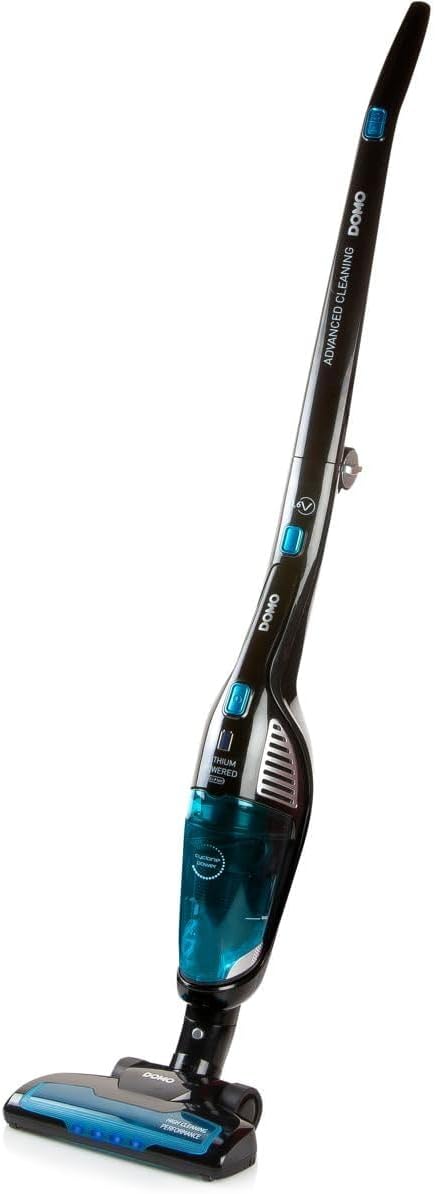
Image: The DOMO DO228SV 3-in-1 Stick Vacuum Cleaner in its full upright configuration, showcasing its sleek design and integrated handheld unit.
Important Safety Instructions
Always follow basic safety precautions when using electrical appliances to reduce the risk of fire, electric shock, or injury.
- Read all instructions before using the appliance.
- Do not use outdoors or on wet surfaces.
- Do not allow to be used as a toy. Close attention is necessary when used by or near children.
- Use only as described in this manual. Use only manufacturer's recommended attachments.
- Do not use with a damaged cord or plug. If appliance is not working as it should, has been dropped, damaged, left outdoors, or dropped into water, return it to a service center.
- Do not pull or carry by cord, use cord as a handle, close a door on cord, or pull cord around sharp edges or corners. Do not run appliance over cord. Keep cord away from heated surfaces.
- Do not unplug by pulling on cord. To unplug, grasp the plug, not the cord.
- Do not handle plug or appliance with wet hands.
- Do not put any object into openings. Do not use with any opening blocked; keep free of dust, lint, hair, and anything that may reduce airflow.
- Keep hair, loose clothing, fingers, and all parts of body away from openings and moving parts.
- Do not pick up anything that is burning or smoking, such as cigarettes, matches, or hot ashes.
- Do not use to pick up flammable or combustible liquids, such as gasoline, or use in areas where they may be present.
- Do not pick up toxic material, such as chlorine bleach, ammonia, or drain cleaner.
- Do not use without dust bag and/or filters in place.
- Turn off all controls before unplugging.
- Use extra care when cleaning on stairs.
- Do not charge the unit outdoors.
- Only use the charger supplied by the manufacturer to recharge.
Package Contents
Verify that all components are present in the packaging:
- DOMO DO228SV Main Unit (Stick Vacuum)
- Removable Handheld Vacuum
- Dust Brush
- Crevice Tool
- Charging Station
- Power Adapter
- Wall Mount
- Mopping Attachment
- Mopping Pad
- Measuring Cup (for mopping attachment)
- User Manual (this document)

Image: The charging station, power adapter, dust brush, and crevice tool included with the DOMO DO228SV vacuum cleaner.
Product Overview
Familiarize yourself with the different parts of your DOMO DO228SV vacuum cleaner.
Main Unit (Stick Vacuum)
- Handle: For comfortable grip and control.
- Power Button: To turn the vacuum on/off.
- Speed Selector: To switch between two suction speeds.
- Dustbin Release Button: To detach the dustbin for emptying.
- Floor Nozzle: Equipped with a rotating brush for effective cleaning of various surfaces.
Removable Handheld Vacuum
The handheld unit detaches from the main stick for quick spot cleaning and hard-to-reach areas.
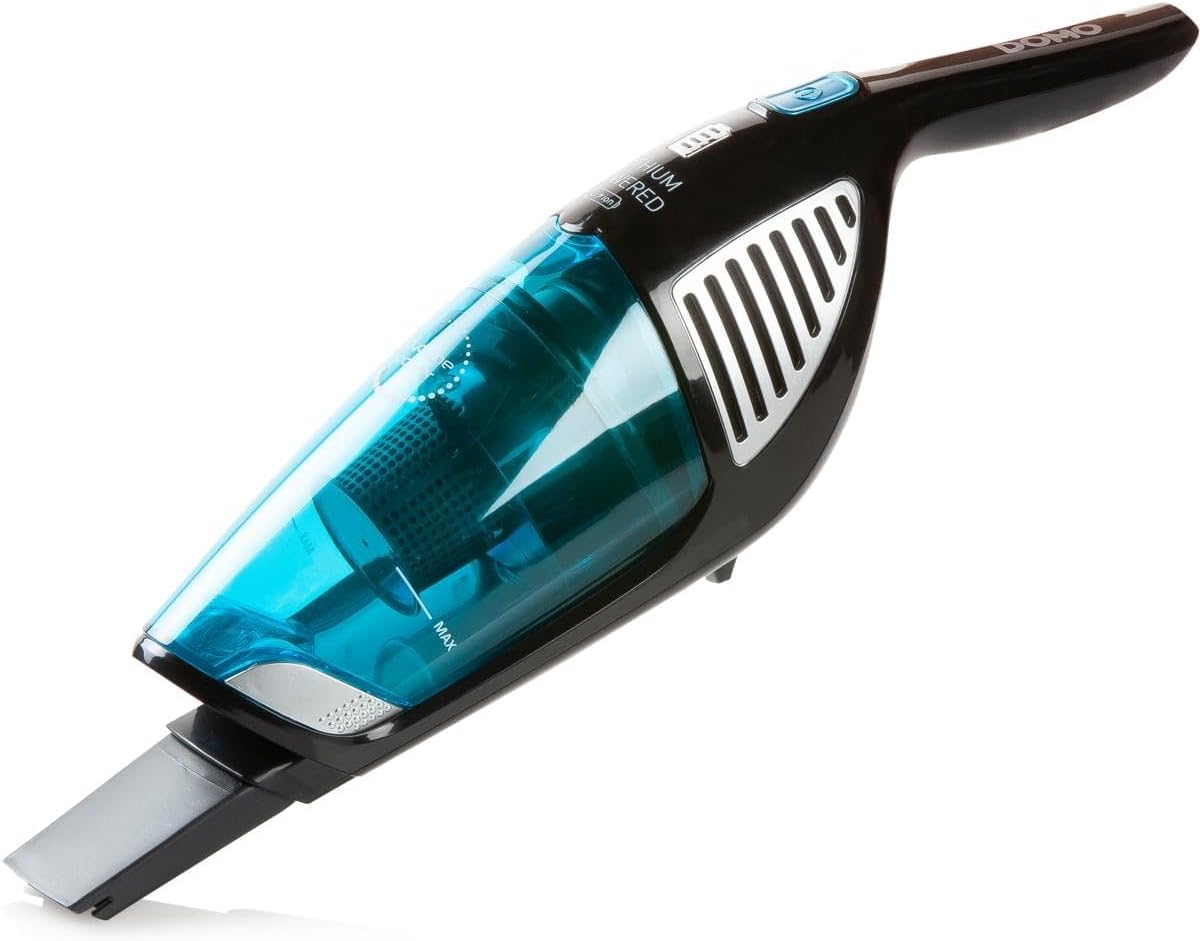
Image: The detachable handheld vacuum unit, showing its compact design and dust collection bin.
Mopping Attachment
This accessory allows for simultaneous vacuuming and wet cleaning.
- Water Tank: For holding cleaning solution or water.
- Mopping Pad: Attaches to the bottom for wet cleaning.
Setup
1. Assembly
- Unpack all components and ensure they are free from damage.
- Insert the handheld vacuum unit into the main stick body until it clicks securely into place.
- Attach the floor nozzle to the bottom of the main stick body.
2. Charging the Battery
Before first use, fully charge the vacuum cleaner for 4 to 6 hours.
- Place the vacuum cleaner onto the charging station.
- Connect the power adapter to the charging station and then plug it into a wall outlet.
- The charging indicator light will illuminate, indicating that the unit is charging.
- Once fully charged, the indicator light may change or turn off (refer to specific indicator behavior in your manual if available).

Image: The DOMO DO228SV vacuum cleaner docked in its charging station, ready for or undergoing charging.
3. Wall Mounting (Optional)
The charging station can be wall-mounted for convenient storage. Use the provided wall mount and hardware to secure the charging station to a suitable wall location.
Operating Instructions
Using as a Stick Vacuum
- Ensure the vacuum is fully charged.
- Press the power button to turn on the vacuum.
- Select the desired suction speed using the speed selector button (two speeds available).
- Guide the vacuum over the floor surface. The rotating brush in the floor nozzle will assist in picking up debris.
- After use, press the power button to turn off the vacuum and return it to the charging station.
Using as a Handheld Vacuum
- Press the release button to detach the handheld unit from the main stick.
- Attach the dust brush or crevice tool as needed for specific cleaning tasks (e.g., upholstery, corners, car interiors).
- Press the power button on the handheld unit to start vacuuming.
- After use, turn off the handheld unit and reattach it to the main stick or place it back on the charging station.
Using the Mopping Function (3-in-1 System)
- Ensure the mopping attachment is clean and the mopping pad is attached.
- Fill the water tank of the mopping attachment with clean water or a suitable floor cleaning solution using the provided measuring cup. Do not overfill.
- Attach the filled mopping attachment to the floor nozzle of the stick vacuum.
- Turn on the vacuum cleaner. As you vacuum, the mopping pad will simultaneously clean the floor surface.
- This function is ideal for hard floors. Avoid using on carpets or rugs.
- After use, empty any remaining liquid from the water tank and clean the mopping pad.

Image: The mopping attachment connected to the vacuum's floor nozzle, demonstrating its use for wet cleaning.

Image: A hand pouring liquid into the water tank of the mopping attachment using the provided measuring cup.
Maintenance
Regular maintenance ensures optimal performance and extends the lifespan of your vacuum cleaner.
1. Emptying the Dustbin
Empty the dustbin after each use or when the MAX fill line is reached.
- Ensure the vacuum is turned off.
- Press the dustbin release button to detach the dustbin from the handheld unit.
- Hold the dustbin over a waste bin and open the bottom flap to release the collected debris.
- Close the flap and reattach the dustbin to the handheld unit.

Image: A hand detaching the transparent dustbin from the handheld vacuum unit for emptying or cleaning.
2. Cleaning the Filter
The filter should be cleaned regularly to maintain suction power. Tap out dust or rinse with water if necessary. Ensure the filter is completely dry before reinserting.
3. Cleaning the Floor Nozzle and Brush Roll
Periodically check the floor nozzle and brush roll for tangled hair, threads, or debris. Use scissors to cut away any obstructions and remove them.
4. Cleaning the Mopping Pad
After each use of the mopping function, remove the mopping pad and rinse it thoroughly with water. It can be hand-washed or machine-washed according to its care instructions.
Troubleshooting
| Problem | Possible Cause | Solution |
|---|---|---|
| Vacuum does not turn on. | Battery is not charged. | Charge the vacuum cleaner for 4-6 hours. |
| Low suction power. | Dustbin is full. Filter is clogged. Obstruction in nozzle/hose. | Empty the dustbin. Clean or replace the filter. Remove any obstructions. |
| Brush roll not rotating. | Hair or debris tangled in brush roll. | Turn off the vacuum and carefully remove tangled debris from the brush roll. |
| Water not dispensing from mopping attachment. | Water tank is empty. Nozzle is clogged. | Refill the water tank. Check for and clear any clogs in the water dispensing nozzles. |
Specifications
| Brand | DOMO |
| Model Number | DO228SV |
| Color | Silver |
| Product Dimensions (L x W x H) | 19 x 26 x 116.7 cm |
| Item Weight | 3.37 Kilograms |
| Voltage | 21.6 Volts |
| Power | 120 Watts |
| Maximum Suction Power | 7 KPA |
| Number of Speeds | 2 |
| Dustbin Capacity | 0.5 Liters |
| Battery Type | 1 Lithium-ion |
| Charging Time | 4 to 6 hours |
| Operating Time | Up to 50 minutes |
| Noise Level | 1 Decibel (Note: This value is unusually low and may be a specific measurement context.) |
| Filter Type | Cartridge |
| Power Source | Battery Powered (Cordless operation) |
| Manufacturer | Linea2000 |
| Country of Origin | China |
Warranty and Support
For warranty information and customer support, please refer to the warranty card included with your product or contact DOMO customer service. Keep your proof of purchase for any warranty claims.
For further assistance, visit the official DOMO website or contact their authorized service centers.


