
1. Introduction
This manual provides comprehensive instructions for the installation, usage, and maintenance of your LeYi protective case, tempered glass screen protectors, and camera lens protectors. This kit is designed to offer robust protection for your Xiaomi Redmi Note 10 4G or Redmi Note 10S device.
2. Package Contents
Please verify that all items are present in your package:
- 1 x LeYi Protective Case with Integrated Ring Stand
- 2 x Tempered Glass Screen Protectors
- 2 x Camera Lens Protectors
- 1 x Installation Kit (cleaning wipes, dust removal sticker)
3. Compatibility
This product is specifically designed for:
- Xiaomi Redmi Note 10 4G (6.43 inches)
- Xiaomi Redmi Note 10S
Important: This product is NOT compatible with Xiaomi Redmi Note 10 5G (6.5 inches).

Image: Visual comparison showing the LeYi case is compatible with Xiaomi Redmi Note 10 4G (left) but not Xiaomi Redmi Note 10 5G (right).
4. Setup and Installation
4.1. Case Installation
- Ensure your phone is clean and free of dust.
- Align your Xiaomi Redmi Note 10 4G or Note 10S with the case, starting with the top edge.
- Gently press the phone into the case, ensuring all corners and edges are securely fitted. The flexible TPU frame will accommodate your device.

Image: The LeYi case highlighting precise cutting hole positions for ports, raised bezels for camera protection, and the 360-degree rotating kickstand.
4.2. Tempered Glass Screen Protector Installation
Note: The screen protector may be slightly smaller than the phone screen to ensure compatibility with various phone cases and prevent lifting.
- Clean the Screen: Use the provided alcohol wipe to thoroughly clean your phone screen. Follow with the microfiber cloth to dry and remove any streaks.
- Remove Dust: Use the dust removal sticker to pick up any remaining dust particles from the screen. Ensure the screen is completely dust-free.
- Align the Protector: Carefully peel off the protective film from the adhesive side of the tempered glass. Align the screen protector with your phone screen, paying attention to the cutouts for the speaker and camera.
- Apply: Once aligned, gently lower the protector onto the screen. The adhesive will start to spread. If bubbles appear, gently push them towards the edges using the microfiber cloth.
4.3. Camera Lens Protector Installation
- Clean the Camera Lenses: Use an alcohol wipe and microfiber cloth to clean the camera lens area on your phone.
- Remove Dust: Use a dust removal sticker to ensure no dust remains on the camera lenses.
- Align and Apply: Carefully peel off the backing from the camera lens protector. Align it precisely over your phone's camera lenses and gently press down to secure it.

Image: A close-up view of the case demonstrating the raised bezel around the camera module, designed to protect the lenses from scratches and impacts.
5. Operating Instructions
5.1. Using the 360° Rotating Ring Stand
The integrated metal ring on the back of the case serves multiple functions:
- Finger Holder: Insert your finger through the ring for a secure grip, reducing the risk of accidental drops.
- Kickstand: Rotate the ring 150 or 360 degrees to position your phone horizontally or vertically for hands-free viewing of videos or video calls. The ring can be folded flat when not in use.
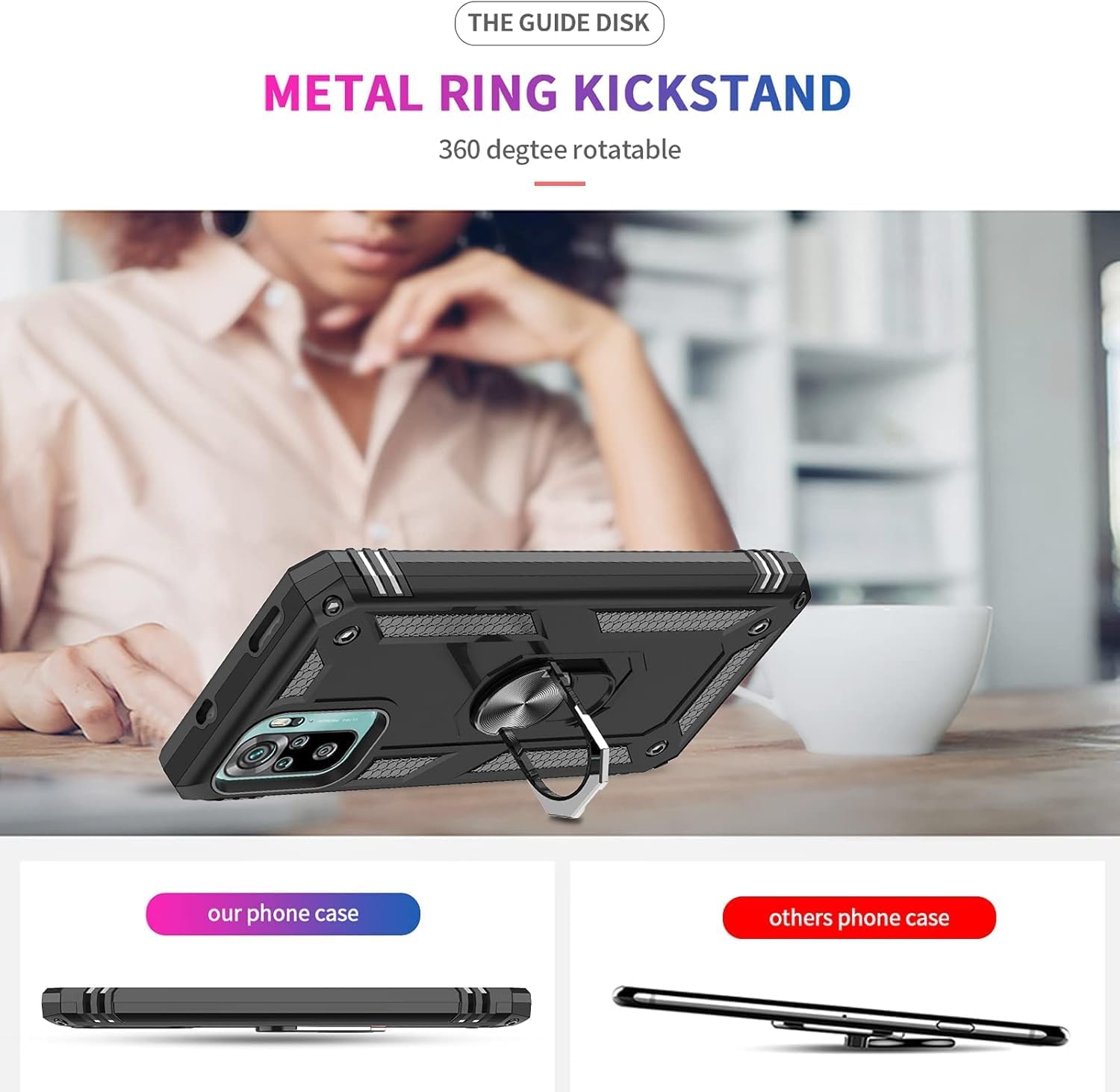
Image: The LeYi case with its metal ring kickstand extended, supporting the phone in a horizontal viewing position on a surface.
5.2. Magnetic Car Mount Compatibility
The case features a built-in metal patch that allows it to be securely attached to a magnetic car mount. This provides convenient navigation and hands-free operation while driving.
Note: A magnetic car mount is not included with this product and must be purchased separately.

Image: The LeYi case with its integrated metal patch being attached to a magnetic car mount, demonstrating its compatibility.
6. Maintenance
To ensure the longevity and effectiveness of your LeYi protective kit:
- Cleaning the Case: Wipe the case regularly with a soft, damp cloth to remove dust and smudges. For tougher stains, a mild soap solution can be used, followed by thorough drying.
- Cleaning Screen/Camera Protectors: Use a microfiber cloth to gently wipe the screen and camera protectors. Avoid abrasive materials or harsh chemicals that could damage the oleophobic coating.
- Avoid Extreme Conditions: Do not expose the case or protectors to extreme temperatures or direct sunlight for prolonged periods, as this may affect material integrity.
7. Troubleshooting
7.1. Screen Protector Bubbles
If bubbles appear after installation:
- Small Bubbles: Gently push them towards the nearest edge using a microfiber cloth or a credit card wrapped in cloth.
- Large Bubbles/Dust: If a bubble persists due to a dust particle, carefully lift the nearest corner of the screen protector with a piece of tape, use another piece of tape to remove the dust, and then reapply.
7.2. Wireless Charging Interference
If you experience issues with wireless charging, please remove the case before placing your phone on the wireless charger. The integrated metal patch may interfere with some wireless charging pads.
8. Specifications
| Brand | LeYi |
| Model Number | KWSS2200 |
| Compatible Phone Models | Xiaomi Redmi Note 10 4G, Xiaomi Redmi Note 10S |
| Material | Flexible TPU (Thermoplastic Polyurethane), Hard PC (Polycarbonate), Metal |
| Features | 360° Rotating Ring Stand, Magnetic Car Mount Compatible (built-in metal patch), Military-Grade Drop Protection, Raised Bezels for Screen and Camera, Anti-fingerprint, Anti-scratch |
| Dimensions (L x W x H) | 17 x 10 x 1.5 cm |
| Item Weight | 30 Grams |
| Water Resistance Level | Not Waterproof |
9. Warranty and Support
LeYi is committed to providing high-quality products and excellent customer service. Your purchase includes:
- 180 Days Worry-free Return: For any product issues within 180 days of purchase.
- 24-hour Lightning Response: Dedicated customer service team available to assist you promptly.
- Lifetime Technical Help: Ongoing support for any technical queries or assistance you may need.
If you encounter any problems with your product, please contact LeYi customer support via email for assistance. We are dedicated to ensuring your satisfaction.