
1. Introduction
Thank you for choosing the Gateman GRAB100-FH Digital Door Lock. This manual provides essential information for the proper installation, operation, and maintenance of your new digital door lock. The GRAB100-FH features advanced fingerprint recognition, IPX4 class waterproofing, and fire-resistant properties, ensuring both convenience and enhanced security for your home or office.
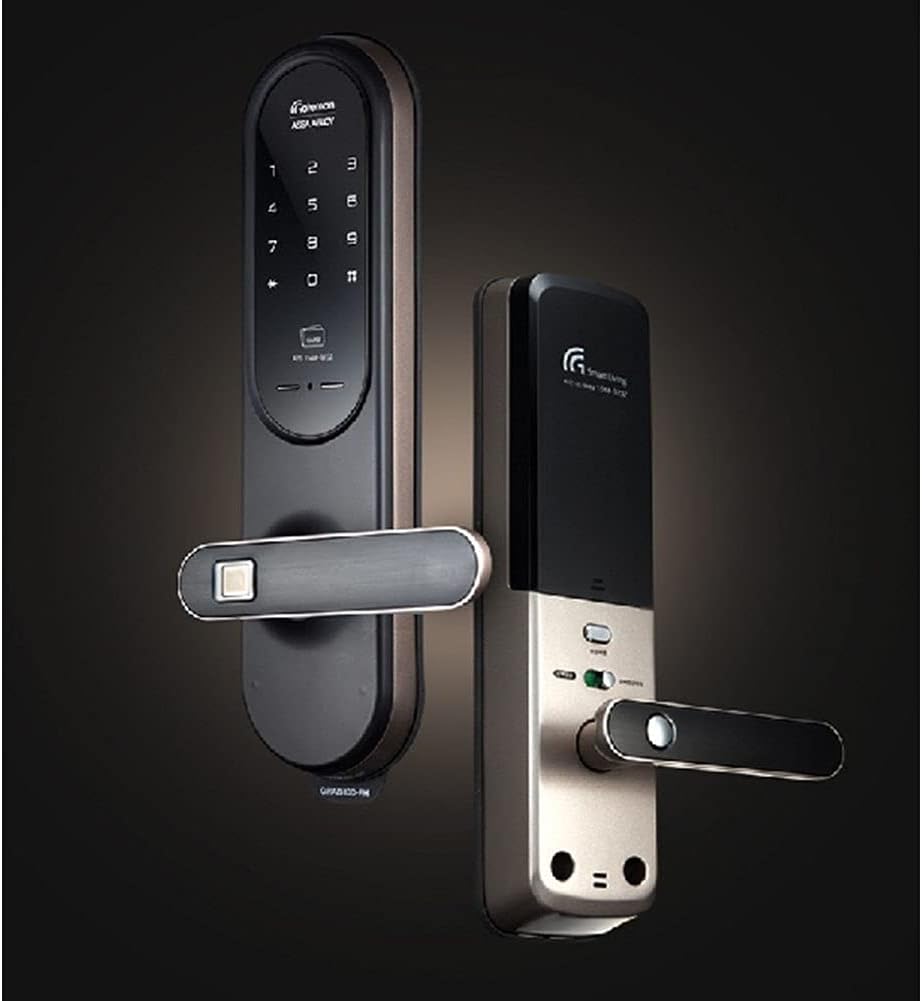
Image 1.1: The Gateman GRAB100-FH Digital Door Lock installed on a door, showcasing its sleek design.
2. Setup and Installation
Proper installation is crucial for the optimal performance and security of your Gateman GRAB100-FH Digital Door Lock. It is highly recommended to have the lock installed by a qualified professional. This section provides general guidelines.
2.1 Package Contents
Before installation, verify that all components are present in the package. Refer to the product packaging for a detailed list of included items.
2.2 Battery Installation
- The lock requires four (4) 1.5V AA alkaline batteries.
- Locate the battery compartment on the interior unit of the door lock.
- Open the battery cover and insert the batteries, ensuring correct polarity (+/-).
- Close the battery cover securely.

Image 2.1: The interior and exterior units of the Gateman GRAB100-FH Digital Door Lock, showing the components.
3. Operating Instructions
The Gateman GRAB100-FH offers multiple convenient and secure ways to operate your door lock.
3.1 QuickPass Fingerprint Recognition
This feature allows for rapid and natural door unlocking. Simply place your registered finger on the fingerprint sensor, and the lock will authenticate and open the door.

Image 3.1: Close-up view of the QuickPass fingerprint recognition sensor, designed for quick access.
3.2 Smart Etiquette Function
Activate the Smart Etiquette Function for silent operation of the door lock. This is useful in situations where minimizing sound is desired, such as late at night or early morning.
3.3 External Forced Lock Function
When activated from the outside, this function enhances security by triggering an intrusion alarm if the door is opened from the inside. This provides an additional layer of protection when you are away.
3.4 Internal Forced Lock Function
When set from the inside, this function disables all external authentication methods, including passwords, card keys, and fingerprints. This ensures privacy and prevents unauthorized entry from the outside.

Image 3.2: Detailed view of the digital keypad and fingerprint sensor on the Gateman GRAB100-FH.
4. Maintenance
Regular maintenance ensures the longevity and reliable operation of your digital door lock.
4.1 Cleaning
- Wipe the lock's surface with a soft, dry cloth.
- Avoid using abrasive cleaners, solvents, or harsh chemicals, as these can damage the finish and internal components.
- Keep the fingerprint sensor clean and free of dirt or moisture for optimal recognition.
4.2 Battery Replacement
- Replace all four (4) AA alkaline batteries when the low battery indicator appears or when the lock's response becomes slow.
- Always replace all batteries at once with new ones of the same type. Do not mix old and new batteries.
5. Troubleshooting
If you encounter issues with your Gateman GRAB100-FH, refer to the following common problems and solutions.
5.1 Lock Not Responding
- Check Batteries: Ensure batteries are correctly installed and have sufficient charge. Replace if necessary.
- Power Cycle: Remove batteries, wait 30 seconds, then reinsert them.
5.2 Fingerprint Not Recognized
- Clean Sensor: Ensure the fingerprint sensor is clean and dry.
- Proper Placement: Ensure your finger covers the entire sensor surface.
- Re-register Fingerprint: If issues persist, try deleting and re-registering your fingerprint.
5.3 Alarm Sounds Unexpectedly
- Check Forced Lock Function: Verify if the External Forced Lock Function is active.
- Door Alignment: Ensure the door is properly closed and aligned, as misalignment can sometimes trigger alarms.
6. Specifications
Detailed technical specifications for the Gateman GRAB100-FH Digital Door Lock.
| Model Number | GRAB100-FH |
| Rated Voltage | DC 6V |
| Operating Temperature | -15°C to 55°C |
| Sensor Operating Temperature | 55°C |
| Exterior Unit Dimensions (L x W x H) | 76 x 31 x 312 mm (2.99 x 1.22 x 12.28 inches) |
| Interior Unit Dimensions (L x W x H) | 76 x 36 x 312 mm |
| Batteries | 4 x 1.5V AA Alkaline Batteries |
| Lock Type | Electronic |
| Special Features | Fingerprint Recognition, Fire Resistant, IPX4 Waterproofing |
| Control Method | Touch |
| UPC | 191997047007 |

Image 6.1: Visual representation of the fire-resistant properties of the Gateman GRAB100-FH, designed to withstand high temperatures.
7. Warranty and Support
For warranty information and customer support, please refer to the documentation provided at the time of purchase or contact your retailer. Gateman is committed to providing reliable products and assistance.
- Warranty: Specific warranty terms and conditions may vary by region and retailer. Please retain your proof of purchase.
- Technical Support: For technical assistance, troubleshooting beyond this manual, or service inquiries, please contact the authorized Gateman service center or your product supplier.


