
1. Product Overview
The NPET Automatic Pet Feeder (Model DU3L-KY) is designed to provide scheduled meals for your cats and dogs. It features a 4-liter capacity food tank, programmable meal times and portion sizes, a voice recording function, and a clog-free design. The feeder is constructed with BPA-free materials for your pet's safety.

Image 1.1: The NPET Automatic Pet Feeder, showing the food reservoir, control panel, and feeding bowl filled with kibble.
Package Contents:
- NPET Automatic Pet Feeder Main Unit
- Food Bowl
- Power Adapter (5V DC)
- Instruction Manual
2. Setup
2.1 Assembly
- Place the main feeder unit on a flat, stable surface.
- Attach the food bowl to the base of the feeder. Ensure it clicks securely into place.
- Remove the lid from the food reservoir.
- Fill the food reservoir with dry pet food. The feeder has a 4-liter capacity.
- Securely replace the lid, ensuring the sliding lock is engaged to keep food fresh and prevent pets from accessing it.
2.2 Power Supply
The feeder can be powered by the included 5V DC power adapter or by 3 D-size batteries (not included) for backup power.
- Primary Power: Connect the power adapter to the feeder's power port and plug it into a wall outlet.
- Backup Power: For uninterrupted operation during power outages, install 3 D-size batteries into the battery compartment located at the bottom of the feeder.

Image 2.1: Illustration of the dual power supply options for the feeder, showing the power adapter and the battery compartment for 3 D-size batteries.
The feeder has a memory function that retains your settings in case of power loss, provided batteries are installed.
3. Operating Instructions
3.1 Control Panel Overview
The control panel features a display screen and several buttons for programming. The display shows current time, battery level, meal number, portion size, and lock status.

Image 3.1: Detailed view of the feeder's display screen, indicating battery level, time (24H format), meal number (1-4), portion size (1-9), and lock status. Also shows the anti-clog dispensing mechanism.
3.2 Setting the Clock
- Press and hold the "SET" button until the hour digit flashes.
- Use the "UP" and "DOWN" buttons to adjust the hour.
- Press "SET" again to move to the minute digit, then adjust with "UP" and "DOWN".
- Press "SET" to confirm the time.
3.3 Programming Meal Times and Portions
The feeder allows for 1 to 4 meals per day, with 1 to 9 portions per meal (approximately 7g ± 2g per portion).
- Press the "SET" button repeatedly to cycle through Meal 1, Meal 2, Meal 3, and Meal 4 settings.
- When a meal number flashes, press "SET" to enter its time setting.
- Adjust the hour and minute for the meal using the "UP" and "DOWN" buttons, confirming each with "SET".
- After setting the time, the portion size will flash. Use "UP" and "DOWN" to select the desired number of portions (1-9).
- Press "SET" to confirm the portion size for that meal.
- Repeat for any additional meals you wish to program. To disable a meal, set its portion size to 0.

Image 3.2: A cat consuming food from the feeder, illustrating the concept of a scientific healthy diet with programmable meal times and portion sizes.
3.4 Voice Recording
You can record a 10-second voice message that will play during each scheduled feeding.
- Press and hold the "REC" button. The microphone icon will appear on the display.
- Speak your message clearly into the microphone for up to 10 seconds.
- Release the "REC" button to save the recording.
- To test the recording, briefly press the "REC" button.

Image 3.3: A cat observing the feeder, highlighting the 10-second voice recording feature that calls pets to their meals.
3.5 Manual Feeding
To dispense a single portion manually, briefly press the "FEED" button. This will dispense one portion immediately without affecting the programmed schedule.
4. Maintenance
4.1 Cleaning the Feeder
Regular cleaning ensures hygiene and proper operation of your feeder.
- Unplug the feeder from the power outlet and remove any backup batteries.
- Remove the food bowl and the food reservoir.
- Wash the food bowl and food reservoir with mild soap and water. Rinse thoroughly and dry completely before reassembly.
- Wipe the main unit with a damp cloth. Do not submerge the main unit in water.
- Ensure all parts are completely dry before refilling with food and reassembling.
The food bowl is BPA-free and designed for easy cleaning.
4.2 Food Storage
The secure sliding lock lid helps keep dry food fresh and prevents pets from accessing the reservoir. Ensure the lid is always properly closed.
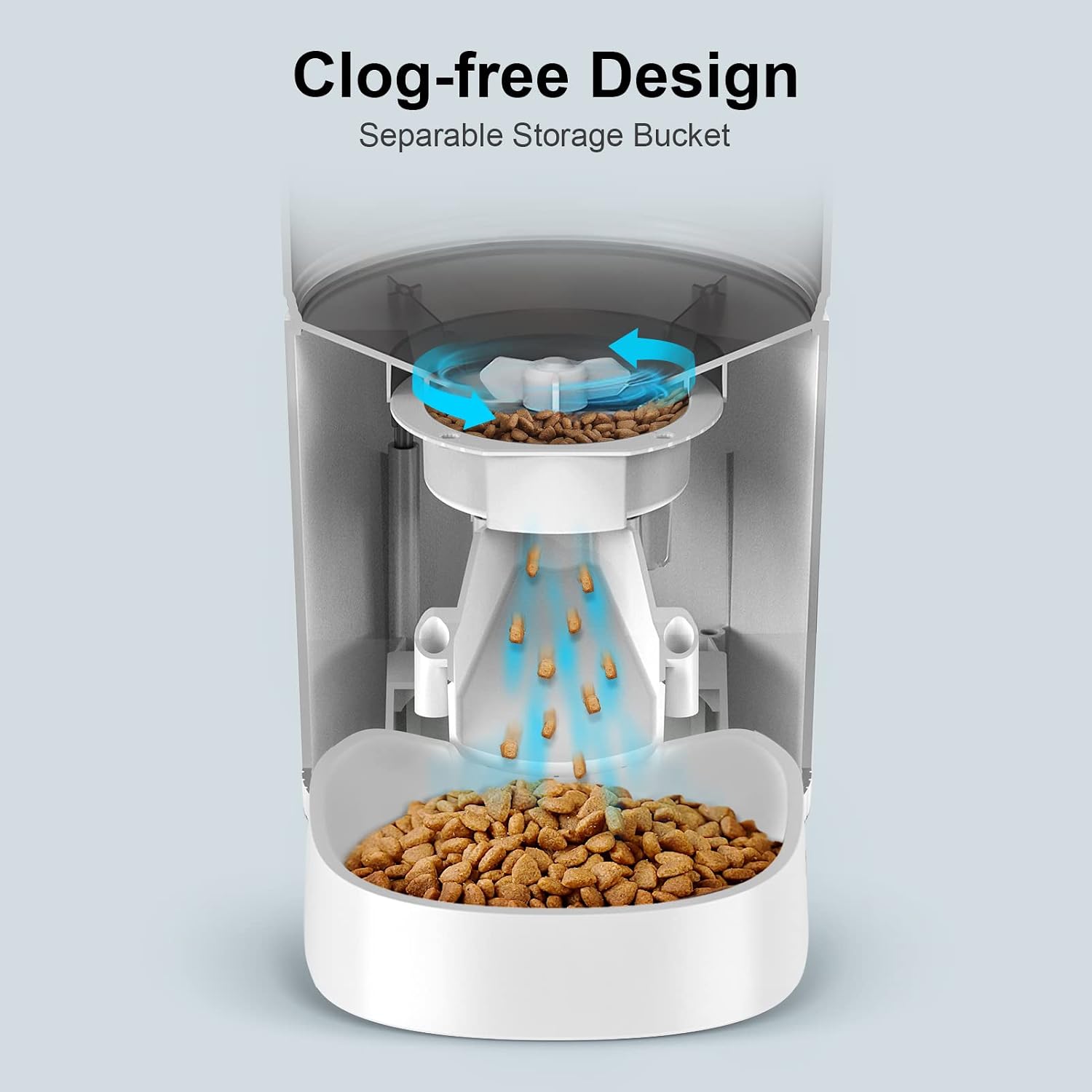
Image 4.1: An internal diagram of the feeder's clog-free design, illustrating how food is dispensed smoothly from the separable storage bucket.
5. Troubleshooting
| Problem | Possible Cause | Solution |
|---|---|---|
| Feeder not dispensing food. |
|
|
| Display screen is blank or not working. |
|
|
| Voice recording not playing. |
|
|
| Feeder settings reset unexpectedly. |
|
|
6. Specifications
| Brand | NPET |
| Model Name | DU3L-KY |
| Capacity | 4 Liters (135 oz / 16.9 cups) |
| Material | BPA-Free Plastic |
| Power Supply | 5V DC Adapter (included), 3 x D-size Batteries (not included) |
| Meals Per Day | 1-4 meals |
| Portions Per Meal | 1-9 portions (approx. 7g ± 2g per portion) |
| Voice Recording | Up to 10 seconds |
| Target Species | Cats, Dogs |
| Item Weight | 3.14 pounds |
| Dimensions (L x W x H) | 12.87 x 7.95 x 7.83 inches (Package Dimensions) |
7. Warranty and Support
7.1 Warranty Information
Please refer to the product packaging or the official NPET website for the most current warranty information. Typically, NPET products come with a limited manufacturer's warranty covering defects in materials and workmanship.
7.2 Customer Support
For technical assistance, troubleshooting, or warranty claims, please contact NPET customer support through their official website or the contact information provided on the product packaging.
NPET Official Website: Visit the NPET Store on Amazon
