
1. Safety Information
Please read all instructions carefully before using this appliance and retain for future reference. Failure to follow these instructions may result in electric shock, fire, or serious injury.
- Always unplug the fan from the power outlet before cleaning, servicing, or moving it.
- Do not operate the fan with a damaged cord or plug. If the cord or plug is damaged, contact customer service for repair or replacement.
- This fan is intended for indoor use only. Do not use outdoors or in wet locations.
- Keep the fan away from water and other liquids. Do not immerse the fan in water.
- Ensure the fan is placed on a stable, flat surface to prevent it from tipping over.
- Keep children and pets away from the fan during operation.
- Do not insert fingers or any objects into the grille when the fan is operating.
- Do not block air openings or operate near curtains, drapes, or other objects that could block airflow.
- Do not use the fan in areas where flammable liquids or gases are stored.
2. Product Overview
The Amazon Basics 40" 70-Degree Oscillating Digital Tower Fan is designed to provide efficient and customizable cooling for various indoor spaces. It features a sleek, compact design and user-friendly controls.
Components
- Tower Fan Unit
- Base (requires assembly)
- Remote Control
Key Features
- Efficient Cooling: Delivers powerful airflow for effective cooling in enclosed spaces.
- Customizable Speeds: Four intuitive speed settings to adjust airflow.
- Multiple Modes: Includes Standard, Breeze, and Nature modes for varied airflow patterns.
- Oscillation: 70-degree oscillation for wide-range air flow coverage.
- Timer Function: Programmable timer up to 15 hours for energy saving and convenience.
- Remote Control: Convenient remote for adjusting settings from a distance.
- Digital Controls: Easy-to-use digital control panel located on the top of the fan.
- Compact Design: Slim tower design (11.4"D x 11.4"W x 39.3"H) fits easily into any room.

Figure 2.1: The Amazon Basics 40-inch Digital Tower Fan shown with its remote control. The fan is black with a sleek, tall design, and the remote is compact with clearly labeled buttons for power, speed, mode, oscillation, and timer.

Figure 2.2: A diagram illustrating the key features of the tower fan, including its 40-inch height, 4 customizable airflow speed settings, timer with auto shutoff (1h, 2h, 4h, 8h options), and convenient remote control for adjusting speed, oscillation, and timer. The diagram highlights the digital display and control panel on top of the fan.
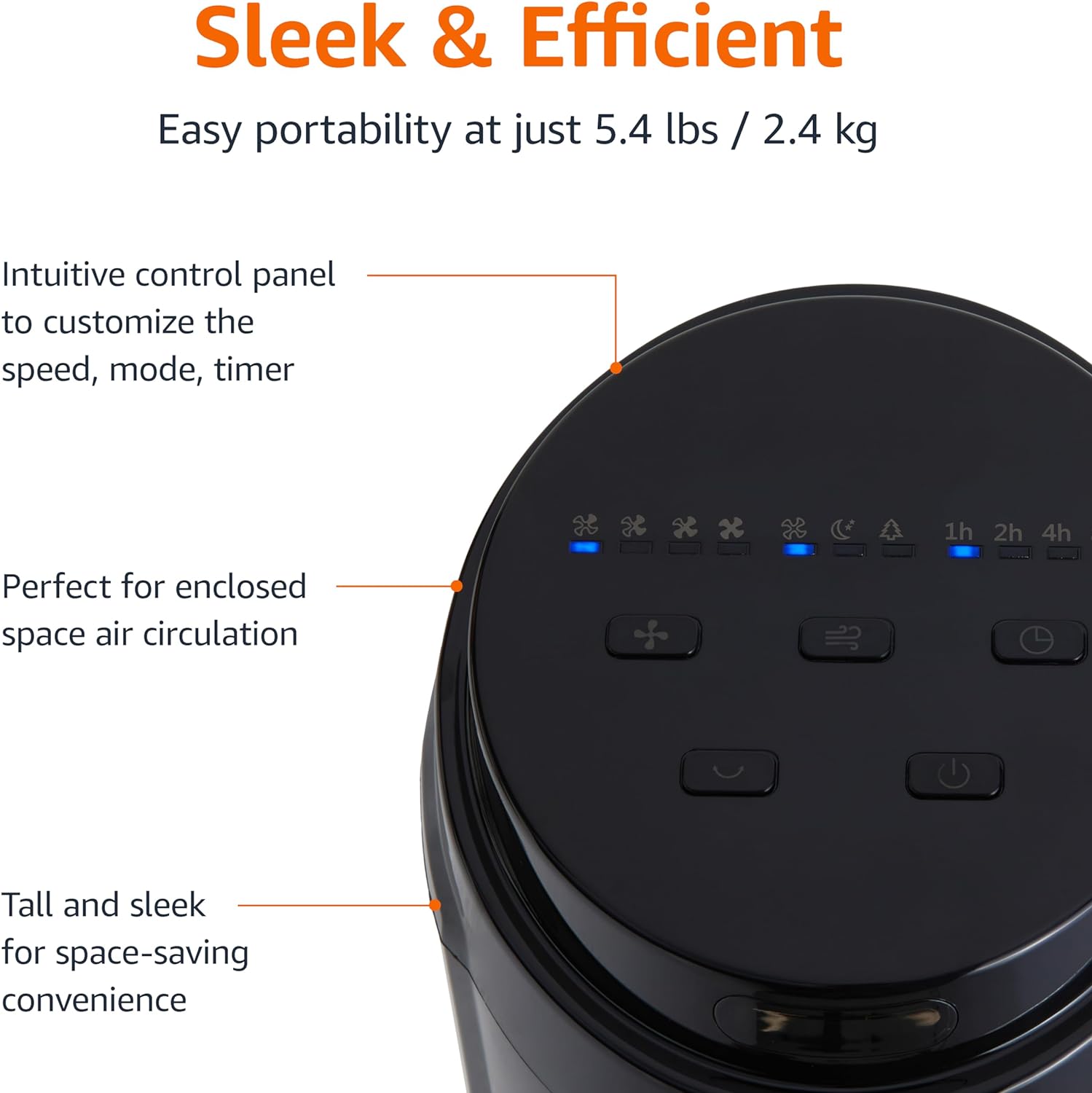
Figure 2.3: A close-up view of the intuitive control panel located on the top of the Amazon Basics Tower Fan. The panel features buttons for speed, mode, power, oscillation, and timer, along with LED indicators for selected settings. This design allows for easy customization of fan operation.
3. Setup
3.1 Assembly
- Carefully remove all components from the packaging.
- Attach the fan base to the main tower unit. Align the slots on the base with the corresponding tabs on the bottom of the fan.
- Secure the base using the provided screws, if any, ensuring it is firmly attached.
3.2 Placement
- Place the fan on a firm, level surface.
- Ensure there is adequate space around the fan for proper air circulation, especially for the oscillation feature.
- Keep the fan at least 1 foot (30 cm) away from walls, furniture, and other objects.
- Plug the power cord into a standard NEMA 5-15 (US Standard Wall Outlet) electrical outlet.
4. Operating Instructions
The fan can be operated using either the control panel on top of the unit or the included remote control.
4.1 Control Panel & Remote Control Functions
| Button/Function | Description |
|---|---|
| Power (On/Off) | Turns the fan on or off. |
| Speed | Cycles through 4 fan speed settings (Low, Medium, High, Max). |
| Mode | Selects between 3 operating modes:
|
| Oscillation | Activates or deactivates the 70-degree oscillation feature, allowing the fan to sweep air across a wider area. |
| Timer | Sets the fan to automatically turn off after a specified period (up to 15 hours in 1-hour increments). |
4.2 Remote Control Usage
The remote control allows for convenient operation of all fan functions from a distance. Ensure the remote is pointed towards the fan's control panel for optimal response.
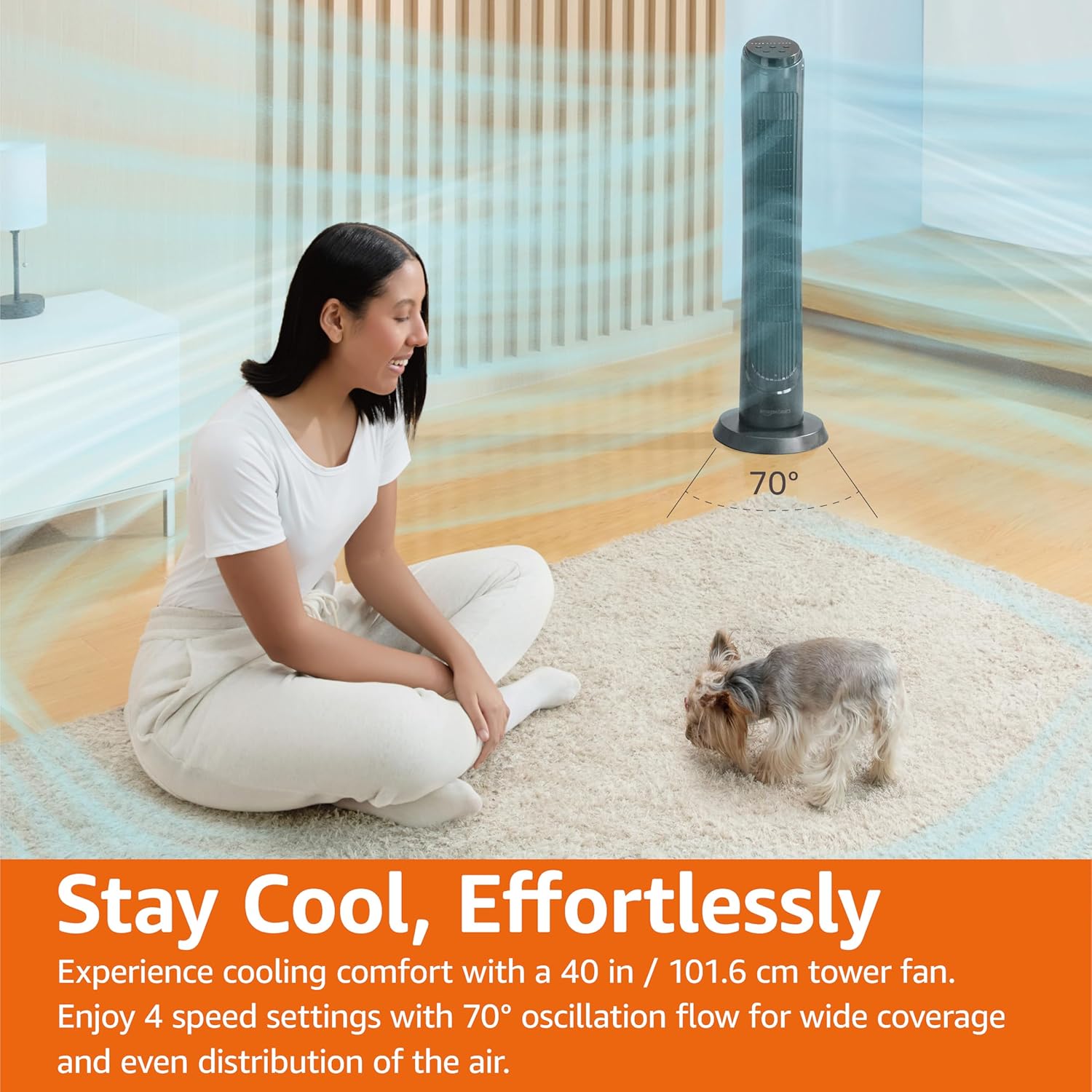
Figure 4.1: The Amazon Basics Tower Fan oscillating 70 degrees, providing wide coverage and even air distribution in a room. A person and a small dog are comfortably seated on a rug, benefiting from the airflow.

Figure 4.2: The Amazon Basics Tower Fan positioned in a modern living space, demonstrating its effective airflow. The image visually represents the air movement from the fan, highlighting its ability to circulate air throughout the room.
5. Maintenance
5.1 Cleaning
- Always unplug the fan before cleaning.
- Use a soft, damp cloth to wipe the exterior surfaces of the fan.
- Do not use abrasive cleaners or harsh chemicals, as these may damage the fan's finish.
- For dust accumulation on the air intake or output grilles, use a vacuum cleaner with a brush attachment to gently remove dust.
- Ensure the fan is completely dry before plugging it back in.
5.2 Storage
- If storing the fan for an extended period, clean it thoroughly as described above.
- Store the fan in its original packaging or a suitable box to protect it from dust and damage.
- Store in a cool, dry place.
6. Troubleshooting
If you experience issues with your fan, please refer to the following common problems and solutions:
| Problem | Possible Cause | Solution |
|---|---|---|
| Fan does not turn on. | No power supply; Power button not pressed. | Ensure the power cord is securely plugged into a working outlet. Press the Power button on the control panel or remote. |
| Weak or no airflow. | Air intake/output blocked; Fan speed too low. | Check for any obstructions around the fan grilles. Increase the fan speed setting. |
| Oscillation not working. | Oscillation feature not activated. | Press the Oscillation button on the control panel or remote. Ensure the fan is on a flat surface. |
| Remote control not working. | Batteries are dead; Remote not pointed correctly. | Replace the remote control batteries. Ensure the remote is pointed directly at the fan's control panel. |
| Unusual noise. | Fan not on a level surface; Internal obstruction. | Place the fan on a stable, level surface. Unplug the fan and check for any foreign objects inside the grilles (do not attempt to disassemble). |
If the problem persists after trying these solutions, please contact customer support.
7. Specifications
| Attribute | Detail |
|---|---|
| Brand | Amazon Basics |
| Model Name | DC2021 |
| Color | Black |
| Electric Fan Design | Floor Fan |
| Power Source | AC Power |
| Style | 40" - Digital |
| Product Dimensions | 11.4"D x 11.4"W x 39.3"H |
| Room Type | Bedroom, Living Room, Office |
| Special Feature | Oscillating, 4 Speeds, 3 Modes, Timer, Remote Control |
| Recommended Uses | Cooling and Air Circulation for Indoor Spaces |
| Noise Level | 60 dB |
| Wattage | 50 watts |
| Item Weight | 7.5 Pounds (approx. 3.4 kg) |
| Included Components | Remote |
| Indoor/Outdoor Usage | Indoor |
| Control Method | Remote |
| Blade Material | Plastic |
| Number of Power Levels | 4 |
| Main Power Connector Type | NEMA 5-15 (US Standard Wall Outlet) |
| Manufacturer | Amazon |
| UPC | 840095880428 |
| Country of Origin | China |
8. Warranty and Support
For detailed warranty information, please refer to the official Warranty PDF document provided by Amazon Basics. This document outlines the terms and conditions of your product's warranty.
For further assistance, troubleshooting not covered in this manual, or to inquire about replacement parts, please contact Amazon Basics customer support.
- Official User Manual (PDF): Download PDF
- Official Warranty (PDF): Download PDF
- Amazon Basics Store: Visit Store

