
Introduction
The INNOTALK W780 is a wireless headset system designed for desk phones, offering enhanced mobility and clear communication in office environments. Utilizing DECT 6.0 technology, it provides an extended wireless range and features a noise-canceling microphone for superior audio quality. This manual provides detailed instructions for setting up, operating, and maintaining your INNOTALK W780 headset system.
Package Contents
Please verify that all items are present in your package:
- Wireless Headset
- Charging Base
- Telephone Cord
- Headband
- Earhook
- Power Adapter
- Quick Setup Guide
- Manual (this document)
- Black and Wine color Headset Cover

Image: The INNOTALK W780 wireless headset resting on its charging base, showcasing the complete system.
Product Features
The INNOTALK W780 headset system is equipped with features designed for professional communication:
- Extended Wireless Range: DECT 6.0 technology provides up to 300 feet of roaming freedom from your desk phone.
- Crystal-Clear Audio: Features a digital noise-canceling microphone and Digital Signal Processing (DSP) for superior sound clarity, filtering out ambient noise.
- Long Talk Time: Enjoy up to 12 hours of talk time on a single charge.
- Comfortable Design: Ultra-lightweight headband, 180° rotatable speaker, and soft memory foam ear cushions ensure comfort during extended use.
- Customizable Style: Includes changeable headset covers in black and wine colors.
- Intuitive Controls: One-touch call controls, volume adjustment, and mute function on the headset.
- Magnetic Charging Dock: Secure and convenient charging with glass window illumination for incoming calls.
- Desk Phone Compatibility: Connects to most desk phones via the wired handset or RJ9 headset port.

Image: An illustration highlighting key features such as DECT 6.0 technology, digital voice processing, noise-canceling microphone, and 12-hour talk time.

Image: A diagram detailing the ergonomic design, including the ultra-lightweight headband, 180° rotatable speaker, 2.4-inch soft memory foam ear cushion, and DSP noise-canceling microphone.
Setup Instructions
Follow these steps to set up your INNOTALK W780 wireless headset system:
- Connect the Power Adapter: Plug the power adapter into the charging base and then into a wall outlet.
- Connect to Desk Phone:
- Option 1 (RJ9 Headset Port): If your desk phone has a dedicated RJ9 headset port, connect one end of the provided telephone cord to the RJ9 port on the charging base and the other end to the RJ9 headset port on your desk phone.
- Option 2 (Corded Handset Port): If your desk phone does not have an RJ9 headset port, disconnect the corded handset from your desk phone. Connect one end of the provided telephone cord to the handset port on the charging base and the other end to the handset port on your desk phone. Then, connect your desk phone's corded handset to the dedicated handset port on the charging base.
- Charge the Headset: Place the wireless headset onto the charging base. Ensure it is seated correctly and the charging indicator light illuminates. Allow the headset to charge fully before first use (approximately 2 hours).
- Initial Pairing: The headset and base are typically pre-paired from the factory. If pairing is required, refer to the quick setup guide for specific instructions.

Image: A visual guide illustrating how to connect the charging base to a desk phone using either the RJ9 modular headset port or by integrating with the corded handset receiver.
Operating Instructions
Learn how to use your INNOTALK W780 wireless headset for daily communication:
Power On/Off
- To power on the headset, press and hold the Multi-function button until the indicator light illuminates.
- To power off, press and hold the Multi-function button until the indicator light turns off.
Making and Answering Calls
- To Make a Call: Lift the headset from the charging base (if applicable), dial the number on your desk phone, and the call will be routed to your headset.
- To Answer a Call: When an incoming call rings, press the Multi-function button on the headset to answer.
- To End a Call: Press the Multi-function button on the headset. Alternatively, place the headset back on the charging base.
Volume Control
- Use the volume up (+) and volume down (-) buttons on the headset to adjust the listening volume.
Mute Function
- Press the Mute button on the headset to mute your microphone during a call. Press it again to unmute.
Charging the Headset
- Place the headset on the charging base when not in use to ensure it is always charged. The charging indicator on the base will show its status.
Maintenance
Proper care ensures the longevity and optimal performance of your headset:
- Cleaning: Use a soft, dry cloth to clean the headset and charging base. Avoid using harsh chemicals or abrasive materials.
- Ear Cushions: The ear cushions are replaceable. If they become worn, they can be changed using the provided spare covers or by purchasing new ones.
- Storage: Store the headset on its charging base or in a cool, dry place away from direct sunlight and extreme temperatures.
- Battery Care: For optimal battery life, avoid fully discharging the headset frequently. Charge it regularly, especially if it will not be used for an extended period.
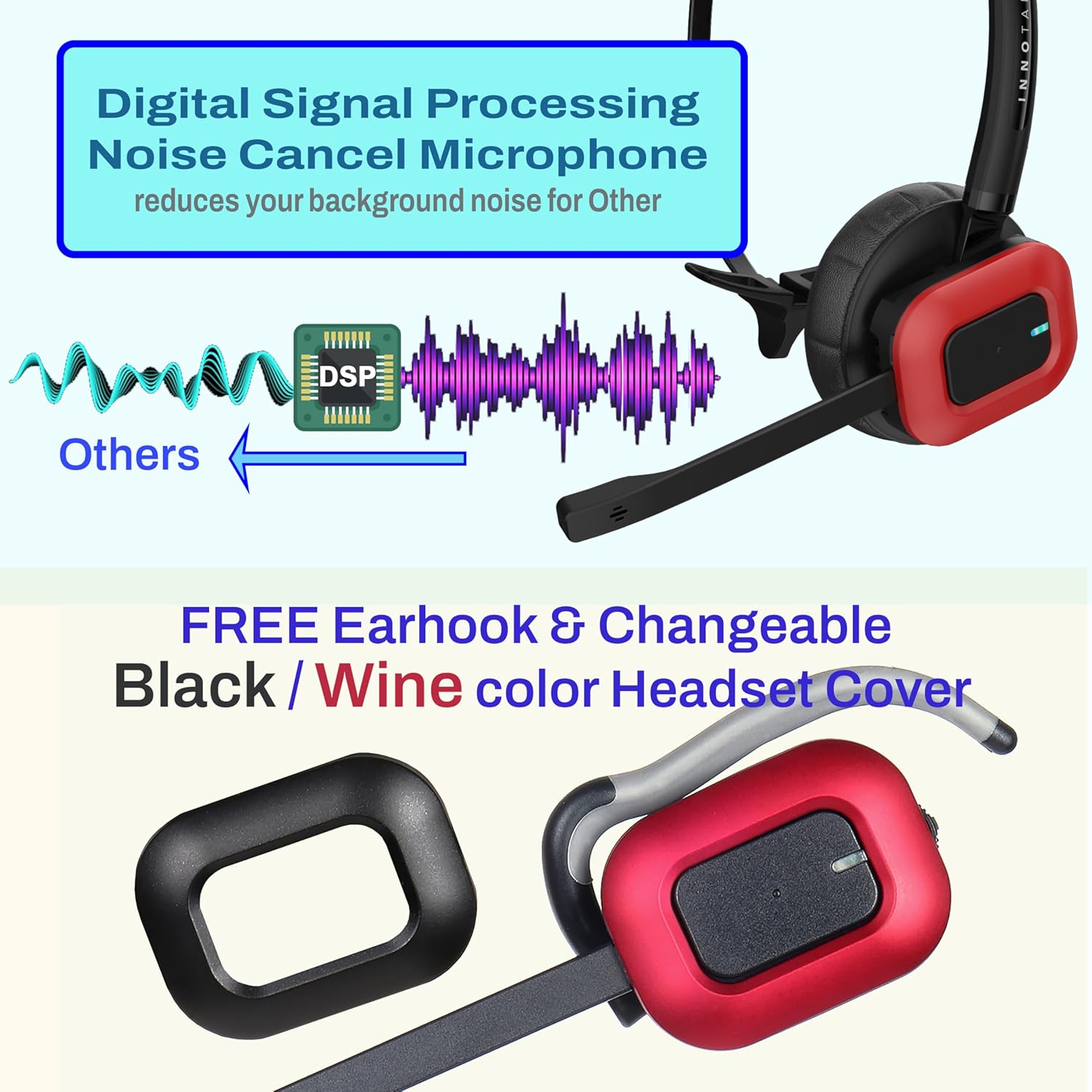
Image: A close-up of the headset highlighting the DSP noise-canceling microphone and the option to change headset covers, demonstrating customization and maintenance aspects.
Troubleshooting
If you encounter issues with your INNOTALK W780 headset, refer to the following common solutions:
| Problem | Possible Cause | Solution |
|---|---|---|
| No dial tone or audio | Incorrect connection to desk phone; headset not powered on or charged. | Verify all cables are securely connected to the desk phone and charging base. Ensure the headset is powered on and fully charged. |
| Cannot be heard by others | Microphone muted; microphone not positioned correctly. | Check if the microphone is muted and press the Mute button to unmute. Adjust the microphone boom closer to your mouth. |
| Poor sound quality or static | Out of range; interference from other devices. | Move closer to the charging base. Ensure the base is not placed too close to other electronic devices that may cause interference. |
| Headset not charging | Headset not properly seated on base; power adapter issue. | Ensure the headset is correctly placed on the charging contacts. Check if the power adapter is securely plugged into the base and wall outlet. |
Specifications
Detailed technical specifications for the INNOTALK W780 Wireless Headset:
| Feature | Detail |
|---|---|
| Model Number | W780 |
| Connectivity Technology | Wireless (DECT 6.0), RJ9 Modular |
| Wireless Range | Up to 300 feet |
| Talk Time | Up to 12 hours |
| Charging Time | Approximately 2 hours |
| Noise Control | Active Noise Cancellation (Microphone) |
| Frequency Response | 1.9 GHz |
| Sensitivity | 100 dB |
| Headphones Jack | RJ9 Modular |
| Included Components | Wireless Headset, Charging Base, Telephone Cord, Headband, Earhook, Power Adapter, Quick Setup Guide, Manual, Black and Wine color Headset Cover |
| Material | Plastic |
| Item Weight | 1.08 pounds (total package) |
| Product Dimensions | 4.25 x 3.25 x 4.3 inches |
| UPC | 734092422456 |
Warranty and Support
The INNOTALK W780 Wireless Headset comes with a Two-Year Warranty from the date of purchase, covering manufacturing defects under normal use. For warranty claims or technical assistance, please contact INNOTALK customer support through their official website or the contact information provided in your product packaging. Please have your product model number (W780) and proof of purchase ready when contacting support.
