
1. Introduction
The ZEAPON PONS PT Motorized Pan Head is a versatile 2-axis gimbal stabilizer designed to enhance your camera movements. It integrates seamlessly with Zeapon camera sliders and offers advanced shooting capabilities, including 360-degree panoramic shots and intelligent waypoint control. This manual provides detailed instructions for setup, operation, and maintenance to ensure optimal performance of your device.
2. What's in the Box
Upon unboxing your ZEAPON PONS PT Motorized Pan Head, you should find the following components:
- PONS Motorized Pan Head
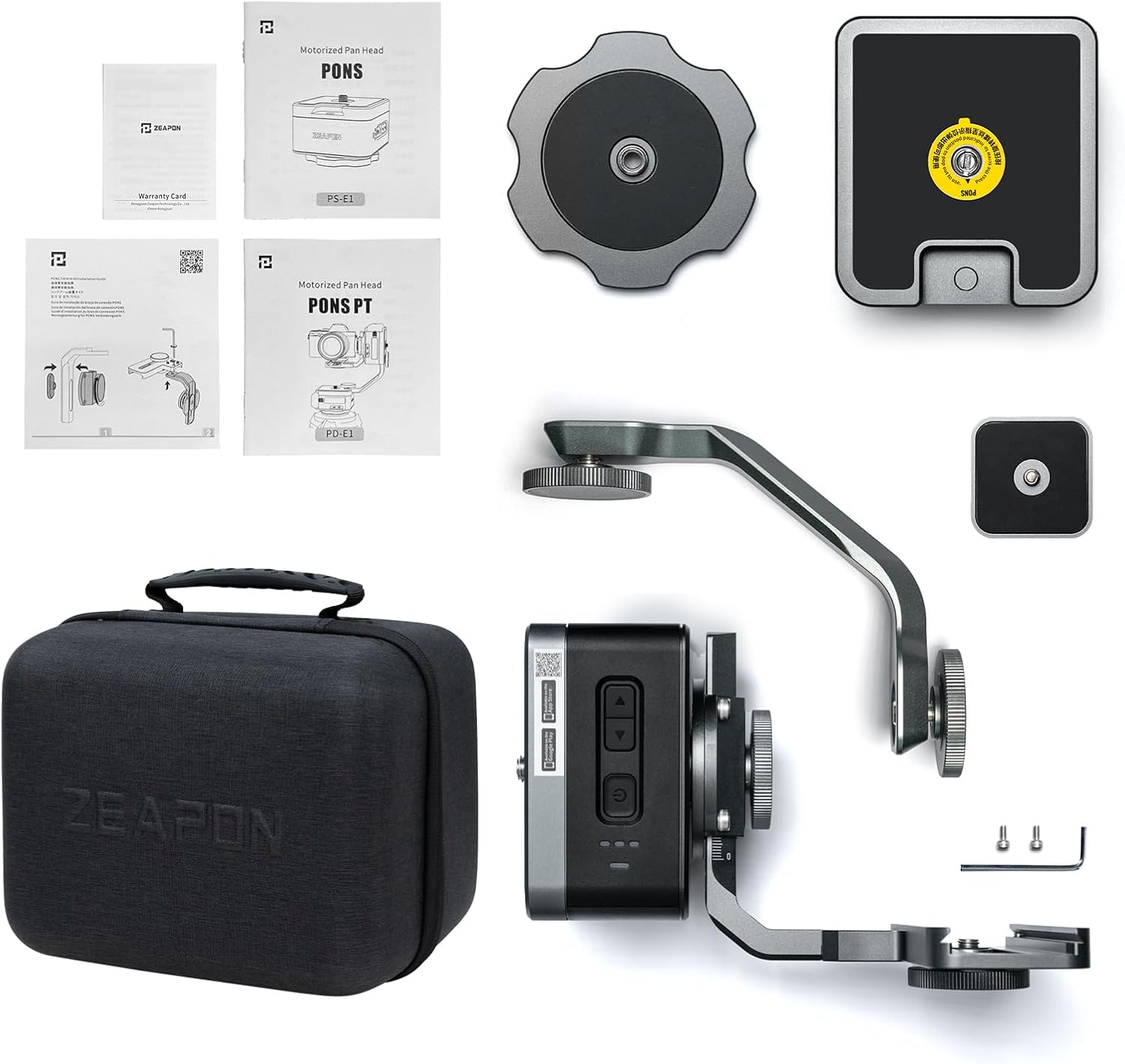
3. Product Features
- Intelligent Orbit & Waypoint Surrounding: For horizontal surrounding or multi-point orbit changing, select orbit points and adjust camera direction in the Zeapon Lab app. The app automatically calculates spatial running posture for complex waypoint shooting.
- High Load Capacity: The high-power silent step motor supports a horizontal load of up to 50 kg (110 lbs) with ultra-quiet operation (39 dB). It operates steadily in both heading and pitching without requiring leveling.
- Automated Shooting: Double-clicking operation buttons on the rail slider and pan head enables automatic shooting, ensuring stable footage without sway.
- 360-Degree Panoramic Shooting: Input camera sensor size and focal length into the Zeapon Lab app. The software calculates the number of shots needed, and the camera automatically captures 360-degree panoramic photos.
- Adjustable Positions & Lens Compatibility: The tilt arm kit features a position adjustment design for quick center of gravity adjustments, compatible with most mainstream cameras. Its heightening structure accommodates large aperture lenses without additional pads.
4. Setup
4.1 PONS Pan Head (Single Axis)
The PONS Pan Head module features a box-shape design with three buttons: one for power on/off and two for direction control. Double-clicking a direction button initiates continuous rotation. A single click on the power button cycles through three different speed settings.

The Pan Head module weighs 850g (1.9 lbs) without the battery. Its robust metal construction ensures durability. It is powered by a Sony NPF type battery (sold separately).
4.2 Mounting the PONS Pan Head
The top screw on the module supports both 1/4-inch and 3/8-inch screws, eliminating the need for adapters due to its spring-loaded design. The screw can be fully hidden by pushing it in and turning it, preventing snags during transport.

4.3 PONS PT Module (Pan & Tilt)
The PONS PT module combines two PONS Pan Heads linked by a metal bracket, allowing for both pan and tilt movements. The arm connecting to the camera is adjustable in two places to fit and balance most cameras, even with larger lenses. Balancing the camera is crucial, similar to using a gimbal. The PONS PT's joints are locked when powered off, ensuring stability. It has a maximum vertical payload of 4 kg (8.8 lbs).

The quick release plate is Arca Swiss compatible and features magnets for secure attachment. This design allows the bottom plate to snap and follow the camera position, making it easy to lock the camera securely.
5. Operating Instructions
5.1 Basic Operation with Slider
Attach the PONS Pan Head to a camera slider. The motor operates quietly, and the movement is smooth. This setup allows for two-axis shots.

The PONS Pan Head can also be used independently by turning it upside down and attaching a provided plate, allowing it to sit nicely on a flat surface for rotating subjects, ideal for product videography.
5.2 Zeapon Lab App Control
The Zeapon Lab app, available for iOS and Android, offers a redesigned user interface for controlling your Zeapon devices. While modules have physical buttons, the app is essential for multi-axis camera movements and advanced features.
Before using the app, ensure all modules are connected and their firmware is updated via the app's settings. The main screen consists of three parts: waypoint management, a speed control slider for playback, and virtual joysticks for pan/tilt and slider movement.
You can program 2 to 6 waypoints. Press the desired waypoint as the starting point, then press play. The system will move to the starting point and play back the programmed waypoints. The playback speed can be adjusted globally for all waypoints.
5.2.1 Intelligent Timelapse Mode
This beginner-friendly mode allows you to input shutter time, interval time, and speed. The app automatically calculates other parameters. This mode is recommended for users new to timelapse videography.
5.2.2 Customized Timelapse Mode
For experienced users, this mode provides full control over all important timelapse parameters. You can precisely set photos, FPS, play time, waiting time, shutter time, noise reduction, and interval time.
5.2.3 Stop-Motion Mode
Similar to timelapse, but you manually trigger the shutter for each photo. This mode includes a re-shoot feature, allowing you to jump to a specific photo in the sequence and re-shoot from that point onwards, which is useful for correcting mistakes.
5.2.4 Panorama Mode
Create 360-degree panoramic shots. Input camera information (focal length, sensor size), and the app calculates rotation and number of shots. You will need to merge the photos using your own photo editing software.

5.2.5 Matrix Mode
Similar to panorama mode, but instead of a 360-degree photo, it creates a large wide-angle photo involving both tilting and panning. The app automatically calculates the number of photos needed.

5.3 Zeapon Timelapse Trigger
The Zeapon Timelapse Trigger is a small device that attaches to your camera's hot shoe. It has a built-in rechargeable battery lasting 14 hours. This trigger helps solve the problem of fixed shutter speeds in timelapse photography, especially during dramatic lighting changes (e.g., day-to-night transitions).
When using the trigger, set your waypoints in the Zeapon Lab app and go to the camera mode. Enter the desired number of photos and frame rate. The app will calculate the video length. Press the start button. On your camera, enable the 'flash rear sync' option. The timelapse trigger detects when the camera takes a photo via the hot shoe connection and then tells the Zeapon Lab app to move the slider to the next position, repeating the process.
A key advantage is that your smart device does not need to be actively running the Zeapon Lab app in the foreground; it can run in the background, allowing you to use other apps. The app will simply wait for the camera to fire and respond, eliminating the need to fix the shutter speed for the entire sequence.
6. Maintenance
To ensure the longevity and optimal performance of your ZEAPON PONS PT Motorized Pan Head, follow these maintenance guidelines:
- Keep the device clean and free from dust and debris. Use a soft, dry cloth for cleaning.
- Avoid exposing the device to extreme temperatures or moisture.
- Store the device in its protective case when not in use.
- Regularly check all screws and connections to ensure they are secure.
- Ensure batteries are charged before use and stored properly when not in use for extended periods.
7. Troubleshooting
If you encounter issues with your ZEAPON PONS PT, consider the following:
- Connection Issues: Ensure Bluetooth is enabled on your smart device and the Zeapon Lab app is updated. Check if the device firmware is up to date via the app.
- Movement Irregularities: Verify that the camera is properly balanced on the PONS PT module. Check for any obstructions preventing smooth movement.
- Timelapse Trigger Disconnection: Ensure your smart device remains within 10-15 meters of the timelapse trigger during operation.
- App Functionality: If the app behaves unexpectedly, try restarting the app or your smart device. Ensure the app has all necessary permissions.
For persistent issues, refer to the official ZEAPON website for detailed troubleshooting guides or contact customer support.
8. Specifications
| Feature | Specification |
|---|---|
| Brand | ZEAPON |
| Model | PONS PT |
| Max Horizontal Load | 50 kg (110 lbs) |
| Max Vertical Load (PONS PT) | 4 kg (8.8 lbs) |
| Item Weight (Pan Head) | 850 g (1.9 lbs) without battery |
| Power Source | Sony NPF type battery (not included) |
| Mounting Screws | Hidden 1/4" & 3/8" |
| App Compatibility | Zeapon Lab (iOS & Android) |
| UPC | 657808924955 |
| Package Dimensions | 9.4 x 8.1 x 6.3 inches |
| Date First Available | September 15, 2021 |
9. Warranty and Support
For warranty information, product registration, and technical support, please visit the official ZEAPON website or contact their customer service directly. Keep your purchase receipt as proof of purchase for warranty claims.
Official ZEAPON Store: https://www.amazon.com/stores/Zeapon/page/95E9969D-1EAD-4DA9-98BF-C55157FEF4D0


