
1. Product Overview
This document provides essential information for the installation and care of the Ygpmoiki LCD Screen Touch Display Digitizer Assembly Replacement Part for the Motorola Moto G Stylus 5G.
This replacement part is designed to restore the display and touch functionality of your device.

Image 1.1: Front and back view of the LCD Screen Touch Display Digitizer Assembly. The front shows the display surface, while the back reveals the flex cables and connectors for integration with the phone's motherboard.
2. Important Compatibility Information
- Compatible Models: Motorola Moto G Stylus 5G (XT2131, XT2131-1, XT2131-2, XT2131-3, XT2131-4, XT2131DL) 6.8 Inches.
- Incompatible Models: This part is NOT compatible with the Moto G Stylus 4G models. Please verify your device model before purchase and installation.
Ensuring model compatibility is crucial for proper function and to prevent damage to your device.
3. Installation Guidelines
- Professional Installation Recommended: This product is not equipped with installation tools and requires specialized knowledge and tools for proper installation. It is strongly recommended that installation and maintenance be performed by qualified professional personnel.
- Pre-Installation Testing: Before fully installing the display assembly, connect the flex cables to the motherboard for a functional test. Power on the device to check for display issues, touch responsiveness, and any abnormalities. Proceed with full installation only if no problems are detected during this test.
- Frame Consideration: The display assembly is supplied without the front frame. The existing frame from your device will need to be used.
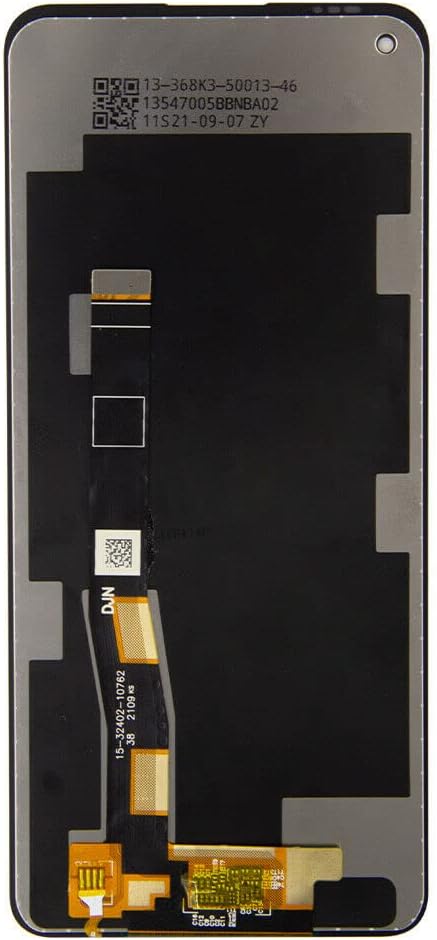
Image 3.1: Rear view of the display assembly, highlighting the delicate flex cables and connectors that interface with the device's motherboard. Handle these components with extreme care during installation.

Image 3.2: Detailed view of the flex cable connections. Proper alignment and secure connection of these cables are critical for the display and touch functions to operate correctly.
4. Operating (Post-Installation)
Once correctly installed, the replacement screen assembly should function identically to the original display. Verify the following:
- Display Functionality: Ensure the screen displays images clearly, without dead pixels, discoloration, or flickering.
- Touch Responsiveness: Test the entire screen for accurate and consistent touch input.
- Brightness and Sensors: Confirm that automatic brightness adjustment and proximity sensor functions (if applicable and integrated with the display) are working correctly.
5. Care and Handling
To ensure the longevity and optimal performance of your new display, observe the following care instructions:
- Avoid Impact: Protect the screen from drops and impacts, which can cause cracks or internal damage.
- Clean Gently: Use a soft, lint-free cloth, slightly dampened with water or a screen cleaner, to clean the display. Avoid harsh chemicals.
- Temperature Extremes: Do not expose the device to extreme temperatures, as this can affect display performance and lifespan.
- Liquid Exposure: Keep the device away from liquids to prevent damage to the display and internal components.
6. Troubleshooting
If you encounter issues after installation, consider the following:
- No Display/Partial Display: Recheck all flex cable connections to ensure they are securely seated. A loose connection is a common cause.
- Unresponsive Touch: Verify the touch digitizer flex cable is properly connected. Ensure there is no debris or damage to the connector.
- Display Anomalies (lines, discoloration): This could indicate a faulty connection or a damaged display. If pre-installation testing was performed, and the issue appeared after full installation, re-evaluate the installation process for any stress points or damage.
- Professional Assistance: Given the complexity of smartphone repairs, if basic troubleshooting does not resolve the issue, it is advisable to seek assistance from a professional repair technician.
7. Product Specifications
| Specification | Detail |
|---|---|
| Compatible Device | Motorola Moto G Stylus 5G |
| Model Numbers | XT2131, XT2131-1, XT2131-2, XT2131-3, XT2131-4, XT2131DL |
| Screen Size | 6.8 Inches |
| Component Type | LCD Screen Touch Display Digitizer Assembly |
| Color | Black |
| Item Weight | 6.2 ounces |
| Package Dimensions | 7.28 x 5.35 x 0.71 inches |
| Manufacturer | Ygpmoiki |
| Date First Available | July 22, 2019 |
8. Support and Warranty Information
For any questions regarding this product, installation, or troubleshooting, please contact the seller or manufacturer directly. Specific warranty terms and conditions are typically provided at the point of purchase or by the manufacturer.
It is recommended to retain your purchase receipt for warranty claims.