
Sundirect MD650-Plus
Sundirect MD650-Plus Infrared Mirror Heater User Manual
Model: MD650-Plus | Brand: Sundirect
1. Introduction
This manual provides essential information for the safe and efficient operation of your Sundirect MD650-Plus Infrared Mirror Heater. Please read these instructions carefully before installation and use, and retain them for future reference.
The Sundirect MD650-Plus is an infrared mirror heater designed for bathrooms and similar spaces, featuring anti-fog properties and integrated WiFi thermostat control.
2. Safety Instructions
Always observe the following safety precautions to prevent injury or damage:
- Ensure the heater is installed by a qualified electrician in accordance with local regulations.
- Do not cover the heater. Covering can lead to overheating and fire risk.
- Keep flammable materials away from the heater.
- Do not operate the heater with a damaged cord or plug.
- Avoid direct contact with the hot surface during operation.
- This appliance is not intended for use by persons (including children) with reduced physical, sensory or mental capabilities, or lack of experience and knowledge, unless they have been given supervision or instruction concerning use of the appliance by a person responsible for their safety.
- Children should be supervised to ensure that they do not play with the appliance.
3. Package Contents
Verify that all components are present before installation:
- Sundirect MD650-Plus Infrared Mirror Heater
- Smart 1.0 Pro WiFi Thermostat (integrated receiver)
- Mounting hardware (Easy-Fit solution)
- User Manual (this document)
4. Specifications
| Feature | Detail |
|---|---|
| Model | MD650-Plus |
| Dimensions | 60 x 120 cm |
| Power Output | 650 W |
| Heated Area | 7 to 13 m² |
| Total Depth | 3.8 cm |
| Material | Glass |
| Weight | 17 kg |
| Thermostat | Smart 1.0 Pro WiFi Thermostat (integrated receiver) |
| Features | Quick heating, Wi-Fi compatible, Adjustable temperature, Electronic thermostat, Anti-fog mirror |
5. Installation and Setup
5.1 Choosing a Location
Select a suitable wall location in your bathroom or desired room. Ensure there is adequate clearance around the heater and that the wall can support its weight (17 kg).

Image: The Sundirect MD650-Plus Infrared Mirror Heater seamlessly integrated into a modern bathroom setting, reflecting a shower area. This illustrates a typical installation environment.
5.2 Mounting the Heater
The MD650-Plus uses an Easy-Fit mounting solution. Follow these general steps:
- Prepare the Wall: Mark the drilling points on the wall according to the mounting template (if provided) or the back of the heater. Ensure the marks are level.
- Drill Holes: Drill holes at the marked points and insert appropriate wall plugs suitable for your wall type.
- Attach Mounting Bracket: Secure the mounting bracket (if separate) or directly mount the heater to the wall using the provided screws.
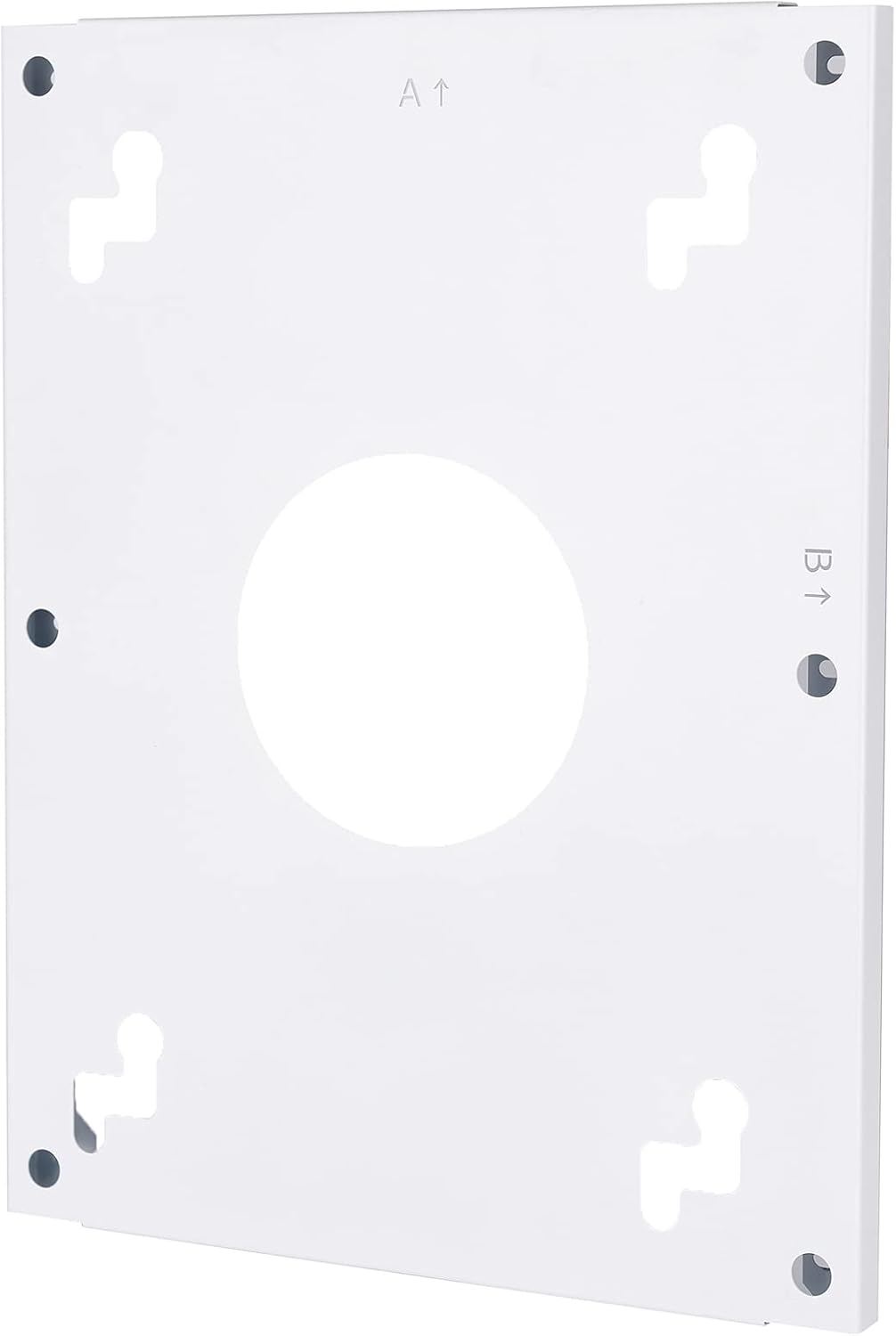
Image: Rear view of the heater's mounting plate, showing the screw holes and keyhole slots for secure wall attachment. Arrows indicate 'A' and 'B' for orientation.
Image: The back of the Sundirect MD650-Plus heater, displaying the power cable and the integrated receiver box with an on/off switch. This shows the electrical connection point.
5.3 Electrical Connection
The heater must be connected to a suitable power supply by a qualified electrician. The integrated receiver and power cable are located on the back of the unit.
- Ensure the power supply matches the heater's requirements (650W).
- The integrated receiver allows for connection to the Smart 1.0 Pro WiFi Thermostat.

Image: A detailed view of the integrated receiver box on the back of the heater, featuring an on/off switch and indicator lights. This highlights the control interface for the heater.
5.4 Smart 1.0 Pro WiFi Thermostat Setup
The MD650-Plus comes with an integrated receiver for the Smart 1.0 Pro WiFi Thermostat. To control your heater via smartphone, you need to pair the thermostat with the Sundirect Smart App.
- Download the App: Scan the QR code or visit the provided links to download the Sundirect Smart App or Tuya Smart App.
- Pairing: Follow the in-app instructions to pair your Smart 1.0 Pro WiFi Thermostat with the app. This typically involves putting the thermostat into pairing mode and connecting it to your home WiFi network.
- Control: Once paired, you can control the heater's temperature, schedule, and other settings directly from your smartphone.

Image: Two QR codes for downloading the control applications. The left QR code links to Tuya Smart App, and the right QR code links to Sundirect Smart App.

Image: A smartphone displaying the Sundirect smart app interface, showing temperature control and a WiFi logo, indicating remote control capabilities.
6. Operating Instructions
6.1 Basic Operation
After successful installation and pairing, you can operate your heater:
- Power On/Off: Use the physical switch on the integrated receiver (if applicable) or the app to turn the heater on or off.
- Temperature Control: Adjust the desired room temperature using the Smart 1.0 Pro WiFi Thermostat or the Sundirect Smart App.
- Anti-Fog Function: The mirror's anti-fog feature activates when the heater is operating, preventing condensation.

Image: The Sundirect MD650-Plus mirror heater shown with an overlay of the Smart 1.0 Pro WiFi Thermostat, illustrating the integrated control system.
6.2 App Control Features
The Sundirect Smart App provides advanced control options:
- Scheduling: Set daily or weekly heating schedules to optimize energy consumption.
- Zone Control: If you have multiple Sundirect heaters, manage them individually or in groups.
- Energy Monitoring: Monitor energy usage (feature availability may vary by app version).
7. Maintenance and Cleaning
Regular maintenance ensures optimal performance and longevity of your heater.
- Cleaning the Mirror Surface: Use a soft, damp cloth and a mild glass cleaner. Do not use abrasive cleaners or harsh chemicals, as these can damage the mirror coating.
- General Cleaning: Wipe the frame and back of the heater with a dry or slightly damp cloth. Ensure the heater is unplugged and cool before cleaning.
- No User-Serviceable Parts: Do not attempt to open or repair the heater yourself. Refer all servicing to qualified personnel.

Image: An icon depicting a crossed-out cleaning brush over a mirror, signifying that abrasive cleaners should not be used on the mirror surface.
8. Troubleshooting
If you encounter issues with your Sundirect MD650-Plus heater, refer to the following common problems and solutions:
| Problem | Possible Cause | Solution |
|---|---|---|
| Heater not turning on | No power supply; Main switch off; Thermostat not calling for heat | Check power connection; Ensure main switch on receiver is ON; Verify thermostat settings and battery (if applicable). |
| Heater not heating sufficiently | Room size too large for heater; Thermostat set too low; Drafts in room | Ensure heater matches room size (7-13 m²); Increase thermostat setting; Seal drafts. |
| WiFi connection issues | Incorrect WiFi password; Router too far; Network interference | Re-enter WiFi password in app; Move router closer or use a repeater; Check for other devices interfering with WiFi signal. |
| Mirror fogging up | Heater not active; Extreme humidity | Ensure heater is on and operating; Allow time for the anti-fog function to work. |
9. Warranty Information
Sundirect products are manufactured to high-quality standards. For specific warranty terms and conditions, please refer to the warranty card included with your product or visit the official Sundirect website. Keep your proof of purchase for warranty claims.
10. Customer Support
For further assistance, technical support, or spare parts inquiries, please contact Sundirect customer service through their official website or the contact information provided with your purchase.
You can also refer to the seller infrarot-fussboden-de on Amazon for purchase-related queries.
Related documentsMD650-Plus


Ask a question about this manual
Ask about setup, troubleshooting, compatibility, parts, safety, or missing instructions. Manuals+ will review the question and use this page’s manual context to help answer it.