
Introduction
The DeLUX Seeker Wireless Ergonomic Vertical Mouse (Model M618XSD) is designed to provide a comfortable and efficient computing experience. Its unique vertical design promotes a natural handshake position, reducing wrist strain during extended use. Featuring an OLED screen for quick parameter checks, multi-device connectivity, and customizable functions, this mouse is engineered for enhanced productivity and user comfort.

Image: The DeLUX Seeker Wireless Ergonomic Vertical Mouse, showcasing its unique vertical design and white finish.
Key Features
- OLED Screen Display: The mouse features an integrated OLED screen that provides real-time information on battery capacity, current DPI level, and active connection mode (USB, 2.4G, BT1, BT2). This allows for quick status checks without needing software.

Image: A close-up view of the mouse's OLED screen, showing battery percentage, DPI setting, and connection mode.
- Ergonomic Vertical Design: Engineered with a snail bionic structure, the mouse promotes a natural handshake position for the hand and wrist, significantly reducing fatigue and discomfort associated with traditional mouse usage. It includes a magnetic wrist rest for additional support.

Image: An illustration comparing the natural handshake grip provided by the vertical mouse to the pronated grip of a traditional mouse, highlighting ergonomic benefits.
- Multi-Device Connectivity: The mouse supports three connection modes: USB-C wired, 2.4G wireless via USB receiver, and Bluetooth 5.0 (BT1 + BT2). This allows seamless connection and switching between up to four different devices, enhancing workflow efficiency.

Image: A visual representation of the mouse's ability to connect to four different devices using wired, 2.4G wireless, and two Bluetooth channels.
- 4-Way Navigation: In addition to the standard vertical scroll wheel, the mouse features a thumb wheel for horizontal scrolling, providing versatile navigation options for various applications and documents.

Image: A detailed view highlighting both the traditional vertical scroll wheel and the innovative ball-shaped thumb wheel for horizontal navigation.
- Programmable Functions: Utilize the dedicated driver software (Windows only) to customize light effects, assign button functions, create macros, adjust DPI settings (up to 7200DPI), and modify polling rate and scroll speed for a personalized user experience.

Image: A screenshot of the DeLUX software interface, demonstrating options for customizing lighting, button assignments, and other mouse settings.
- High Precision Tracking: The optical tracking engine supports up to 7200 DPI, allowing for precise cursor control with minimal hand movement, further contributing to reduced fatigue.

Image: A graphic illustrating the high precision tracking capability and the ease of adjusting DPI settings for optimal cursor control.
- Rechargeable Battery: Equipped with a 1000mAh rechargeable battery, providing long-lasting power for daily use. A 1.6m soft braided Type-C cable is included for charging.

Image: The DeLUX mouse alongside its USB-C charging cable, highlighting its rechargeable battery feature.
- RGB Backlight Sensor: The integrated RGB backlight automatically turns on/off based on your movements, conserving power while providing aesthetic illumination.

Image: A detailed shot of the mouse's side, showcasing the RGB backlight illuminating through its honeycomb pattern.
- Silent Clicks: Designed with silent click buttons to minimize distractions and allow for greater focus during work or leisure.
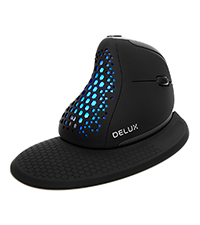
Image: An icon representing the silent click feature of the mouse, with arrows pointing to the main click buttons.
- Exchangeable Back Cover: The mouse features a removable, replaceable, and cleanable back cover for easy maintenance and customization.

Image: A visual demonstrating the removable back cover of the mouse, indicating its ease of exchange and cleaning.
Package Contents
The DeLUX Seeker Wireless Ergonomic Vertical Mouse package includes:
- DeLUX Seeker Wireless Ergonomic Vertical Mouse (M618XSD)
- USB Receiver
- USB-C Charging Cable (1.6m)
- Magnetic Wrist Rest
- User Manual (this document)
Setup
1. Charging the Mouse
Before first use, it is recommended to fully charge the mouse. Connect the provided USB-C charging cable to the mouse's USB-C port and the other end to a USB power source (e.g., computer USB port, wall adapter). The OLED screen will indicate charging status.
2. Connecting the Mouse
The DeLUX Seeker mouse offers three connection methods:
- 2.4G Wireless Connection:
- Locate the USB receiver inside the mouse's battery compartment or packaging.
- Plug the USB receiver into an available USB port on your computer.
- Turn on the mouse using the power switch located on the bottom. The mouse should automatically connect.
- Bluetooth Connection (BT1 / BT2):
- Turn on the mouse.
- Press the mode switch button (usually located near the scroll wheel or on the bottom) to select either BT1 or BT2 mode. The OLED screen will display the selected mode.
- On your device (computer, tablet, smartphone), go to Bluetooth settings and search for new devices.
- Select "DeLUX M618XSD" or a similar name from the list of available devices to pair.
- Repeat for a second Bluetooth device using the other BT mode (BT2).
- USB-C Wired Connection:
- Connect the provided USB-C cable directly from the mouse to a USB port on your computer.
- The mouse will function as a wired mouse and will also charge simultaneously.

Image: The DeLUX mouse connected to a laptop, illustrating its wired usage and charging capability.
Operating Instructions
1. DPI Adjustment
The mouse supports multiple DPI levels for varying cursor sensitivity. Use the dedicated DPI button (often located near the scroll wheel or on top of the mouse) to cycle through available DPI settings. The current DPI will be displayed on the OLED screen.
2. Using the Scroll Wheels
- Normal Scroll Wheel: Located on the top of the mouse, this wheel is used for vertical scrolling in documents and web pages.
- Thumb Wheel: Positioned on the side for easy thumb access, this ball-shaped wheel enables horizontal scrolling, useful for wide spreadsheets or timelines.
3. Programmable Buttons and RGB Lighting
For advanced customization of button functions, macro settings, and RGB lighting effects, download and install the official DeLUX driver software from the manufacturer's website. The software is compatible with Windows operating systems. The RGB backlight features an intelligent sensor that activates/deactivates based on mouse movement to conserve power.
Maintenance
- Cleaning: Use a soft, dry cloth to clean the mouse surface. For stubborn dirt, a slightly damp cloth with mild soap can be used, ensuring no liquid enters the mouse. The exchangeable back cover can be removed for thorough cleaning.
- Battery Care: To prolong battery life, avoid fully discharging the mouse frequently. Charge the mouse when the OLED screen indicates low battery. If storing the mouse for an extended period, charge it to about 50% and store in a cool, dry place.
- Storage: Store the mouse and its accessories in a clean, dry environment away from extreme temperatures and direct sunlight.
Troubleshooting
- Mouse not responding:
- Ensure the mouse is turned on and fully charged.
- For 2.4G connection, verify the USB receiver is securely plugged in and try a different USB port.
- For Bluetooth, ensure Bluetooth is enabled on your device and the mouse is in the correct BT mode (BT1/BT2). Try re-pairing the device.
- If using wired connection, ensure the USB-C cable is properly connected.
- Cursor movement is erratic or slow:
- Check the DPI setting on the OLED screen and adjust it to a higher value if needed.
- Ensure the mouse sensor is clean and free from debris.
- Use the mouse on a clean, non-reflective surface or a mouse pad.
- OLED screen is blank:
- The mouse might be in power-saving mode or the battery is depleted. Charge the mouse.
- Ensure the mouse is turned on.
- Cannot customize settings via software:
- Ensure you have downloaded and installed the correct driver software for your operating system (Windows only).
- Verify the mouse is connected to your computer.
Specifications
| Feature | Detail |
|---|---|
| Model Number | M618XSD |
| Product Dimensions | 6.54 x 3.82 x 3.23 inches |
| Item Weight | 5.8 ounces |
| Connectivity Technology | Wireless (2.4G, Bluetooth 5.0), Wired (USB-C) |
| Movement Detection | Optical |
| DPI Range | Up to 7200 DPI (Adjustable) |
| Battery Type | 1 Lithium Ion battery (included) |
| Special Features | Ergonomic Design, OLED Screen, LED Lights, Rechargeable, Silent Clicks, Programmable Buttons, Thumb Wheel |
Warranty and Support
For detailed warranty information and technical support, please refer to the official DeLUX website or contact their customer service. A digital version of this user manual is available for download at https://manuals.plus/m/05c1fd043a040e0a74ab4a419d27689baac8655505a3d995fa1a123f4627fa65.