
1. Introduction
This manual provides instructions for the safe and effective use of your Fosmon 6 Outlet Wall Mount Surge Protector with 4 USB-A ports. Please read this manual thoroughly before installation and operation, and retain it for future reference.
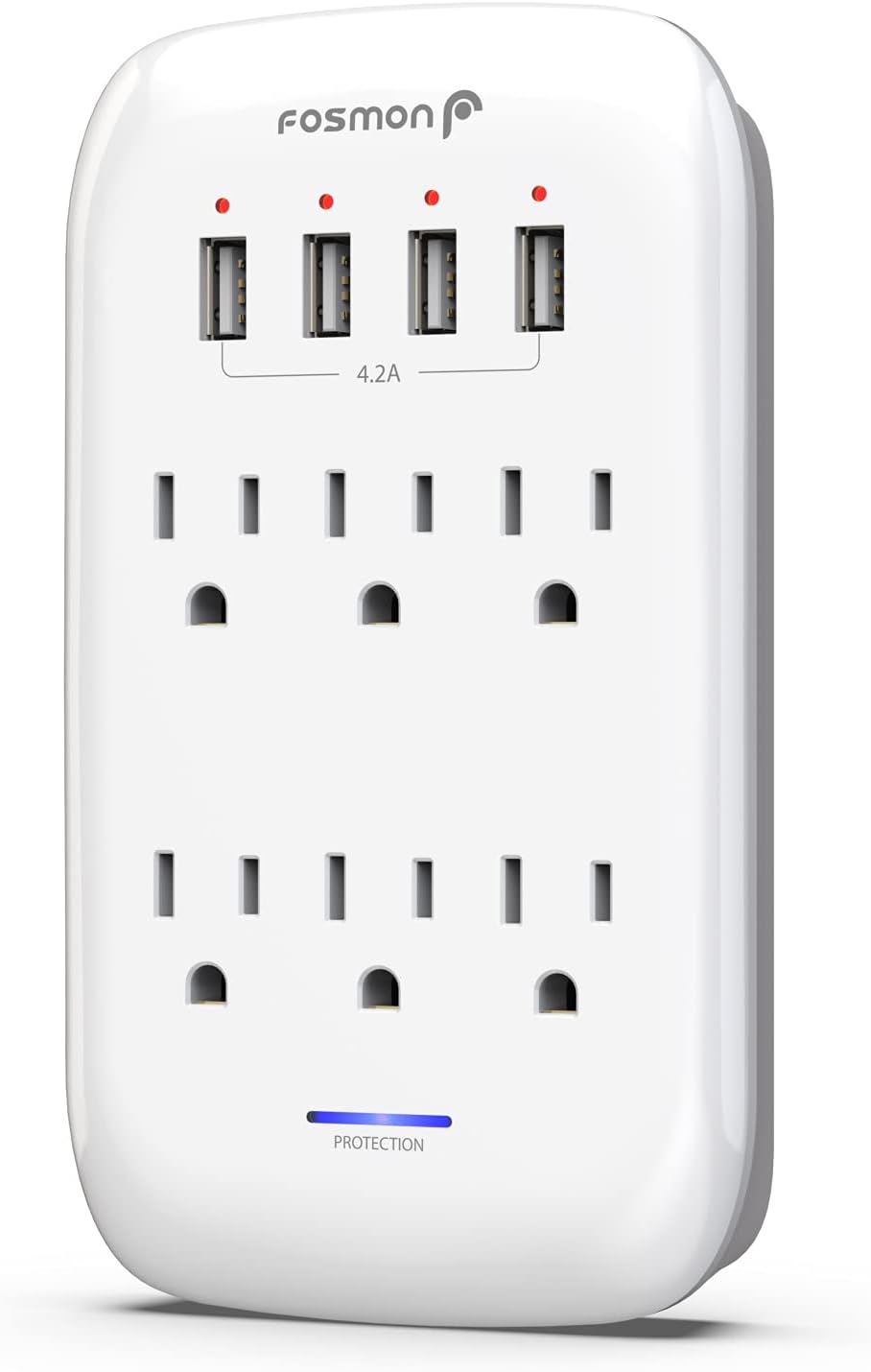
Image 1.1: Front view of the Fosmon 6 Outlet Wall Mount Surge Protector, showing six AC outlets and four USB-A charging ports.
2. Safety Information
Adherence to the following safety guidelines is crucial for preventing damage to the product, connected devices, and personal injury.
- This surge protector is ETL certified and conforms to UL498A and UL1449 standards, ensuring a high level of safety.
- The shell of the multi-plug outlet is constructed from durable, fireproof material.
- The unit provides 1225-Joule surge protection for AC outlets.
- USB ports include overload, overvoltage, and overcurrent protection.
- Do not exceed the maximum electrical rating of 1875 Watts (15 Amps at 125 Volts).
- Do not use in wet environments or near water.
- Do not disassemble or modify the device.
- Keep out of reach of children.

Image 2.1: Diagram illustrating the certified safety features including 1225 Joules Surge Protection, Over Voltage Protection, Short Circuit Protection, Over Current Protection, Fireproof Material, and Over Heat Protection.
3. Product Features
The Fosmon Wall Mount Surge Protector is designed to provide comprehensive power and charging capabilities while protecting your electronics.
- 6 AC Outlets: Provides power for up to six standard electrical devices.
- 4 USB-A Charging Ports: Delivers 5V/4.2A (21W total) for fast charging of USB-powered devices.
- 1225-Joule Surge Protection: Safeguards connected equipment from power surges and spikes.
- Grounded LED Indicator: An illuminated blue LED light indicates that the surge protection is active and functioning correctly.
- Power Filtration: Suppresses power noise caused by EMI and RFI, contributing to the longevity of your appliances.
- Compact Design: Lightweight and portable, suitable for various environments including homes, offices, and travel.

Image 3.1: The surge protector mounted on a wall, charging a smartphone via USB and powering a coffee maker via an AC outlet, highlighting its fast USB charging capability.
4. Setup and Installation
Follow these steps to properly install your wall mount surge protector.
- Identify Outlet Type: The surge protector is compatible with both standard duplex and decorative wall outlets.
- For Standard/Decorative Outlets: Simply plug the surge protector directly into an existing wall outlet. Ensure a secure connection.
- For GFCI or USB Outlets: If you are plugging the surge protector into a GFCI (Ground Fault Circuit Interrupter) or USB wall outlet, the stabilizing post on the back of the surge protector may need to be removed. This is due to the larger gap between the two sockets on these types of outlets. Use a pair of pliers or cutters to carefully snip off the stabilizing post.

Image 4.1: Visual guide showing how to cut off the stabilizing post for compatibility with GFCI and USB outlets, and how it fits into standard duplex and decorative outlets.
5. Operating Instructions
Once installed, the surge protector is ready for use.
- AC Outlets: Plug your electronic devices directly into any of the six 3-prong AC outlets. Ensure the total wattage of all connected devices does not exceed 1875 Watts.
- USB Charging Ports: Connect your USB-powered devices (smartphones, tablets, etc.) to any of the four USB-A ports using appropriate charging cables. The ports will automatically detect and deliver optimal charging current up to 4.2A total.
- Protection Indicator: The blue LED light labeled "PROTECTION" on the front of the unit indicates that the surge protection feature is active. If this light is off, the surge protection may have been compromised, and the unit should be replaced.

Image 5.1: The surge protector mounted on a wall, actively powering a laptop and charging a tablet and smartphone, demonstrating its function as a central power and charging station.
6. Maintenance
The Fosmon Wall Mount Surge Protector requires minimal maintenance.
- Keep the unit clean by wiping it with a dry, soft cloth. Do not use liquid cleaners or aerosols.
- Regularly check the blue "PROTECTION" LED indicator. If it is off, the surge protection has been exhausted, and the unit should be replaced to ensure continued protection for your devices.
- Ensure the unit is not obstructed by furniture or other objects to allow for proper ventilation.
7. Troubleshooting
If you encounter issues with your surge protector, refer to the following common solutions:
- No Power to Devices:
- Ensure the surge protector is securely plugged into a functioning wall outlet.
- Check if the blue "PROTECTION" LED is illuminated. If not, the surge protection may be depleted, and the unit needs replacement.
- Verify that the connected devices are properly plugged into the surge protector and are functioning correctly on their own.
- Confirm that the total power draw of all connected devices does not exceed the unit's maximum capacity (1875W).
- USB Devices Not Charging:
- Ensure the USB cable is securely connected to both the surge protector and the device.
- Try a different USB port or a different USB cable to rule out cable or port issues.
- Confirm the device is compatible with USB charging and is not fully charged.
- Loose Fit in Outlet:
- If the surge protector feels loose in a GFCI or USB outlet, ensure the stabilizing post was correctly removed as per Section 4.
- If it's loose in a standard outlet, the wall outlet itself may be worn and require inspection by a qualified electrician.
8. Specifications
| Feature | Specification |
|---|---|
| Model Number | C-10778US |
| AC Outlets | 6 (3-prong) |
| USB-A Ports | 4 |
| USB Output | 5V/4.2A (21W total) |
| Surge Protection | 1225 Joules |
| AC Input | 125VAC, 60Hz |
| Max Wattage | 1875 Watts |
| Max Amperage | 15 Amps |
| Dimensions | 6.5 x 3.7 x 1.7 inches (165.1 x 94 x 43.2 mm) |
| Weight | 9.6 ounces |
| Material | Plastic, Rubber (Fireproof) |
| Certifications | ETL Listed (UL498A, UL1449) |

Image 8.1: Diagram showing the physical dimensions of the surge protector, including length (6.5in/165.1mm), width (3.7in/94mm), and depth (1.7in/43.2mm).
9. Warranty and Support
Fosmon offers a limited lifetime warranty for this product. For warranty claims, technical support, or customer service inquiries, please contact Fosmon's USA-based customer service team. Refer to the official Fosmon website or your purchase documentation for detailed contact information.