
Introduction
This manual provides detailed instructions for the setup, operation, and maintenance of your DT96 Smartwatch. Please read this guide thoroughly to ensure proper use and to maximize the features of your device.
Package Contents
Upon opening your DT96 Smartwatch package, please verify that all the following items are included:
- DT96 Smartwatch Unit
- Stainless Steel Strap
- Silicone Strap
- Charging Cable
- User Manual (this document)

Image: The DT96 Smartwatch unit shown with both the included stainless steel mesh strap and an additional black silicone strap.
Setup
1. Charging the Smartwatch
Before first use, fully charge your DT96 Smartwatch. Connect the charging cable to the charging port on the back of the watch and plug the other end into a USB power adapter (not included) or a computer's USB port.
- Charging Time: Approximately 2 hours for a full charge.
- Battery Life: Up to 7-9 days in standby mode.
2. Installing the Straps
Your DT96 Smartwatch comes with two interchangeable straps: one stainless steel and one silicone. To install a strap:
- Locate the quick-release pins on the strap.
- Insert one end of the pin into the lug hole on the watch casing.
- Slide the quick-release lever to retract the other end of the pin, align it with the opposite lug hole, and release the lever.
- Gently pull the strap to ensure it is securely attached.
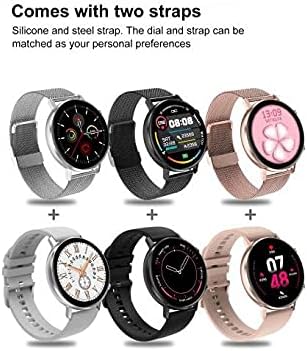
Image: Examples of the DT96 Smartwatch fitted with different strap types, including silicone and steel, demonstrating customization options.
3. App Installation and Pairing
To unlock the full functionality of your DT96 Smartwatch, you need to install the companion application on your smartphone and pair the devices via Bluetooth.
- Download the App: Scan the QR code in the quick start guide (if provided) or search for the official DT96 companion app in your smartphone's app store (e.g., Apple App Store or Google Play Store).
- Enable Bluetooth: Ensure Bluetooth is enabled on your smartphone.
- Open the App: Launch the DT96 app and follow the on-screen instructions to create an account or log in.
- Pair the Device: Within the app, navigate to the device pairing section. The app will search for available devices. Select "DT96" from the list.
- Confirm Pairing: A pairing request may appear on both your phone and the smartwatch. Confirm the pairing on both devices.
- Language Settings: The smartwatch supports multiple languages including Chinese, English, Russian, German, Spanish, Portuguese, French, Japanese, Italian, and Polish. Language settings are typically managed through the companion app.
Operating Instructions
The DT96 Smartwatch features a touch-sensitive display and physical buttons for navigation and control.
1. Basic Navigation
- Touch Screen: Swipe left, right, up, or down to navigate through menus and features. Tap to select an option.
- Side Buttons: Use the physical buttons on the side of the watch to return to the home screen, power on/off, or access specific functions as defined in the app.
2. Key Features
The DT96 Smartwatch offers a range of features to enhance your daily life:
- Activity Tracker: Monitors steps, distance, and calories burned. Access daily activity summaries through the watch or the companion app.
- Notifications: Receive alerts for calls, messages, and app notifications directly on your wrist. Ensure notification permissions are granted in the companion app.
- Time Display: Digital time display with customizable watch faces.
- Heart Rate Monitor: Tracks your heart rate throughout the day. Consult the app for detailed heart rate data and trends.
- Sleep Monitor: Analyzes your sleep patterns, including deep sleep, light sleep, and wake times.
- SpO2 Monitor: Measures blood oxygen levels.
- Music Player Control: Control music playback on your connected smartphone.
- Weather: View current weather conditions (requires app connection and location permissions).
- Alarm, Calculator, Calendar, Stop Watch, Reminders: Access these utility functions directly from the watch.
3. Customizing Watch Faces
Personalize your DT96 Smartwatch with various watch faces:
- The watch comes with 4 pre-installed watch face styles.
- Additional watch faces (over 14) can be downloaded and applied through the companion app.
- Open the app, navigate to the watch face section, select your preferred design, and sync it to your watch.
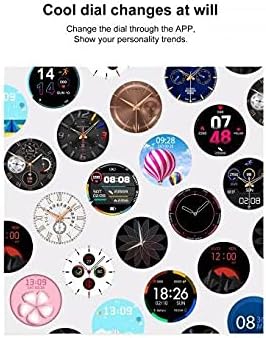
Image: A selection of diverse watch faces available for customization on the DT96 Smartwatch, demonstrating various styles and information displays.
Maintenance
1. Cleaning Your Smartwatch
To keep your DT96 Smartwatch in optimal condition:
- Wipe the screen and casing with a soft, lint-free cloth.
- For stubborn marks, slightly dampen the cloth with water. Avoid using harsh chemicals or abrasive materials.
- Clean the charging contacts regularly to ensure efficient charging.
2. Water Resistance
The DT96 Smartwatch is water-resistant. However, it is not suitable for diving, hot showers, or prolonged submersion. Avoid exposing the watch to hot water or steam, as this can damage the seals.
Troubleshooting
If you encounter issues with your DT96 Smartwatch, refer to the following common solutions:
- Watch not turning on: Ensure the watch is fully charged. Connect it to the charger for at least 30 minutes.
- Cannot pair with smartphone:
- Ensure Bluetooth is enabled on your phone and the watch.
- Make sure the watch is within range of your phone.
- Restart both your phone and the smartwatch.
- Try unpairing and re-pairing the device through the app.
- Notifications not appearing:
- Check notification permissions in your phone's settings for the DT96 app.
- Ensure notifications are enabled within the DT96 companion app.
- Verify that the watch is properly connected to your phone via Bluetooth.
- Inaccurate activity data: Ensure the watch is worn snugly on your wrist. Calibrate the app if there's an option.
- Screen unresponsive: Try restarting the watch by pressing and holding the side button. If unresponsive, allow the battery to drain completely and then recharge.
Specifications
| Feature | Detail |
|---|---|
| Model Name | DT96 |
| Connectivity Technology | Bluetooth 5.0 |
| Display Type | Digital, Touch Screen |
| Display Resolution | 240 x 240 pixels |
| Shape | Round |
| Case Material | Stainless Steel |
| Strap Material | Silicone, Stainless Steel (interchangeable) |
| Water Resistance Level | Water Resistant |
| Target Audience | Unisex Adult |
| Compatible Devices | Smartphone |
| Supported Applications | Alarm, Calculator, Calendar, Contacts, Email, Fitness Tracker, GPS (via phone), Heart Rate Monitor, Messages, Multisport Tracker, Music Player, Pedometer, Phone, Reminders, Sleep Monitor, SpO2 Monitor, Stop Watch, Voice Assistant, Weather |
| Charging Time | Approx. 2 hours |
| Standby Time | 7-9 days |
| Languages Supported | Chinese, English, Russian, German, Spanish, Portuguese, French, Japanese, Italian, Polish |

Image: Technical diagram illustrating the dimensions of the DT96 Smartwatch, including watch face diameter, thickness, strap width, and recommended wrist circumference.
Warranty and Support
For warranty information, please refer to the documentation provided at the time of purchase or contact your retailer. For technical support, please refer to the contact information provided by the manufacturer or retailer.
Always ensure you are using the latest version of the companion app for optimal performance and access to new features.


