
Introduction
This manual provides detailed instructions for the assembly, operation, maintenance, and troubleshooting of your Carlett Classic Family Lett470 folding shopping cart. Please read these instructions carefully before using the product to ensure safe and efficient operation. Keep this manual for future reference.
Product Overview
The Carlett Classic Family Lett470 is a versatile 4-wheel shopping cart designed for ease of use and high capacity. It features a robust yet lightweight frame, a large main bag, and an integrated insulated compartment for temperature-sensitive items. Its compact folding design makes storage convenient.
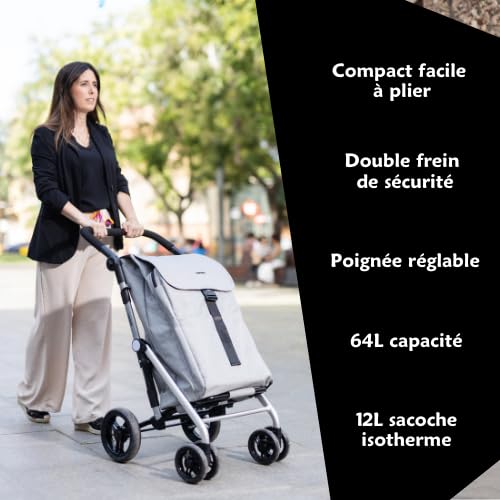
Image: Carlett Classic Family shopping cart in use, illustrating key features such as compact folding, double safety brake, adjustable handle, 64L capacity, and 12L insulated bag.
Setup Instructions
1. Unpacking
Carefully remove all components from the packaging. Ensure all parts are present: the main frame, the fabric bag, and the wheels.
2. Attaching the Wheels
The cart comes with four wheels. The front wheels are designed to swivel 360 degrees for enhanced maneuverability. The rear wheels are larger and include a brake mechanism.
- Locate the wheel attachment points on the cart frame.
- Align each wheel with its corresponding axle. Push firmly until you hear a click, indicating the wheel is securely locked in place.
- Gently pull on each wheel to confirm it is properly attached and does not detach easily.

Image: Close-up of the front swivel wheels, demonstrating their 360-degree rotation capability.
3. Unfolding the Cart
To unfold the cart:
- Place the cart on a flat, stable surface.
- Release any locking mechanisms that hold the cart in its folded position.
- Gently pull the handle upwards and outwards until the frame fully extends and locks into its open position. Ensure all joints are securely locked before use.
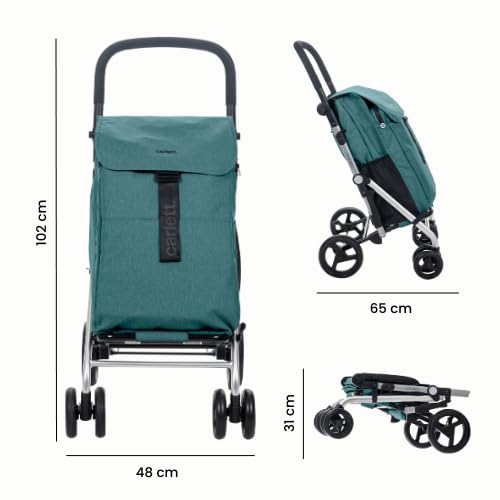
Image: Diagram illustrating the unfolded dimensions of the cart (102 cm height, 48 cm width, 65 cm depth) and its compact folded dimensions (31 cm height).
Operating Instructions
1. Adjusting the Handle
The ergonomic handle can be adjusted to a comfortable height. Locate the adjustment buttons or levers on the side of the handle. Press or release them to extend or retract the handle, then ensure it locks into your desired position.
2. Using 4-Wheel Mode
In 4-wheel mode, the cart can be pushed like a stroller, offering excellent stability and maneuverability, especially with heavy loads. The 360-degree swivel front wheels allow for easy navigation in tight spaces.
3. Converting to 2-Wheel Mode
For pulling the cart over curbs, stairs, or uneven terrain, it can be converted to a 2-wheel configuration. Simply tilt the cart back onto its larger rear wheels. This mode is also useful for compact storage when partially folded.

Image: The Carlett shopping cart in its two-wheel pulling position, ideal for navigating obstacles.
4. Engaging the Safety Brake
The cart is equipped with a safety brake on the rear wheels to prevent unintended movement. To engage the brake, press down on the brake lever located near the rear wheels. To release, lift the lever. Always engage the brake when the cart is stationary, especially on inclines.

Image: Close-up of the rear wheel brake, showing the lever in the engaged position.
5. Loading the Cart
The main bag has a generous capacity of 64 liters and can hold up to 32 kg. The front of the cart features a 12-liter insulated bag, perfect for keeping frozen or chilled items fresh. Utilize the side luggage racks and rear pocket for additional storage of smaller items or personal belongings.

Image: Close-up of the insulated bag zipper, highlighting its design for temperature-sensitive items.
6. Folding for Storage
To fold the cart for compact storage:
- Empty the bag and ensure no items are obstructing the folding mechanism.
- Release the handle adjustment and retract the handle to its lowest position.
- Locate the folding release mechanism (usually a lever or button near the base or handle) and activate it.
- Gently push the frame inwards until it collapses into its compact form. Secure any locking clips to keep it folded.
- The bag and wheels are removable for even more compact storage if needed.

Image: The Carlett shopping cart in its compact folded state, ready for storage.
Maintenance
1. Cleaning the Fabric Bag
The fabric bag is water-resistant. For general cleaning, wipe with a damp cloth and mild soap. For stubborn stains, hand wash with cold water and air dry. Do not machine wash or tumble dry, as this may damage the material and insulation.
2. Cleaning the Frame and Wheels
Wipe the metal frame with a damp cloth to remove dirt and debris. Periodically check the wheels for any tangled hair or debris that might impede their movement. Clean the wheel axles as needed to ensure smooth rotation.
3. Storage
Store the cart in a dry, cool place away from direct sunlight when not in use. Ensure it is clean and dry before storing to prevent mold or corrosion.
Troubleshooting
Wheels not swiveling smoothly:
Check for debris (hair, lint, dirt) caught in the wheel axles. Clean thoroughly. Ensure the wheels are securely attached and not loose.
Cart difficult to fold/unfold:
Ensure all locking mechanisms are fully disengaged before attempting to fold or unfold. Check for any obstructions in the frame joints. Apply a small amount of silicone spray to moving parts if stiffness persists.
Brake not engaging/disengaging:
Inspect the brake mechanism for any damage or obstructions. Ensure the lever moves freely. If the issue persists, contact customer support.
Specifications

Image: Detailed diagram outlining the Carlett Classic Family shopping cart's features and specifications.
| Feature | Specification |
|---|---|
| Model Number | LETT470-C6 |
| Brand | Carlett |
| Dimensions (Unfolded) | 62 x 48 x 102 cm (L x W x H) |
| Dimensions (Folded) | 48 x 31 x 65 cm (L x W x H) |
| Cart Weight | 5 kg |
| Main Bag Capacity | 64 Liters |
| Maximum Load Capacity | 32 kg |
| Insulated Bag Capacity | 12 Liters (approx. 10.5L from diagram) |
| Frame Material | Metal (Aluminum) |
| Handle Material | Metal |
| Wheel Type | 4 wheels (front 360° swivel, rear with brake, EVA material) |
| Special Features | Compact folding, convertible to 2 wheels, water-resistant fabric, safety brake |
| Recommended Use | Indoor, Outdoor |
Warranty and Support
Carlett products are manufactured to high-quality standards. This product comes with a standard manufacturer's warranty against defects in materials and workmanship. For specific warranty details, duration, and terms, please refer to the warranty card included with your purchase or visit the official Carlett website.
For technical support, spare parts, or any inquiries regarding your Carlett Classic Family Lett470 shopping cart, please contact Carlett customer service through their official website or the contact information provided in your product packaging.