
Introduction
Thank you for choosing the MageGee K1 Gaming Keyboard. This wired, full-sized 104-key keyboard is designed for an enhanced gaming and typing experience, featuring vibrant 7-color LED backlighting, a durable clear housing, and ergonomic design. This manual provides essential information for setup, operation, and maintenance to ensure optimal performance and longevity of your keyboard.
What's in the Box
- MageGee K1 Gaming Keyboard
- USB Cable (attached)
Setup
The MageGee K1 keyboard is designed for simple plug-and-play functionality, requiring no additional drivers for basic operation.
- Connect the Keyboard: Locate an available USB port on your PC, desktop, or laptop. Insert the USB cable from the MageGee K1 keyboard into the USB port.
- System Recognition: Your operating system should automatically detect and install the necessary generic drivers. This process may take a few moments.
- Ready for Use: Once recognized, the keyboard is ready for immediate use.
Operating Instructions
1. LED Backlight Control
The MageGee K1 features a fantastic 7-color LED backlight with multiple modes. The light is displayed over the entire keyboard and keys due to its transparent housing.
- Change Backlight Color: Press FN + TAB keys simultaneously to cycle through the 7 available colors (blue, red, green, pink, cyan, yellow, white).
- Switch Light Modes: Hold down FN + ESC keys simultaneously to cycle through 4 light modes: dim, bright, pulse, and off.
- Auto-Off Feature: The backlight will automatically turn off after 10 minutes of inactivity. Press any key to wake it up.

Image: The MageGee K1 keyboard displaying various 7-color LED backlight options, illustrating the vibrant illumination across the keys.

Image: A close-up of the MageGee K1 keyboard, highlighting the 'FN' and 'ESC' keys for switching light modes, and 'FN' and 'TAB' keys for changing backlight colors.
2. Multimedia Shortcuts
Access frequently used programs and functions quickly with multimedia combination keys.
- Press Fn + F1-F12 for convenient operations such as music control, email access, and website shortcuts.
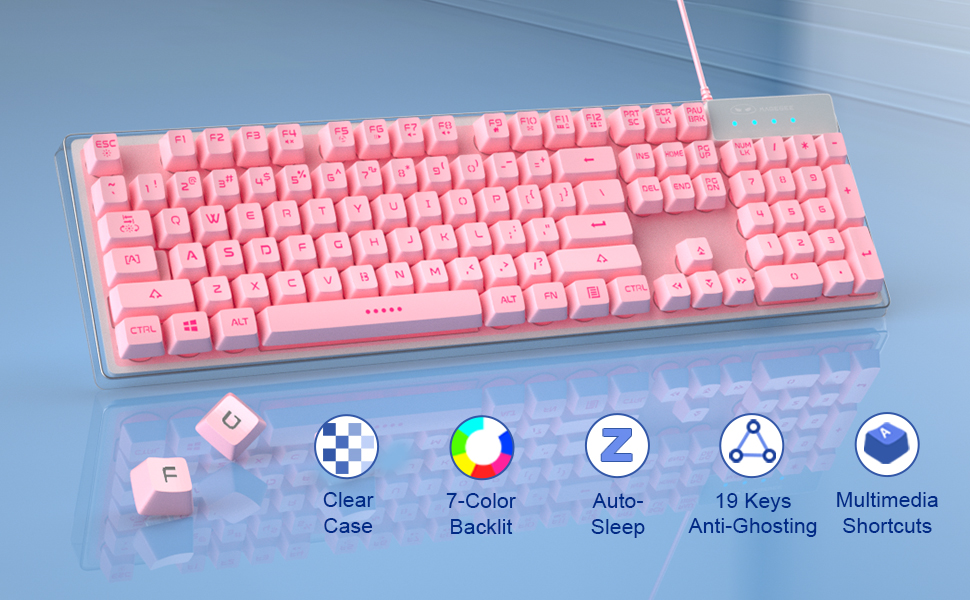
Image: The MageGee K1 keyboard with a diagram overlay showing the 'FN' key combined with F1-F12 for various multimedia functions like volume control, media playback, and application shortcuts.
3. 19-Key Anti-Ghosting
The keyboard supports 19-key rollover, allowing you to press multiple keys simultaneously without any input conflicts, crucial for fast-paced gaming.

Image: A visual representation of the MageGee K1 keyboard emphasizing the 19-key anti-ghosting capability, indicating simultaneous key presses are registered accurately.
4. WASD and Arrow Key Swap
For enhanced gaming, you can switch the functionality of the WASD keys with the arrow keys.
- Press FN + W keys simultaneously to toggle between WASD and arrow key functions.
Maintenance
Proper maintenance ensures the longevity and performance of your MageGee K1 keyboard.
- Cleaning: The floating keycaps are removable, making them easy to clean. Use a soft brush or compressed air to remove dust and debris from between the keys. For surface cleaning, wipe with a damp cloth.
- Splash-Proof Design: The keyboard features a splash-proof design to prevent damage from spilled drinks. However, it is not fully waterproof; avoid submerging the keyboard in liquid.

Image: The MageGee K1 keyboard with water droplets on its surface, illustrating its splash-proof design to protect against accidental spills.


