
Introduction
The Diablo X-Ray Gaming Chair is engineered to deliver superior seating comfort and ergonomic support for individuals who spend extended periods at a computer, whether for gaming or professional tasks. This chair combines a distinctive design with advanced ergonomic features and high-quality materials to enhance your overall experience. This manual provides essential information for assembly, operation, maintenance, and troubleshooting to ensure optimal use of your gaming chair.

The Diablo X-Ray Gaming Chair in a home office setting, showcasing its design and presence.
Safety Information
- Maximum Load Capacity: Do not exceed the recommended maximum load of 150 kilograms (330 lbs). Exceeding this limit may cause damage to the chair or personal injury.
- Assembly: Ensure all components are securely fastened before use. Refer to the assembly instructions carefully.
- Children: Keep small parts away from children during assembly. This chair is designed for adult and adolescent use.
- Stability: Avoid standing on the chair or using it for purposes other than seating.
- Movement: Exercise caution when reclining or adjusting the chair to prevent tipping or injury.
Package Contents
Please verify that all the following components are present in your package:
- Backrest
- Seat Base
- Armrests (2)
- Star Base
- Casters (5)
- Gas Lift Cylinder
- Gas Lift Cover
- Mechanism (Tilttech Butterfly System)
- Lumbar Pillow (ProSpine Support)
- Headrest Pillow (Magnetic Memory Foam)
- Side Covers (2)
- Hardware Kit (screws, washers, Allen key)
Setup (Assembly Instructions)
Follow these steps to assemble your Diablo X-Ray Gaming Chair:
- Attach Casters to Star Base: Insert the five casters into the holes at the end of each leg of the star base. Push firmly until they click into place.
- Install Gas Lift: Place the gas lift cylinder into the center hole of the star base. Cover it with the gas lift cover.
- Attach Mechanism to Seat Base: Align the mechanism with the screw holes on the underside of the seat base. Ensure the front of the mechanism faces the front of the seat. Secure with screws from the hardware kit.
- Attach Armrests to Seat Base: Secure the armrests to the designated holes on the underside of the seat base using the provided screws.
- Connect Backrest to Seat Base: Attach the backrest to the seat base using the side brackets. Secure with screws, then cover the brackets with the plastic side covers.
- Place Assembled Seat onto Gas Lift: Carefully place the assembled seat and backrest onto the gas lift cylinder, ensuring it is centered and stable.
- Attach Cushions: Position the lumbar pillow against the lower backrest and the magnetic headrest pillow at the top of the backrest.

Diagram illustrating the dimensions of the Diablo X-Ray Gaming Chair: 130cm height, 71cm width, and 52cm depth.
Operating Instructions (Adjustments)
Your Diablo X-Ray Gaming Chair offers multiple adjustment options for personalized comfort:
- Seat Height Adjustment (Tilttech Butterfly System): Pull the lever located on the right side of the seat upwards to raise or lower the seat. Release the lever at your desired height.
- Backrest Recline (Tilttech Gear): Pull the lever on the left side of the seat upwards to unlock the backrest. Lean back to your desired angle and release the lever to lock it in place.
- Rocking Function (Tilttech Swing): Pull the right lever outwards to enable the rocking function. Push it inwards to lock the chair in an upright position. The tension of the rocking can be adjusted by turning the knob underneath the seat.
- 4D Armrest Adjustment (Armtech Quatro SoftTouch): The armrests can be adjusted in four dimensions: height, forward/backward, left/right, and pivot. Use the buttons and levers on the armrests to make these adjustments.
- Lumbar Support (ProSpine Support): The integrated lumbar support can be adjusted by turning the knob on the side of the backrest.
- Magnetic Headrest: The memory foam headrest pillow is magnetically attached and can be easily repositioned vertically along the top of the backrest for optimal neck support.

Close-up view of the Armtech Quatro SoftTouch 4D armrests, demonstrating their multi-directional adjustability.
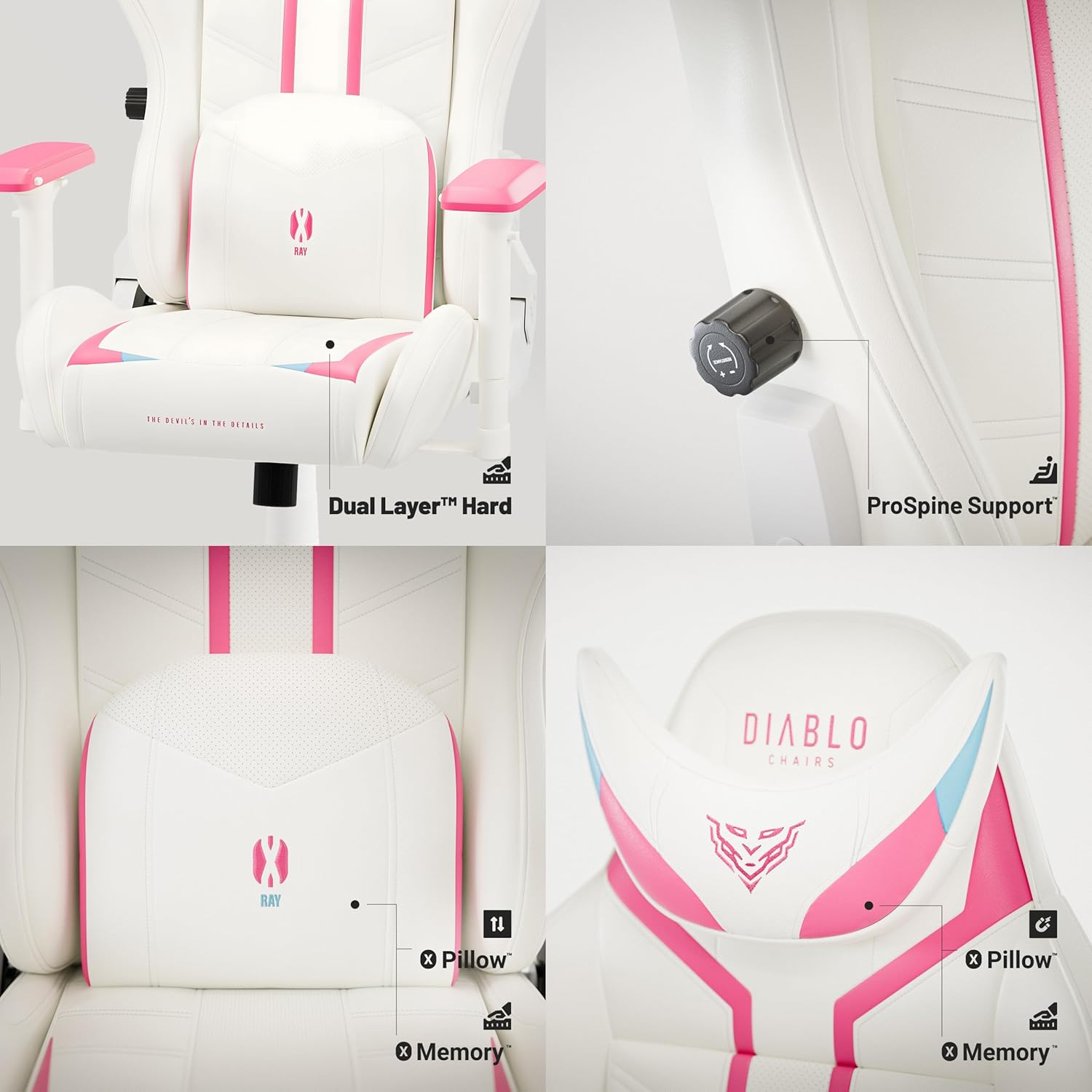
Detailed view of the ergonomic features: Dual Layer seat cushion, ProSpine Support knob for lumbar adjustment, and magnetic memory foam headrest pillow.

Illustration of the Tilttech Swing mechanism, demonstrating the chair's rocking and recline function.
Maintenance
- Cleaning: For general cleaning, use a soft, damp cloth. For spot cleaning, use a mild soap solution and gently wipe the affected area. Avoid harsh chemicals or abrasive cleaners, as they may damage the synthetic leather.
- Material Care: The chair is made of synthetic leather and perforated synthetic leather (HDS Air). To maintain its appearance and durability, avoid prolonged exposure to direct sunlight and extreme temperatures.
- Casters: Periodically check the PFC 360 rubber casters for hair or debris that may hinder smooth movement. Clean as needed.
- Fasteners: Occasionally check all screws and bolts to ensure they are tight. Retighten if necessary to maintain stability.

Close-up of the HDS Air perforated synthetic leather material used on the Diablo X-Ray Gaming Chair, designed for enhanced breathability.

Detail of the PFC 360 rubber casters on the chair's base, designed for smooth and quiet movement on hard surfaces.
Troubleshooting
| Problem | Possible Cause | Solution |
|---|---|---|
| Chair does not adjust height. | Gas lift cylinder malfunction or lever not engaged. | Ensure the height adjustment lever is fully pulled. If the issue persists, the gas lift may need replacement. |
| Backrest does not recline or lock. | Recline lever not engaged or mechanism obstruction. | Check if the recline lever is fully pulled. Inspect the mechanism for any obstructions. |
| Chair feels wobbly. | Loose screws or improper assembly. | Check and tighten all assembly screws, especially those connecting the backrest and seat base. Ensure the star base and gas lift are properly seated. |
| Squeaking noises during movement. | Loose connections or friction between parts. | Tighten all screws. Apply a small amount of silicone lubricant to moving parts of the mechanism or where components rub together. |
Specifications
| Feature | Detail |
|---|---|
| Model Name | X-Ray |
| Product Dimensions (D x W x H) | 52 x 71 x 130 cm |
| Item Weight | 24 Kilograms |
| Recommended Maximum Load | 150 Kilograms |
| Color | Rose/White |
| Material | Synthetic leather/perforated synthetic leather (HDS Air) |
| Frame Material | Metal |
| Armrest Style | 4D Armtech Quatro SoftTouch |
| Special Features | Adjustable Armrest, Headrest, Lumbar Cushion, Ergonomic Design, Adjustable Height |
| Casters | PFC 360 Rubber Casters |
| Gas Lift | Class 4 with Air Damper System |
| Recommended Age Range | Adult, Adolescent |
| Recommended Usage | Office, Relaxation, Gaming, Reading |
Warranty and Support
For warranty information and customer support, please refer to the documentation included with your purchase or contact the manufacturer directly. Keep your proof of purchase for any warranty claims.
Manufacturer: Diablo


