
1. Introduction
This manual provides instructions for the proper installation, operation, and maintenance of your Kolink RGB Extension Cable. Please read this manual thoroughly before use to ensure safe and efficient operation.
The Kolink RGB Extension Cable is designed to extend the reach of your 4-pin RGB lighting connections within your PC system, offering greater flexibility for component placement and aesthetic customization.
2. Safety Information
- Ensure your PC system is powered off and unplugged from the wall outlet before installing or removing any components.
- Handle the cable by its connectors, not by the wires, to prevent damage.
- Do not expose the cable to excessive force, sharp objects, or extreme temperatures.
- This product is intended for indoor use within a computer chassis.
- Verify that the connector type (4-pin RGB) matches your devices before connection. Incorrect connection may cause damage.
3. Package Contents
Your package should contain the following item:
- 1x Kolink RGB Extension Cable (50cm)
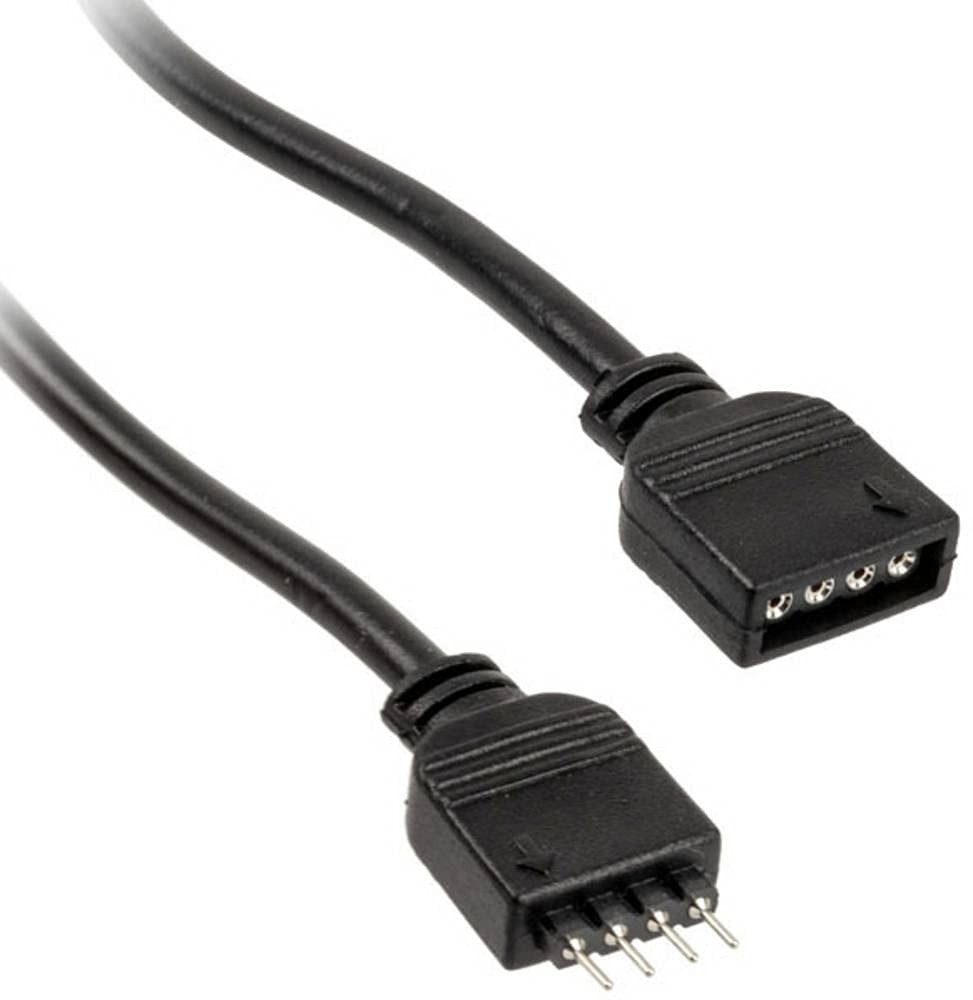
Figure 1: Kolink RGB Extension Cable. This image shows the 50cm black extension cable with its 4-pin male and female connectors, designed for extending RGB lighting connections within a PC.
4. Setup and Installation
- Power Off System: Ensure your computer is completely powered off and disconnected from the main power supply.
- Identify Connectors: Locate the 4-pin RGB header on your motherboard or existing RGB controller, and the 4-pin RGB connector on the device you wish to extend (e.g., an RGB fan or LED strip).
- Connect Extension Cable: Carefully connect the male end of the Kolink RGB Extension Cable to the female 4-pin RGB header on your motherboard or controller. Ensure the pins align correctly and the connection is secure.
- Connect Device: Connect the female end of the Kolink RGB Extension Cable to the male 4-pin RGB connector of your RGB device. Again, ensure correct pin alignment and a secure connection.
- Cable Management: Route the cable neatly within your PC case, ensuring it does not obstruct airflow or interfere with moving parts like fans. The tangle-free design assists with this.
- Power On System: Once all connections are secure, close your PC case, reconnect the power supply, and power on your system.
5. Operation
The Kolink RGB Extension Cable functions as a passive extension for your 4-pin RGB signals. Once connected, the RGB device will operate as if it were directly connected to the motherboard or controller, allowing you to control its lighting effects through your system's existing RGB software or hardware controls.
No additional software or drivers are required for the cable itself.
6. Maintenance
- Cleaning: If necessary, gently wipe the cable with a dry, lint-free cloth to remove dust. Do not use liquid cleaners.
- Inspection: Periodically inspect the cable for any signs of wear, fraying, or damage to the connectors. If damage is observed, discontinue use and replace the cable.
- Storage: When not in use, store the cable in a cool, dry place, away from direct sunlight and extreme temperatures. Avoid sharp bends or kinks.
7. Troubleshooting
| Problem | Possible Cause | Solution |
|---|---|---|
| RGB device not lighting up. | Loose connection, incorrect pin alignment, or faulty RGB device/controller. | Ensure all 4-pin connections are secure and correctly aligned. Verify the RGB device works when connected directly. Check motherboard/controller settings. |
| Incorrect colors or flickering. | Loose connection, software issue, or incompatible RGB standard. | Check connections. Update or reinstall RGB control software. Ensure your device uses the 4-pin 12V RGB standard (not 3-pin 5V ARGB). |
| Cable appears damaged. | Physical damage. | Discontinue use immediately. Replace the cable. |
8. Specifications
- Brand: KOLINK
- Model: PGW-AC-KOL-042
- Cable Type: RGB Extension Cable
- Connector Type: 4-pin RGB (Male-to-Female)
- Length: 50 cm
- Number of Pins: 4
- Maximum Voltage: 5 Volts (DC) (Note: Standard 4-pin RGB is typically 12V. Users should verify their device's voltage requirement to ensure compatibility.)
- Special Feature: Tangle Free
- Recommended Uses: PC fan extension, RGB lighting extension
- Color: Black
- Compliance: RoHS
9. Warranty and Support
Kolink products are manufactured to high-quality standards. For warranty information and technical support, please refer to the official Kolink website or contact your retailer. Keep your proof of purchase for warranty claims.
EU Spare Part Availability Duration: 1 Year (as per product specifications).