
SOFAR 5KTLM-G2
SOFAR 5KTLM-G2 5KW Ongrid Inverter User Manual
1. Product Overview
The SOFAR 5KTLM-G2 is a 5KW Ongrid Inverter designed for single-phase solar power systems. It features advanced technology for efficient energy conversion and system management. This inverter is equipped with an intelligent solar optimization technique that increases solar energy usage in both backup and charging modes to reduce grid power consumption. It includes an in-built heavy-duty solar charge controller, ensuring a continuous and uniform power supply.
Key Features:
- Built-in zero export function
- IP65 ingress protection for durability
- Maximum efficiency up to 98.2%
- Smart monitoring via RS485, with optional Wifi/Ethernet/GPRS connectivity
- Two MPPT (Maximum Power Point Tracking) for high precision string detection
- I-V curve scanning function
- Integrated sound and light alarm function
- Safety protection features including Anti-islanding, RCMU, and Ground fault monitoring
- Standard communication modes: Rs485, with optional Wifi/Ethernet/GPRS, and SD card support
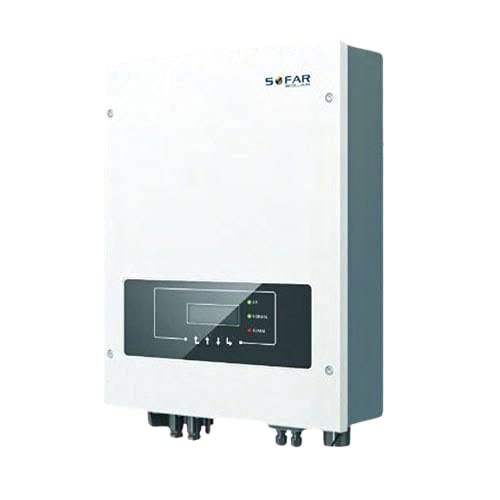
Figure 1: Front view of the SOFAR 5KTLM-G2 5KW Ongrid Inverter, showing the display panel and connection ports at the bottom.
2. Installation and Setup
Proper installation is crucial for the safe and efficient operation of your SOFAR 5KTLM-G2 inverter. It is recommended that installation be performed by a qualified electrician or solar professional.
2.1. Site Selection
- Choose a location that is cool, dry, and well-ventilated.
- Ensure the mounting surface is strong enough to support the inverter's weight (approximately 400g, but consider mounting hardware).
- Avoid direct sunlight exposure to prevent overheating.
- Maintain adequate clearance around the inverter for proper airflow and maintenance access.
- The inverter has IP65 ingress protection, but indoor installation or protection from extreme weather is still recommended for longevity.
2.2. Mounting the Inverter
- Mark the drilling points on the wall according to the inverter's mounting bracket.
- Drill holes and insert appropriate wall plugs.
- Secure the mounting bracket to the wall.
- Carefully lift and attach the inverter to the mounting bracket.
2.3. Electrical Connections
Warning: All electrical connections must comply with local and national electrical codes. Ensure all power sources are disconnected before making any connections.
- DC Input (PV Array): Connect the positive and negative cables from your solar PV array to the designated DC input terminals on the inverter. Observe correct polarity. The inverter supports two MPPT inputs.
- AC Output (Grid/Load): Connect the AC output cables from the inverter to your electrical grid connection point or load distribution panel.
- Grounding: Ensure the inverter is properly grounded according to safety standards.
- Communication Cables: Connect RS485 communication cables. If using optional Wifi/Ethernet/GPRS modules, connect them as per their respective instructions.
3. Operation
3.1. Initial Power-Up
- After all electrical connections are secure, switch on the DC isolator for the PV array.
- Switch on the AC circuit breaker connected to the inverter's output.
- The inverter will perform a self-test and then begin operation, indicated by the status lights and display.
3.2. Monitoring
The SOFAR 5KTLM-G2 features a display panel and indicator lights for real-time status monitoring. Detailed monitoring data can be accessed via the optional Wifi/Ethernet/GPRS modules and associated software or mobile applications.
- Display Panel: Shows operational parameters such as power output, voltage, current, and energy yield.
- Indicator Lights: Provide quick visual status (e.g., Power, Fault, Communication). Refer to the inverter's specific LED indicator guide for detailed meanings.
- Remote Monitoring: Utilize the smart monitoring features (RS485, Wifi/Ethernet/GPRS) to track performance, receive alerts, and manage settings remotely.
3.3. Shutdown Procedure
- Switch off the AC circuit breaker connected to the inverter's output.
- Switch off the DC isolator for the PV array.
- Wait for the inverter's display and indicator lights to turn off, indicating complete shutdown.
4. Maintenance
Regular maintenance ensures the longevity and optimal performance of your SOFAR 5KTLM-G2 inverter. Always ensure the inverter is completely shut down and isolated from all power sources before performing any maintenance.
- Cleaning: Periodically clean the exterior of the inverter with a soft, dry cloth to remove dust and debris. Do not use liquid cleaners or solvents.
- Ventilation: Ensure that the ventilation openings are clear and not obstructed to allow for proper heat dissipation.
- Cable Connections: Annually inspect all electrical connections for tightness and signs of corrosion or damage. Tighten any loose connections.
- Environmental Check: Regularly check the installation environment for any changes that might affect the inverter's performance, such as excessive heat, moisture, or pest activity.
- Firmware Updates: Check with SOFAR support for any available firmware updates to ensure your inverter operates with the latest features and optimizations.
5. Troubleshooting
This section provides guidance for common issues. For complex problems, contact qualified service personnel.
| Problem | Possible Cause | Solution |
|---|---|---|
| Inverter not powering on | No DC input from PV array; AC breaker off; Internal fault | Check PV array connections and DC isolator; Ensure AC breaker is on; Contact support if fault persists. |
| Low power output | Shading on PV panels; Dirty PV panels; Inverter derating due to high temperature; MPPT issue | Clear shading; Clean PV panels; Ensure adequate ventilation around inverter; Check MPPT settings or contact support. |
| Fault indicator light on | System error; Grid fault; Internal component failure | Note the error code on the display (if any); Check grid connection; Perform a full shutdown and restart; Contact support with error details. |
| No communication | Loose communication cable; Network issue; Incorrect settings | Check RS485 or network cable connections; Verify network settings; Consult communication module manual. |
6. Technical Specifications
| Specification | Value |
|---|---|
| Brand | SOFAR |
| Model | 5KTLM-G2 |
| Rated Power Output | 5 KW |
| MPPT Trackers | 2 |
| Phase | Single Phase |
| Max. Efficiency | 98.2% |
| Ingress Protection | IP65 |
| Communication | RS485, Wifi/Ethernet/GPRS (optional) |
| Product Dimensions (LxWxH) | 78 x 45 x 12 cm |
| Item Weight | 400 g |
| Power Source | Battery Powered (for internal operations/backup, main power from PV) |
| Frequency | 50 Hz |
7. Warranty and Support
For warranty information, please refer to the documentation provided with your purchase or contact your SOFAR authorized dealer. Technical support can be obtained through your installer or by contacting SOFAR customer service directly. Ensure you have your product model number (5KTLM-G2) and serial number ready when seeking support.
Related documents5KTLM-G2


Ask a question about this manual
Ask about setup, troubleshooting, compatibility, parts, safety, or missing instructions. Manuals+ will review the question and use this page’s manual context to help answer it.