1. Introduction
This manual provides essential instructions for the safe and effective use of your Eztronics Corp 14.4V 3.0Ah/3000mAh NiMh Replacement Battery Pack. This battery is designed to be compatible with specific Shark Freestyle Navigator Cordless Stick Vacuum models, including XBT1106, SV1106, and SV1112. Please read this manual thoroughly before installation and use.
Important Compatibility Note: This battery pack is specifically for 14.4V systems and is not compatible with Shark XBT1106N & SV1106N models. Always verify your vacuum cleaner's original battery specifications before purchase and installation.
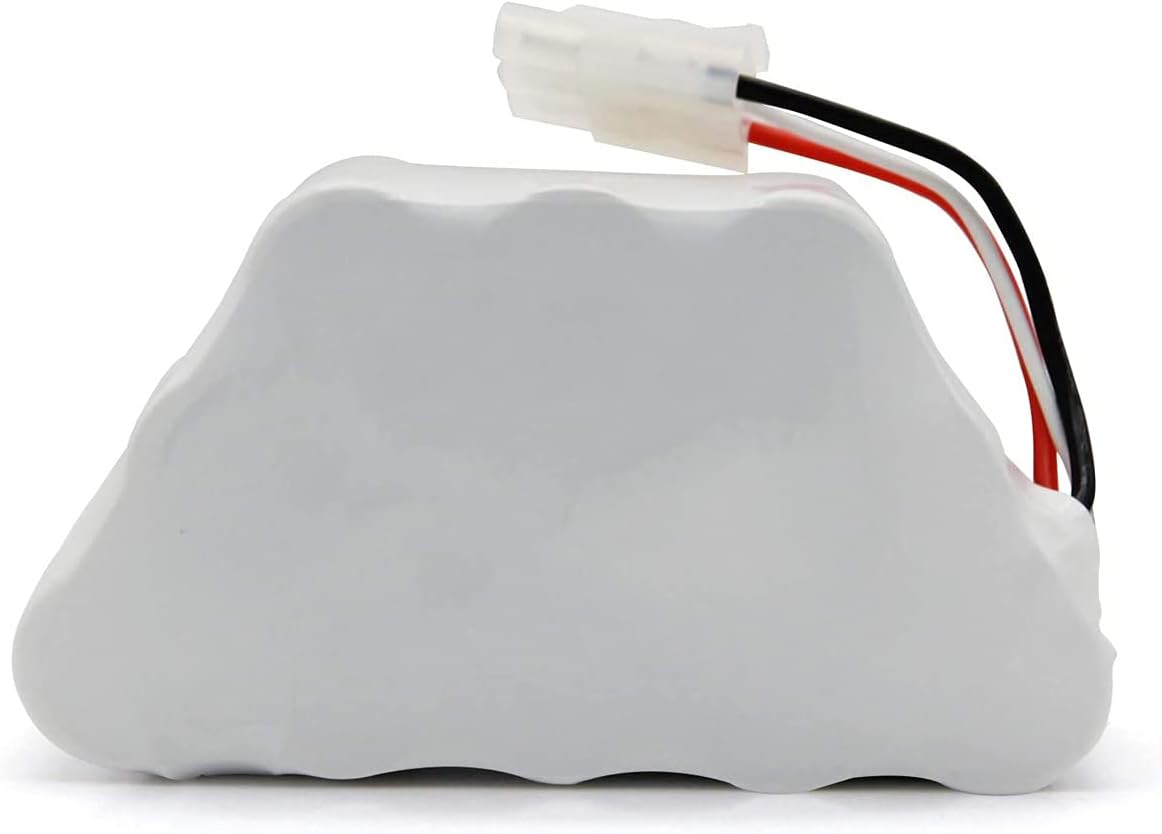
Image 1.1: Side view of the Eztronics Corp 14.4V 3.0Ah NiMh Replacement Battery Pack, showing its general shape and connector wires.
2. Setup and Installation
Follow these steps to safely replace the battery in your Shark Freestyle Navigator Cordless Stick Vacuum.
- Power Off and Unplug: Ensure your vacuum cleaner is completely powered off and disconnected from any charging source before beginning the battery replacement process.
- Locate Battery Compartment: Refer to your vacuum cleaner's original manual to locate and open the battery compartment. This is typically on the underside of the vacuum head or main body.
- Remove Old Battery: Carefully disconnect the old battery pack from its connector. Note the orientation of the connector for correct reinstallation. Remove the old battery from the compartment.
- Verify Compatibility: Before installing the new battery, compare it with your original battery and the vacuum's battery compartment. Ensure the new Eztronics Corp battery pack matches the voltage (14.4V) and physical configuration.

Image 2.1: Visual guide for identifying the correct battery type based on the vacuum's internal battery compartment and original battery configuration. Ensure your original battery matches the 'This battery is right for you' example.
- Install New Battery: Insert the Eztronics Corp replacement battery pack into the compartment, ensuring it fits securely. Connect the battery's wiring harness to the vacuum's connector, matching the orientation noted earlier.
- Close Compartment: Securely close the battery compartment cover.
- Initial Charge: Place the vacuum on its charging base or connect it to its charger for an initial full charge before first use.
3. Operating Instructions
This replacement battery pack is designed to provide extended runtime for your compatible Shark vacuum cleaner.
- First Use: For optimal performance, fully charge the battery pack before its first use.
- Charging: Always use the original charger supplied with your Shark vacuum cleaner. The battery pack will charge according to the vacuum's standard charging cycle.
- Usage: Operate your vacuum cleaner as per its original instructions. The 3000mAh capacity of this replacement battery provides an extended operating time compared to standard 2000mAh or 2500mAh batteries.
- Discharge: It is generally recommended to allow the battery to fully discharge occasionally before recharging to help maintain its capacity, though NiMh batteries are less prone to memory effect than older NiCd types.
4. Maintenance and Storage
Proper care will extend the life of your replacement battery pack.
- Regular Charging: Recharge the battery after each use to ensure it is ready for the next cleaning session.
- Storage: If storing the vacuum or battery for an extended period (more than one month), store the battery in a cool, dry place at approximately 50% charge. Avoid storing fully charged or fully discharged.
- Temperature: Avoid exposing the battery to extreme temperatures, both hot and cold, as this can degrade performance and lifespan.
- Cleaning: Keep the battery contacts clean and free of dust or debris. Use a dry cloth to wipe them if necessary.
- Disposal: When the battery reaches the end of its life, dispose of it responsibly according to local regulations for NiMh batteries. Do not dispose of in household waste.
5. Troubleshooting
If you encounter issues with your replacement battery pack, consider the following:
- Battery Not Charging:
- Ensure the vacuum is properly seated on the charging base or the charger is securely connected.
- Verify the power outlet is functional.
- Check the battery connector for any damage or loose connections.
- Confirm the battery is compatible with your specific Shark model (14.4V, not N-series).
- Short Run Time:
- Ensure the battery has been fully charged.
- Over time, all rechargeable batteries experience a decrease in capacity. If the battery is old, it may be reaching the end of its service life.
- Check for blockages in the vacuum cleaner that might be causing the motor to work harder, thus draining the battery faster.
- Vacuum Not Powering On:
- Confirm the battery is correctly installed and connected.
- Ensure the battery has sufficient charge.
- If the issue persists, it may indicate a problem with the vacuum cleaner itself rather than the battery.
If troubleshooting steps do not resolve the issue, please refer to the Warranty & Support section.
6. Specifications
| Feature | Specification |
|---|---|
| Battery Type | Ni-Mh (Nickel-Metal Hydride) |
| Battery Voltage | 14.4V |
| Battery Capacity | 3000mAh (3.0Ah) |
| Compatible Models | Shark XBT1106, SV1106, SV1112 Freestyle Navigator Cordless Stick Vacuum |
| Incompatible Models | Shark XBT1106N, SV1106N |
| Manufacturer | Eztronics Corp |

Image 6.1: Angled view of the battery pack, highlighting the connector type and wiring.
7. Warranty and Support
This Eztronics Corp replacement battery pack comes with a 1-year warranty from the date of purchase, covering manufacturing defects.
For warranty claims, technical support, or any questions not addressed in this manual, please contact Eztronics Corp customer service through the retailer where the product was purchased. Please have your purchase details and product model information available when contacting support.


