
True Wireless 9D HiFi Stereo Sound Earbuds (B09FSKF41Z)
User Manual
True Wireless 9D HiFi Stereo Sound Earbuds
Introduction
Thank you for choosing the Generic True Wireless 9D HiFi Stereo Sound Earbuds. This manual provides essential information for setting up, operating, and maintaining your new earbuds. Please read it thoroughly before use to ensure optimal performance and longevity of your device.
Product Overview
The Generic True Wireless Earbuds offer a superior audio experience with 9D HiFi stereo sound and heavy bass. Featuring Bluetooth 5.0 for stable connectivity, touch controls, CVC 8.0 noise cancelling, and IPX5 water resistance, these earbuds are designed for comfort and performance across various activities, from music listening to gaming and sports.

Figure 1: True Wireless Earbuds and Charging Case. The case features an LED display indicating battery percentage.
Package Contents
- True Wireless Earbuds (Left and Right)
- Portable Charging Case
- USB Charging Cable
- User Manual (This document)
Setup
1. Initial Charging
Before first use, fully charge the earbuds and the charging case. Connect the charging case to a USB power source using the provided charging cable. The LED display on the case will indicate the charging status and battery level.

Figure 2: The charging case functions as a power bank with a 2000mAh capacity, capable of charging the earbuds multiple times and even a mobile phone in emergencies.
2. Pairing with Your Device (One-Step Pairing)
- Ensure Bluetooth is enabled on your smartphone, tablet, or computer.
- Open the charging case and take out both earbuds. They will automatically power on and enter pairing mode.
- On your device, search for Bluetooth devices and select "True Wireless Earbuds" (or similar name) from the list.
- Once connected, you will hear a confirmation sound, and the earbuds will be ready for use.
The earbuds support automatic re-connection to the last paired device once removed from the case.

Figure 3: Automatic pairing feature, where earbuds connect to your device simply by being picked up from the charging case.

Figure 4: The earbuds feature an upgraded Bluetooth 5.0 chip for stable and extended range connectivity.
Operating Instructions
Touch Controls
The earbuds feature intelligent fingerprint touch operation for various functions. Refer to the table below for common controls:

Figure 5: Intelligent fingerprint touch operation guide for various functions.
| Action | Function |
|---|---|
| Touch 1 time | Answer/Hang up call, Pause/Play music |
| Touch 2 times | Switch songs (Next/Previous, depending on earbud) |
| Touch 3 times | Volume control (Increase/Decrease, depending on earbud) |
| Touch for 3 seconds | Wake up voice assistant (Siri/Alexa/Google) |
| Touch for 5 seconds | Power on/off |
Audio Features
These earbuds deliver 9D HiFi Stereo Surround Sound with heavy bass, providing an immersive audio experience for music and gaming. The built-in CVC 8.0 noise cancelling technology helps to filter ambient noise for clearer calls and listening.

Figure 6: Highlighting the 9D Surround Heavy Bass sound quality and smart features like auto-connect and touch control.
Battery and Charging
The earbuds provide up to 5 hours of active listening or calling on a single charge. The portable charging case can recharge the earbuds up to 40 times, extending the cumulative battery life to approximately 220 hours. The charging case itself has a 2000mAh battery capacity and can also function as an emergency power bank for your mobile phone.

Figure 7: Detailed battery life information, including cumulative usage and number of charges from the case.
Charging the Case
Connect the charging case to a USB power adapter (not included) or a computer's USB port using the provided charging cable. The LED display will show the current battery percentage, indicating charging progress.
Charging the Earbuds
Place the earbuds back into the charging case. They will automatically begin charging. The LED indicators on the earbuds (if present) or the case's display will show their charging status.
Maintenance
Cleaning
- Wipe the earbuds and charging case with a soft, dry, lint-free cloth.
- Do not use abrasive cleaners, alcohol, or chemical solvents.
- Ensure charging contacts are clean and free of debris.
Water Resistance (IPX5)
The earbuds are designed with IPX5 water resistance, meaning they can withstand water projected by a nozzle (e.g., sweat, light rain). They are suitable for sports and exercise. However, they are not designed for submersion in water or for use during swimming. Always ensure the charging port is dry before charging.

Figure 8: The IPX5 water resistance protects the earbuds from sweat and splashes, making them ideal for active use.
Storage
When not in use, store the earbuds in their charging case to protect them and keep them charged. Store in a cool, dry place away from extreme temperatures.
Troubleshooting
- Earbuds not pairing: Ensure both earbuds are out of the case and fully charged. Turn off and on Bluetooth on your device. Forget the device from your Bluetooth list and try pairing again.
- Only one earbud working: Place both earbuds back into the charging case, close the lid, wait a few seconds, then take them out again. This often re-syncs them.
- No sound: Check the volume level on both your device and the earbuds. Ensure the earbuds are properly connected to your device.
- Charging issues: Ensure the charging cable is securely connected to both the case and the power source. Clean the charging contacts on the earbuds and inside the case.
- Touch controls unresponsive: Ensure your fingers are clean and dry. Try restarting the earbuds by placing them in the case and taking them out again.
Specifications
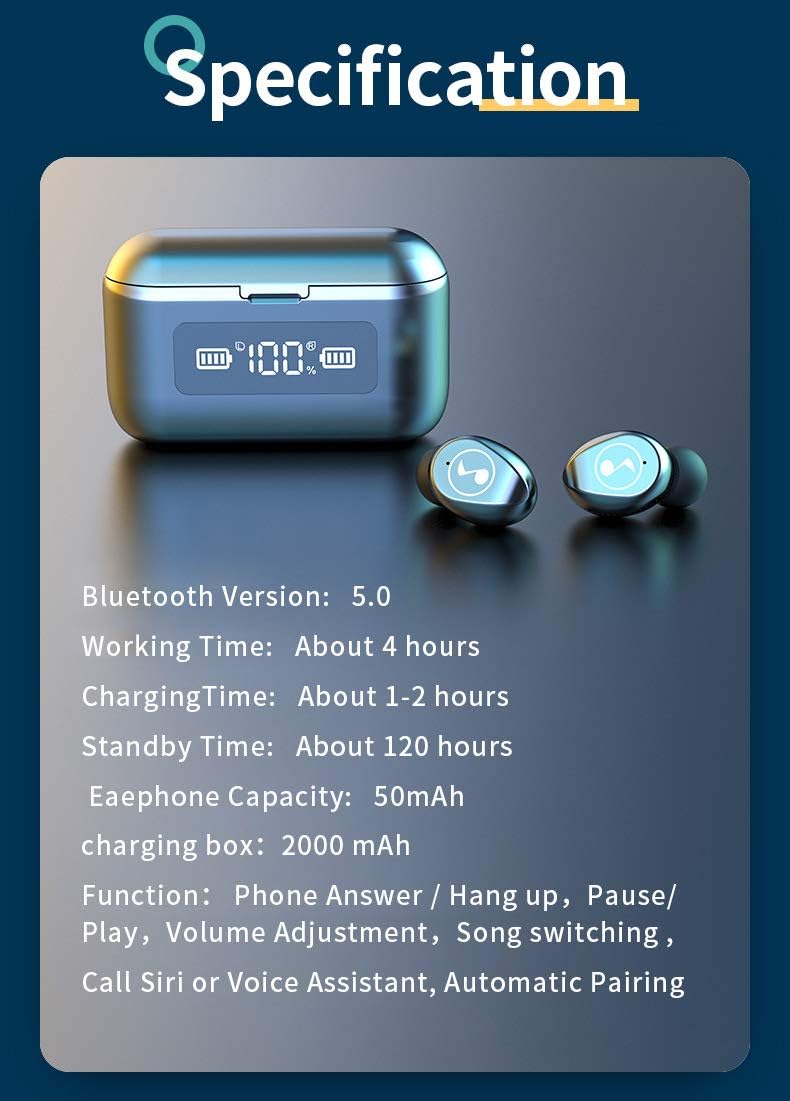
Figure 9: Visual summary of key product specifications.
| Feature | Detail |
|---|---|
| Model | True Wireless 9D HiFi Stereo Sound Earbuds |
| Connectivity | Bluetooth 5.0 |
| Earbud Battery Capacity | 50mAh (per earbud) |
| Charging Case Battery Capacity | 2000mAh |
| Earbud Playtime | Up to 5 hours (single charge) |
| Cumulative Playtime (with case) | Up to 220 hours |
| Water Resistance | IPX5 |
| Noise Cancelling | CVC 8.0 |
| Control Method | Touch Control |
| Material | Plastic |
| Color | Black |
Warranty and Support
For warranty information and customer support, please refer to the product packaging or contact the manufacturer directly. Keep your purchase receipt as proof of purchase for any warranty claims.
Manufacturer: Generic
ASIN: B09FSKF41Z
Related Documents - True Wireless 9D HiFi Stereo Sound Earbuds (B09FSKF41Z)
 |
QCY-T13 True Wireless Earbuds User Manual Comprehensive user manual for the QCY-T13 True Wireless Earbuds, covering overview, wearing instructions, pairing, LED light guide, charging, powering on/off, button controls, factory resetting, customer service, and important tips and warnings. |
 |
QCY-T13 True Wireless Earbuds User Manual This document provides a comprehensive guide to the QCY-T13 True Wireless Earbuds, covering overview, wearing instructions, pairing, LED light guide, charging, powering on/off, button controls, factory resetting, and customer service information. |
 |
Black Shark Lucifer T14 Wireless Earbuds User Manual User manual for Black Shark Lucifer T14 wireless earbuds. Features include Bluetooth 5.0, IPX5 water resistance, touch controls, long playtime, and noise cancellation. Find specifications, setup guides, and safety instructions. |
 |
TREBLAB X8 True Wireless Earbuds User Manual Comprehensive user manual for the TREBLAB X8 True Wireless Earbuds, detailing features like Active Noise Cancelling, Bluetooth 5.4, IPX5 waterproofing, 40-hour playtime, and dual ENC mics for optimal audio and comfort during sports and travel. |
 |
J52 Wireless Earbuds Instruction Manual Comprehensive instruction manual for the J52 Wireless Earbuds, covering setup, operation, troubleshooting, and specifications. Learn how to connect, use touch controls, and maintain your earbuds. |
 |
TWS Y20 Wireless Earbuds: Function Instructions & Specifications by Xawy Comprehensive guide to Xawy TWS Y20 wireless earbuds, covering setup, operation, specifications, and precautions. Learn how to pair, use touch controls, and maintain your earbuds for optimal performance. |
Ask a question about this manual
Ask about setup, troubleshooting, compatibility, parts, safety, or missing instructions. Manuals+ will review the question and use this page’s manual context to help answer it.