
Introduction
Thank you for purchasing the Sharper Image SpaStudio 8-inch Vanity Mirror. This advanced mirror is designed to enhance your beauty routine with its integrated wireless Qi charging pad, dimmable LED halo light, and versatile magnification options. Please read this manual thoroughly before use to ensure proper operation and care.
Safety Information
Please observe the following general safety warnings when handling electrical devices:
- Handle the device with care to prevent damage.
- Avoid dropping the mirror or exposing it to strong impacts.
- Keep away from water or excessive moisture.
- Do not attempt to disassemble or repair the device yourself. Refer to qualified service personnel.
- Ensure the power adapter is compatible with your local power supply.
Package Contents
- SpaStudio™ Vanity Mirror
- 10x Magnifying Mini Mirror (magnetic attachment)
- DC Power Adapter

Image: Package contents including the vanity mirror, 10x magnifying mirror, and DC adapter.
Product Features
- Wireless Qi Charging Pad: Seamlessly charge any Qi-enabled device on the built-in pad. This allows you to keep your phone propped up for easy viewing while charging.
- Dimmable LED Halo Light Ring: The adjustable, touch-controlled LED light ring provides optimal brightness for various tasks, from makeup application to skincare.
- Versatile 10X & 5X Magnification: The dual-sided mirror offers a standard view and 5X magnification. For detailed tasks, attach the magnetic 10X mini mirror.
- Catchall Storage Base: The base of the mirror features a tray for convenient storage of small items, helping to keep your vanity or countertop organized.
- Fully Adjustable: The mirror's height, tilt, and swivel can be adjusted to achieve your preferred viewing angle for comfort and effectiveness.
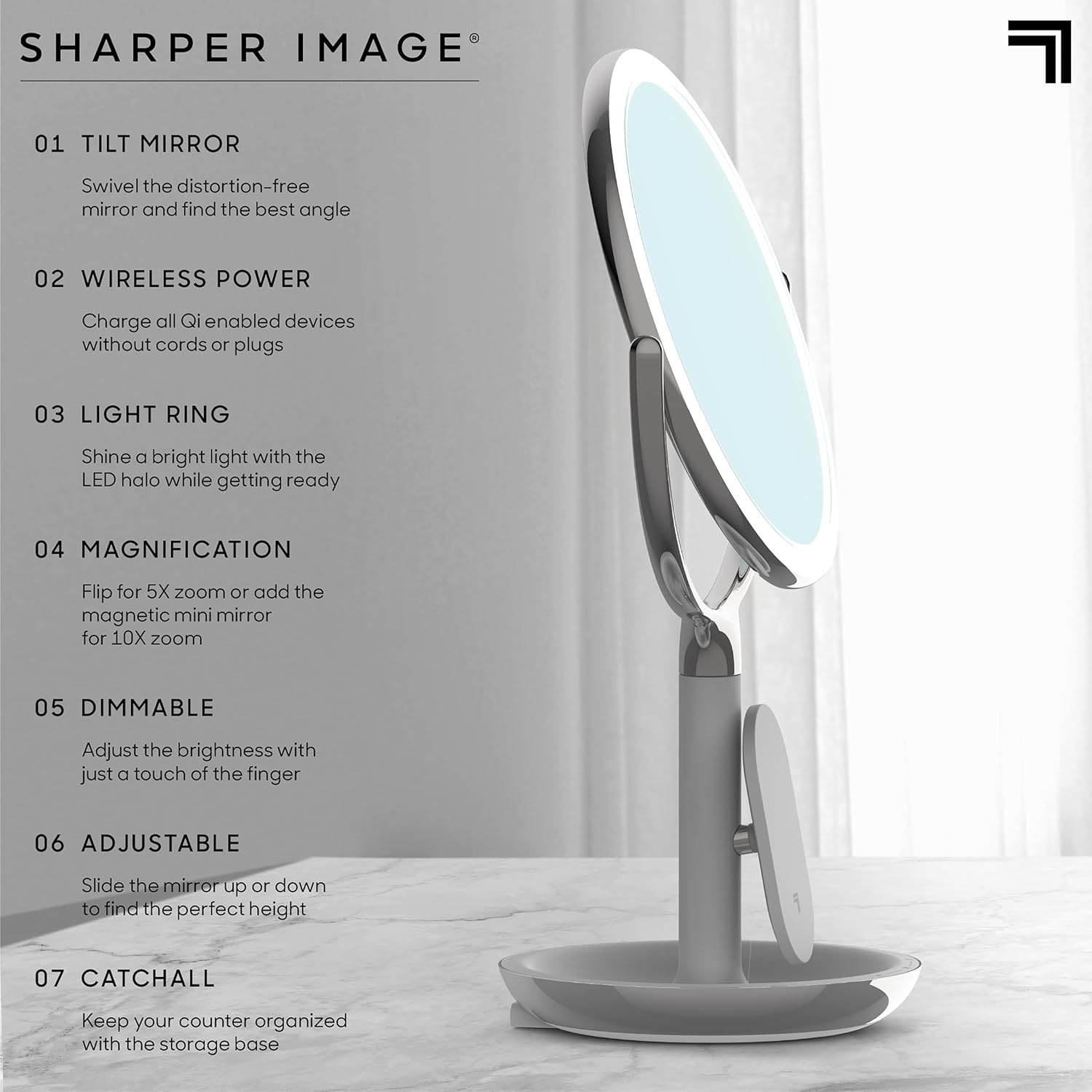
Image: Overview of the mirror's features including tilt, wireless charging, light ring, magnification, dimmable function, adjustability, and catchall base.
Setup
- Unpack: Carefully remove all components from the packaging.
- Placement: Place the mirror on a stable, flat surface.
- Power Connection: Connect the DC power adapter to the input port located on the side of the mirror base. Plug the adapter into a standard electrical outlet.

Image: The DC power input port on the mirror's base.
Operating Instructions
LED Light Operation
- Turn On/Off: Locate the touch control area on the mirror base. Tap once to turn the LED light on or off.
- Adjust Brightness: Slide your finger along the touch-sensitive bar on the base from left to right to increase brightness, or right to left to decrease brightness.

Image: Demonstrating the touch control for adjusting light brightness.
Using Magnification
- 5X Magnification: The main mirror is dual-sided. Gently rotate the mirror head 180 degrees to switch between the standard view and the 5X magnified view.
- 10X Magnification: For even closer detail, attach the included magnetic 10X mini mirror to either side of the main mirror.

Image: Attaching the 10X magnetic mini mirror.
Wireless Charging
- Place your Qi-enabled device directly onto the wireless charging pad located on the mirror's stand.
- Ensure the device is centered on the pad for optimal charging. A charging indicator on your device will confirm connection.
Video: Demonstration of the wireless charging feature on the Sharper Image SpaStudio Vanity Mirror.
Adjusting Mirror Angle
The mirror head can be tilted and swiveled to find your most comfortable and effective angle. The stand also allows for height adjustment by sliding the mirror up or down.
Maintenance
- Cleaning: To clean the mirror surface, use a soft, lint-free cloth. For stubborn spots, a small amount of glass cleaner can be applied to the cloth (not directly to the mirror). Avoid abrasive cleaners.
- Base Cleaning: Wipe the base and stand with a soft, damp cloth. Do not immerse any part of the mirror in water.
- Storage: Store the mirror in a dry, cool place when not in use.
Troubleshooting
| Problem | Possible Cause | Solution |
|---|---|---|
| LED light does not turn on. | Not plugged in; power adapter issue; touch control not activated. | Ensure the power adapter is securely plugged into the mirror and a working outlet. Tap the touch control area firmly. |
| Wireless charging is not working. | Device not Qi-enabled; device not properly aligned; foreign objects on pad. | Verify your device supports Qi wireless charging. Reposition the device to ensure it is centered on the charging pad. Remove any objects between the device and the pad. |
| Mirror does not hold its adjusted angle. | Joints may be loose. | Check for any visible screws at the pivot points and gently tighten if necessary. Avoid over-tightening. |
Specifications
- Brand: Sharper Image
- Model: SpaStudio 8” Vanity Mirror
- Shape: Round
- Product Dimensions: 15.66"L x 8"W
- Frame Material: Metal
- Mounting Type: Tabletop Mount
- Color: Silver
- Additional Features: Adjustable, Magnifying, Touch Sensor, Wireless Qi Charging
- Magnification Maximum: 10 x
- Item Weight: 1 Pounds
- UPC: 843479149012
- ASIN: B09FQZ7WP8

Image: Dimensions and key features of the mirror.
Warranty Information
For information regarding product warranty, please refer to the warranty card included with your purchase or contact Sharper Image customer support.
Customer Support
If you have any questions or require assistance with your Sharper Image SpaStudio 8-inch Vanity Mirror, please contact Sharper Image customer support through their official website or the contact information provided in your product packaging.

