
Introduction
This manual provides instructions for the ALLIMITY GB346WJSA replacement remote control, designed for use with specific Sharp Smart TV models including 4T-C60BK2UD and 4T-C70BK2UD. This remote offers standard television control functions and includes a voice control feature. Please read these instructions carefully to ensure proper setup and operation.
Setup
1. Battery Installation
The remote control requires two (2) AAA alkaline batteries (not included). Follow these steps to install them:
- Locate the battery compartment on the back of the remote control.
- Press down on the tab and slide the battery cover downwards to open it.
- Insert two AAA batteries, ensuring the positive (+) and negative (-) terminals align correctly with the markings inside the compartment.
- Slide the battery cover back into place until it clicks securely.

Image: Back view of the remote control with the battery compartment open, illustrating where to insert AAA batteries.
2. Initial Setup and Pairing
For basic functions (e.g., power, volume, channel), no programming is required. Simply insert new batteries, and the remote should operate your compatible Sharp Smart TV directly.
For the Voice Function, pairing with your Sharp Smart TV is required. The specific pairing process may vary slightly depending on your TV model. Generally, you will need to access your TV's settings menu to initiate the remote control pairing process. Refer to your Sharp Smart TV's user manual for detailed instructions on how to pair a Bluetooth remote control or activate voice control functionality.
Operating Instructions
This remote control provides access to various functions of your Sharp Smart TV. Below are some common button functions:
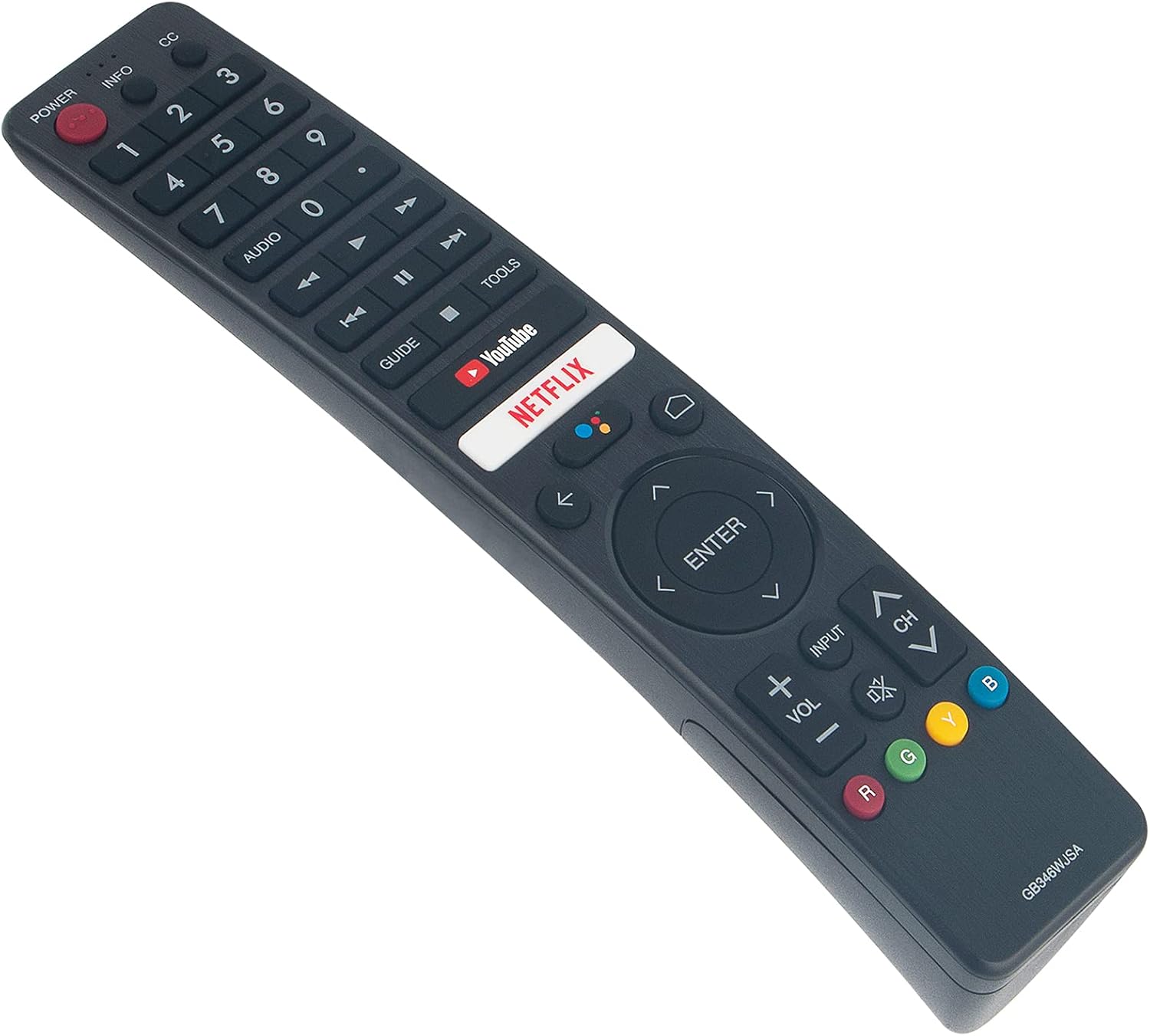
Image: Front view of the ALLIMITY GB346WJSA remote control, displaying its layout and button labels.
- POWER: Turns the TV on or off.
- INFO / CC: Displays information or activates Closed Captions.
- Number Buttons (0-9): Directly select channels.
- AUDIO: Adjusts audio settings or tracks.
- GUIDE: Accesses the electronic program guide.
- YouTube / NETFLIX: Direct access buttons for these streaming services.
- Navigation Pad (Up, Down, Left, Right, ENTER): Navigates menus and confirms selections.
- BACK / HOME: Returns to the previous screen or accesses the TV's home menu.
- INPUT: Selects input sources (HDMI, AV, etc.).
- VOL +/-: Adjusts the volume level.
- CH +/-: Changes channels.
- MUTE: Mutes or unmutes the TV audio.
- Color Buttons (R, G, Y, B): Functionality varies by application or TV menu.
Using Voice Control
Once the remote is successfully paired with your Sharp Smart TV for voice functionality, press the dedicated voice button (often indicated by a microphone icon) and speak clearly into the remote. Ensure you are within a reasonable distance from the remote and that there are no obstructions between you and the remote's microphone.
Maintenance
Battery Replacement
Replace batteries when the remote's response becomes sluggish or stops working. Always replace both batteries at the same time with new AAA alkaline batteries. Do not mix old and new batteries, or different types of batteries.
Cleaning
To clean the remote control, gently wipe it with a soft, dry cloth. Do not use liquid cleaners, sprays, or abrasive materials, as these can damage the remote's surface or internal components.
Troubleshooting
Remote Not Responding
- Check Batteries: Ensure batteries are correctly inserted and are not depleted. Replace with fresh AAA alkaline batteries if necessary.
- Line of Sight: Ensure there are no obstructions between the remote control and the TV's infrared receiver.
- TV Compatibility: Verify that your TV model is listed as compatible with the ALLIMITY GB346WJSA remote control.
Voice Function Not Working
- Pairing Status: Confirm that the remote control has been successfully paired with your Sharp Smart TV for voice functionality. This is a separate step from basic remote operation.
- TV Settings: Access your TV's settings menu to check if voice control is enabled and if the remote is properly connected. Refer to your TV's specific instructions for voice remote pairing.
- Microphone Obstruction: Ensure the microphone on the remote is not covered or obstructed.
- Distance: Speak clearly and within a reasonable distance to the remote.
Specifications
| Brand | ALLIMITY |
| Model Number | GB346WJSA |
| Compatible Devices | Sharp Smart TV (4T-C60BK2UD, 4T-C70BK2UD) |
| Connectivity Technology | Bluetooth |
| Special Feature | Voice Function, No Programming Required (for basic functions) |
| Power Source | 2 x AAA Batteries (not included) |
| Maximum Range | 10 Meters |
| Item Weight | 2 Ounces |
| Item Dimensions (L x W x H) | 6"L x 2"W x 0.5"H |
Warranty and Support
This product comes with a 30-day refund policy and a 60-day warranty from the date of purchase. For any issues or support inquiries, please contact the seller or refer to the product listing for customer service contact information.