
1. Introduction
Thank you for choosing the Midea MMDF07S2WW 0.7 cubic feet microwave oven. This manual provides essential information for the safe and efficient operation, maintenance, and troubleshooting of your appliance. Please read these instructions thoroughly before use and retain them for future reference.

Figure 1: Front view of the Midea MMDF07S2WW Microwave Oven.
2. Important Safety Instructions
When using electrical appliances, basic safety precautions should be followed, including the following:
- Read all instructions before using the appliance.
- Do not attempt to operate this oven with the door open as this can result in harmful exposure to microwave energy.
- Do not place any object between the oven front face and the oven door or allow soil or cleaner residue to accumulate on sealing surfaces.
- Do not operate the oven if it is damaged. It is particularly important that the oven door closes properly and that there is no damage to the: (1) door (bent), (2) hinges and latches (broken or loosened), (3) door seals and sealing surfaces.
- The oven should not be adjusted or repaired by anyone except properly qualified service personnel.
- Always ensure the appliance is properly grounded.
- Do not heat liquids or other foods in sealed containers since they are liable to explode.
- Never use metal utensils or containers in the microwave.
3. Setup and Installation
3.1 Unpacking
Carefully remove the microwave oven from its packaging. Remove all packing materials, including any protective film or tape. Inspect the oven for any damage. If the oven appears damaged, do not operate it and contact customer service.
3.2 Placement
Place the microwave oven on a flat, stable surface that is strong enough to hold the oven and the food you will be placing in it. Ensure there is adequate ventilation around the oven. Maintain a minimum of 4 inches (10 cm) of space on the top, back, and sides for proper airflow.
3.3 Power Connection
Plug the microwave oven into a dedicated 120V, 60Hz, AC-only electrical outlet. Do not use an extension cord or adapter. The microwave operates at 1050 watts.
4. Operating Instructions
4.1 Control Panel Overview
The control panel features a digital display, numeric keypad, and various function buttons for easy operation.
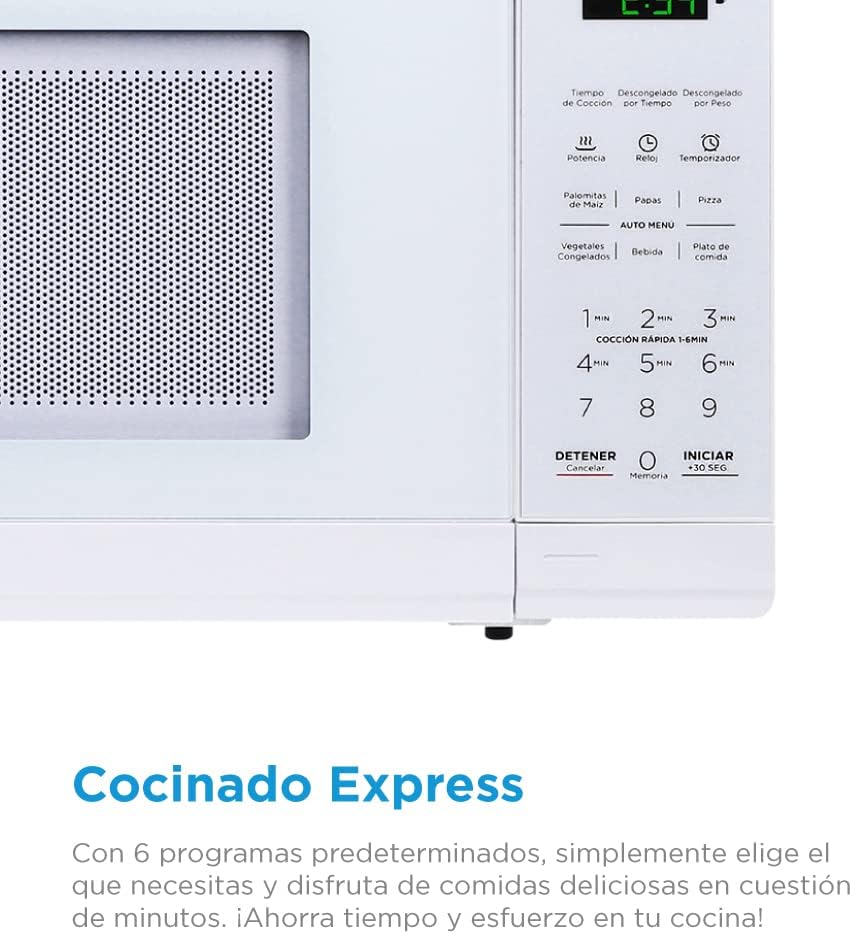
Figure 2: Detailed view of the control panel, showing various cooking and defrost options.
4.2 Time Cook
To cook food for a specific duration:
- Place food in the oven and close the door.
- Press the "Time Cook" button.
- Enter the desired cooking time using the numeric keypad.
- Press "Start" to begin cooking.
4.3 Power Levels
The microwave offers 10 power levels to suit various cooking needs, from gentle warming to rapid cooking.

Figure 3: Illustration of the 10 available power levels for precise cooking control.
To adjust the power level:
- Press the "Power" button after setting the cooking time.
- Select the desired power level (e.g., 1 for 10%, 10 for 100%) using the numeric keypad.
- Press "Start".
4.4 Defrost Options
The microwave provides options for defrosting by time or by weight, ensuring your food is thawed evenly.

Figure 4: The microwave's defrost functions, allowing for thawing by weight or time.
Follow the instructions on the control panel for "Time Defrost" or "Weight Defrost".
4.5 Quick Cook and +30 Seconds Option
For quick heating, simply press the "Start/+30 Sec" button to immediately start cooking for 30 seconds at full power. You can press it repeatedly to add more time in 30-second increments.

Figure 5: The Timer and +30 Seconds option for convenient and quick cooking.
4.6 Auto Menus
The microwave includes convenient auto menus for common foods:
- Popcorn: For perfectly popped corn.
- Potato: Ideal for baking potatoes.
- Pizza: Reheat pizza slices.
- Frozen Vegetable: Cook frozen vegetables.
- Beverage: Heat drinks.
- Dinner Plate: Reheat a full dinner plate.
Select the desired auto menu and press "Start". The oven will automatically set the appropriate cooking time and power level.
5. Maintenance and Cleaning
5.1 Cleaning the Exterior
Wipe the exterior of the oven with a damp cloth and mild soap. Avoid using abrasive cleaners or scouring pads, as they can scratch the surface. Ensure the control panel is kept dry.
5.2 Cleaning the Interior
Clean the interior cavity regularly. For stubborn food splatters, place a bowl of water with lemon slices inside and microwave for 2-3 minutes. The steam will loosen the residue, making it easier to wipe clean with a soft cloth. The glass turntable can be removed and washed with warm, soapy water.
5.3 Turntable Care
Ensure the turntable and its support ring are correctly positioned before operating the oven. Do not operate the oven without the turntable in place.
6. Troubleshooting
If you experience issues with your microwave oven, refer to the following common problems and solutions:
- Oven not starting: Check if the power cord is securely plugged in. Ensure the door is completely closed. Check for a blown fuse or tripped circuit breaker.
- Food not heating: Verify that the cooking time and power level are set correctly. Ensure the door is fully closed.
- Sparking inside the oven: Remove any metal objects or containers. Ensure the interior is clean and free of food residue.
- Turntable not rotating: Check if the turntable is correctly placed on its support. Ensure there is no obstruction preventing rotation.
If the problem persists after trying these solutions, please contact Midea customer support.
7. Specifications
| Model Number | MMDF07S2WW |
| Brand | Midea |
| Capacity | 0.7 Cubic Feet (20 L) |
| Wattage | 1050 watts |
| Voltage | 120 Volts |
| Product Dimensions | 10 x 12 x 17 inches |
| Item Weight | 23.1 pounds (10.5 Kilograms) |
| Color | White |
| Material | Stainless Steel |
| Installation Type | Freestanding |
| Controller Type | Touch |
| Special Feature | Programmable |
8. Warranty and Support
Midea offers a 2-year warranty on parts and components for this microwave oven. Additionally, the magnetron component is covered by a 6-year warranty. Please retain your proof of purchase for warranty claims.

Figure 6: Warranty information for the Midea microwave oven.
For technical support, service, or warranty inquiries, please contact Midea customer service through their official website or the contact information provided with your product documentation.


