Vieta Pro VHP-TW24LP True Wireless Earbuds User Manual
Model: VHP-TW24LP
Brand: Vieta Pro
1. Introduction
Thank you for choosing the Vieta Pro VHP-TW24LP True Wireless Earbuds. These earbuds are designed to provide a high-quality audio experience with the convenience of true wireless technology. Featuring Bluetooth 5.0, integrated microphone, IPX4 water resistance, and up to 20 hours of battery life, they are perfect for daily use, sports, and on-the-go listening.
Please read this manual carefully before using the product to ensure proper operation and to maximize your listening experience.
2. Safety Information
- Do not expose the earbuds or charging case to extreme temperatures, humidity, or corrosive substances.
- Avoid dropping, hitting, or disassembling the device.
- Keep the earbuds away from children and pets.
- Do not use the earbuds at excessively high volumes for prolonged periods to prevent hearing damage.
- Clean the earbuds and charging case with a soft, dry cloth. Do not use harsh chemicals or abrasive materials.
- The earbuds are IPX4 water-resistant, meaning they are protected against splashing water from any direction. They are not designed for submersion in water.
3. Package Contents
Ensure all items are present in the package:
- Vieta Pro VHP-TW24LP True Wireless Earbuds (Left and Right)
- Charging Case
- USB Charging Cable
- Sport Kit (cable to unite earbuds and support ear tips)
- User Manual
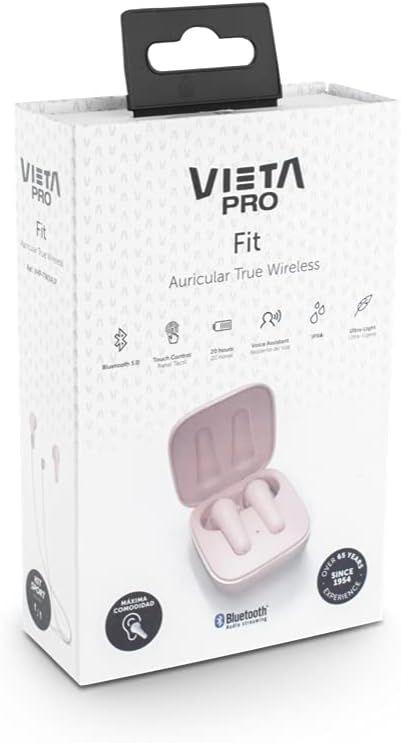
Image: The product box for the Vieta Pro VHP-TW24LP earbuds, illustrating the packaging and some included accessories.
4. Product Overview
Familiarize yourself with the components of your Vieta Pro VHP-TW24LP earbuds.

Image: A close-up view of the pink Vieta Pro VHP-TW24LP earbuds, with one earbud resting outside its open charging case, highlighting the design and color.
Earbud Components:
- Touch Control Area: For managing playback, calls, and voice assistant.
- Microphone: For calls and voice commands.
- Charging Contacts: Connects with the charging case.
- LED Indicator: Shows pairing status and battery level.
Charging Case Components:
- Earbud Charging Slots: Holds and charges the earbuds.
- Charging Indicator: Shows case battery status.
- USB Charging Port: For charging the case.
5. Setup
5.1 Initial Charging
Before first use, fully charge the earbuds and the charging case.
- Place both earbuds into the charging case.
- Connect the USB charging cable to the charging port on the case and to a power source (e.g., computer USB port, wall adapter).
- The LED indicator on the case will show charging status. Once fully charged, the indicator will change or turn off.
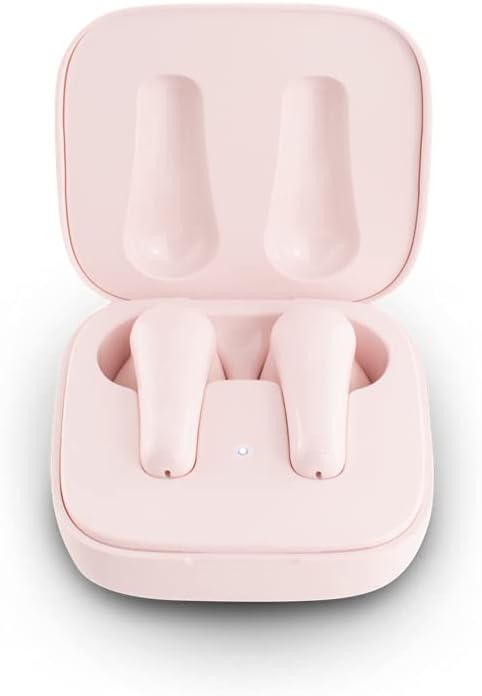
Image: The Vieta Pro VHP-TW24LP earbuds securely placed within their pink charging case, indicating they are ready for charging or storage.
5.2 Bluetooth Pairing
The earbuds feature instant connection and Dual Master technology, allowing each earbud to function independently.
- Open the charging case and take out both earbuds. They will automatically enter pairing mode.
- On your smartphone or Bluetooth-enabled device, go to the Bluetooth settings.
- Search for "VHP-TW24LP" in the list of available devices and select it to connect.
- Once connected, you will hear an audible confirmation, and the earbud LED indicators will turn off or flash slowly.
- For subsequent uses, the earbuds will automatically connect to the last paired device when taken out of the case.

Image: A woman wearing the Vieta Pro earbuds, smiling and looking at her smartphone, demonstrating the ease of connection and use.
6. Operating Instructions
The VHP-TW24LP earbuds feature intuitive touch controls for various functions.
6.1 Power On/Off
- Power On: Take the earbuds out of the charging case. They will power on automatically.
- Power Off: Place the earbuds back into the charging case. They will power off and begin charging automatically.
6.2 Music Playback
- Play/Pause: Tap the touch control area on either earbud once.
- Next Track: Double-tap the touch control area on the right earbud.
- Previous Track: Double-tap the touch control area on the left earbud.
- Volume Up: Triple-tap the touch control area on the right earbud.
- Volume Down: Triple-tap the touch control area on the left earbud.
6.3 Call Management
- Answer/End Call: Tap the touch control area on either earbud once.
- Reject Call: Press and hold the touch control area on either earbud for 2 seconds.
6.4 Voice Assistant
- Activate Voice Assistant: Press and hold the touch control area on either earbud for 3 seconds.
6.5 Sport Kit Usage
The included sport kit allows you to connect the two earbuds with a cable for added security during physical activity.
- Attach the provided cable to the designated slots on each earbud.
- Use the additional ear tips for a more secure fit if needed.

Image: The pink Vieta Pro earbuds connected by their sport kit cable, demonstrating how they can be worn around the neck for secure active use.
7. Maintenance
7.1 Cleaning
- Regularly clean the earbuds and charging case with a soft, lint-free cloth.
- For stubborn dirt, slightly dampen the cloth with water. Do not use excessive liquid.
- Ensure charging contacts are clean and dry before placing earbuds in the case.
7.2 Storage
- When not in use, store the earbuds in their charging case to protect them and keep them charged.
- Store the device in a cool, dry place, away from direct sunlight and extreme temperatures.
7.3 Water Resistance (IPX4)
The VHP-TW24LP earbuds are rated IPX4, offering protection against splashing water. This makes them suitable for workouts and light rain.
- Do not submerge the earbuds in water.
- Do not expose them to running water (e.g., shower, faucet).
- Dry the earbuds thoroughly before placing them back in the charging case if they get wet.
8. Troubleshooting
| Problem | Possible Cause | Solution |
|---|---|---|
| Earbuds not pairing with device. | Bluetooth is off on device; earbuds not in pairing mode; interference. | Ensure Bluetooth is enabled. Place earbuds back in case, then take them out to re-enter pairing mode. Move closer to the device. |
| Only one earbud playing sound. | One earbud not connected; low battery on one earbud. | Place both earbuds back in the case, close it, then open and take them out again. Ensure both are charged. |
| Earbuds not charging. | Charging contacts dirty; cable faulty; power source issue. | Clean charging contacts on earbuds and case. Try a different USB cable or power source. Ensure earbuds are correctly seated in the case. |
| Low volume or poor sound quality. | Earbuds dirty; incorrect fit; device volume too low. | Clean earbud mesh. Adjust earbud position for a better seal. Increase volume on both earbuds and connected device. |
9. Specifications
| Feature | Detail |
|---|---|
| Model | VHP-TW24LP |
| Connectivity Technology | Wireless (Bluetooth 5.0) |
| Battery Life (Earbuds + Case) | Up to 20 hours |
| Water Resistance Rating | IPX4 (Splash resistant) |
| Control Type | Touch Control |
| Microphone | Integrated |
| Material | Plastic and Silicone |
| Frequency Range | 20 Hz - 20,000 Hz |
| Weight | 180 g (Product) |
| Compatible Devices | Tablets, Laptops, Desktop Computers, Smart Speakers, Game Consoles |
10. Warranty and Support
Vieta Pro products are manufactured to the highest quality standards. For information regarding warranty coverage and terms, please refer to the warranty card included in your product packaging or visit the official Vieta Pro website.
If you encounter any issues or have questions not covered in this manual, please contact Vieta Pro customer support:
- Online Support: Visit the Vieta Pro Brand Store on Amazon for FAQs and contact options.
- Manufacturer: FRAMASON AUDIO SA
This manual is for informational purposes only. Specifications are subject to change without notice.