
OLIGHT O-SWIVEL-BK#US-FBA
OLIGHT Swivel 400 Lumens LED Compact Rechargeable Magnetic COB Work Light
Model: O-SWIVEL-BK#US-FBA | Brand: OLIGHT
Product Overview
The OLIGHT Swivel is a versatile and durable work light designed for various applications, from job sites to camping. It features a super bright COB LED, a heavy-grip magnetic base, and a convenient hanging hook, offering multiple hands-free lighting options. Its robust ABS body ensures durability and IPX4 water resistance.
- Super Bright COB Light: Max 400 Lumens COB LED magnetic work light with built-in battery.
- Heavy-grip Magnetic Base: Three strong magnets inside the stand can firmly attach onto any iron surfaces.
- Rechargeable and Max Runtime: Built-in rechargeable battery, can be fully charged in 3.7 hours via a Type-C port, and ensuring a max runtime of 90 hours.
- Reveal itself in the Darkness: Glow-in-the-dark Strip around the panel, allows you to quickly locate the swivel in the dark.
- Hard and Waterproof: Sturdy ABS body with IPX4 waterproof, withstands corrosion, heat, impact and water splash easily.

Figure 1: OLIGHT Swivel Work Light in its compact, folded position.
Setup
Before first use, ensure the OLIGHT Swivel is fully charged. The device comes with a built-in rechargeable battery.
- Initial Charge: Connect the provided USB Type-C charging cable to the charging port on the side of the Swivel. Plug the other end into a compatible USB power source (e.g., wall adapter, power bank, computer USB port).
- Charging Indicator: The battery level indicator lights will illuminate during charging. All four lights will be solid blue when fully charged. A full charge typically takes approximately 3.7 hours.
- Unfold Stand: Gently unfold the adjustable stand from the main body of the light to position it as desired. The stand features firm detents to hold its position.

Figure 2: The OLIGHT Swivel with its USB Type-C charging port and battery level indicators visible.
Operating Instructions
The OLIGHT Swivel offers multiple lighting modes and versatile positioning options.
Power On/Off and Mode Selection:
- COB Floodlight: Press the power button once to activate the COB floodlight. Subsequent presses will cycle through brightness levels (e.g., Medium, High, Low).
- Flashlight (Spotlight): While the COB floodlight is on, press and hold the power button to switch to the flashlight mode. Release and press again to cycle through its brightness settings.
- Power Off: To turn off the light, cycle through all modes until the light turns off, or press and hold the power button for approximately 1 second when the light has been in a mode for more than 3 seconds.
Positioning and Mounting:
- Adjustable Stand: The integrated stand can be rotated 180 degrees to direct the light precisely where needed. It features strong detents to maintain the chosen angle.
- Magnetic Base: The stand incorporates three strong neodymium magnets, allowing the Swivel to be securely attached to any ferrous metal surface for hands-free operation.
- Hanging Hook: The stand also functions as a clip-style hook, enabling the light to be hung from various objects like backpacks, tents, branches, or wires.
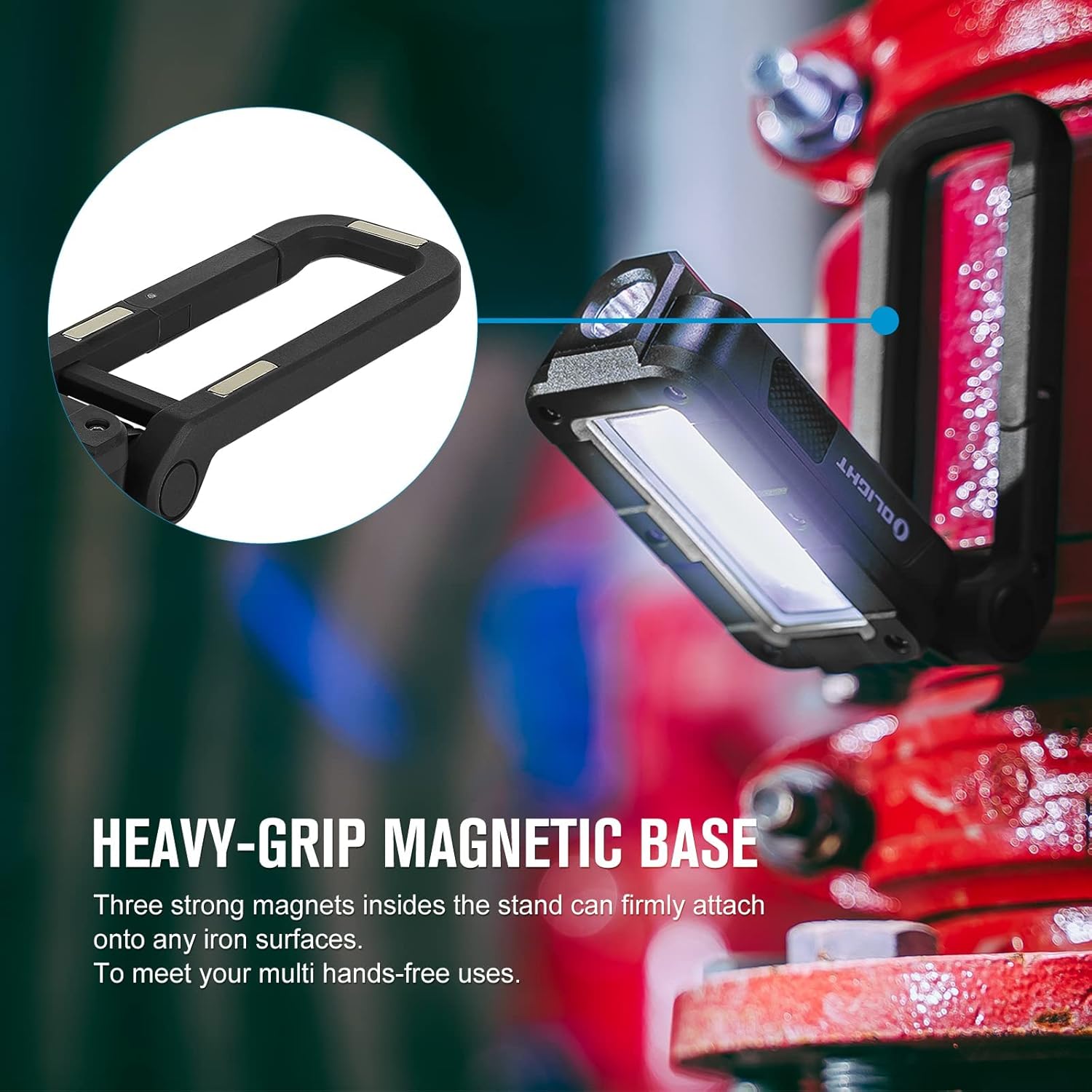
Figure 3: The strong magnetic base allows the Swivel to be mounted on metal surfaces, providing hands-free illumination.

Figure 4: The versatile clip-style hook enables easy hanging from tents, branches, or backpacks.
Video 1: Official product video demonstrating the OLIGHT Swivel Work Light's features, including its magnetic base and adjustable stand.
Maintenance
Proper maintenance ensures the longevity and optimal performance of your OLIGHT Swivel.
- Cleaning: Wipe the light with a soft, damp cloth to remove dirt or debris. Avoid using abrasive cleaners or solvents that could damage the ABS body or lens.
- Battery Care: Recharge the battery regularly, even if the light is not in frequent use, to maintain battery health. Avoid fully depleting the battery for extended periods.
- Storage: Store the light in a cool, dry place away from direct sunlight and extreme temperatures.
- Water Resistance: While IPX4 water resistant, avoid submerging the light in water. Ensure the USB-C port cover is securely closed to prevent water ingress.

Figure 5: The IPX4 water resistance protects the light from splashes, but it should not be submerged.
Troubleshooting
If you encounter issues with your OLIGHT Swivel, refer to the following common problems and solutions:
| Problem | Possible Cause | Solution |
|---|---|---|
| Light does not turn on. | Low battery; Power button not pressed correctly. | Charge the battery fully. Ensure the power button is pressed firmly. |
| Light output is dim. | Low battery; Incorrect brightness setting. | Recharge the battery. Cycle through brightness settings to select a higher level. |
| Light does not hold position. | Stand detents worn; Excessive weight on hook/magnet. | Ensure the stand is locked into a detent. Reduce load if hanging. If detents are worn, contact support. |
| Charging issue. | Faulty cable/adapter; Dirty charging port. | Try a different USB-C cable and power adapter. Clean the charging port gently. |
Specifications
| Feature | Detail |
|---|---|
| Brand | OLIGHT |
| Model Number | O-SWIVEL-BK#US-FBA |
| Light Source Type | COB LED, Light Emitting Diode |
| Brightness | 400 lumens (Max) |
| Power Source | Battery Powered (1 Lithium Ion battery included) |
| Battery Description | Customized Rechargeable Battery |
| Voltage | 3.7 Volts |
| Charging Port | USB Type-C |
| Max Runtime | 90 hours |
| Material | Acrylonitrile Butadiene Styrene (ABS) |
| Water Resistance | IPX4 |
| Product Dimensions | 4.84"L x 2.01"W x 1.38"H |
| Item Weight | 9.1 ounces (0.26 Kilograms) |
Warranty and Support
OLIGHT offers a comprehensive warranty for the Swivel work light.
- Warranty: Lifetime warranty for products purchased after January 1st, 2023.
- Protection Plans: Additional protection plans may be available for purchase, such as a 4-Year Protection Plan or Complete Protect. Please refer to your purchase details for eligibility and terms.
- User Manual (PDF): For a detailed PDF version of the user manual, please refer to the official document provided at https://manuals.plus/m/267baa4364ab4b83b5dd2544449a537c0e1aa835b4c62c78284c2113748b210b.
- Contact Support: For any further assistance, technical support, or warranty claims, please visit the official OLIGHT website or contact their customer service directly.
Related documentsO-SWIVEL-BK#US-FBA


Ask a question about this manual
Ask about setup, troubleshooting, compatibility, parts, safety, or missing instructions. Manuals+ will review the question and use this page’s manual context to help answer it.