
Introduction
This manual provides comprehensive instructions for the safe and efficient operation, installation, and maintenance of your Candy CS4 1172DE/1-S washing machine. Please read this manual carefully before using the appliance and keep it for future reference.

Image: Front view of the Candy CS4 1172DE/1-S washing machine, showing the control panel, detergent drawer, and large front-loading door.
Important Safety Information
Always follow basic safety precautions when using electrical appliances to reduce the risk of fire, electric shock, and injury to persons.
- Ensure the appliance is properly grounded.
- Do not allow children to play on or in the appliance.
- Unplug the appliance before cleaning or performing maintenance.
- Do not install or store the appliance where it will be exposed to the weather.
Setup and Installation
Unpacking
Carefully remove all packaging materials. Inspect the appliance for any damage. Keep packaging materials out of reach of children.
Removing Transit Bolts
Before using the washing machine, it is essential to remove all transit bolts located at the rear of the appliance. Failure to do so will cause damage during operation.
- Locate the transit bolts on the back of the machine.
- Use a wrench to loosen and remove each bolt.
- Insert the plastic caps provided into the holes.
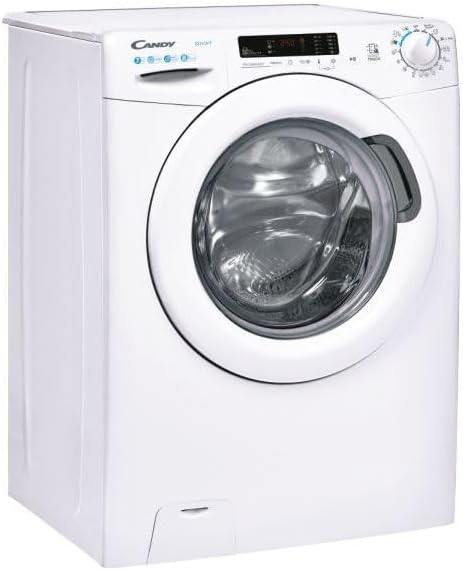
Image: Side view of the Candy CS4 1172DE/1-S washing machine, showing its compact design.
Positioning and Leveling
Place the washing machine on a firm, level floor. Adjust the leveling feet to ensure the appliance is stable and does not wobble.
Water and Electrical Connections
Connect the water inlet hose to a cold water tap. Ensure the drain hose is properly installed into a standpipe or sink. Plug the power cord into a grounded electrical outlet.
Operating Instructions
Control Panel Overview
The control panel features a program selector dial, a digital display, and various function buttons.

Image: Angled view of the Candy CS4 1172DE/1-S washing machine, highlighting the control panel and detergent drawer.
Loading Laundry
Open the door and load laundry, ensuring not to overload the drum. Close the door firmly.
Adding Detergent
Pull out the detergent drawer and add the appropriate amount of detergent and fabric softener to the designated compartments.
Selecting a Program
Turn the program selector dial to choose the desired wash program based on fabric type and soil level.
Starting a Wash Cycle
Press the Start/Pause button to begin the selected wash program.
Maintenance and Cleaning
Cleaning the Detergent Drawer
Regularly clean the detergent drawer to prevent residue buildup. Remove the drawer and rinse it under running water.
Cleaning the Drum
Run a maintenance wash cycle (e.g., a hot wash with no laundry and a descaling agent) periodically to clean the drum and remove odors.
Cleaning the Drain Filter
The drain filter should be cleaned regularly to ensure proper drainage and prevent blockages.
- Open the filter cover at the bottom front of the machine.
- Place a shallow container to collect any residual water.
- Unscrew the filter counter-clockwise and remove it.
- Clean the filter under running water and remove any debris.
- Reinsert the filter and screw it clockwise until tight. Close the cover.
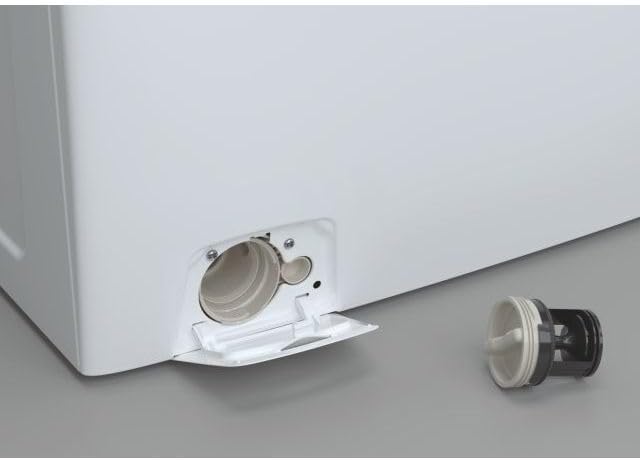
Image: Close-up view of the washing machine's drain filter compartment, showing the filter removed for cleaning.
Care for the Door Seal
Wipe the door seal after each wash to prevent mold and mildew buildup.
Troubleshooting
Before contacting service, refer to the following table for common issues and their solutions.
| Problem | Possible Cause | Solution |
|---|---|---|
| Machine does not start | No power; Door not closed; Program not selected. | Check power supply; Ensure door is firmly closed; Select a program and press Start. |
| Water not filling | Water tap closed; Inlet hose kinked; Water pressure too low. | Open water tap; Straighten hose; Check household water pressure. |
| Machine vibrating excessively | Transit bolts not removed; Machine not level; Uneven load. | Remove transit bolts; Adjust leveling feet; Redistribute laundry. |
| Water not draining | Drain hose kinked; Drain filter blocked; Pump fault. | Straighten hose; Clean drain filter; Contact service if problem persists. |
Technical Specifications
Below are the key technical specifications for the Candy CS4 1172DE/1-S washing machine.
- Brand: Candy
- Model: CS4 1172DE/1-S
- Capacity: 7 Kilograms
- Maximum Rotational Speed: 1100 RPM
- Energy Efficiency Class: D
- Annual Energy Consumption: 69 Kilowatt Hours
- Noise Level (Spin): 79 dB
- Installation Type: Freestanding
- Access Location: Front-loading
- Product Dimensions (LxWxH): 50 x 50 x 28 cm (Note: The provided dimensions seem unusually small for a washing machine. Standard dimensions are typically around 60x60x85 cm. Please refer to the product label for exact dimensions.)
- Weight: 61 kg
- Voltage: 220 Volts
- Colour: White

Image: Energy label for the Candy CS4 1172DE/1-S washing machine, detailing energy efficiency, capacity, and noise levels.
Warranty and Support
This product comes with a manufacturer's warranty. For detailed warranty terms and conditions, please refer to the warranty card included with your appliance or visit the official Candy website.
For technical assistance, spare parts, or to schedule a service appointment, please contact Candy customer support. Have your model number (CS4 1172DE/1-S) and serial number ready when contacting support.
Manufacturer: Candy
Minimum guarantee offered by the provider: 24 months
Online Information: For more information, including the product information sheet, you can visit the supplier's website. A link to the information provided by the supplier can be found at https://corporate.haier-europe.com/en/.


