
Indesit MTWE-71252WGCC
Indesit Mytime 7Kg Front Load Washing Machine User Manual
Model: MTWE-71252WGCC
Introduction
This manual provides essential information for the safe and efficient operation, installation, and maintenance of your Indesit Mytime 7Kg Front Load Washing Machine, model MTWE-71252WGCC. Please read these instructions carefully before using the appliance and retain them for future reference.

Figure 1: Indesit Mytime 7Kg Front Load Washing Machine (MTWE-71252WGCC)
This image displays the full front view of the Indesit Mytime 7Kg Front Load Washing Machine. It is white with a large circular door for loading laundry and a control panel at the top. The control panel features a central program selection knob and a digital display to the right.
Safety Information
Always follow basic safety precautions when using electrical appliances to reduce the risk of fire, electric shock, and injury to persons.
- Ensure the appliance is properly grounded.
- Do not allow children to play on or in the appliance.
- Unplug the appliance before cleaning or performing any maintenance.
- Do not install or store the appliance where it will be exposed to the weather.
- Do not wash articles that have been previously cleaned in, washed in, soaked in, or spotted with gasoline, dry-cleaning solvents, or other flammable or explosive substances.
Setup and Installation
Unpacking
Carefully remove all packaging materials. Ensure all components are present and undamaged. Retain packaging for future transport if needed.
Location
Place the washing machine on a firm, level floor. Avoid direct sunlight or extreme temperatures. Ensure adequate ventilation around the appliance.

Figure 2: Example installation in a laundry area
This image shows the Indesit washing machine placed in a dedicated laundry space, demonstrating typical installation within cabinetry. It highlights the compact design suitable for various home environments.
Connecting Water and Drain Hoses
Connect the water inlet hose to a cold water tap. Ensure connections are tight to prevent leaks. Position the drain hose securely into a standpipe or sink, ensuring it is not kinked.

Figure 3: Rear connections for water and drain
This image provides a view of the back of the washing machine, clearly showing the grey corrugated drain hose and the white water inlet hose connected to the appliance. This illustrates the typical setup for water supply and drainage.
Electrical Connection
Plug the power cord into a grounded electrical outlet. Do not use extension cords or adapters. Refer to the specifications section for power requirements.
Operating Instructions
Control Panel Overview

Figure 4: Control Panel
This image shows a detailed view of the washing machine's control panel. It features a large central knob for program selection, labeled with various wash cycles, and a digital display to the right with touch-sensitive buttons for additional functions like temperature, spin speed, and delay start.
Loading Laundry
Open the door and load laundry into the drum. Do not overload the machine; ensure there is enough space for clothes to tumble freely. The machine has a 7kg capacity.

Figure 5: Open Drum View
This image displays the washing machine with its front-loading door open, revealing the stainless steel drum inside. The drum features numerous perforations for water circulation during the wash cycle.
Adding Detergent
Pull out the detergent dispenser drawer. Add appropriate amounts of detergent, fabric softener, and pre-wash agents to the designated compartments.

Figure 6: Detergent Dispenser
This image shows the detergent dispenser drawer of the washing machine pulled open. The drawer has clearly marked compartments for main wash detergent, pre-wash detergent, and fabric softener, along with a guide to various wash programs.
Selecting a Program
Turn the program selection knob to choose one of the 16 available washing programs. Common programs include:
- Fast Cycles: Mixed, Cotton 60°, Cotton 40°, Wool, Express
- Traditional Cycles: Synthetics, Silk & Delicates, Whites, Sport, Cotton, Synthetics, Rinse + Spin, Spin + Drain, Eco Cotton, 20°C
Adjusting Options
Use the buttons on the digital display to adjust options such as temperature, spin speed, and delay start. The machine features a Child Lock function for safety.

Figure 7: Digital Display and Program Knob
This image provides a close-up of the washing machine's control knob and digital display. The knob allows selection of various wash programs, while the display shows selected options and status indicators. Buttons around the display control functions like temperature, spin, and special features.
Starting a Wash Cycle
Press the "Start/Pause" button to begin the selected wash cycle.
Maintenance and Care
Cleaning the Detergent Dispenser
Regularly clean the detergent dispenser drawer to prevent residue buildup. Remove the drawer and rinse it under running water.
Cleaning the Drum
The machine features an Auto-clean cycle. Run this cycle periodically to maintain drum hygiene and prevent odors.
Cleaning the Drain Filter
Periodically check and clean the drain filter, located at the bottom front of the machine, to ensure proper drainage and prevent blockages.
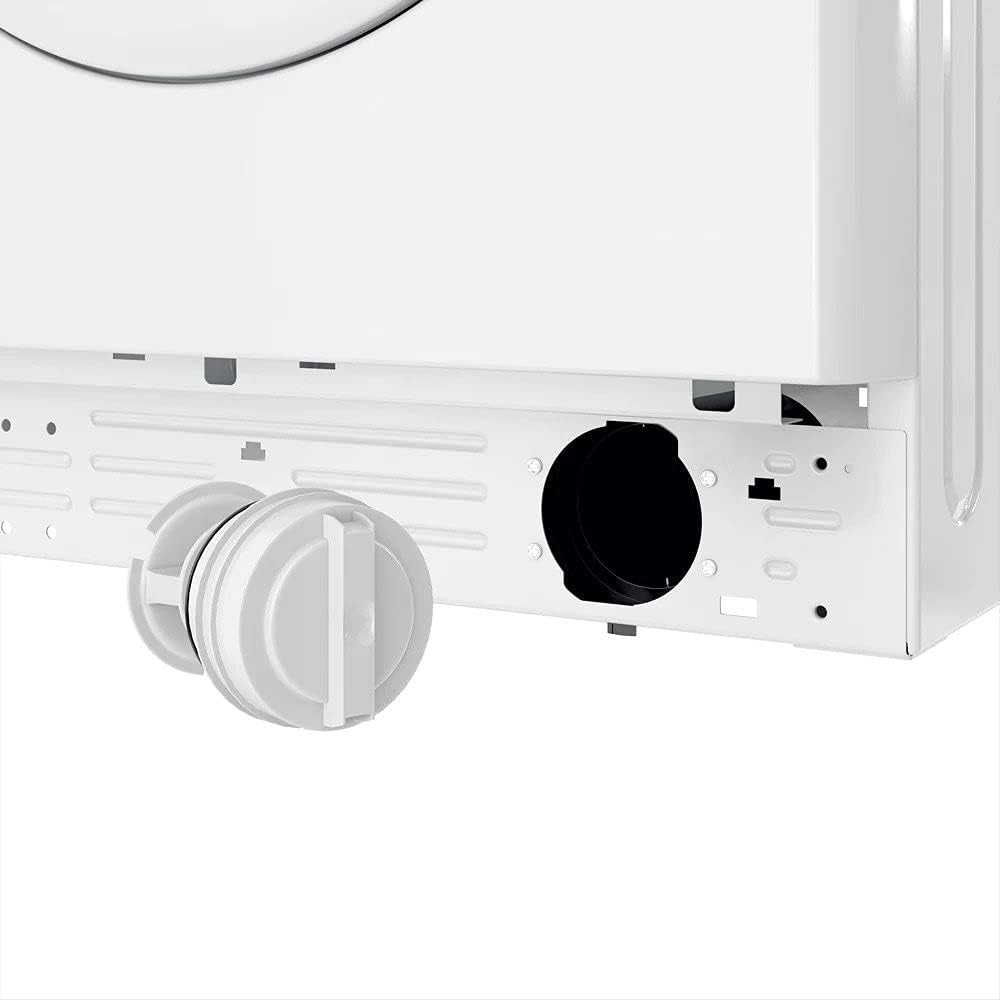
Figure 8: Drain Filter Access
This image shows the lower front section of the washing machine with the drain filter cap unscrewed and partially removed, indicating the access point for cleaning the filter. This is a crucial maintenance step to prevent blockages.
Exterior Cleaning
Wipe the exterior surfaces with a soft, damp cloth. Do not use abrasive cleaners or solvents.
Troubleshooting
| Problem | Possible Cause | Solution |
|---|---|---|
| Machine does not start | Power cord unplugged; Door not closed properly; Program not selected. | Check power connection; Ensure door is securely latched; Select a wash program and press Start. |
| Water not filling | Water tap closed; Inlet hose kinked; Water pressure too low. | Open water tap; Straighten hose; Check household water pressure. |
| Machine not draining | Drain hose kinked or blocked; Drain filter clogged. | Straighten drain hose; Clean drain filter. |
| Excessive vibration/noise | Machine not level; Transit bolts not removed; Uneven load. | Adjust leveling feet; Ensure transit bolts are removed (during installation); Redistribute laundry inside drum. |
For issues not listed here, please contact customer support.
Specifications
- Brand: Indesit
- Model: MTWE-71252WGCC
- Capacity: 7 Kilograms
- Max Spin Speed: 1200 RPM
- Noise Level: 76 dB
- Installation Type: Freestanding
- Product Dimensions (D x W x H): 54 x 59.5 x 85 cm
- Item Weight: 66.5 Kilograms
- Control Console: Knob
- Access Location: Front Load
- Special Features: Child Lock, Water Balance Plus, Auto-clean cycle, Cotton 40, Delay Start
- Number of Programs: 16
- Color: White
- Material Type: Plastic
- Included Components: Main unit
- Date First Available: 7 September 2021
Warranty and Support
This Indesit appliance comes with a standard manufacturer's warranty. Please refer to the warranty card included with your purchase for specific terms and conditions, including warranty duration and coverage details.
For technical assistance, spare parts, or to schedule a service appointment, please contact Indesit customer support. Contact details can typically be found on the Indesit official website or in the documentation provided with your appliance.
Extended warranty options may be available from third-party providers. For example, 1-Year and 2-Year Extended Warranties by Salama Care are mentioned as available for this product.
Important Notes
No official product videos from the seller were available in the provided data to be embedded in this manual.
Related documentsMTWE-71252WGCC


Ask a question about this manual
Ask about setup, troubleshooting, compatibility, parts, safety, or missing instructions. Manuals+ will review the question and use this page’s manual context to help answer it.