Introduction
This manual provides comprehensive instructions for the Treedix Type C USB LiPo Battery Charger Board. This compact board is designed for charging 3.7V/4.2V single Lithium-Ion and Lithium-Polymer batteries, featuring a Type C USB input, JST socket for battery connection, an LED charge indicator, and automatic power-down upon full charge. Please read this manual carefully before use to ensure proper operation and safety.
Product Overview
The Treedix Type C USB LiPo Battery Charger Board integrates the MCP73831T-2ACI/OT battery charge controller IC, providing reliable and efficient charging for compatible batteries. Its small form factor makes it suitable for various electronic projects and applications.
- Input Connector: Type C USB
- Battery Connector: JST Socket
- Charge Controller IC: MCP73831T-2ACI/OT
- Indicator: LED for charging status
- Safety Features: Automatic power-down when battery is fully charged
- Compatibility: 3.7V/4.2V single Lithium-Ion/Lithium-Polymer batteries

Image: Two Treedix Type C USB LiPo Battery Charger Boards, each with a JST cable attached, showcasing the compact design and connectors.

Image: Back view of a single Treedix LiPo Charger Basic board, showing the circuit board and branding.
Specifications
| Feature | Specification |
|---|---|
| Input Voltage | DC 5V (via Type C USB) |
| Output Voltage | 4.2V (for 3.7V/4.2V LiPo/Li-Ion) |
| Default Charging Rate | 500mA |
| Dimensions | 21.5mm x 20.5mm (0.85in x 0.81in) |
| Thermal Regulation Range | -40°C to +85°C |
| Battery Type | Single Cell 3.7V/4.2V Lithium-Ion/Lithium-Polymer |
| Weight | Approximately 0.81 ounces (0.02 kg) |

Image: A diagram illustrating the physical dimensions of the charger board, measuring approximately 0.67 inches by 1.1 inches.
Safety Information
Adhering to safety guidelines is crucial when working with LiPo/Li-Ion batteries and charging circuits. Failure to follow these instructions can result in damage to the charger, battery, or personal injury.
- Correct Polarity: Always ensure the battery is connected with the correct polarity. The red wire of your battery's JST connector should align with the '+' terminal on the charger board, and the black wire with the '-' terminal. Incorrect polarity will immediately damage the charger board.
- Battery Compatibility: Only use this charger board with single-cell 3.7V/4.2V Lithium-Ion or Lithium-Polymer batteries. Do not attempt to charge other battery types.
- Charging Environment: Charge batteries in a fire-safe area, away from flammable materials. Monitor the charging process.
- Current Limits: The default charging rate is 500mA. Charging a battery with a current exceeding its specified maximum charging current can reduce battery life or cause damage.
- Physical Damage: Do not use the charger board if it appears physically damaged.
- Thermal Considerations: The board may become warm during charging. Ensure adequate ventilation.
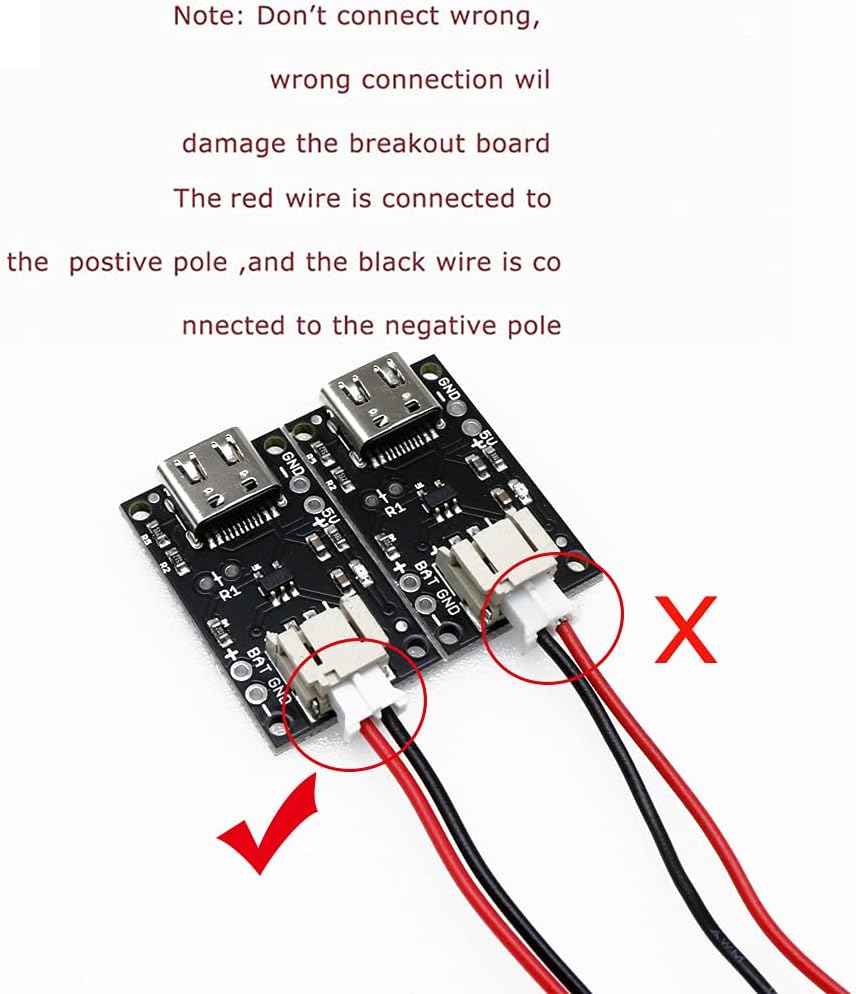
Image: A visual guide demonstrating the correct (green checkmark) and incorrect (red X) ways to connect a JST battery to the charger board, emphasizing proper polarity.
Setup
- Connect Power Source: Plug a Type C USB cable into the USB port on the charger board. Connect the other end of the cable to a 5V USB power source (e.g., a computer USB port, a USB wall adapter).
- Connect Battery: Carefully connect your 3.7V/4.2V Lithium-Ion or Lithium-Polymer battery to the JST socket on the charger board. Ensure the polarity is correct: the red wire of the battery's JST connector should connect to the '+' terminal on the board, and the black wire to the '-' terminal. Refer to the safety information and the provided image for correct connection.
- Verify Connection: Once the battery is connected, the LED indicator on the board should illuminate, indicating that charging has begun.
Operating Instructions
The Treedix charger board operates automatically once connected.
- Charging Indication: When the battery is charging, the onboard LED indicator will be lit.
- Full Charge Indication: When the battery is fully charged, the LED indicator will automatically turn off. The board will then cease charging to prevent overcharging.
- Monitoring: While the board has automatic protection, it is good practice to periodically monitor the charging process, especially for new batteries or setups.

Image: A close-up view of the charger board highlighting the red LED indicator, which illuminates when the battery is actively charging and turns off when fully charged.
Charging Rate Adjustment
The default charging rate of this board is 500mA. For some batteries, a lower charging current may be desired to extend battery life or match specific battery specifications. The charging current can be adjusted by modifying the resistor at position R1 on the board.
- Default Setting: The 500mA current is set by a 2K resistor (marked '202') on the board.
- Modification Procedure: To lower the charge current, you must cut the existing trace at R1 and replace the surface mount resistor with a higher resistance value, or add an external resistor. This modification requires advanced soldering skills and knowledge of electronics.
- Resistor Calculation: The approximate value for the total resistance (R_total) needed to achieve a desired charging current (I_charge in mA) can be calculated using the formula: R_total (Ohms) = 1000 / I_charge (mA). If replacing the existing resistor, the new resistor value should be R_total. If adding an external resistor in series, the value would be R_total - 2000 (Ohms).
- Caution: Incorrect modification can permanently damage the charger board. Proceed with caution and only if you possess the necessary expertise.
Maintenance
The Treedix charger board requires minimal maintenance.
- Cleaning: Keep the board clean and free from dust and debris. Use a soft, dry cloth for cleaning. Avoid liquids.
- Storage: Store the board in a dry, cool environment when not in use.
- Inspection: Periodically inspect the board for any signs of physical damage or loose connections.
Troubleshooting
| Problem | Possible Cause | Solution |
|---|---|---|
| LED indicator does not light up when connected. | No power input, faulty USB cable, incorrect battery connection, or fully charged battery. |
|
| Board gets excessively hot or emits smoke/burning smell. | Incorrect battery polarity, short circuit, or incompatible battery. |
|
| Battery does not charge or charges slowly. | Loose connection, faulty battery, or insufficient power source. |
|
Warranty and Support
For warranty information or technical support, please refer to the retailer or manufacturer's official website. Keep your purchase receipt for any warranty claims.
Manufacturer: Treedix
ASIN: B09FJJBLQ1


