
1. Introduction
The LiitoKala Lii-PD4 is a versatile 4-bay universal battery charger designed to intelligently charge a wide range of rechargeable batteries. It features an intuitive LCD digital display that provides real-time charging information, ensuring safe and efficient power management for your devices. This manual provides essential information for the proper setup, operation, and maintenance of your charger.

Figure 1: LiitoKala Lii-PD4 Universal Battery Charger with included power cable.
2. Safety Information
Please read this manual thoroughly before using the charger to ensure safe operation and prevent damage to the device or batteries.
- Always pay special attention to the recommended charge current for your specific battery type. Avoid charging batteries beyond their recommended current limit.
- If using DC input, only a 12V 1A adapter is recommended.
- Be mindful of potential heating during the charging process. Ensure adequate ventilation around the charger.
- After charging is complete, remove the charger from the power source and promptly remove the batteries from the charger.
- This charger is designed for indoor use only. Do not expose it to water or high humidity.
- The charger includes multi-safety protection functions against over-charge, over-discharge, short circuit, and polarity reversal. It can smartly identify broken batteries for enhanced safety.
3. Product Features
- Wide Compatibility: Supports Li-ion / IMR / LiFePO4 (26650, 20700, 18650, 18490, 18350, 17670, 17500, 16340(RCR123), 14500, 10440) and NiMH/Cd (AA, AAA, SC, C) rechargeable batteries. Note: Cannot charge 1.5V AA AAA batteries.
- Multi-functional LCD Display: Shows battery type (Ni-MH 1.2V, Li-Fe 3.2V, Li-ion 3.7V, Li-ion 3.80V IMR), charging capacity, voltage, and current (0.5A/1A/2A).
- Automatic and Manual Mode Selection: Automatically identifies Li-ion and Ni-MH batteries. Allows manual adjustment of charging mode for LiFePO4 and 3.80V Li-ion (IMR) batteries.
- Advanced Safety Protections: Features over-charge, over-discharge, short circuit, and polarity reverse protection. Smartly identifies broken batteries.
- Multiple Power Input Options: Operates with AC cable 110-240V 50/60Hz (included) or an optional 12V 1A adapter.
- Independent Charging Channels: Four independent charging channels with microcomputer management system, allowing simultaneous charging of different battery types and sizes without interference.
- Intelligent Current Auto-Set: Automatically sets charging current to 500mA, 1000mA, or 2000mA. 2000mA is fixed only for slot #4.
4. Compatible Battery Types
The LiitoKala Lii-PD4 charger supports a wide range of cylindrical rechargeable batteries. Please refer to the list below for compatible types and sizes:
- Li-ion / IMR / LiFePO4: 26650, 20700, 18650, 18490, 18350, 17670, 17500, 16340 (RCR123), 14500, 10440
- NiMH / Cd: AA, AAA, SC, C
Important Note: This charger cannot charge 1.5V AA or AAA batteries.

Figure 2: Visual representation of compatible battery types and sizes.
5. Setup
To begin using your LiitoKala Lii-PD4 charger, follow these simple steps:
- Unpack the charger and all accessories from the packaging.
- Connect the provided AC power cable to the charger's input port.
- Plug the other end of the AC power cable into a standard 110-240V 50/60Hz wall outlet.
- Upon successful connection, the LCD display will light up for 3 seconds, then display "null" if no batteries are inserted, and will turn off in 30 seconds.
Video 1: Demonstration of connecting the charger to power and inserting various battery types. This video illustrates the initial setup and how the charger recognizes different batteries.
6. Operating Instructions
6.1 Inserting Batteries
The Lii-PD4 charger features four independent charging bays. To charge a battery:
- Ensure the charger is connected to a power source.
- Carefully insert a rechargeable battery into any of the four charging bays, observing the correct polarity (+/-). The charger will automatically detect the battery.
- Once detected, the LCD will show the channel number and the battery type image (e.g., "Li-Ion 3.7V") will flash, indicating it's ready to set the battery type.
- If no operation is performed within 5 seconds, the charger will begin automatic detection (for Li-Ion 3.7V or NiMH batteries) and start charging. The charging percentage image will flash.

Figure 3: The charger with different types of batteries inserted into its four independent bays.
6.2 Understanding the LCD Display
The high-definition LCD display provides comprehensive information about the charging process for each channel:
- Battery Type: Displays the detected or manually set battery chemistry (e.g., NiMH/NiCd-1.2V, LiFePO4-3.2V, Li-ion-3.7V, Li-ion-3.80V IMR).
- Percentage: Shows the current charging progress in percentage.
- Charging Record (mAh): Indicates the amount of charge delivered to the battery.
- Battery Voltage (V): Displays the real-time voltage of the battery.
- Time (h): Shows the elapsed charging time.
- Charging Current (mA): Displays the current charging rate (500mA, 1000mA, 2000mA).
- "End" Indicator: Appears on the LCD's bottom right corner when charging is complete for a specific channel.
You can short-click the channel button to cycle through the display information for that specific slot.
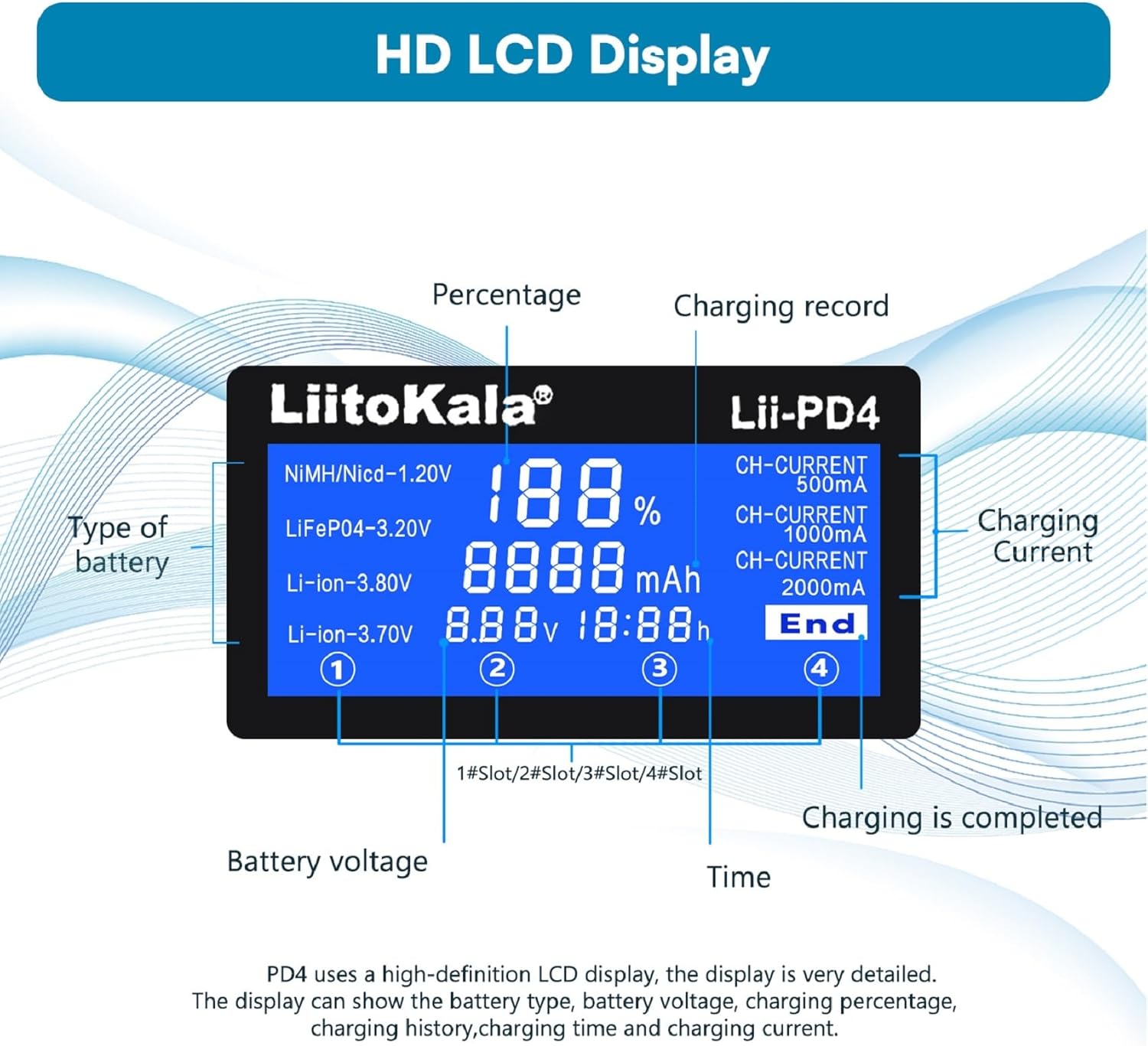
Figure 4: Detailed view of the HD LCD display and its various indicators.

Figure 5: The LCD display illustrating charging time, percentage, and other key metrics.
6.3 Manual Battery Type Selection (for LiFePO4 and 3.80V IMR Li-ion)
When a battery is inserted and detected, the battery type image will flash. At this moment, short-click the corresponding channel button to manually select the correct battery type (LiFePO4 or 3.80V IMR Li-ion). If no selection is made within 5 seconds, the charger will proceed with automatic detection (Li-Ion 3.7V or NiMH).
6.4 Charging Current Levels
The charger intelligently auto-sets the charging current based on the number of batteries and their type. The available current levels are 500mA, 1000mA, and 2000mA.
- For Li-ion / IMR / LiFePO4:
- 2000mA: Available only for Slot #4 when charging a single battery.
- 1000mA: Available for up to 2 batteries simultaneously.
- 500mA: Available for up to 4 batteries simultaneously.
- For NiMH / NiCd:
- 1000mA: Available for up to 2 batteries simultaneously.
- 500mA: Available for up to 4 batteries simultaneously.
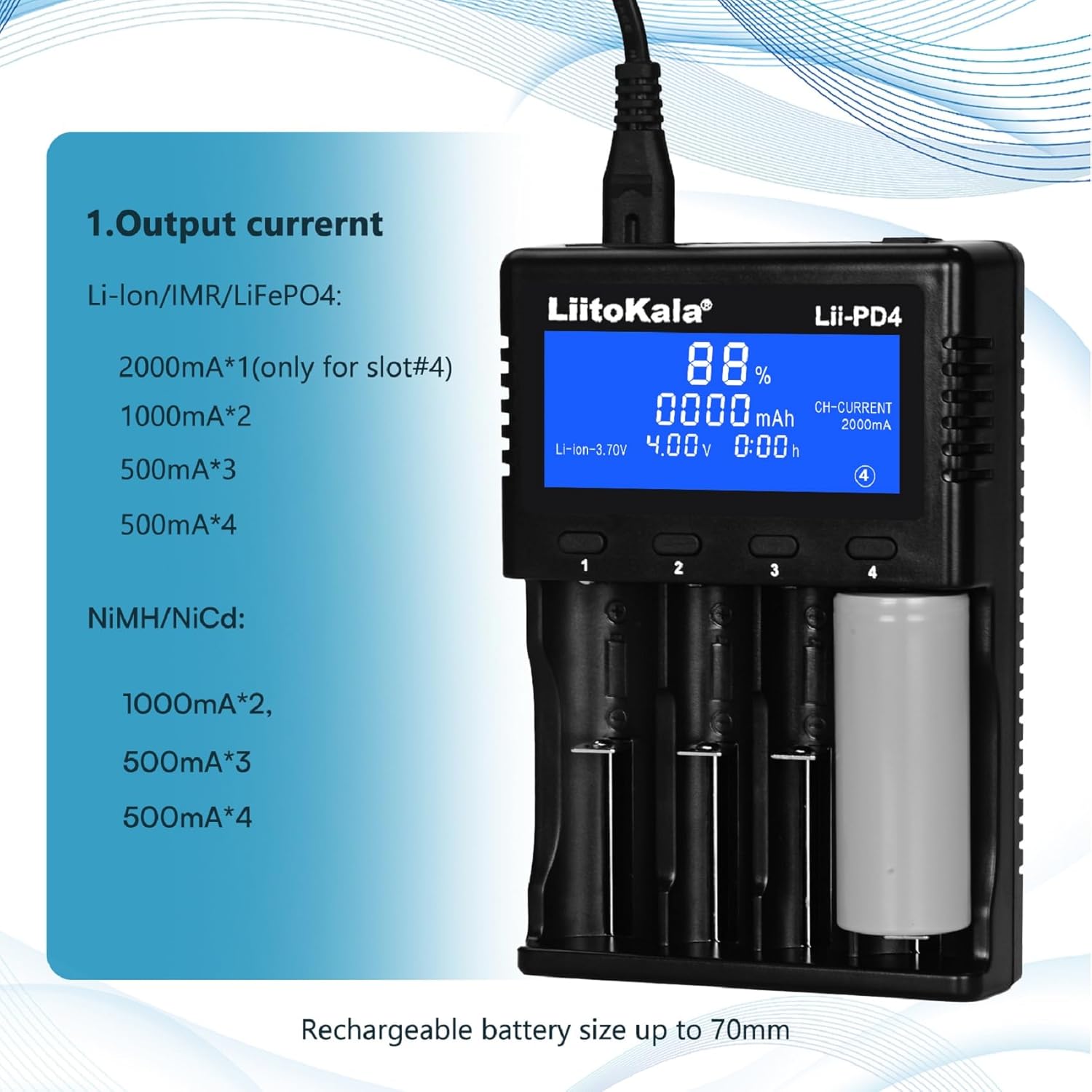
Figure 6: Overview of the charger's output current capabilities for different battery types and quantities.
7. Maintenance
- Keep the charger clean and free from dust and debris. Use a soft, dry cloth for cleaning.
- Store the charger in a cool, dry place when not in use.
- Avoid dropping the charger or subjecting it to strong impacts.
- Do not attempt to disassemble or modify the charger. This will void the warranty and could lead to safety hazards.
8. Troubleshooting
The LiitoKala Lii-PD4 charger is designed with smart detection capabilities to ensure safe operation. If you encounter issues, consider the following:
- Charger displays "null": This indicates no battery is inserted or the inserted battery is not detected. Ensure the battery is correctly seated and making proper contact with the terminals.
- Charger does not start charging: The charger can smartly identify broken batteries. If a battery is damaged or non-rechargeable, the charger may not initiate charging. Try a known good battery to confirm charger functionality.
- Unusual heating: While some heat is normal during charging, excessive heat may indicate an issue. Ensure the charger is in a well-ventilated area and that the battery is compatible and in good condition. Discontinue use if overheating persists.
- Display issues: If the display is not functioning correctly, ensure the power connection is stable.
For persistent issues not covered here, please contact customer support.
9. Specifications
| Attribute | Value |
|---|---|
| Product Dimensions | 1.38 x 3.94 x 5.2 inches (3.94"D x 5.24"W x 1.38"H) |
| Item Weight | 10.6 ounces (0.3 Kilograms) |
| ASIN | B09FHSYLTG |
| Item Model Number | Lii-PD4 |
| Manufacturer | Liitokala |
| Brand | LiitoKala |
| Color | black |
| Output Voltage | 3.8 Volts |
| Date First Available | September 5, 2021 |

Figure 7: Rear view of the charger displaying product specifications and certifications.
10. Warranty and Support
Information regarding specific warranty terms and customer support contact details was not provided in the product data. Please refer to the product packaging or the manufacturer's official website for warranty information and support inquiries.


