
KUQIBAO K10
KUQIBAO Motorcycle Helmet Bluetooth Headset User Manual
Model: K10 | Brand: KUQIBAO
Introduction
Thank you for choosing the KUQIBAO Motorcycle Helmet Bluetooth Headset. This device is designed to enhance your riding experience by providing seamless audio communication and entertainment. Featuring Bluetooth 5.0 technology, a waterproof design, and a long-lasting 1200 mAh lithium battery, it allows you to listen to music, make calls, use radio functions, and follow mobile phone navigation with clarity and convenience. Its simple, tool-free installation and detachable design make it versatile for various helmet types.

Figure 1: KUQIBAO Motorcycle Helmet Bluetooth Headset main unit and wired speakers with microphone.
Package Contents
Please verify that all items listed below are included in your package:
- Bluetooth Headset Main Unit
- Microphone (Soft or Hard Wheat, depending on model)
- Earphones (Speakers)
- Microphone Velcro
- Earphone Velcro
- Host Steel Clip
- Headphone Booster Pads
- Wiring Stickers
- Charging Cable

Figure 2: All components included in the KUQIBAO Helmet Bluetooth Headset package.
Product Features
- Bluetooth 5.0 Connectivity: Ensures stable and efficient wireless communication.
- Waterproof Design: Provides durability and reliable performance in various weather conditions.
- Long Battery Life: Equipped with a 1200 mAh polymer lithium battery, offering approximately 20 hours of continuous music playback and 80 hours of standby time. Fully charges in about 2 hours.
- Clear Audio: Features 40MM speakers and a microphone with electronic noise reduction technology for good sound quality and clear communication even at high speeds.
- Multi-functional: Supports listening to music, making and receiving calls, radio functions, and mobile phone navigation audio.
- Simple & Detachable Installation: Designed for tool-free installation and features a detachable main unit and speaker for convenience when changing helmets.

Figure 3: Visual representation of the headset's core functionalities.
Setup & Installation
The KUQIBAO Helmet Bluetooth Headset is designed for easy, tool-free installation. Follow these steps to properly install your headset:
1. Prepare Your Helmet
- Remove the helmet's inner lining to access the ear areas.
- Identify suitable flat surfaces inside the helmet near the ears for speaker placement.
2. Install the Main Unit
- Attach the main unit to the side of the helmet using the provided host steel clip. Ensure it is securely fastened.
- The main unit should be positioned on the left side of the helmet for optimal microphone cable routing.

Figure 4: Main unit attached to the helmet.
3. Speaker and Microphone Installation
The headset supports both soft and hard wheat (boom) microphones. Choose the appropriate installation method based on your microphone type and helmet design.
For Soft Wheat Microphone (Suitable for Full Face Helmets):
- Apply the earphone velcro pads to the inside of the helmet where your ears will be. Use booster pads if needed for better fit and sound.
- Attach the earphones (speakers) to the velcro pads. Ensure they are centered over your ears.
- Route the microphone cable to the left ear area. The soft wheat microphone is typically integrated with one of the speakers.
- Secure any loose wires using the provided wiring stickers.
For Hard Wheat Microphone (Suitable for Open Face or Half Helmets):
- Apply the earphone velcro pads to the inside of the helmet where your ears will be. Use booster pads if needed.
- Attach the earphones (speakers) to the velcro pads.
- Attach the hard wheat microphone to the right side of the helmet, ensuring the microphone extends towards your mouth.
- Secure any loose wires using the provided wiring stickers.
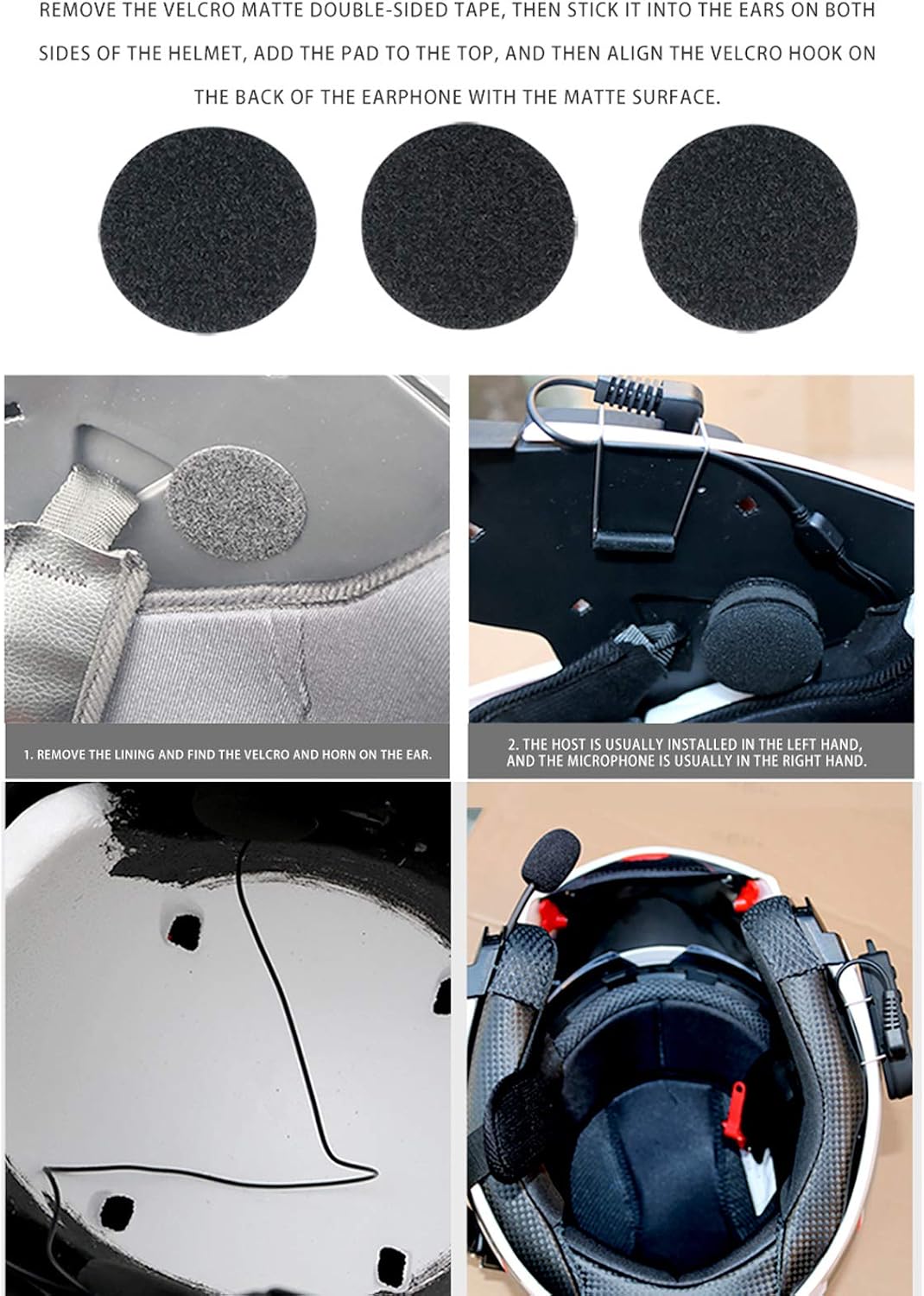
Figure 5: Visual guide for speaker and microphone placement within the helmet.
4. Reinstall Helmet Lining
- Carefully reinstall the helmet's inner lining, ensuring all wires are tucked away and not pinched.
- Verify that the speakers are comfortably positioned over your ears and the microphone is correctly aligned.
Helmet Compatibility
The KUQIBAO headset is compatible with most helmet types, including open face, half helmets, full face helmets, and visor helmets.

Figure 6: The headset can be installed on various helmet designs.
Installation Video Guide
For a visual walkthrough of the installation process, please refer to the official video below:
Video 1: Official installation guide for the KUQIBAO Helmet Bluetooth Headset, demonstrating steps for both soft and hard wheat microphones.
Operating Instructions
Familiarize yourself with the controls and functions of your KUQIBAO Bluetooth Headset:
Controls Overview

Figure 7: Main control buttons and charging port.
- Power Button: Typically used for powering on/off and pairing.
- Volume Up (+): Increases audio volume.
- Volume Down (-): Decreases audio volume.
- Phone Key (Call Button): Manages calls (answer, end, redial).
- Charging Port: For connecting the charging cable.
Power On/Off
- Power On: Press and hold the Power Button until the indicator light turns on.
- Power Off: Press and hold the Power Button until the indicator light turns off.
Bluetooth Pairing
- Ensure the headset is powered off.
- Press and hold the Power Button for approximately 5-7 seconds until the indicator light flashes rapidly, indicating pairing mode.
- On your mobile device, enable Bluetooth and search for "KUQIBAO" or "K10".
- Select the headset from the list to connect. Once connected, the indicator light will typically slow its flashing or turn solid.
Music Playback
- Once paired, open your music application on your mobile device.
- Music will automatically stream to the headset.
- Use the Volume Up (+) and Volume Down (-) buttons to adjust the volume.
- (Note: Specific controls for play/pause, next/previous track may vary or be controlled via your phone.)
Call Management
- Answer Call: Press the Phone Key once when an incoming call is received.
- End Call: Press the Phone Key once during an active call.
- Reject Call: Press and hold the Phone Key for 2 seconds when an incoming call is received.
- Redial Last Number: Double-press the Phone Key when the headset is idle.
- Automatic Answer: The headset is designed to automatically answer calls after a few rings.
Navigation & Radio
- Navigation: Audio from your mobile phone's navigation app will be transmitted to the headset once connected.
- Radio: The headset supports radio functions. (Specific activation method for radio may vary, refer to quick start guide if provided with product.)
Maintenance
To ensure the longevity and optimal performance of your KUQIBAO Helmet Bluetooth Headset, please follow these maintenance guidelines:
- Cleaning: Wipe the main unit and speakers with a soft, damp cloth. Do not use harsh chemicals or abrasive cleaners.
- Storage: When not in use for extended periods, store the headset in a cool, dry place away from direct sunlight and extreme temperatures.
- Charging: Use only the provided charging cable. Avoid overcharging the battery.
- Water Exposure: While waterproof, avoid submerging the unit in water for prolonged periods. Ensure the charging port cover is securely closed when not charging.
- Cable Care: Handle cables gently to prevent damage. Avoid sharp bends or excessive pulling.
Troubleshooting
If you encounter any issues with your headset, please refer to the following common problems and solutions:
| Problem | Possible Cause / Solution |
|---|---|
| Headset does not power on. | Battery is low. Charge the headset fully. |
| Cannot pair with mobile device. |
|
| No sound or low volume. |
|
| Poor call quality / Microphone not working. |
|
| Intermittent connection. |
|
Specifications
| Feature | Detail |
|---|---|
| Model Number | K10 |
| Connectivity Technology | Wireless (Bluetooth 5.0) |
| Battery Type | 1200 mAh Polymer Lithium Battery |
| Charging Time | Approximately 2 hours |
| Music Playback Time | Approximately 20 hours |
| Standby Time | Approximately 80 hours |
| Speaker Size | 40MM |
| Microphone Technology | Electronic Noise Reduction |
| Water Resistance Level | Waterproof |
| Control Method | Touch (Buttons) |
| Product Dimensions | 7.87 x 5.51 x 1.26 inches |
| Item Weight | 8.4 ounces |
| Color | White+Hard Wheat |
Warranty & Support
For warranty information or technical support, please refer to the product packaging or contact KUQIBAO customer service directly. Keep your purchase receipt for any warranty claims.
Manufacturer: KUQIBAO
Related documentsK10


Ask a question about this manual
Ask about setup, troubleshooting, compatibility, parts, safety, or missing instructions. Manuals+ will review the question and use this page’s manual context to help answer it.