
1. Introduction
This manual provides essential instructions for the safe and efficient use of your Xiaomi Mi Portable Bluetooth Speaker. Please read this manual thoroughly before using the product and retain it for future reference. The speaker features high-quality sound, True Wireless Stereo (TWS) capability, Bluetooth 5.0 connectivity, and IPX7 waterproofing, making it suitable for various environments.

Image: Angled view of the Xiaomi Mi Portable Bluetooth Speaker, highlighting its compact design and control panel.
2. Package Contents
Ensure all items are present in the package:
- Xiaomi Mi Portable Bluetooth Speaker x1
- Charging Cable x1 (USB-C)
- User Manual x1
3. Product Features
- High-Quality Sound: Delivers clear and balanced audio.
- True Wireless Stereo (TWS): Connect two speakers for an immersive stereo experience.
- Bluetooth 5.0: Stable and efficient wireless connectivity.
- IPX7 Waterproof: Protected against immersion in water up to 1 meter for 30 minutes.
- Long Play Time: Approximately 13 hours of playback at 50% volume.
- Built-in Microphone: For hands-free calling.
- AUX Input: For wired audio connection.
4. Controls and Indicators
Familiarize yourself with the speaker's control buttons and indicators:
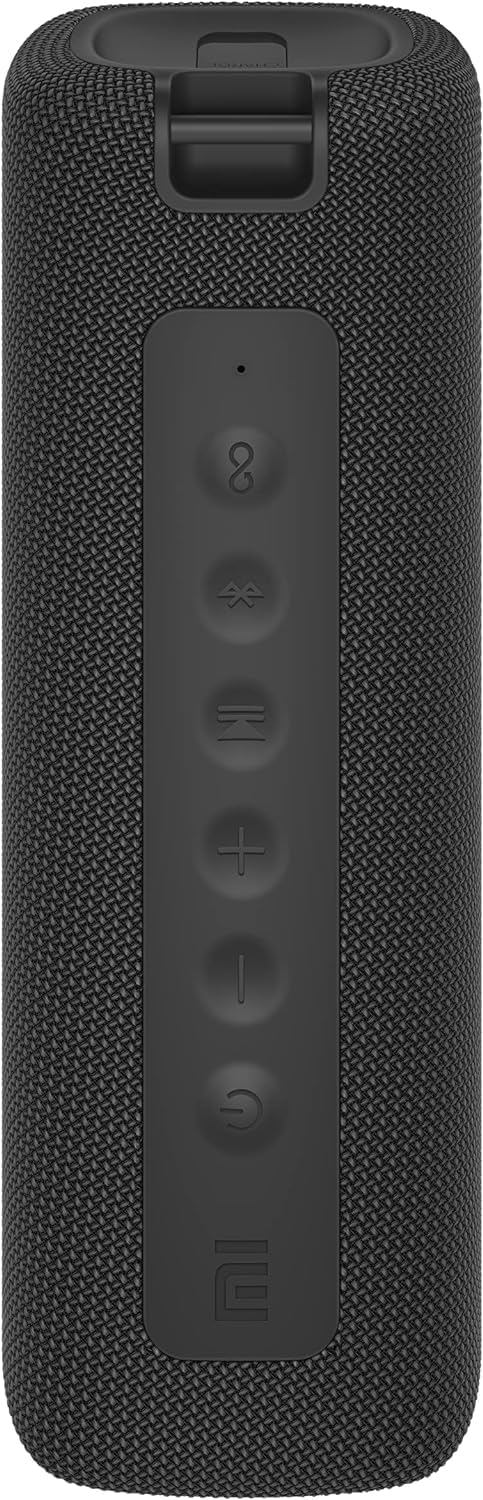
Image: Front view of the speaker with clearly visible control buttons.
| Button/Indicator | Function |
|---|---|
| Power Button (⏻) | Press and hold for 2 seconds to power on/off. Short press to play/pause music or answer/end calls. |
| Volume Down (−) | Short press to decrease volume. Press and hold for previous track. |
| Volume Up (+) | Short press to increase volume. Press and hold for next track. |
| Bluetooth Button (Ⓑ) | Short press to enter Bluetooth pairing mode. |
| TWS Button (∞) | Press to initiate True Wireless Stereo pairing with another Mi Portable Bluetooth Speaker. |
| LED Indicator | Indicates power status, charging status, and Bluetooth pairing status. |
5. Setup
5.1 Charging the Speaker
- Connect the provided USB-C charging cable to the speaker's charging port.
- Connect the other end of the cable to a 5V 1A USB power adapter (not included) or a computer's USB port.
- The LED indicator will show charging status (e.g., red while charging, off when fully charged).
- A full charge takes approximately 4 hours.
5.2 Power On/Off
- To Power On: Press and hold the Power button for 2 seconds. You will hear an audible prompt, and the LED indicator will light up.
- To Power Off: Press and hold the Power button for 2 seconds. You will hear an audible prompt, and the LED indicator will turn off.
5.3 Bluetooth Pairing
- Ensure the speaker is powered on. The LED indicator will flash blue, indicating it's in pairing mode.
- On your device (smartphone, tablet, computer), enable Bluetooth and search for available devices.
- Select "Mi Portable Bluetooth Speaker" from the list of devices.
- Once paired, the LED indicator will turn solid blue, and you will hear a confirmation sound.
- The speaker will automatically connect to the last paired device when powered on, if within range.
5.4 True Wireless Stereo (TWS) Pairing
To pair two Xiaomi Mi Portable Bluetooth Speakers for stereo sound:
- Ensure both speakers are powered on and not connected to any other Bluetooth device.
- On one speaker (this will be the primary speaker), short press the TWS button (∞). The LED indicator will flash.
- On the second speaker, short press the TWS button (∞).
- The two speakers will automatically connect to each other. You will hear a confirmation sound, and the LED indicators on both speakers will turn solid blue.
- Now, connect your device to the primary speaker via Bluetooth as described in section 5.3. The sound will play in stereo through both speakers.
5.5 AUX Connection
For wired audio playback:
- Connect a 3.5mm audio cable (not included) from your audio source to the AUX IN port on the speaker.
- The speaker will automatically switch to AUX mode.
- Control playback and volume from your audio source device.
6. Operating Instructions
6.1 Music Playback
- Play/Pause: Short press the Power button.
- Volume Up: Short press the Volume Up (+) button.
- Volume Down: Short press the Volume Down (−) button.
- Next Track: Press and hold the Volume Up (+) button.
- Previous Track: Press and hold the Volume Down (−) button.
6.2 Call Management
- Answer/End Call: Short press the Power button when a call comes in or during a call.
- Reject Call: Press and hold the Power button for 2 seconds when a call comes in.
7. Maintenance
- Cleaning: Wipe the speaker with a soft, damp cloth. Do not use abrasive cleaners or solvents.
- Storage: Store the speaker in a cool, dry place away from direct sunlight and extreme temperatures.
- Water Resistance: The speaker is IPX7 waterproof. Ensure the charging port cover is securely closed before exposure to water. Do not submerge the speaker for extended periods or beyond specified depths.
- Battery Care: To prolong battery life, avoid fully discharging the speaker frequently. Charge it regularly, even if not in use for long periods.
8. Troubleshooting
| Problem | Possible Solution |
|---|---|
| Speaker does not power on. | Ensure the battery is charged. Connect to a power source and try again. |
| Cannot pair via Bluetooth. |
|
| No sound or low volume. |
|
| TWS pairing fails. |
|
| Poor sound quality. |
|
9. Specifications

Image: Bottom view of the speaker, displaying model number and certifications.
| Parameter | Value |
|---|---|
| Model | MDZ-36-DB |
| Product Dimensions | W 213 x D 74 x H 74 mm (approx. 8 x 3 x 3 inches) |
| Connectivity | Bluetooth 5.0, 3.5mm AUX IN |
| Rated Output | 2 x 8W (16W total) |
| Signal-to-Noise Ratio | ≥ 70dB |
| TWS Connection Range | ≤ 5m |
| Waterproof Rating | IPX7 |
| Battery Type | Lithium-ion, 3.7V |
| Battery Capacity | 2600mAh |
| Battery Charging Time | Approx. 4 hours |
| Playback Time | Approx. 13 hours (at 50% volume) |
| Frequency Range | 80Hz to 20KHz |
| Rated Impedance | 4 Ω |
| Transmission Distance | 15m |
| Rated Input | 5V 1A |
| Item Weight | 500 Grams (1.1 pounds) |
10. Warranty and Support
For detailed warranty information, please refer to the warranty card included with your product or visit the official Xiaomi website.
If you encounter any issues not covered in this manual, please contact Xiaomi customer support or visit their official support channels for assistance.


