
DELTACO SH-P02E
Deltaco Smart Home SH-P02E Double Wi-Fi Smart Plug
User Manual
Introduction
The DELTACO SH-P02E is a wireless dual-outlet smart plug designed for convenient control of your electrical devices and real-time energy monitoring. This manual provides comprehensive instructions for setting up, operating, and maintaining your smart plug to ensure optimal performance and safety.
Safety Information
- Do not disassemble or modify the device.
- Ensure the total load connected to the smart plug does not exceed 13A (2990W).
- Avoid exposing the device to water, moisture, or extreme temperatures.
- Use only in dry indoor environments.
- Keep out of reach of children.
- Unplug the device from the wall outlet before cleaning.
Package Contents
Please check the box for the following items:
- 1 x DELTACO SH-P02E Double Wi-Fi Smart Plug
- 1 x User Manual (this document)

Image: The retail packaging of the Deltaco SH-P02E Smart Plug, showing the product inside the box with branding and key features.
Product Overview
The DELTACO SH-P02E features two individually controllable outlets and a power button for manual control. The device is compact and designed to fit standard wall outlets.

Image: Front view of the Deltaco SH-P02E Smart Plug, showing the two power outlets and the power button on the side.

Image: Side view of the Deltaco SH-P02E Smart Plug, highlighting the power button and the compact design.
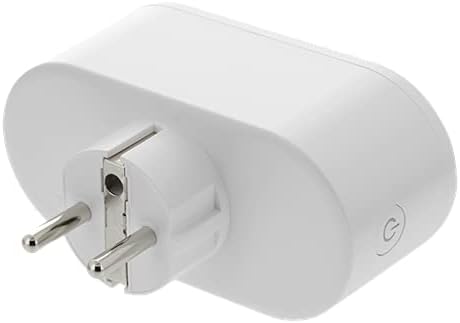
Image: Back view of the Deltaco SH-P02E Smart Plug, showing the electrical prongs for plugging into a wall outlet.
Setup
1. Download the DELTACO SMART HOME App
The DELTACO SMART HOME app is required to control your smart plug. It is available for free on both Android and iOS devices.
- Search for "DELTACO SMART HOME" in the Google Play Store (for Android) or Apple App Store (for iOS).
- Download and install the app.
- Register a new account or log in if you already have one.
2. Plug in the Smart Plug
Plug the SH-P02E smart plug into a standard wall outlet. Ensure it is within range of your Wi-Fi router.
3. Pair with the App
Follow the in-app instructions to add your new device. The app will guide you through the pairing process, which typically involves:
- Selecting "Add Device" or the "+" icon in the app.
- Choosing the correct device type (e.g., "Smart Plug" or "Electrical Outlet").
- Confirming the device is in pairing mode (often indicated by a blinking light).
- Entering your 2.4GHz Wi-Fi network name (SSID) and password. Note: The device only supports 2.4GHz Wi-Fi networks (802.11b/g/n).
- Waiting for the app to connect to the device.
Operating Instructions
Basic On/Off Control
You can turn the smart plug on or off in several ways:
- Via the App: Open the DELTACO SMART HOME app, select your SH-P02E device, and tap the power icon to toggle the entire plug on or off. Each outlet can also be controlled individually within the app.
- Manually: Press the physical power button on the side of the smart plug to turn it on or off.
Energy Monitoring
The SH-P02E features an energy monitoring system. Within the DELTACO SMART HOME app, you can:
- View real-time power consumption for connected devices.
- Access historical data, including daily and monthly total energy consumption.
Timer and Scheduling
Automate your devices using the app's timer and scheduling functions:
- Timer: Set a countdown timer for the plug to turn off after a specified duration.
- Schedule: Program specific times for the plug to turn on or off daily or on selected days of the week.
- Automation: Configure advanced automation rules based on conditions like sunrise/sunset, device status, or other smart home triggers.
Voice Control Integration
The SH-P02E can be integrated with popular voice assistants for hands-free control:
- Google Assistant: Link your DELTACO SMART HOME account in the Google Home app. You can then use voice commands like "Hey Google, turn on the living room plug."
- Amazon Alexa: Enable the DELTACO SMART HOME skill in the Amazon Alexa app. Use commands such as "Alexa, turn off the lamp."
Maintenance
To ensure the longevity and proper functioning of your smart plug:
- Clean the device with a soft, dry cloth. Do not use liquid or aerosol cleaners.
- Keep the device free from dust and debris.
- Store in a cool, dry place when not in use for extended periods.
Troubleshooting
| Problem | Possible Cause | Solution |
|---|---|---|
| Device not connecting to Wi-Fi. | Incorrect Wi-Fi password; 5GHz Wi-Fi network; device too far from router. |
|
| App cannot find the device. | Device not in pairing mode; app permissions. |
|
| Voice control not working. | Incorrect linking; device name issues. |
|
Specifications
| Feature | Detail |
|---|---|
| Model | SH-P02E |
| Brand | DELTACO |
| Color | White |
| Dimensions (L x W x H) | 1 x 1 x 1 cm |
| Weight | 192 grams |
| Power | Max 2990W (13A) |
| Wi-Fi Standard | 2.4GHz 802.11b/g/n |
| Number of Outlets | 2 (individually controllable) |
| Features | Energy Monitoring, Timer, Scheduling, Voice Control (Google Assistant, Amazon Alexa) |
Warranty and Support
DELTACO products are designed for reliability and performance. For warranty information and technical support, please refer to the official DELTACO website or contact their customer service directly.
For the latest support information, visit: www.deltaco.eu/support
Note: Information regarding spare parts availability and guaranteed software updates is not available at the time of this manual's publication.
Related documentsSH-P02E


Ask a question about this manual
Ask about setup, troubleshooting, compatibility, parts, safety, or missing instructions. Manuals+ will review the question and use this page’s manual context to help answer it.