
1. Introduction
The FULODE KD-1008 is a 10-outlet rack-mountable power conditioner designed to provide clean, stable power and surge protection for your audio and video equipment. It features eight independently switched rear outlets, two always-on front outlets, a USB charging port, and a digital voltage display for comprehensive power management.
2. Safety Information
Please read and understand all safety instructions before operating this device. Failure to follow these instructions may result in electric shock, fire, or damage to the unit or connected equipment.
- Grounding: Always connect the unit to a grounded power outlet. Do not defeat the grounding plug.
- Moisture: Do not expose the unit to rain, moisture, or excessive humidity. Do not operate with wet hands.
- Ventilation: Ensure adequate ventilation around the unit. Do not block ventilation openings.
- Servicing: Do not attempt to open or service the unit yourself. Refer all servicing to qualified personnel.
- Overload: Do not overload the power conditioner. Ensure the total current draw of connected devices does not exceed the unit's maximum rating.
- Power Cord: Protect the power cord from being walked on or pinched, particularly at plugs, convenience receptacles, and the point where they exit from the apparatus.
3. Product Overview
The FULODE KD-1008 features a robust design for rack mounting, offering convenient access to controls and connections.
3.1 Front Panel Features

This image displays the front and rear panels of the FULODE KD-1008 power conditioner, with numbered labels indicating various ports and controls. The front panel includes two always-on outlets, eight independent control buttons with indicator lights, a bypass switch, a USB port, a digital voltage display, and the main power switch. The rear panel shows the power cord input and eight sequenced output sockets.
- Input AC Outlets: Two 'always-on' power outlets on the front panel. These outlets are directly powered and not controlled by the sequencing function or individual switches.
- Independent Control Buttons (1-8): Each button controls a corresponding rear panel output socket. The indicator light above each button shows the on/off status of the respective outlet.
- Bypass Switch: Pressing this button powers on all output sockets simultaneously, bypassing the sequential power-on function. When turned off, all power is cut immediately.
- USB 5V Power Supply: A USB port for charging external devices.
- Accurate Voltage Display: A digital LED display showing the current AC input voltage.
- Main Power Switch: Controls the sequential power-on and power-off of the 1-8 output sockets. When turned on, outlets power up in sequence (1 to 8). When turned off, outlets power down in sequence (8 to 1).
3.2 Rear Panel Features
- Power Cord: Fixed power input cable for connecting to a wall outlet.
- Output Sockets (1-8): Eight power output sockets on the rear panel, controlled by the independent switches and the main power switch.
- AC Input Voltage Selector (110V/220V): A switch to select between 110V and 220V input voltage, located near the power cord. Ensure this is set correctly for your region.
3.3 Key Features
- 10 Power Outlets: Includes two front-panel 'always-on' outlets and eight rear-panel sequenced outlets.
- Independent Outlet Control: Each of the eight rear outlets can be individually switched on or off.
- USB Charging Port: Integrated 5V USB port for powering or charging compatible devices.
- Voltage Protection: Built-in safety features protect connected equipment from voltage fluctuations and surges.
- Digital Voltage Readout: LED display provides real-time monitoring of the input AC voltage.
- Rack-Mountable Design: Standard 1U rack-mountable chassis for easy integration into professional setups.
4. Setup
Follow these steps to properly set up your FULODE KD-1008 power conditioner.
4.1 Unpacking and Inspection
- Carefully remove the unit from its packaging.
- Inspect the unit for any signs of damage during shipping. If damage is found, contact your retailer immediately.
- Ensure all components are present.
4.2 Rack Mounting

This image shows the FULODE KD-1008 power conditioner installed within a standard equipment rack, positioned above other audio processing units. This demonstrates its rack-mountable design and how it integrates into a professional setup.
- The KD-1008 is designed for standard 1U rack spaces.
- Align the mounting ears of the power conditioner with the holes on your equipment rack.
- Secure the unit using appropriate rack screws (not included).
4.3 Power Connection

This image provides the physical dimensions of the FULODE KD-1008 power conditioner (19 x 6.7 x 2.1 inches, 4.96 lbs). It also highlights the US plug type and the AC input voltage selector switch (110V/220V) located on the rear panel.
- Before connecting the power cord, verify the AC Input Voltage Selector switch on the rear panel is set to the correct voltage for your region (110V or 220V).
- Plug the attached power cord into a grounded wall outlet.
4.4 Connecting Equipment
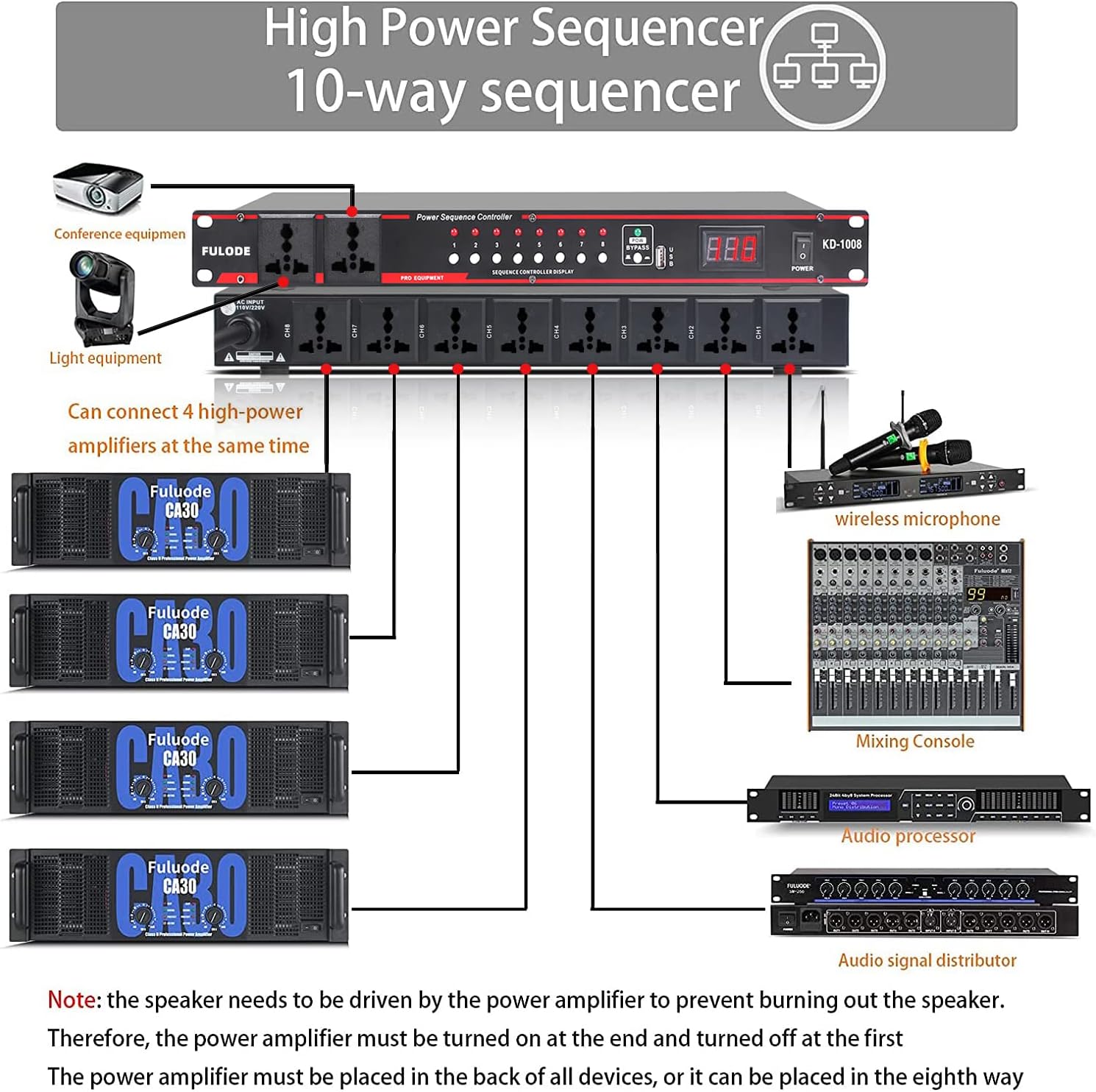
This diagram shows a typical setup where various devices such as lighting equipment, equalizers, wireless microphones, mixing consoles, audio processors, and amplifiers are connected to the FULODE KD-1008 power conditioner. It emphasizes the sequential power-on capability and the importance of connecting power amplifiers last to prevent speaker damage.
- Connect your audio, video, or lighting equipment to the 8 rear output sockets (1-8) or the 2 front 'always-on' outlets.
- For equipment that benefits from sequential power-up (e.g., to prevent 'thumps' or surges), connect them to the rear outlets.
- Important Note: If connecting power amplifiers, it is recommended to connect them to the last sequenced outlets (e.g., CH8) so they power on after other equipment and power off first. This helps prevent damage to speakers.
5. Operating Instructions
Understand how to use the various functions of your power conditioner.
5.1 Powering On/Off Sequentially
- Press the main POWER switch on the front panel to turn the unit on. The rear outlets (1-8) will power on sequentially, indicated by their respective lights.
- To turn off, press the main POWER switch again. The rear outlets (1-8) will power off in reverse sequence.
5.2 Using Independent Outlet Control
- Once the unit is powered on (either sequentially or via Bypass), you can individually control the 8 rear outlets using their dedicated buttons (1-8).
- Pressing an independent control button will toggle the power to its corresponding rear outlet. The indicator light will show its status.
5.3 Using the Bypass Function
- To power on all 8 rear outlets simultaneously, press the BYPASS switch. This overrides the sequential power-up.
- To power off all outlets immediately, press the BYPASS switch again.
5.4 Using the USB Port

This image illustrates a smartphone being charged via the built-in USB port on the front panel of the FULODE KD-1008 power conditioner, highlighting its convenience for powering small external devices.
- Connect your USB-powered device to the USB port on the front panel.
- The USB port provides 5V power for charging or operating compatible devices.
5.5 Monitoring Voltage

This image shows the FULODE KD-1008 power conditioner with its digital LED display indicating '119V', demonstrating its real-time voltage monitoring capability and highlighting its power failure protection feature.
- The digital LED display continuously shows the current input AC voltage.
- Monitor this display to ensure your equipment is receiving stable power.
6. Maintenance
Proper maintenance ensures the longevity and optimal performance of your power conditioner.
- Cleaning: Disconnect the unit from the power outlet before cleaning. Use a soft, dry cloth to wipe the exterior. Do not use liquid cleaners or aerosols.
- Ventilation: Periodically check that the ventilation openings are clear of dust and debris.
- Cord Inspection: Regularly inspect the power cord for any signs of damage, fraying, or kinks. Replace if damaged.
7. Troubleshooting
If you encounter issues with your FULODE KD-1008, refer to the following common problems and solutions.
| Problem | Possible Cause | Solution |
|---|---|---|
| Unit does not power on. | No power from wall outlet; Power cord not securely connected; Main power switch off. | Check wall outlet with another device; Ensure power cord is fully inserted; Press the main POWER switch. |
| Rear outlets not providing power. | Individual outlet switch is off; Unit is in sequential power-up mode and not all outlets are on yet; Bypass mode not engaged. | Press the individual control button for the desired outlet; Wait for the sequential power-up to complete or use the Bypass switch. |
| Voltage display is blank or incorrect. | Unit is not receiving power; Internal fault. | Ensure the unit is powered on and receiving AC input. If the problem persists, contact support. The display provides an indication of the input voltage; minor variations may occur. |
| USB port not charging. | Device not compatible; USB cable faulty; Unit not powered on. | Ensure the unit is powered on. Try a different USB cable or device. |
8. Specifications
- Model: KD-1008
- Input/Output Voltage: 110-220V AC
- Total Outlets: 10 (2 front 'always-on', 8 rear sequenced with independent control)
- USB Output: 5V
- Rack Size: 1U
- Product Dimensions: 19 x 6.7 x 2.1 inches (48.26 x 17.02 x 5.33 cm)
- Item Weight: 5.94 pounds (2.69 kg)
9. Warranty and Support
For warranty information and technical support, please refer to the documentation included with your purchase or visit the official FULODE website. Keep your proof of purchase for warranty claims.
For direct assistance, please contact FULODE customer service.