
1. Product Overview
The Knowtek DSE710 is an Automatic Start Control Module designed for diesel generator sets. It provides an advanced range of engine monitoring and protection features, ensuring reliable operation. This controller is capable of monitoring multiple engine parameters simultaneously and offers user-friendly setup options.
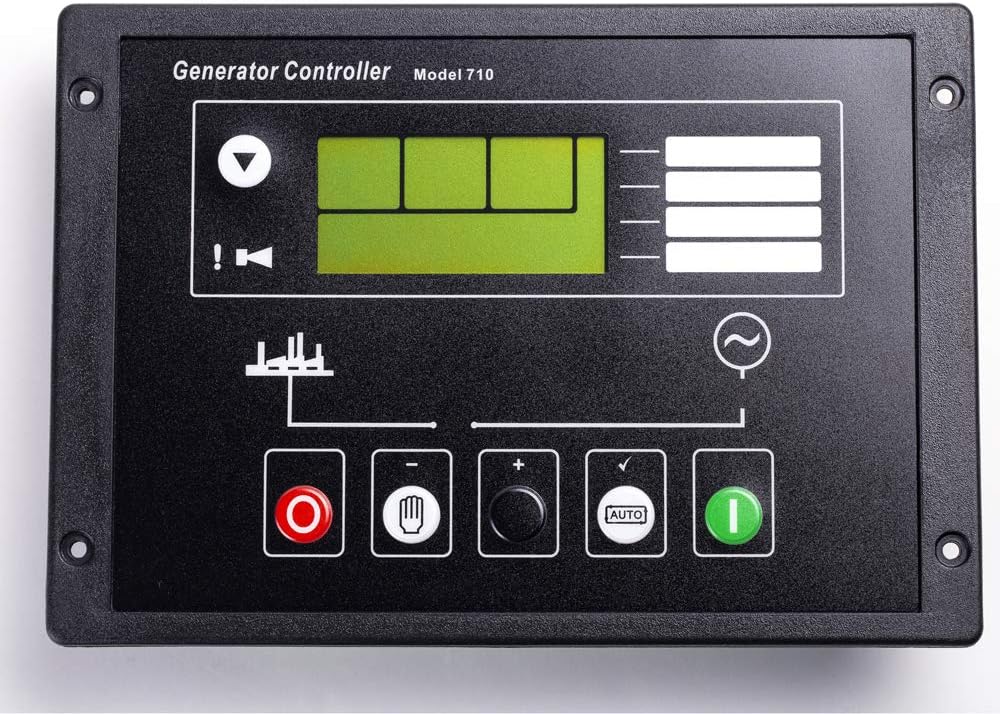
Figure 1: Front view of the DSE710 Automatic Generator Controller.
2. Setup and Installation
The DSE710 controller is designed for straightforward installation. Ensure all power to the generator set is disconnected before beginning installation. Mount the controller securely in a suitable control panel enclosure.
2.1 Wiring Connections
Connect the necessary power, sensor, and control wiring to the terminal blocks located on the rear of the unit. Refer to the detailed wiring diagrams provided with the product packaging for specific connection points. Ensure all connections are secure and correctly polarized.

Figure 2: Side view illustrating the terminal blocks for wiring.

Figure 3: Rear view of the controller with wiring terminals and PC interface.
2.2 Configuration
The DSE710 Generator Controller can be configured either directly using the front panel buttons and display, or remotely via a PC using the DSE810 interface and license-free PC software. Detailed configuration instructions are available in the software manual.
3. Operating Instructions
The DSE710 functions as an automatic start control module. Once properly configured and connected, it will automatically manage the starting and stopping of the generator set based on programmed parameters and detected conditions.
3.1 Manual Operation
For manual control, use the dedicated buttons on the front panel. The red button typically serves as a stop/reset function, while the green button initiates a manual start. The 'AUTO' button engages or disengages automatic mode.
3.2 Monitoring
The controller continuously monitors multiple engine parameters, including oil pressure, engine temperature, and generator output. Critical information and alerts are displayed on the integrated screen.
4. Maintenance
To ensure optimal performance and longevity of the DSE710 controller, regular inspection is recommended. Keep the unit clean and free from dust and moisture. Periodically check all wiring connections for tightness and signs of wear or corrosion. No user-serviceable parts are inside the unit.
5. Troubleshooting
If the controller is not functioning as expected, consider the following basic troubleshooting steps:
- No Power: Verify that the power supply to the controller is connected correctly and within the specified voltage range. Check fuses if applicable.
- Engine Not Starting: Confirm that the generator set's fuel supply, battery, and starter motor are operational. Check for any active alarms on the controller display.
- Incorrect Readings: Ensure all sensor connections are secure and the sensors themselves are functioning correctly.
- Configuration Issues: If recent changes were made, re-verify the configuration settings using either the front panel or the PC software.
For persistent issues, consult the comprehensive troubleshooting guide in the full product manual or contact Knowtek technical support.
6. Specifications
| Feature | Detail |
|---|---|
| Model Number | DSE710 |
| Manufacturer | KNOWTEK |
| Product Dimensions | 7.5 x 5.5 x 1.5 inches |
| Item Weight | 1.01 pounds |
| Voltage | 12 Volts |
| Material | Plastic |
| Display Type | LCD or LED |
| UPC | 785378886332 |
7. Warranty Information
This Knowtek DSE710 Automatic Generator Controller comes with a 1-year warranty from the date of purchase. This warranty covers defects in materials and workmanship under normal use. Please retain your proof of purchase for warranty claims. The warranty does not cover damage caused by improper installation, misuse, accidents, or unauthorized modifications.
8. Customer Support
For technical assistance, detailed product documentation, or warranty inquiries, please contact Knowtek customer support. Refer to the contact information provided with your product or visit the official Knowtek website.
You can visit the Knowtek Store on Amazon for more information: Knowtek Store