
1. Introduction
Thank you for choosing the Rokform Rugged Series Case for your iPhone 13 Pro. This case is engineered to provide superior protection, versatile mounting options, and MagSafe compatibility, enhancing your device's functionality in various environments. Please read this manual carefully to ensure proper installation and optimal use of your new case.
2. Product Overview
The Rokform Rugged Series Case for iPhone 13 Pro is designed with durability and functionality in mind. Key features include:
- Dual Magnetic System: Integrated industrial-grade magnets for secure attachment to magnetic surfaces.
- MagSafe Compatibility: A built-in magnet array that works seamlessly with Apple MagSafe chargers and accessories.
- RokLock Twist Lock System: Allows for secure mounting to various Rokform accessories (sold separately) like bike, car, and motorcycle mounts.
- Military-Grade Drop Protection: Constructed from high-impact polycarbonate and thermoplastic polyurethane with reinforced corners, exceeding MIL-STD 801G-516.6 standards.
- Enhanced Screen and Camera Protection: Raised bezels provide six-sided, 360-degree protection.
- Slim Design: Maintains a sleek profile while offering robust protection.

Figure 1: Rokform Rugged Series iPhone 13 Pro Case.
3. Case Compatibility
This Rokform Rugged Series Case is specifically designed for the iPhone 13 Pro. Please ensure your device matches this model for proper fit and function.

Figure 2: Compatibility chart showing the Rokform case is compatible with iPhone 13 Pro, but not iPhone 13 mini, iPhone 13, or iPhone 13 Pro Max.
4. Setup
4.1 Installing Your iPhone 13 Pro into the Case
- Ensure your iPhone 13 Pro is clean and free of debris.
- Align the top edge of your iPhone with the top of the case.
- Gently press your phone into the case, ensuring all corners and edges are securely seated. The flexible material will allow for a snug fit.
4.2 Removable Center Magnet
The case features a removable center magnet. This magnet can be removed to enable wireless charging with standard MagSafe compatible chargers. To remove:
- Locate the circular magnet in the center of the case's back.
- Gently push the magnet out from the inside of the case.
- Store the magnet in a safe place if you plan to reinsert it later.
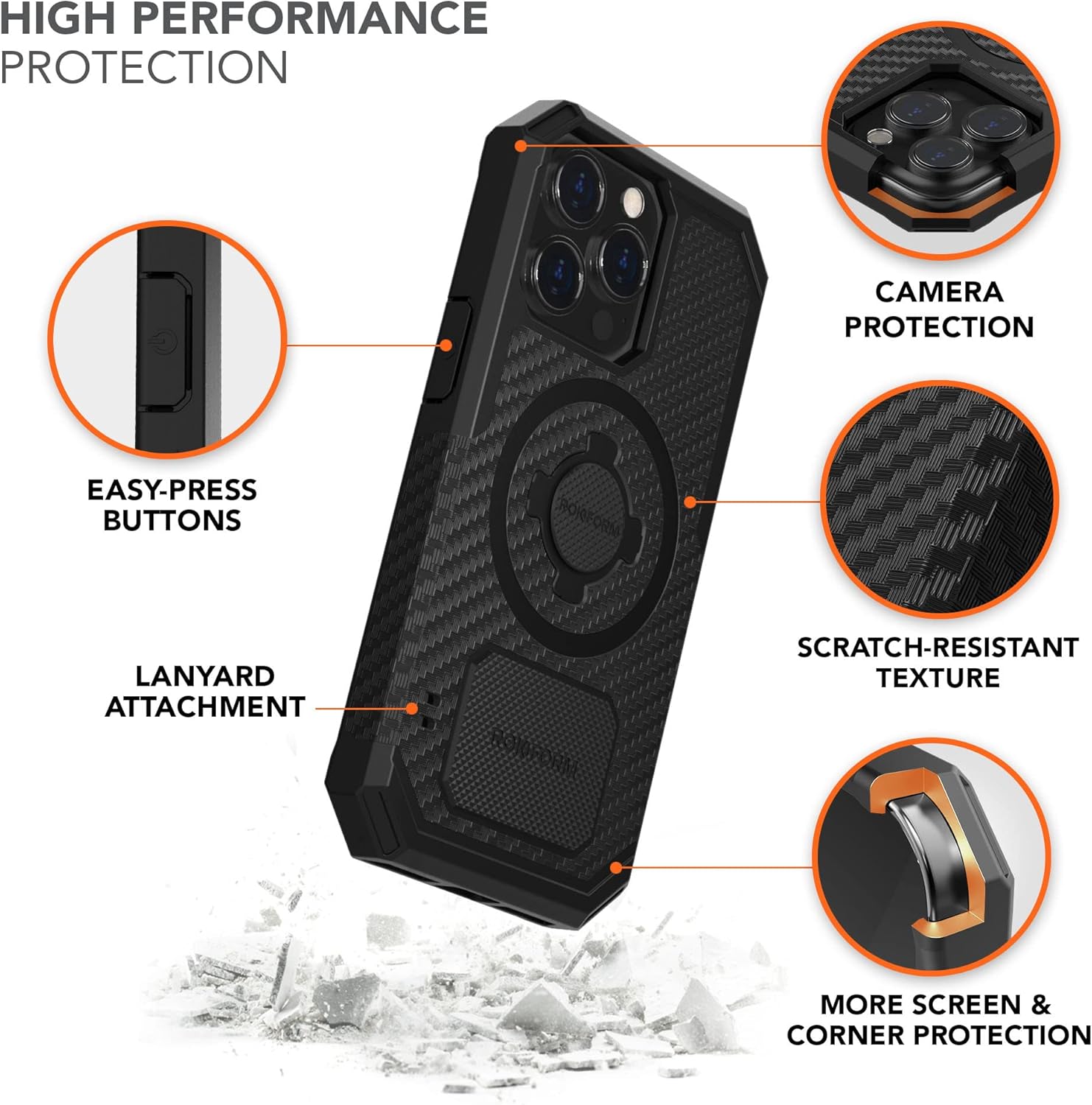
Figure 3: Exploded view illustrating the removable magnetic plug and built-in case magnet.
5. Operating Instructions
5.1 Magnetic Mounting
Your Rokform case includes two powerful industrial-grade magnets. These allow your iPhone 13 Pro to stick securely to any magnetic surface, providing hands-free convenience. The magnets will not affect credit cards, Wi-Fi, GPS, or Bluetooth functionality.

Figure 4: The Rokform case magnetically attached to a metal toolbox, demonstrating hands-free use.
Video 1: Demonstrates magnetic mounting of the Rokform case to gym equipment for convenient access during workouts.
5.2 RokLock Twist Lock System
The built-in RokLock Twist Lock System allows you to securely mount your iPhone 13 Pro to a variety of Rokform accessories. Simply align the case with the mount and twist to lock it into place.

Figure 5: The RokLock Twist Lock System securely attaching the iPhone case to a bike mount.
5.3 MagSafe Compatibility
The case features an integrated MagSafe compatible magnet array, allowing it to work with Apple MagSafe chargers and accessories.

Figure 6: The Rokform case demonstrating compatibility with a MagSafe wireless charger.
5.4 Wireless Charging
For optimal wireless charging performance with standard MagSafe compatible chargers, it is recommended to remove the center magnet from the case. This ensures a direct and efficient connection to the charging pad.
Video 2: Illustrates the process of removing the center magnet from the Rokform case to enable wireless charging.
6. Maintenance
To keep your Rokform Rugged Series Case in optimal condition:
- Clean the case regularly with a soft, damp cloth.
- Avoid using harsh chemicals or abrasive cleaners, as these may damage the case material.
- Periodically check the case for any signs of wear or damage, especially around the corners and ports, to ensure continued protection.
7. Troubleshooting
7.1 Wireless Charging Issues
If you experience issues with wireless charging, ensure the removable center magnet has been taken out of the case. The presence of this magnet can interfere with some wireless charging pads. Reinsert the magnet only when not using wireless charging or if using a Rokform-specific wireless charger designed to accommodate it.
7.2 Magnetic Attachment Strength
If the magnetic attachment feels weaker than expected, ensure the magnetic surface is clean and flat. Rough or uneven surfaces may reduce magnetic grip. For maximum magnetic holding power, ensure both the case's magnets are making full contact with the metal surface.
Video 3: A demonstration of the Rokform case's durability during a 2nd story drop test, highlighting its protective capabilities.
8. Specifications
| Product Dimensions | 6.02 x 3.06 x 0.57 inches |
| Item Weight | 2.82 ounces |
| Material | Polycarbonate, Thermoplastic Polyurethane |
| Compatible Phone Models | iPhone 13 Pro |
| Color | Black |
| Item Model Number | 308501P-PRO |
9. Warranty and Support
Rokform offers a 2-year warranty on its entire catalog. For any issues with your purchase or to receive 5-star customer support, please contact Rokform directly. They are committed to resolving any concerns you may have.
For more information, visit the official Rokform store: Rokform Store on Amazon