
Candy CSE C8LF-S
CANDY CSE C8LF-S Smart Condenser Dryer - User Manual
Model: CSE C8LF-S | Brand: Candy
1. Introduction
This user manual provides essential information for the safe and efficient operation, installation, and maintenance of your new Candy CSE C8LF-S Smart Condenser Dryer. Please read this manual thoroughly before using the appliance and keep it for future reference. This dryer features an 8 kg capacity and Class B energy efficiency, designed for convenient and effective laundry drying.
2. Safety Information
Always adhere to the following safety precautions to prevent personal injury or damage to the appliance.
- Read all instructions before use.
- Ensure the appliance is properly grounded.
- Do not install or store the appliance where it will be exposed to the weather or to freezing temperatures.
- Do not dry unwashed items in the tumble dryer.
- Items that have been soiled with substances such as cooking oil, acetone, alcohol, petrol, kerosene, spot removers, turpentine, waxes and wax removers should be washed in hot water with an extra amount of detergent before being dried in the tumble dryer.
- Remove all objects from pockets such as lighters and matches.
- The appliance must not be supplied through an external switching device, such as a timer, or connected to a circuit that is regularly switched on and off by a utility.
- Supervise children to ensure they do not play with the appliance.
- Ensure adequate ventilation to avoid the back flow of gases into the room from appliances burning other fuels, including open fires.
3. Setup and Installation
Proper installation is crucial for the dryer's performance and safety.
3.1 Unpacking
Carefully remove all packaging materials. Check the appliance for any transport damage. Report any damage to your retailer immediately.
3.2 Placement
Place the dryer on a firm, level floor. Ensure there is sufficient space around the appliance for ventilation. Do not block the ventilation openings. The dryer dimensions are approximately 58.5 cm (depth) x 59.6 cm (width) x 85 cm (height).

Figure 3.2.1: Angled view of the Candy CSE C8LF-S Smart Condenser Dryer, showing its compact design suitable for various placements.

Figure 3.2.2: Detailed dimensions of the dryer, indicating 85cm height, 59.6cm width, and 58.5cm depth for installation planning.
3.3 Electrical Connection
Connect the dryer to a suitable earthed power socket. Ensure the voltage and frequency match the specifications on the rating plate of the appliance (230 Volt). Do not use extension cords or multiple adapters.
3.4 Condensate Drain
As a condenser dryer, water collected during the drying process is stored in a removable water container. This container must be emptied after each cycle. Alternatively, the dryer can be connected to a permanent drain using the supplied hose (refer to the full installation guide for detailed instructions).
4. Operating Instructions
Follow these steps for optimal drying results.

Figure 4.0.1: Front view of the Candy CSE C8LF-S dryer, highlighting the main door and the control panel with program dial and digital display.
4.1 Loading Laundry
Open the dryer door and load laundry, ensuring not to exceed the 8 kg maximum capacity. Overloading can affect drying performance and energy efficiency. Close the door firmly.

Figure 4.1.1: View inside the dryer drum, showing the textured surface designed for efficient tumbling and drying of clothes.
4.2 Control Panel Overview
The control panel features a program selection dial, a digital display, and various function buttons. The "Smart Touch" feature allows for connectivity with your smartphone for additional programs and control.
4.3 Program Selection
Turn the program dial to select the appropriate drying program for your laundry type (e.g., Cotton, Synthetics, Delicates, Mix & Dry). The display will show the estimated drying time.
4.4 Starting a Cycle
Press the Start/Pause button to begin the selected drying cycle. You can pause the cycle at any time by pressing the button again.
4.5 End of Cycle
Once the cycle is complete, the dryer will signal with an audible alert or a message on the display. Remove the laundry promptly to minimize creasing.
4.6 Smart Features (Smart Touch / Connectivity)
The Candy CSE C8LF-S dryer is equipped with Smart Touch technology, allowing you to connect the appliance to your smartphone via the Candy simply-Fi app. This enables you to download additional programs, monitor cycles, and receive maintenance tips. Refer to the app's instructions for pairing and usage.
5. Maintenance and Cleaning
Regular maintenance ensures optimal performance and extends the life of your dryer.
5.1 Cleaning the Lint Filter
The lint filter, located inside the door opening, must be cleaned after every drying cycle. Remove the filter and wipe away accumulated lint. Rinse with water if necessary and ensure it is completely dry before reinserting.

Figure 5.1.1: A hand demonstrating the removal of the lint filter from the dryer's door opening for cleaning.
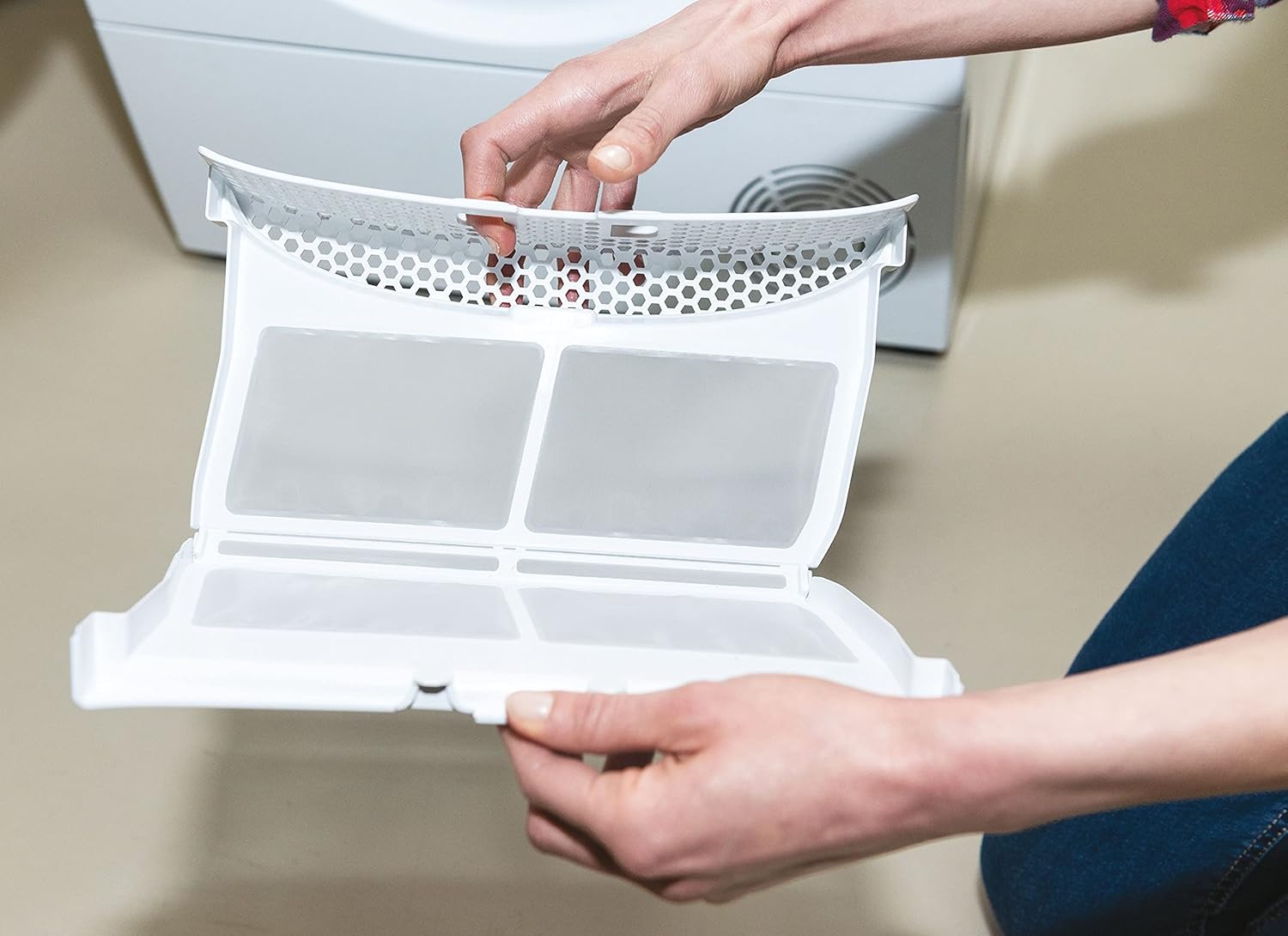
Figure 5.1.2: A close-up view of the lint filter, showing its two-part design that collects lint during the drying process.
5.2 Emptying the Water Container
The water container, typically located at the top or bottom of the dryer, collects condensed water. Empty it after each cycle to prevent the dryer from stopping prematurely. Pull out the container, empty the water, and push it back in until it clicks.
5.3 Cleaning the Condenser/Heat Exchanger
Periodically, the condenser unit (located at the bottom front of the dryer) needs cleaning to maintain efficiency. Open the cover, remove the condenser, and rinse it under running water to remove any lint or debris. Ensure it is dry before reinserting. Refer to the full manual for detailed instructions on accessing and cleaning the condenser.

Figure 5.3.1: A hand demonstrating the removal of the lower filter or condenser tray, which requires periodic cleaning for optimal dryer performance.
5.4 Cleaning the Exterior
Wipe the exterior of the dryer with a soft, damp cloth. Do not use abrasive cleaners or solvents.
6. Troubleshooting
Before contacting service, try these common troubleshooting steps.
- Dryer not starting: Check if the power cord is plugged in, the door is fully closed, and the program is selected and started. Check the circuit breaker.
- Poor drying results: Ensure the lint filter and condenser are clean. Do not overload the dryer. Select the correct program for the fabric type.
- Excessive noise: Check if the dryer is level. Ensure no foreign objects are in the drum.
- Water container full indicator: Empty the water container.
- Error codes: Refer to the full user manual or the Candy simply-Fi app for specific error code explanations and solutions.
7. Specifications
Key technical specifications for the Candy CSE C8LF-S Smart Condenser Dryer.
| Feature | Specification |
|---|---|
| Manufacturer | Candy |
| Model Identifier | CSE C8LF-S |
| Product Dimensions (H x W x D) | 85 cm x 59.6 cm x 58.5 cm |
| Weight | 32.8 Kilograms |
| Capacity | 8 Kilograms |
| Energy Efficiency Class | B |
| Annual Energy Consumption | 561 kWh per year |
| Noise Emission | 69 dB |
| Construction Type | Front-loader |
| Color | White |
| Material | Plastic |
| Voltage | 230 Volt |
| Wattage | 3600 Kilowatt-hours (Max. power input) |
| EPREL Product Database Link | https://eprel.ec.europa.eu/qr/2251955 |

Figure 7.0.1: The EU Energy Label for the Candy CSE C8LF-S, indicating its Class B energy efficiency and other key performance metrics.

Figure 7.0.2: The official Product Fiche providing detailed specifications and energy consumption data for the Candy CSE C8LF-S dryer.
8. Warranty and Support
For warranty information, please refer to the warranty card included with your appliance or visit the official Candy website. For technical support, spare parts, or service requests, please contact Candy customer service.
- Official Website: https://www.candy-group.com
- Service Contact: https://www.candy-group.com/en_GB/contact-us
Related documentsCSE C8LF-S


Ask a question about this manual
Ask about setup, troubleshooting, compatibility, parts, safety, or missing instructions. Manuals+ will review the question and use this page’s manual context to help answer it.