
GIISSMO GIISSMO 7-in-2 USB C Hub
GIISSMO 7-in-2 USB C Hub User Manual
Model: GIISSMO 7-in-2 USB C Hub
1. Introduction
Thank you for choosing the GIISSMO 7-in-2 USB C Hub. This versatile adapter is designed to expand the connectivity of your MacBook Pro or MacBook Air, providing essential ports for various peripherals and external displays. It integrates Thunderbolt 3, HDMI 4K@60Hz, three USB 3.0 ports, and SD/TF card readers, all while supporting up to 100W power delivery. This manual provides detailed instructions on setup, operation, maintenance, and troubleshooting to ensure optimal performance and longevity of your device.

Image 1.1: The GIISSMO 7-in-2 USB C Hub, showcasing its compact design and multiple connectivity options, including USB-C, HDMI, USB-A, and card slots, alongside a MacBook Pro.
2. Product Overview
The GIISSMO 7-in-2 USB C Hub is engineered to seamlessly integrate with your MacBook, offering a comprehensive solution for your connectivity needs. Below is an overview of its components and ports:

Image 2.1: A detailed view of the GIISSMO 7-in-2 USB C Hub, highlighting its seven distinct ports: Thunderbolt 3, HDMI, three USB 3.0 ports, and dedicated SD and TF card slots.
- Thunderbolt 3 Port: Supports 5K@60Hz video output, 40Gbps data transfer, and up to 100W power delivery.
- HDMI 4K@60Hz Port: Connects to external displays for high-resolution video output.
- 3 x USB 3.0 Ports: For connecting USB peripherals like mice, keyboards, and external drives with high-speed data transfer.
- SD Card Slot: Reads standard SD, SDHC, SDXC cards.
- TF (Micro SD) Card Slot: Reads Micro SD, Micro SDHC, Micro SDXC cards.
3. Setup Instructions
Follow these steps to set up your GIISSMO 7-in-2 USB C Hub:
- Connect to MacBook: Align the two USB-C connectors of the hub with the two Thunderbolt 3/USB-C ports on your MacBook Pro or MacBook Air. Gently push the hub until it is securely seated.
- Power Connection (Optional): If you require power delivery to your MacBook or connected devices, connect your MacBook's original USB-C power adapter to the Thunderbolt 3 port on the hub. The hub supports up to 100W power pass-through.
- Connect Peripherals: Once the hub is connected, you can begin connecting your desired peripherals to the available ports.

Image 3.1: The GIISSMO USB C Hub securely connected to a MacBook Pro, demonstrating its compact and integrated fit.
4. Operating Instructions
4.1. Thunderbolt 3 Port Usage
The Thunderbolt 3 port on the hub offers high-speed data transfer, video output, and power delivery:
- Power Delivery: Connect your MacBook's USB-C power adapter to this port to charge your laptop and power the hub simultaneously. Supports up to 100W.
- Data Transfer: Achieve data transfer speeds of up to 40Gbps when connecting compatible Thunderbolt 3 devices.
- Video Output: Supports up to 5K@60Hz video output to a compatible display.

Image 4.1: Visual representation of the Thunderbolt 3 port's capabilities, including high-resolution media display, rapid power delivery, and ultra-fast data transfer rates.
4.2. HDMI 4K@60Hz Port Usage
Connect an external monitor, TV, or projector via the HDMI port for high-definition video output:
- Resolution: Supports resolutions up to 4K (3840x2160) at 60Hz.
- Modes: Supports both mirror mode (duplicate your MacBook screen) and extend mode (use the external display as an additional desktop space).

Image 4.2: A MacBook Pro connected to an external display through the hub, showcasing crystal-clear 4K@60Hz video output for an enhanced viewing experience.

Image 4.3: Illustration of various display configurations, including mirror mode and extend mode, demonstrating how the hub facilitates multi-monitor setups with HDMI and Thunderbolt 3.
4.3. USB 3.0 Ports Usage
The three USB 3.0 ports allow you to connect standard USB-A devices:
- Data Transfer: Offers data transfer speeds up to 5Gbps, which is 10 times faster than USB 2.0. Ideal for external hard drives, USB flash drives, and other high-bandwidth devices.
- Peripheral Connection: Connect your mouse, keyboard, printer, or other USB peripherals.
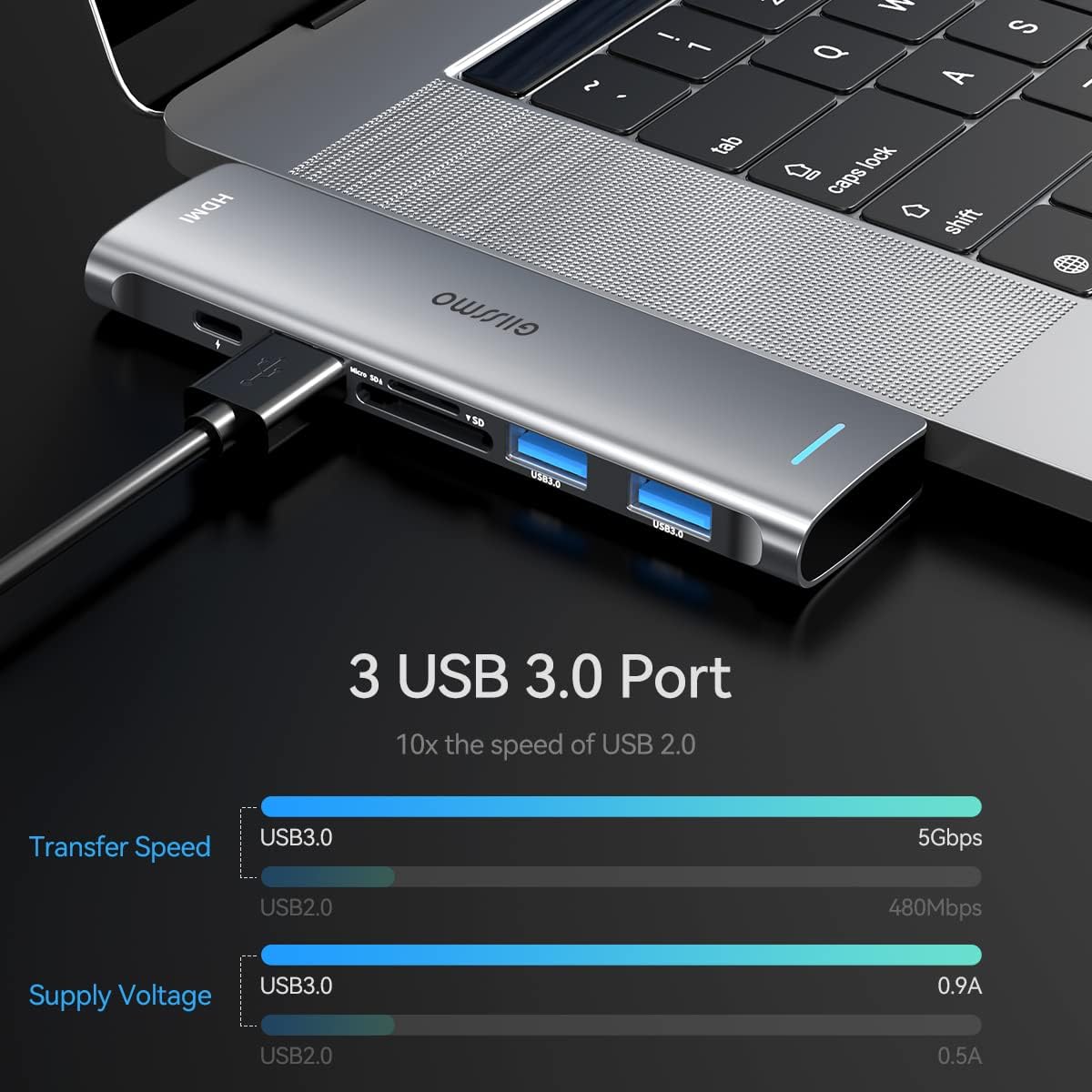
Image 4.4: The three USB 3.0 ports on the hub, demonstrating their capability to connect multiple USB devices simultaneously for efficient data transfer and peripheral use.
4.4. SD/TF Card Reader Usage
The integrated card readers support various memory card formats:
- Supported Cards: SD, SDHC, SDXC, Micro SD, Micro SDHC, Micro SDXC.
- Capacity: Supports cards up to 1TB each.
- Speed: Offers read speeds up to 104MB/s. Insert the card into the corresponding slot until it clicks into place.

Image 4.5: The SD and TF card slots, illustrating compatibility with various memory card types and highlighting the fast 104MB/s read speed and support for up to 2TB capacity.
5. Compatibility
The GIISSMO 7-in-2 USB C Hub is specifically designed for:
- MacBook Pro 2016, 2017, 2018, 2019, 2020 (13-inch, 15-inch, 16-inch models)
- MacBook Air 2018, 2019, 2020
- Compatible with Apple M1 chip models.
Note: This hub is not compatible with MacBooks that have protective covers or cases, as it requires a direct, flush connection to the two USB-C ports.

Image 5.1: The hub's perfect match with both MacBook Pro (2016-2020) and MacBook Air (2018-2020) models, highlighting its seamless integration.

Image 5.2: The hub's design for office use, emphasizing its compatibility with M1 chips and a note regarding its fit with MacBook covers or cases.
6. Troubleshooting
If you encounter issues with your GIISSMO 7-in-2 USB C Hub, refer to the following common problems and solutions:
| Problem | Possible Cause | Solution |
|---|---|---|
| Hub not recognized by MacBook. | Loose connection; incompatible MacBook model; macOS issue. | Ensure the hub is firmly connected to both USB-C ports. Verify your MacBook model is listed in the compatibility section. Restart your MacBook. |
| HDMI display not working or flickering. | Loose HDMI cable; incorrect display settings; cable quality. | Ensure the HDMI cable is securely connected to both the hub and the display. Check display settings on your MacBook (System Preferences > Displays). Try a different HDMI cable, preferably a high-speed one. |
| USB devices not detected. | Loose USB connection; power draw issue; device driver. | Reconnect the USB device. If connecting multiple high-power devices, ensure the hub is connected to power delivery. Check if the device requires specific drivers. |
| SD/TF card not reading. | Card not fully inserted; corrupted card; incompatible format. | Ensure the card is fully inserted into the correct slot. Try the card in another device to check for corruption. Ensure the card format is supported by macOS. |
| Hub feels warm during use. | Normal operation, especially under heavy load. | This is normal due to heat dissipation from the aluminum casing. If it becomes excessively hot, disconnect and allow it to cool. Avoid placing it in enclosed spaces. |
7. Specifications
| Feature | Specification |
|---|---|
| Brand | GIISSMO |
| Model | 7-in-2 USB C Hub |
| Color | 0725 (Space Gray) |
| Interface | 2 x USB-C (Thunderbolt 3 compatible) |
| Ports | 1 x Thunderbolt 3, 1 x HDMI, 3 x USB 3.0, 1 x SD Card Slot, 1 x TF Card Slot |
| Thunderbolt 3 Output | 5K@60Hz Video, 40Gbps Data Transfer, 100W Power Delivery |
| HDMI Output | 4K@60Hz Video |
| USB 3.0 Data Transfer Rate | Up to 5Gbps |
| SD/TF Card Read Speed | Up to 104MB/s |
| Supported OS | macOS, Windows (for compatible devices) |
| Material | Aluminum Alloy |
| Dimensions | Compact and portable (specific dimensions not provided in source) |
| Weight | Approximately 53g |
| UPC | 783973745016 |
8. Maintenance
To ensure the longevity and optimal performance of your GIISSMO 7-in-2 USB C Hub, follow these maintenance guidelines:
- Cleaning: Use a soft, dry cloth to wipe the surface of the hub. Avoid using liquid cleaners or abrasive materials.
- Storage: Store the hub in a cool, dry place away from direct sunlight and extreme temperatures.
- Handling: Avoid dropping the hub or subjecting it to strong impacts. Do not force connectors into ports.
- Ventilation: Ensure the hub has adequate ventilation during operation, especially when under heavy load, to facilitate heat dissipation.
9. Warranty and Support
The GIISSMO 7-in-2 USB C Hub comes with a 2-year manufacturer's warranty. This warranty covers defects in materials and workmanship under normal use.
For technical support, warranty claims, or any inquiries regarding your product, please contact GIISSMO customer service through the retailer's platform or the official GIISSMO website. Please have your purchase receipt or order number ready when contacting support.
Ask a question about this manual
Ask about setup, troubleshooting, compatibility, parts, safety, or missing instructions. Manuals+ will review the question and use this page’s manual context to help answer it.