
Introduction
This Kyglaring LED lighting kit is specifically designed to enhance the LEGO Icons U.S.S. Enterprise NCC-1701-D (set 10356). It transforms your model into a visually stunning display piece by illuminating its intricate details and creating an impressive visual effect. This manual provides essential information for the safe and effective installation, operation, and maintenance of your lighting kit.

Image: A clear warning indicating that the LEGO building blocks are not included with the lighting kit.
Please note: This product includes only the LED lighting kit. The LEGO Icons U.S.S. Enterprise NCC-1701-D (10356) model is not included and must be purchased separately.
Important Safety Information
- This product contains small parts and is not suitable for children under 3 years old due to choking hazards.
- Handle all wires and LED components with care. Do not pull excessively on the wires, as this may damage the connections.
- Ensure the power source is appropriate (5V) and stable. Do not use power sources exceeding the recommended voltage.
- Keep the lighting kit away from water or other liquids to prevent electrical short circuits and damage.
- Always test each light element before final assembly to ensure proper functionality.
- If any component is damaged, discontinue use and contact customer support.
Package Contents
Please verify that all items listed below are present in your package:
- Kyglaring LED Lighting Kit (various light components in numbered bags)
- Light Control Button (for touch control)
- USB Power Cable / Battery Box (batteries not included)
- Tweezers (for precise installation)
- Digital Instruction Manual (online PDF/video access)

Image: Contents of the Kyglaring LED Lighting Kit package, including the main box, light control button, light kits in bags, USB power cable/battery box, and tweezers.
Setup and Installation
Installing your Kyglaring LED lighting kit requires careful attention to detail. Follow the provided digital instructions for a smooth assembly process.
- Prepare Your LEGO Model: Ensure your LEGO Icons U.S.S. Enterprise NCC-1701-D (10356) model is fully assembled and ready for the lighting kit integration.
- Access Digital Instructions: Scan the instruction code on the product packaging or visit the Kyglaring website to access the detailed online PDF and video installation guides. These guides provide step-by-step visual instructions.
- Identify Components: The lighting components are organized in numbered bags. Refer to the digital manual to match the components with the corresponding installation steps.
- Test Lights: Before integrating any light element into your LEGO model, connect it to the power source and test its functionality. This ensures all components are working correctly.
- Careful Wiring: The wires are thin and designed to be discreetly routed within your LEGO model. Use the included tweezers for precise placement. Avoid excessive pulling or bending of wires to prevent damage.
- Connect Power: Once all lights are installed, connect the USB power cable to a 5V USB power source (e.g., power bank, USB wall adapter) or insert batteries into the battery box (if using).
The specially designed clip connectors allow for delicate integration, making the process enjoyable even for beginners. Remember, patience and precision are key for a successful installation.

Image: Illustration showing how to access the digital instruction manual via scanning a code or inputting the model number online.
Operating Instructions
Your Kyglaring LED lighting kit features a touch control system for easy operation and dynamic lighting effects.
Power On/Off and Brightness Adjustment:
- Connect the lighting kit to a 5V power source.
- Use the integrated touch control button to power the lights on or off.
- Tap the touch control button to cycle through multiple brightness levels. The high-quality LEDs provide a soft, non-glaring illumination.
Lighting Modes:
The kit supports various lighting modes to enhance your display:
- Always-on Light: Standard continuous illumination.
- Strobe Light: Rapid flashing effect.
- Breathing Light: Gradual fading in and out effect.
- Blinking Light: Regular on/off flashing.
Refer to your digital instruction manual for specific controls to switch between these modes, if applicable beyond the touch button's primary function.

Image: A side-by-side comparison of the LEGO U.S.S. Enterprise NCC-1701-D model, showing it unlit (left) and fully illuminated with the Kyglaring LED kit (right).

Image: Four different views of the illuminated LEGO U.S.S. Enterprise NCC-1701-D model, showcasing the lighting effects from various angles.
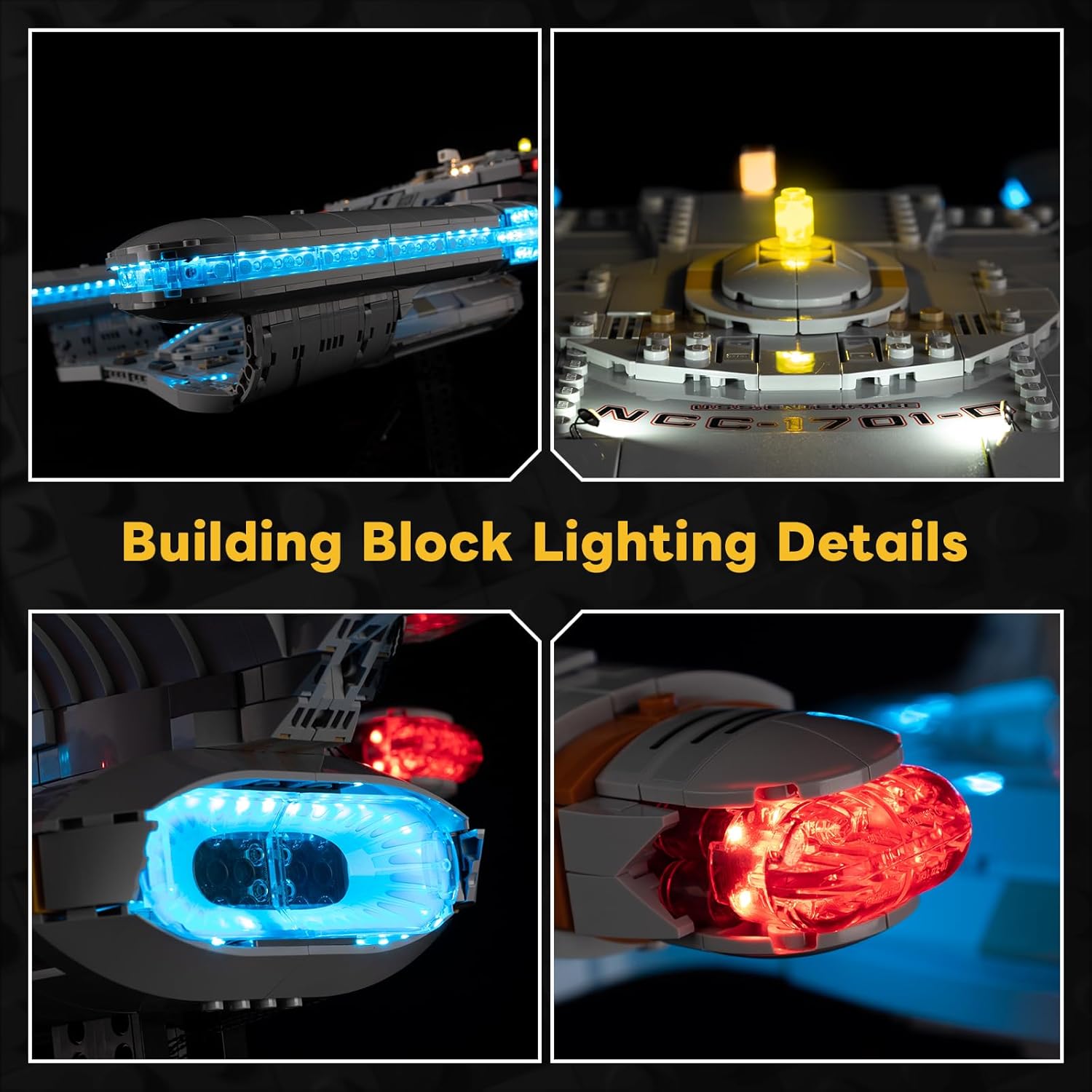
Image: Detailed close-up views of specific illuminated sections of the LEGO U.S.S. Enterprise NCC-1701-D model, highlighting the LED placement and effects.
Video: Demonstration of the Kyglaring LED lighting kit for the LEGO U.S.S. Enterprise NCC-1701-D (10356), showcasing various lighting effects including always-on, strobe, breathing, and blinking modes, and highlighting different illuminated sections of the model.
Maintenance
Proper maintenance ensures the longevity and optimal performance of your lighting kit.
- Cleaning: Gently wipe the LED components and wires with a dry, soft cloth to remove dust. Avoid using liquid cleaners directly on the electrical components.
- Storage: If storing the model for an extended period, disconnect the power source. Store in a cool, dry place away from direct sunlight and extreme temperatures.
- Wire Integrity: Periodically inspect visible wires for any signs of wear or damage. Ensure they are not pinched or stressed.
- Power Source: If using a battery box, replace batteries as needed. Ensure correct battery polarity.
Troubleshooting
If you encounter issues with your Kyglaring LED lighting kit, please refer to the following common solutions:
| Problem | Possible Cause | Solution |
|---|---|---|
| Lights do not turn on. | No power, loose connection, faulty component. |
|
| Some lights are not working. | Loose connection, damaged wire/LED. |
|
| Lights are dim or flickering. | Insufficient power, loose connection, low batteries. |
|
For further assistance, Kyglaring offers a dedicated support team. Do not hesitate to contact them if you cannot resolve the issue using the steps above.
Specifications
| Product Dimensions (L x W x H) | 16 x 14 x 3.51 cm (6.3 x 5.51 x 1.38 inches) |
| Item Weight | 181.44 grams (0.4 lbs) |
| Recommended Age (for LEGO model) | 18+ years (This lighting kit is designed for the LEGO Icons 10356 set, which is intended for adult builders.) |
| Educational Value | Team building skill (as per manufacturer) |
| Manufacturer Reference | 10356 |
| Number of Pieces (in kit) | 1 (referring to the kit as a single product) |
| Assembly Required | Yes |
| Batteries Required/Included | No (for the kit itself, but external batteries may be needed for the battery box) |
| Main Material | Plastic |
| Color/Variant | 10356-TVB (Touch Version) |
| Power Input | 5V (via USB) |
Warranty and Support
Kyglaring is committed to providing a satisfying experience with our products. We offer dedicated customer support to assist you with any questions or issues.
- Customer Service: If you encounter any difficulties during the use or installation of your Kyglaring LED lighting kit, please contact our customer support team. We are available to help resolve technical problems promptly.
- Contact Information: Please refer to the Kyglaring official website or your purchase platform for the most up-to-date contact details for support.
