
LGIDTECH FUT089-B
LGIDTECH FUT089-B 8-Zone LED Remote Controller
User Manual
Product Overview
The LGIDTECH FUT089-B is an advanced 8-Zone RGB+CCT Remote Controller designed for managing various LED lighting products. It features a full touch screen for intuitive control over color, color temperature, saturation, and brightness. This remote is compatible with newer versions of Milight RGB+CCT LED light bulbs, spotlights, downlights, floodlights, and LS2 LED strip light controllers.
Key Features:
- 8-Zone Control: Manage up to eight independent lighting zones.
- Full Touch Screen Design: Sensitive and precise control.
- RGB+CCT Control: Adjust color (16 million colors), color temperature, and saturation.
- Brightness Dimming: Fine-tune brightness from 0.1% to 100%.
- Dynamic Modes: Access various static and dynamic lighting effects.
- 2.4G Wireless Transmitting: Ensures reliable and long-range signal.
- Ergonomic Design: Comfortable hand feeling for easy operation.
Setup
1. Battery Installation
The remote controller requires two (2) AAA batteries (not included). Please ensure correct polarity when inserting the batteries.

Image: Rear view of the remote controller with the battery compartment open, indicating where to insert two AAA batteries. The image also shows the included wall mount holder and a small instruction manual.
2. Linking (Pairing) the Remote with Lights
To link the remote controller with your compatible LED lights, follow these steps:
- Ensure the lights you wish to link are powered off.
- Power on the lights.
- Within 3 seconds of powering on the lights, press the "Zone ON" key on the remote controller three (3) times. Press the key with a quick, rhythmic frequency, similar to knocking on a door.
- If linking is successful, the lights will blink three times.
Note: This remote is designed to work with newer versions of Milight RGB+CCT LED products. It is not compatible with older versions or models such as FUT035, FUT036, FUT037, FUT038, or FUT039.
Operating Instructions
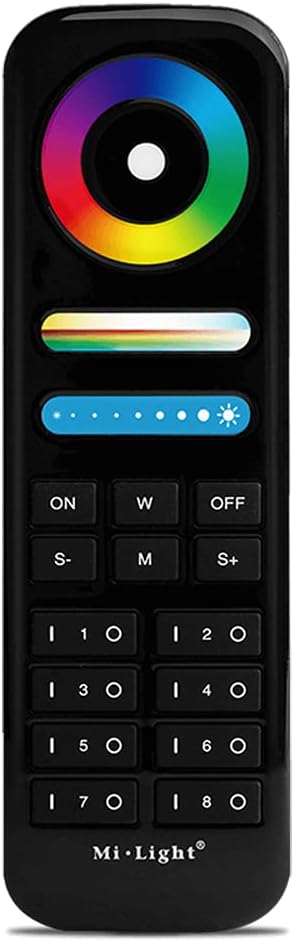
Image: Front view of the LGIDTECH FUT089-B remote controller, highlighting its touch color wheel, brightness/saturation sliders, and zone control buttons.
1. Power On/Off and Zone Selection
- ON: Press to turn on the selected zone(s).
- OFF: Press to turn off the selected zone(s).
- Zone Buttons (1-8): Press the 'I' button for a zone to select it, then press the 'O' button to deselect it. You can control multiple zones simultaneously by selecting them.
- W: Activates pure white light mode for the selected zone(s).

Image: A visual representation of the 8-zone control feature, demonstrating how one remote can manage lighting in different areas of a home or space.
2. Color, Color Temperature, and Saturation Adjustment
- Color Wheel: Touch and slide your finger on the color wheel to select from 16 million colors. The lights will change instantly to the color under your finger.
- Color Temperature Slider: The horizontal slider below the color wheel allows adjustment of the white light color temperature, from warm white to cool white.
- Saturation Slider: The second horizontal slider (often indicated by a rainbow gradient) controls the saturation of the chosen color. Slide to adjust the intensity of the color.

Image: This image illustrates the remote's capability to adjust color, color temperature, and saturation, allowing users to create various lighting atmospheres.
3. Brightness Adjustment
- Brightness Slider: The dedicated brightness slider (often with sun icons) allows precise dimming from 0.1% to 100%. Slide your finger along this bar to increase or decrease the light intensity.

Image: A visual representation of the brightness adjustment feature, showing a hand interacting with the brightness slider on the remote to achieve desired light levels.
4. Dynamic Modes
- M (Mode): Press this button to cycle through various pre-programmed dynamic lighting modes.
- S- / S+: Use these buttons to adjust the speed of the current dynamic mode. S- decreases speed, S+ increases speed.
Maintenance
Cleaning
To clean the remote controller, gently wipe it with a soft, dry cloth. Do not use abrasive cleaners, solvents, or immerse the remote in water. Keep the touch screen free from dust and debris for optimal performance.
Battery Replacement
When the remote's performance degrades or it becomes unresponsive, it is likely time to replace the batteries. Follow the battery installation steps in the Setup section to replace the two AAA batteries. Dispose of old batteries responsibly according to local regulations.
Troubleshooting
- Remote not responding:
- Check if the batteries are inserted correctly and have sufficient charge. Replace batteries if necessary.
- Ensure the remote is within range of the lights and there are no significant obstructions.
- Lights not linking/pairing:
- Ensure the lights are powered off and then on immediately before attempting to link.
- Press the "Zone ON" button exactly three times within 3 seconds. The timing is crucial.
- Verify that your lights are compatible with the FUT089-B remote (newer RGB+CCT versions). This remote is not compatible with FUT035, FUT036, FUT037, FUT038, or FUT039.
- Inconsistent color/brightness:
- Ensure the remote's touch surface is clean and free of smudges or debris.
- Check for any strong electromagnetic interference in the environment.
Specifications
| Parameter | Value |
|---|---|
| Product Name | 8-Zone RGB+CCT Remote Controller |
| Model Number | FUT089-B |
| Brand | LGIDTECH (Miboxer) |
| Working Temperature | -20 to 60℃ (-4 to 140℉) |
| Voltage | 3V (2*AAA Battery, excluded) |
| Dimensions (L x W x H) | 153 x 47 x 19 mm (6.02 x 1.85 x 0.75 inches) |
| Item Weight | 2.82 ounces |
| Control Method | Remote, Touch |
| Connectivity Technology | 2.4G Wireless, Wi-Fi (via gateway, not included) |
| Included Components | Remote Controller, Holder |
What's in the Box
Upon opening the package, you should find the following items:
- 1 x LGIDTECH FUT089-B 8-Zone RGB+CCT Remote Controller
- 1 x Wall Mount Holder
Warranty and Support
For warranty information and technical support, please refer to the documentation provided with your purchase or contact LGIDTECH customer service through their official channels. Keep your purchase receipt as proof of purchase for any warranty claims.
Ask a question about this manual
Ask about setup, troubleshooting, compatibility, parts, safety, or missing instructions. Manuals+ will review the question and use this page’s manual context to help answer it.