
1. Product Overview
The SIUMAL Universal Remote Control (Model XRT140) is designed as a direct replacement for original Vizio Smart TV remote controls. It offers full functionality without the need for complex programming or setup. This remote is compatible with a wide range of Vizio D/E/M/P/PX/V series LCD, LED, OLED, HD, and 4K TVs, providing dedicated buttons for popular streaming services like Vudu, Netflix, Prime Video, Xumo, Hulu, and Redbox.
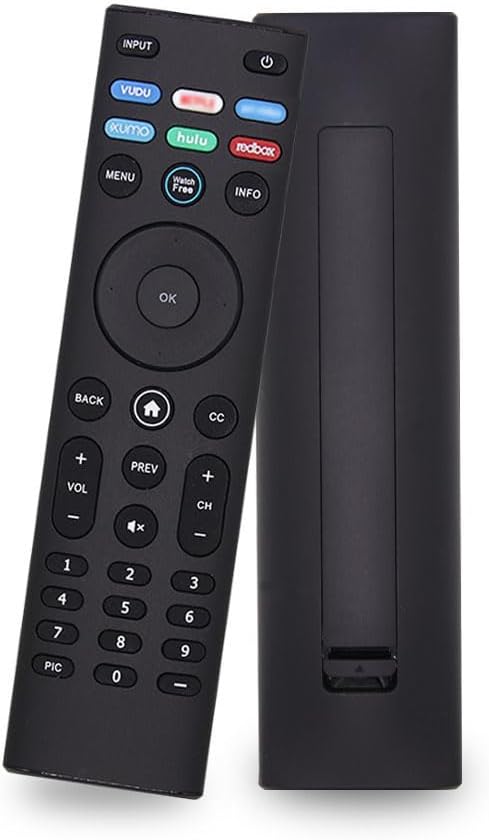
Image 1.1: Front and back view of the SIUMAL Universal Remote Control. The front displays all buttons including power, input, navigation, volume, channel, number pad, and dedicated streaming service buttons. The back shows the battery compartment cover.

Image 1.2: The remote control shown with its approximate dimensions: 17 cm (6.69 inches) in length, 4.5 cm (1.77 inches) in width, and 1.8 cm (0.70 inches) in thickness.
2. Setup
This remote control requires no programming or pairing. It is designed to work immediately with compatible Vizio TVs upon battery installation.
2.1 Battery Installation
- Locate the battery compartment on the back of the remote control.
- Slide the battery compartment cover downwards to open it.
- Insert two (2) AAA batteries (not supplied) into the compartment, ensuring the positive (+) and negative (-) terminals align correctly with the indicators inside.
- Slide the battery compartment cover back into place until it clicks securely.

Image 2.1: Detailed view showing the remote's buttons and an open battery compartment, illustrating where to insert the AAA batteries.
Once batteries are installed, the remote is ready for use.
3. Operating Instructions
The SIUMAL Universal Remote Control functions identically to your original Vizio TV remote. Ensure there are no obstructions between the remote and your TV's infrared (IR) receiver for optimal performance.
3.1 Basic Functions
- Power Button (⑁): Turns the TV on or off.
- Input Button: Cycles through available input sources (HDMI, AV, etc.).
- Volume Up/Down (VOL +/-): Adjusts the TV's volume level.
- Channel Up/Down (CH +/-): Changes TV channels.
- Mute Button (⑂): Mutes or unmutes the TV's audio.
- Number Pad (0-9): Directly enters channel numbers.
3.2 Navigation and Menu
- Directional Pad (Up, Down, Left, Right): Navigates through on-screen menus and selections.
- OK Button: Confirms selections or opens menus.
- Back Button: Returns to the previous screen or menu.
- Home Button (⌂): Accesses the TV's SmartCast or main home screen.
- Menu Button: Opens the TV's main settings menu.
- Info Button: Displays information about the current program or input.
- CC (Closed Caption) Button: Toggles closed captions on or off.
3.3 Streaming Service Buttons
Dedicated buttons provide quick access to popular streaming applications:
- Vudu
- Netflix
- Prime Video
- Xumo
- Hulu
- Redbox

Image 3.1: A hand demonstrating the ergonomic design and comfortable grip of the SIUMAL Universal Remote Control.

Image 3.2: The SIUMAL Universal Remote Control positioned in front of a Vizio Smart TV displaying content, illustrating its intended use.
4. Compatibility
This remote control is compatible with a wide range of Vizio Smart TVs and replaces several Vizio remote models.
4.1 Compatible Vizio Remote Models
XRT136, XRT140, XRT150, XRT132, XRT133, XRT134, XRT135, XRT122, XRT500, XRT510, XRT010, XRT020, XRT110, XRT112, XRT300, XRT301, XRT302, XRT303, VR1, VR2, VR4, VR9, VR10, VR15, VR17, XRT100.
4.2 Compatible Vizio TV Models
V405-H19, V405-H69, V435-H1, V435-H11, V505-H19, V505-H9, V555-G4, V555-H1, V585-H1, V585-H11, V605-H3, V655-H9, V655-H1, V655-H19, V705-G1, V705x-H1, V705-H1, V705-H13, V755-H4, V755-G4, P65QX-H1, P65Q9-H1, P65Q9-H61, P659-G1, P75QX-H1, P75Q9-H1, P75Q9-H61, P759-G1, P85QX-H1, M506x-H9, M50Q7-H61, M50Q7-H1, M55Q7-H1, M55Q8-H1, M556-H1, M557-G0, M586x-H1, M65Q7-H61, M65Q7-H1, M65Q8-H1, P65Q9-H1, M656-H4, M657-G0, OLED65-H1, OLED55-H1, and more.
5. Maintenance
Proper care will extend the life of your remote control.
- Cleaning: Use a soft, dry cloth to clean the remote's surface. Do not use liquid cleaners or abrasive materials.
- Battery Replacement: Replace batteries when the remote's response becomes sluggish or stops working. Always replace both batteries at the same time with new AAA batteries.
- Storage: Store the remote in a cool, dry place away from direct sunlight and extreme temperatures.
- Avoid Drops: While durable, avoid dropping the remote to prevent internal damage.
6. Troubleshooting
If you experience issues with your remote control, try the following solutions:
| Problem | Possible Cause | Solution |
|---|---|---|
| Remote not responding | Dead or incorrectly inserted batteries. | Replace batteries with new AAA batteries, ensuring correct polarity. |
| Remote works intermittently | Low batteries or obstruction between remote and TV. | Replace batteries. Ensure a clear line of sight to the TV's IR receiver. |
| Certain buttons not working | Dirt or debris under the button. | Gently press the button repeatedly. Clean around the button with a soft, dry cloth. |
| Remote does not control TV | TV is not a compatible Vizio model. | Verify your TV model against the compatibility list in Section 4. |
7. Specifications
- Model Number: 71a14f93-929b-4687-bd37-0610d93bfeee (Internal) / XRT140 (Common Reference)
- Brand: SIUMAL
- Material: High-quality ABS
- Color: Black
- Product Dimensions: Approximately 6.69 x 1.77 x 0.70 inches (17 x 4.5 x 1.8 cm)
- Item Weight: Approximately 2.12 ounces (60g)
- Remote Range: Around 10 meters (33 feet)
- Batteries Required: 2 x AAA (Not Included)
- Special Feature: Ergonomic, Universal
- Max Number of Supported Devices: 1 (Television)
- Compatible Devices: Vizio Smart TVs (LCD, LED, OLED, HD, 4K)
8. Warranty and Support
For any issues or questions regarding your SIUMAL Universal Remote Control, please contact the seller or manufacturer directly. Refer to your purchase documentation for specific warranty terms and contact information.
Typically, products are covered by a standard return policy. If you encounter any problems with the item, please reach out to the point of purchase for assistance. They will do their best to resolve the issue.