Introduction
Thank you for choosing the ZIYOU LANG K61 60% Gaming Keyboard. This compact and portable keyboard is designed for an enhanced gaming and typing experience with its ergonomic layout, vibrant RGB backlighting, and versatile functionality. This manual provides detailed instructions on setting up, operating, maintaining, and troubleshooting your keyboard to ensure optimal performance.

Image: The ZIYOU LANG K61 60% Gaming Keyboard, showcasing its compact design and vibrant RGB backlighting.
Package Contents
Please verify that all items are present in your package:
- 1 x ZIYOU LANG K61 Wired Keyboard
- 1 x User Manual (this document)
Setup
The ZIYOU LANG K61 keyboard is designed for simple plug-and-play operation.
- Connect the Keyboard: Locate an available USB port on your computer (PC, Laptop, or Mac). Insert the USB cable of the K61 keyboard into the USB port.
- System Recognition: Your operating system (Windows XP, WIN 7/8/10, Mac OS 2.0) will automatically detect and install the necessary drivers. This process may take a few moments.
- Ready for Use: Once the installation is complete, the keyboard's backlight will illuminate, indicating it is ready for use.
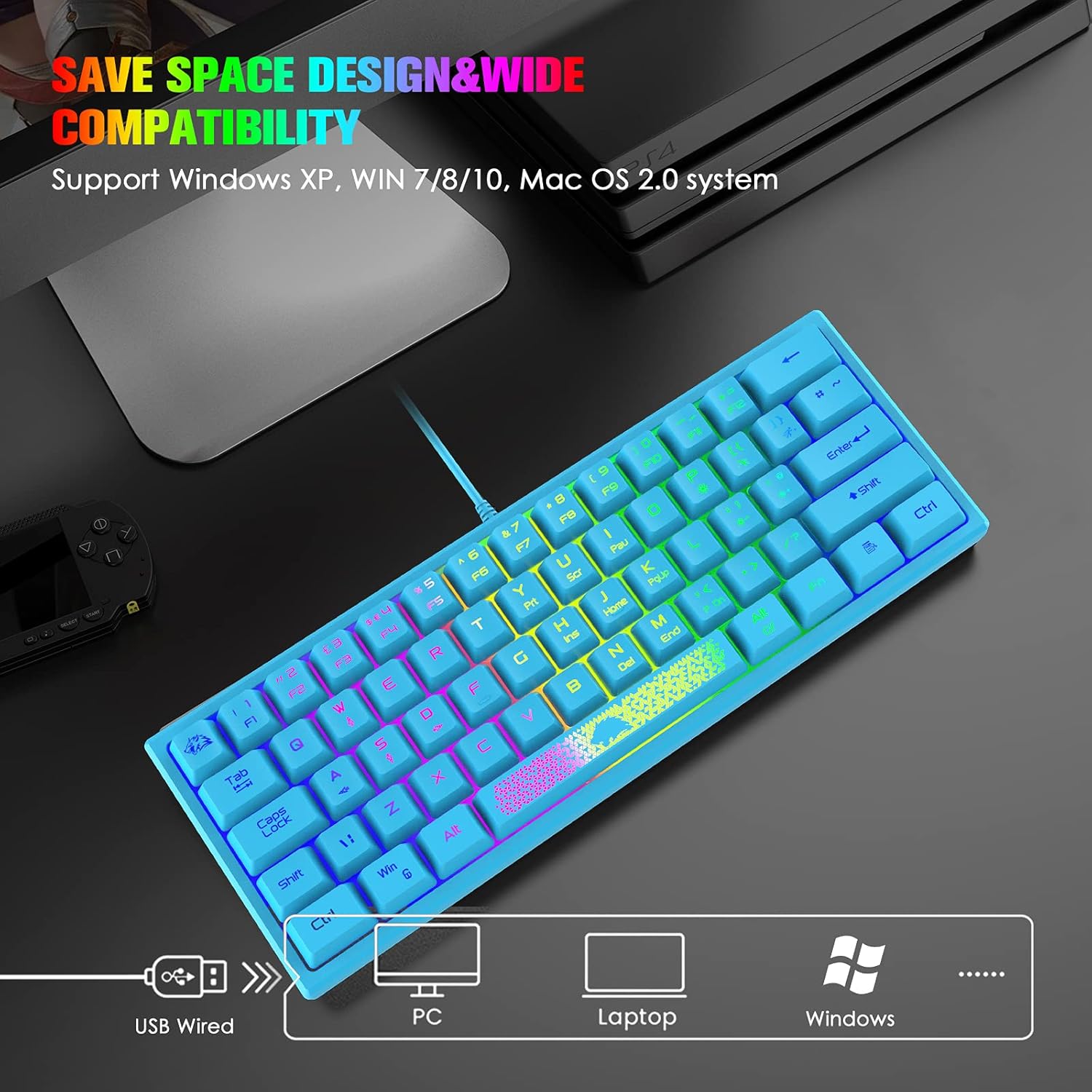
Image: The keyboard connected via USB, illustrating its compatibility with PC, laptop, and Windows operating systems.
Operating Instructions
Basic Key Functions
The K61 features a 62-key layout. Most keys function as standard. Note the unique "Wolf Logo" key, which serves as the ESC key when combined with the FN key.
FN Key Combinations
The FN (Function) key unlocks additional functionalities, allowing the compact K61 to perform like a full-sized keyboard. Press and hold the FN key, then press the desired key for its secondary function.
| Key Combination | Function |
|---|---|
| FN + 1/2/3/4/5/6/7/8/9/0/-_/+= | F1/F2/F3/F4/F5/F6/F7/F8/F9/F10/F11/F12 |
| FN + Wolf Logo Key | ESC Key |
| FN + Y | PrtSc (Print Screen) |
| FN + U | ScrollLock |
| FN + I | Pause |
| FN + H | Insert |
| FN + J | Home |
| FN + K | PageUp |
| FN + N | Delete |
| FN + M | End |
| FN + ,< | PageDown |
| FN + Win | Lock Windows Key and Application Keys |
| FN + W | Toggle W/A/S/D keys to act as Arrow Keys |

Image: Illustration of the FN key combination to switch W/A/S/D keys to arrow key functionality.

Image: Overview of the 62-key layout, highlighting Rainbow Backlight, USB Wired connection, and 19-Key Anti-ghosting features.
Backlight Control
The K61 keyboard features vibrant RGB backlighting with multiple modes and colors.
- Adjust Backlight Mode: Press FN + P key to cycle through up to 7 different backlight modes.
- Adjust Backlight Color (Monochromatic Mode): When in a monochromatic backlight mode, press FN + [{/]} keys to cycle through up to 8 different backlight colors.
- Adjust Backlight Brightness: Press FN + '" /;: keys to increase or decrease the backlight brightness.
- Adjust Backlight Speed (Flowing Mode): When in a flowing backlight mode, press FN + [{/]} keys to slow down or speed up the backlight effect.

Image: Visual guide to adjusting backlight modes, colors, and brightness using FN key combinations.

Image: Examples of various multi-chroma RGB backlight modes available on the keyboard.
Maintenance
Proper maintenance will extend the lifespan of your ZIYOU LANG K61 keyboard.
- Cleaning: Use a soft, dry cloth to wipe the surface of the keyboard. For deeper cleaning, you can carefully remove the keycaps.
- Keycap Removal: The keycaps are removable for easy cleaning or replacement. Gently pull them upwards to detach.
- Spill Resistance: The keyboard is designed to be waterproof and dust-proof. In case of accidental spills, disconnect the keyboard immediately and allow it to dry completely before reconnecting.
- Storage: Store the keyboard in a cool, dry place away from direct sunlight and extreme temperatures.

Image: Close-up showing glowing characters, removable keycaps, adjustable foot stand, and non-slip mat, along with an icon indicating waterproof design.

Image: Highlighting the ergonomic design with a unique logo key and radiant space bar, alongside a visual representation of its waterproof capability.
Troubleshooting
If you encounter issues with your ZIYOU LANG K61 keyboard, please refer to the following common solutions:
| Problem | Possible Cause / Solution |
|---|---|
| Keyboard not responding / No backlight |
|
| Keys not registering or ghosting |
|
| Backlight not working or incorrect color |
|
| W/A/S/D keys acting as arrow keys unexpectedly |
|
Specifications
| Feature | Detail |
|---|---|
| Model | K61 |
| Keyboard Layout | 62 Key |
| Connection Method | Wired (USB) |
| Anti-ghosting | 19 Key Non-Conflict |
| Backlight | Rainbow RGB Backlit (7 modes, 8 colors) |
| Keycap Type | Luminous, Laser Carving, Double Shot Injection |
| Compatibility | Windows XP, WIN 7/8/10, Mac OS 2.0 |
| Ergonomics | High-low layout, Adjustable Foot Support |
| Special Features | Waterproof, Dust-proof, Removable Keycaps, Radiant Space Bar, Unique Logo Key (ESC) |
| Item Weight | 1.26 pounds |
| Package Dimensions | 12.55 x 5.35 x 1.65 inches |
Warranty and Support
For warranty information and technical support, please refer to the contact details provided with your purchase or visit the official ZIYOU LANG website. Keep your purchase receipt as proof of purchase.
For additional resources and product information, you may visit the ZIYOU LANG Store on Amazon.


