
LEDVANCE 570917
LEDVANCE Smart Remote Control
User Manual
1. Introduction
This manual provides comprehensive instructions for the LEDVANCE Smart Remote Control, model 570917. This remote control is designed to wirelessly manage your LEDVANCE SMART+ WiFi compatible products, offering convenient control over lighting functions such as ON/OFF, dimming, color temperature adjustment (warm white to cool white), RGB color selection, and programmable light scenes. It operates independently of voice assistants or the LEDVANCE SMART+ WiFi app for daily use, though the app is required for initial setup and advanced configuration.

Image 1.1: The LEDVANCE Smart Remote Control alongside its product packaging, illustrating the device's design and branding.
2. Setup
2.1. Battery Installation
The LEDVANCE Smart Remote Control requires two AAA batteries for operation. Batteries are not included with the product. To install:
- Locate the battery compartment cover on the back of the remote control.
- Slide the cover downwards to open the compartment.
- Insert two AAA batteries, ensuring correct polarity (+ and -) as indicated inside the compartment.
- Slide the cover back into place until it clicks securely.
2.2. Initial Pairing with SMART+ WiFi Products
To control your LEDVANCE SMART+ WiFi products, the remote control must first be paired. This process typically involves the LEDVANCE SMART+ WiFi app.
- Download the App: Ensure you have the latest version of the LEDVANCE SMART+ WiFi app installed on your smartphone or tablet. The app is essential for the initial configuration of your SMART+ WiFi products and for enabling remote control functionality.
- Enable Remote Control Option: For certain SMART+ devices (e.g., smart bulbs), you may need to enable the remote control option within the device's settings in the LEDVANCE SMART+ WiFi app. Refer to the specific product's manual or the app's help section for detailed instructions on enabling this feature.
- Pairing Process: Follow the pairing instructions provided with your specific LEDVANCE SMART+ WiFi product. The remote control can be paired to control up to 15 compatible SMART+ WiFi products via contactless pairing.

Image 2.1: Diagram illustrating the connection flow from the smartphone app to SMART+ WiFi and Bluetooth devices, highlighting the role of the app in system integration.
3. Operating Instructions
The LEDVANCE Smart Remote Control offers intuitive control over your connected SMART+ WiFi lighting products. Below are the primary functions:
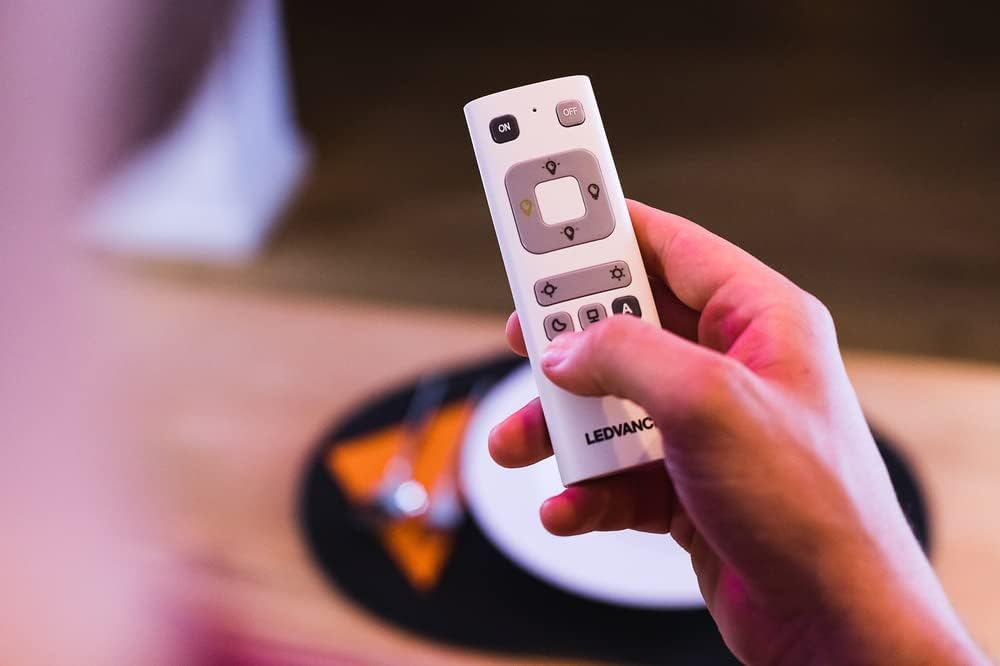
Image 3.1: A detailed view of the LEDVANCE Smart Remote Control, showing its various buttons for light control.
- ON/OFF Buttons: Located at the top of the remote, press ON to turn lights on and OFF to turn them off.
- Dimming Control: Use the dedicated dimming buttons (often marked with sun icons or up/down arrows) to adjust the brightness of your lights. Press the brighter icon to increase brightness and the dimmer icon to decrease it.
- Color Temperature Adjustment: For lights supporting tunable white, use the color temperature buttons (often marked with warm/cool icons) to shift between warm white and cool white light.
- RGB Color Selection: If your SMART+ product supports RGB colors, use the color selection button (often marked with a color wheel icon) to cycle through or select specific colors.
- Programmable Light Scenes: The remote allows selection of pre-defined light scenes. These scenes are typically configured via the LEDVANCE SMART+ WiFi app. Buttons labeled 'A' and 'B' or with specific icons (e.g., moon, palm tree) may correspond to these scenes.
- Controlling Multiple Devices: The remote can control up to 15 compatible SMART+ WiFi products. Ensure all desired devices are properly paired.

Image 3.2: An illustrative diagram showcasing the various functions of LEDVANCE SMART+ products, including ON/OFF, dimming, color light, and warm to cool white adjustments.
4. Maintenance
4.1. Battery Replacement
When the remote control's performance diminishes or it stops responding, it is likely time to replace the batteries. Follow the battery installation steps outlined in Section 2.1.
- Always use new AAA batteries.
- Do not mix old and new batteries, or different types of batteries.
- Dispose of used batteries responsibly according to local regulations.
4.2. Cleaning
To clean the remote control, use a soft, dry cloth. Do not use abrasive cleaners, solvents, or harsh chemicals, as these can damage the surface or internal components. Avoid exposing the remote to excessive moisture.
5. Troubleshooting
If you encounter issues with your LEDVANCE Smart Remote Control, try the following troubleshooting steps:
| Problem | Possible Cause | Solution |
|---|---|---|
| Remote not responding to lights. |
|
|
| Lights not changing color/dimming. |
|
|
For further assistance, refer to the LEDVANCE SMART+ WiFi app's help section or contact LEDVANCE customer support.
6. Specifications
| Feature | Detail |
|---|---|
| Brand | LEDVANCE |
| Model Number | 570917 |
| Color | White |
| Connectivity Technology | Wi-Fi |
| Special Features | Color changing, Dimming |
| Compatible Devices | Lamps, sockets, LED lights, LED strips, under-cabinet LED lights, LED lamps (up to 15 SMART+ WiFi products) |
| Power Source | 2 x AAA batteries (not included) |
| Weight | 32g |
| Dimensions | 41mm x 120mm |
| Maximum Range | 10 Meters |
| Number of Buttons | 8 |
7. Warranty and Support
7.1. Warranty Information
Specific warranty information for the LEDVANCE Smart Remote Control (Model 570917) is not available in the provided product data. For detailed warranty terms and conditions, please refer to the official LEDVANCE website or contact their customer service directly.
7.2. Customer Support
If you require further assistance, have questions about product functionality, or need to report an issue, please contact LEDVANCE customer support. You can typically find contact information on the official LEDVANCE website or within the LEDVANCE SMART+ WiFi app.
For the latest information and resources, visit the official LEDVANCE website: www.ledvance.com
Related documents570917


Ask a question about this manual
Ask about setup, troubleshooting, compatibility, parts, safety, or missing instructions. Manuals+ will review the question and use this page’s manual context to help answer it.