
1. Safety Information
Read all safety warnings and instructions carefully before using this appliance. Failure to follow the warnings and instructions may result in electric shock, fire, or serious injury.
- Ensure the voltage indicated on the rating label corresponds to the mains voltage in your home.
- Do not cover the heater. Overheating may occur.
- Keep flammable materials (e.g., curtains, furniture) at least 1 meter (3 feet) away from the heater.
- Do not use the heater in bathrooms, laundry areas, or similar indoor locations where it may come into contact with water. The appliance has an IP24 rating, meaning it is protected against splashing water, but it is not fully waterproof.
- Always unplug the heater when not in use or before cleaning.
- Do not operate the heater with a damaged cord or plug, or after the appliance malfunctions or has been dropped or damaged in any manner.
- This appliance is not intended for use by persons (including children) with reduced physical, sensory or mental capabilities, or lack of experience and knowledge, unless they have been given supervision or instruction concerning use of the appliance by a person responsible for their safety.
- Children should be supervised to ensure that they do not play with the appliance.
2. Product Overview
The Duux Edge 2000 Smart Convector Heater is designed to provide efficient heating for rooms up to 30 m². It features smart control via a smartphone app, a remote control, and can be operated manually. The heater offers both freestanding and wall-mounted installation options.

Image 2.1: Duux Edge 2000 Smart Convector Heater with its accompanying smartphone application interface.

Image 2.2: The Duux Edge 2000 Smart Convector Heater positioned freestanding in a contemporary living space.
3. Installation & Setup
3.1. Package Contents
Verify that all components are present:
- Duux Edge 2000 Convector Heater
- Remote Control
- Feet for freestanding use (if applicable)
- Wall mounting brackets and screws (if applicable)
- Instruction Manual
3.2. Freestanding Installation
- Carefully unpack the heater and all accessories.
- Attach the provided feet to the bottom of the heater using the screws. Ensure they are securely fastened.
- Place the heater on a stable, level surface, ensuring adequate clearance from walls and furniture (minimum 1 meter).

Image 3.1: Mounting brackets and screws, which may be used for either wall mounting or attaching feet for freestanding use.
3.3. Wall-Mounted Installation
- Select a suitable wall location, ensuring it is clear of obstructions and at least 1 meter from flammable materials.
- Using the provided wall mounting brackets, mark the drilling points on the wall.
- Drill holes and insert wall plugs (if necessary).
- Secure the brackets to the wall with screws.
- Carefully hang the heater onto the installed wall brackets, ensuring it is stable and level.
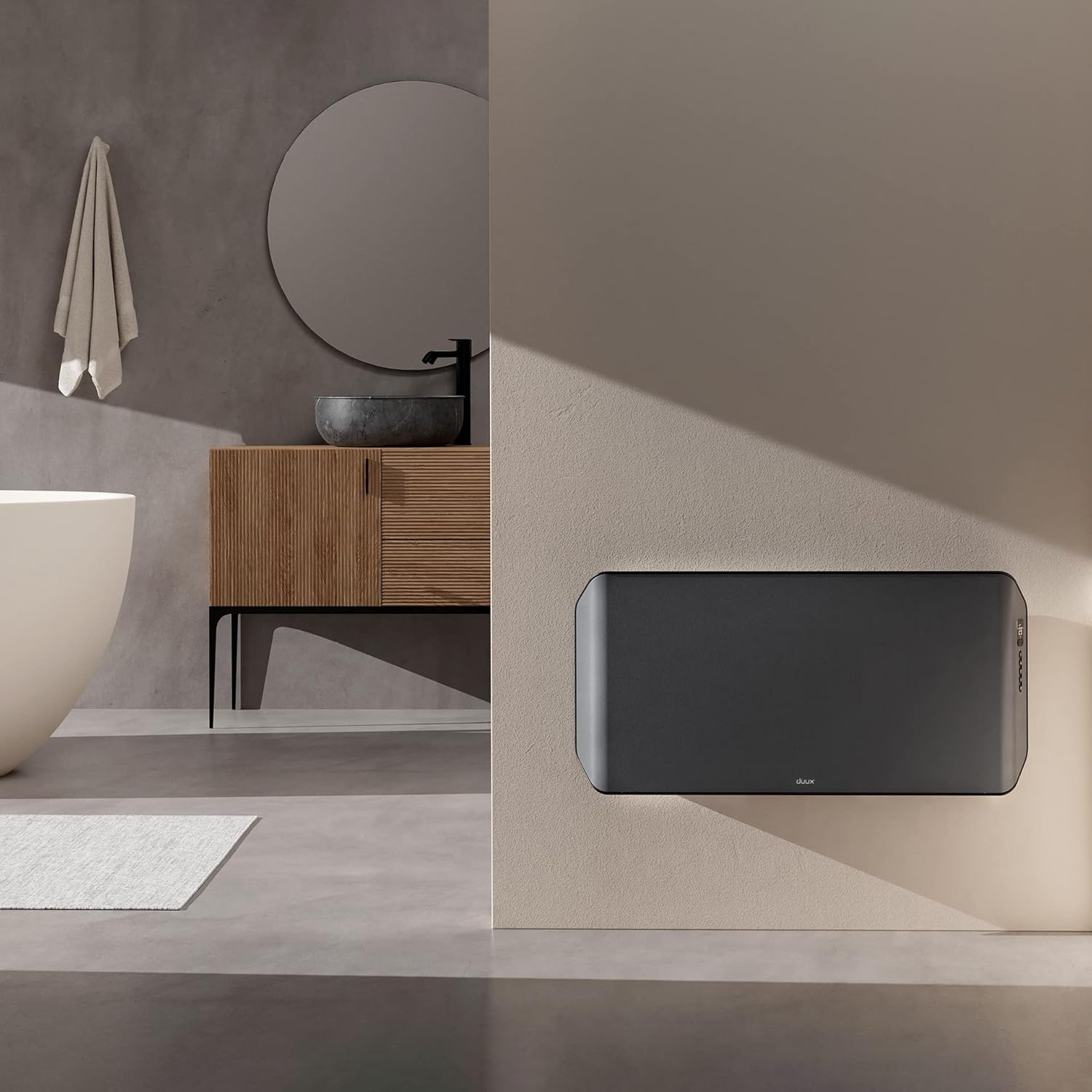
Image 3.2: The Duux Edge 2000 Smart Convector Heater installed on a wall in a bathroom setting.
3.4. Power Connection
Plug the power cord into a suitable electrical outlet. Ensure the outlet meets the power requirements of the heater (240V, 2000W).
4. Operating the Heater
4.1. Control Panel Overview
The control panel is located on the side of the heater and features a digital display and several buttons for manual operation.

Image 4.1: Close-up view of the Duux Edge 2000 heater's integrated control panel.

Image 4.2: A hand demonstrating interaction with the heater's control panel buttons.
4.2. Remote Control Functions
The included remote control allows for convenient adjustment of settings from a distance.
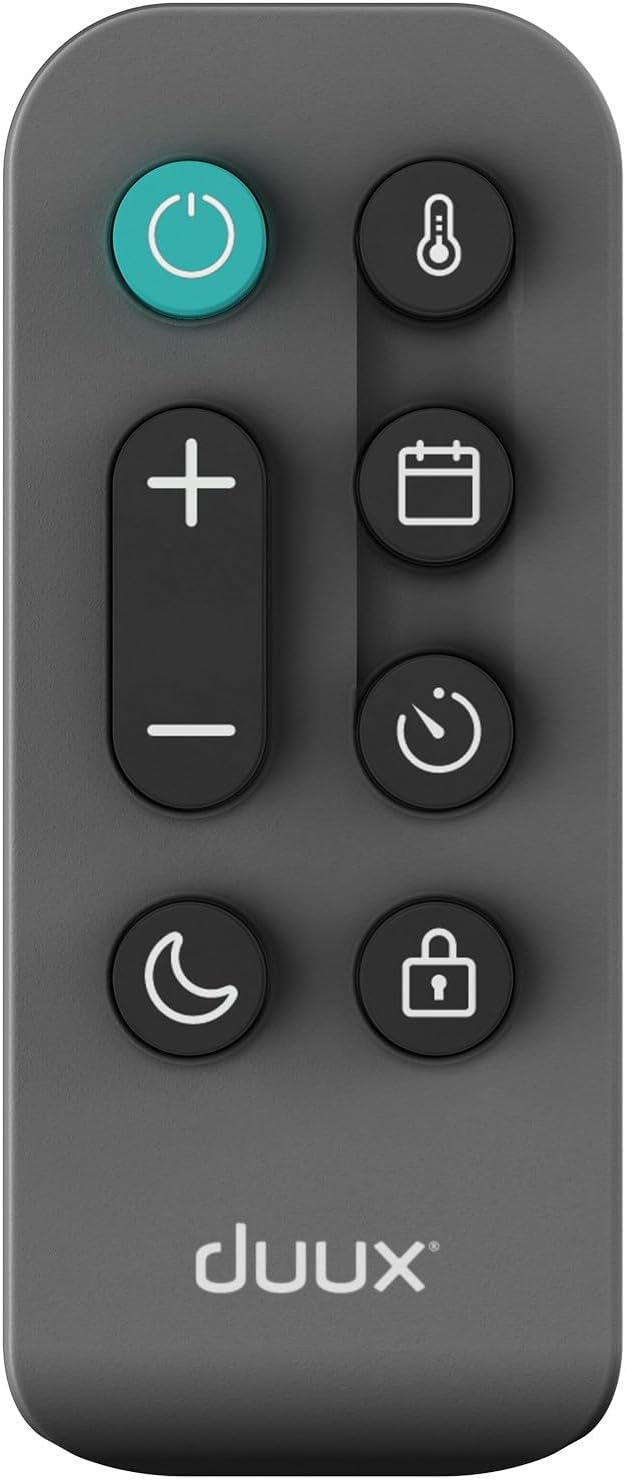
Image 4.3: The remote control for the Duux Edge 2000 Smart Convector Heater, showing various function buttons.
- Power Button: Turns the heater on or off.
- Temperature +/-: Adjusts the desired room temperature.
- Mode Button: Cycles through available heating modes (e.g., Eco, Comfort).
- Timer Button: Sets a timer for automatic shut-off.
- Child Lock Button: Activates or deactivates the child lock function.
- Night Mode Button: Activates a low-light display mode for nighttime use.
4.3. Smart App Control
The Duux Edge 2000 can be controlled via a smartphone app, offering advanced features and scheduling.

Image 4.4: A user interacting with the Duux smartphone application to manage heater settings.
- Download the Duux app from your smartphone's app store.
- Follow the in-app instructions to pair your heater with your device.
- Once paired, you can control temperature, modes, set schedules, and monitor the heater's status remotely.
- The app is compatible with Amazon Alexa and Google Assistant for voice control.
5. Maintenance
Regular maintenance ensures optimal performance and longevity of your heater.
5.1. Cleaning
- Always unplug the heater and allow it to cool completely before cleaning.
- Wipe the exterior surfaces with a soft, damp cloth. Do not use abrasive cleaners or solvents.
- Use a vacuum cleaner with a brush attachment to gently clean dust from the air intake and outlet grilles.
- Do not immerse the heater in water or allow water to drip into the interior.

Image 5.1: Top-rear view of the heater, highlighting the air vents that require periodic cleaning.
5.2. Storage
If storing the heater for an extended period, clean it thoroughly and store it in its original packaging in a dry, cool place.
6. Troubleshooting
If you encounter issues with your Duux Edge 2000 heater, refer to the following common problems and solutions:
| Problem | Possible Cause | Solution |
|---|---|---|
| Heater does not turn on. | No power supply; Power button not pressed; Overheat protection activated. | Check power cord connection and wall outlet; Press the power button; Unplug, wait 30 minutes, then plug back in. |
| Heater is on but not producing heat. | Temperature setting too low; Eco mode active; Room temperature already reached. | Increase the target temperature; Switch to a higher heating mode; The heater will resume heating when the room temperature drops. |
| Smart app cannot connect to the heater. | Wi-Fi signal weak; Incorrect pairing procedure; Router issues. | Ensure heater is within Wi-Fi range; Re-attempt pairing process; Restart your Wi-Fi router. |
| Remote control not working. | Batteries depleted; Obstruction between remote and heater. | Replace remote control batteries; Ensure a clear line of sight to the heater's receiver. |
If the problem persists after attempting these solutions, please contact customer support.
7. Specifications
| Feature | Specification |
|---|---|
| Brand | Duux |
| Model Number | DXCH14 |
| Color | 2000w Gray |
| Power | 2000 Watts |
| Voltage | 240 Volts |
| Automatic Shut-off | Yes |
| Number of Speeds | 2 |
| Special Features | Low energy consumption |
| Product Weight | 7.85 kg |
| Dimensions (L x W x H) | 88 cm x 47 cm x 12 cm |
| Indoor/Outdoor Use | Indoor |
| Mounting Type | Wall mount or freestanding |
| Recommended Room Type | Bathroom (IP24 rated) |
| Heating Coverage | Up to 30 m² |
8. Warranty and Support
For warranty information and customer support, please refer to the documentation included with your product or visit the official Duux website. Keep your proof of purchase for warranty claims.


